If you manage mineral rights or distribute royalty payments in Big Sky Country, filing the Montana Form RW-3 is a critical annual requirement you cannot afford to overlook. This form, formally known as the Annual Mineral Royalty Withholding Tax Reconciliation, serves as the final summary for the tax year, reconciling the total royalty payments made against the taxes withheld and paid to the Montana Department of Revenue. Whether you are a large energy company or a smaller entity managing a few leases, this document ensures that the state’s records match your own, verifying that the 6% mineral royalty withholding tax was correctly calculated and remitted. Filing this form accurately is not just about compliance; it is about closing out your tax year cleanly, preventing audit triggers, and ensuring that any overpayments are identified for potential refunds. With a strict deadline of January 31st (automatically extended to February 28th), understanding exactly how to fill out each line and column—from the aggregate totals to the quarterly breakdowns—is essential for every remitter.
What Is Montana Form RW-3?
The Montana Form RW-3 is an annual reconciliation return used to report the total Montana mineral royalty taxes withheld from payments made to royalty owners. It acts as a “cover sheet” that summarizes all the individual Forms 1099-MISC and 1042-S issued for the year. Even if you did not withhold any tax (perhaps due to specific exemptions), you are still required to file this form if you made royalty payments. The form compares the total tax you should have withheld based on your payments against the actual amount you sent to the state, highlighting any discrepancies that need to be settled. It must be filed alongside copies of the informational returns (1099s/1042-S) provided to the royalty owners.
How To File Form RW-3
You are strongly encouraged to file and pay online through the TransAction Portal (TAP) for the fastest processing. However, if you choose to file by paper, you must mail the completed Form RW-3, along with all corresponding Forms 1099-MISC/1042-S and any payment due, to the address below.
Mail to:
Montana Department of Revenue
PO Box 5835
Helena, MT 59604-5835

How To Complete Form RW-3
Follow these specific instructions to complete the form accurately.
Header Information
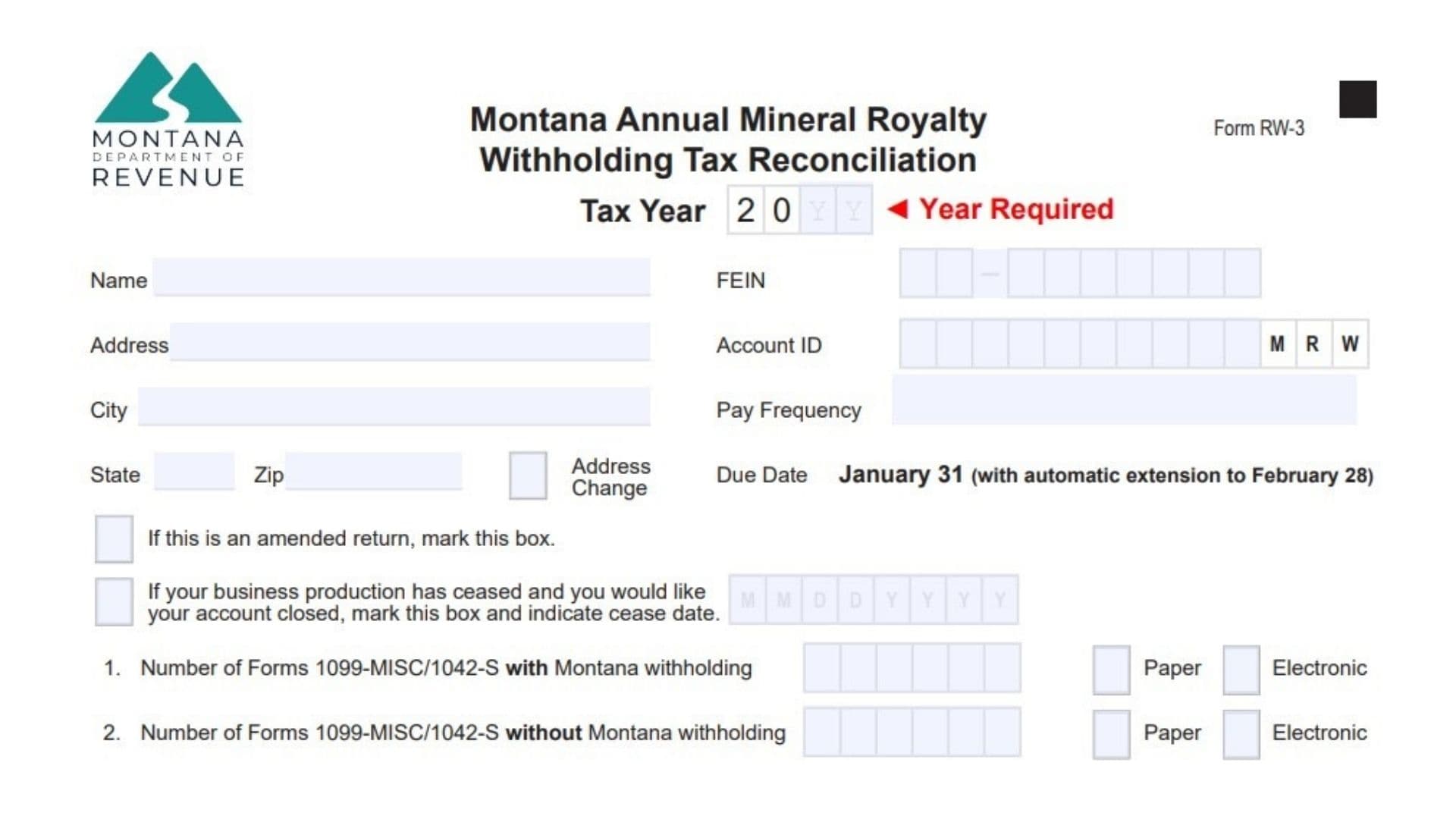
- Tax Year: In the box at the top right, enter the four-digit year for which you are filing (e.g., 2024).
- Business Details: Enter your legal Name, Address, FEIN (Federal Employer Identification Number), Account ID, City, State, and Zip Code.
- Pay Frequency: Indicate your assigned filing frequency.
- Checkboxes:
- Address Change: Check this if your mailing address has changed since your last filing.
- Amended Return: Check this if you are correcting a previously filed return.
- Account Closed: Check this box and enter the “cease date” if your business has stopped producing royalties and you want to close your account.
Summary Lines (1-6)
- Line 1: Enter the total number of Forms 1099-MISC or 1042-S submitted that include Montana mineral royalty withholding. Check the box to indicate if these forms are being submitted via Paper or Electronic methods.
- Line 2: Enter the total number of Forms 1099-MISC or 1042-S submitted that do not have any Montana withholding. Again, check the Paper or Electronic box.
- Line 3: Enter the total amount of Montana net royalty payments made during the year. This should equal the sum of Column B below.
- Line 4: Enter the total Montana mineral royalty tax withheld as reported on all your submitted 1099/1042-S forms. This figure must match the total of Column C below.
- Line 5: Enter the actual total amount of withholding tax you paid to the Department of Revenue throughout the year. This should match the total of Column D below.
- Line 6: Subtract Line 5 from Line 4.
- If the result is zero, your account is balanced.
- If the result is positive, you owe additional tax.
- If the result is negative, you may have a credit (refunds are issued only upon written request).
Quarterly Breakdown (Columns A-E)
You must break down your annual totals by quarter (Jan-Mar, Apr-Jun, Jul-Sep, Oct-Dec).
- Column A (Date Paid): Enter the specific date(s) you made your tax deposits to the state for each quarter.
- Column B (Net Royalty Payments): Enter the total net royalty payments made in each quarter. The sum of this column must equal Line 3.
- Column C (Tax Withheld): Enter the total tax you withheld from royalties for each quarter. The sum of this column must equal Line 4.
- Column D (Tax Paid): Enter the total tax payments you actually remitted to the state for each quarter. The sum of this column must equal Line 5.
- Column E (Difference): For each quarter, subtract Column D from Column C. Enter the difference here. The total of this column must equal Line 6.
Signature And Preparer Info
- Preparer Section: Check Yes or No to indicate if the Department can discuss this return with your tax preparer. If Yes, print their name and phone number.
- Sign and Date: Ensure the form is signed by an authorized individual before mailing.