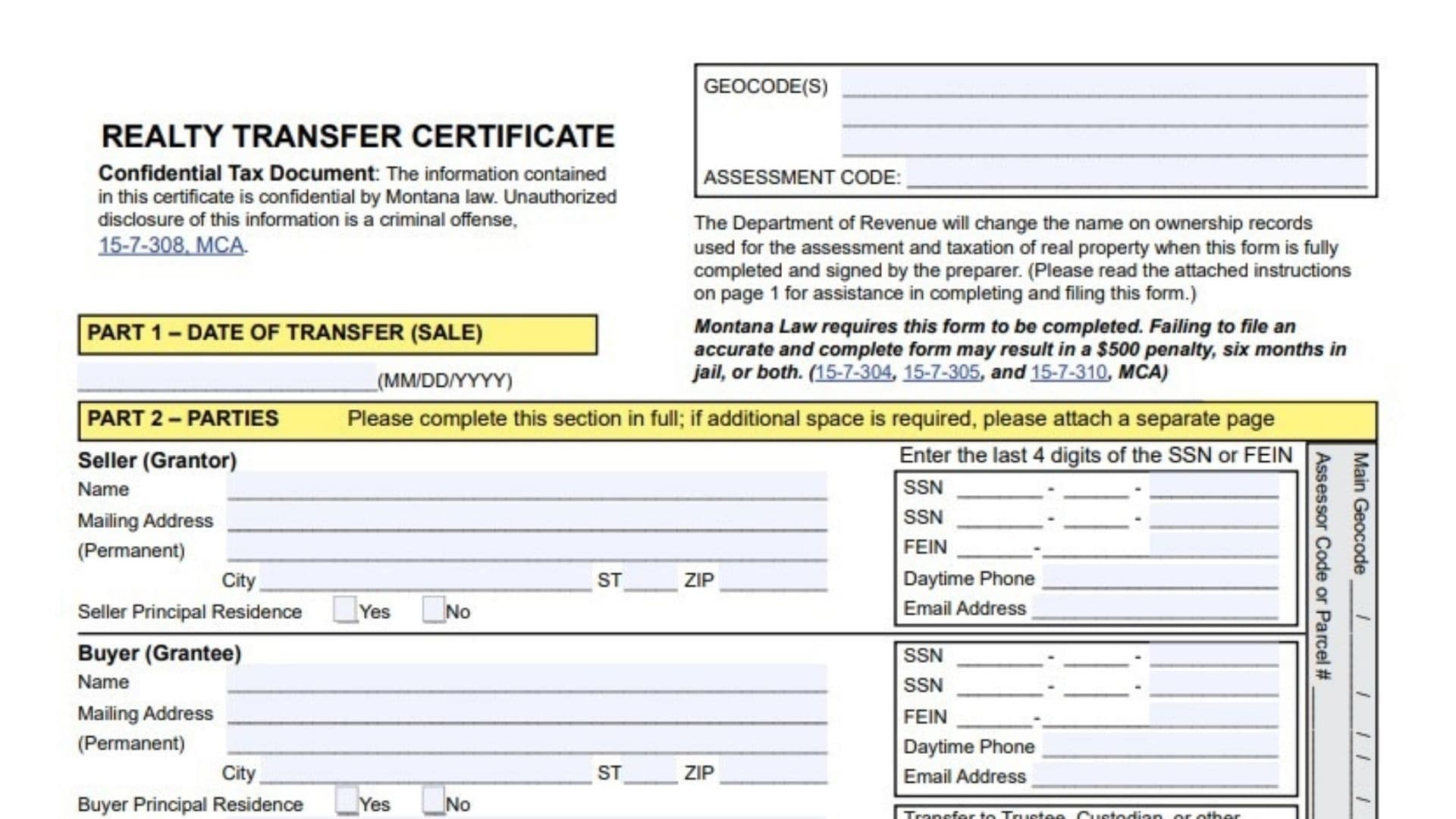
Montana Form RTC (Realty Transfer Certificate) is a required, confidential tax document used to report a transfer of real property so the state can update ownership records for assessment and taxation purposes. It is filed when an instrument or deed is presented for recording, and it captures the transfer date, the parties, the property’s legal description, the type of transfer, sale price details (unless an exception applies), and a required water right disclosure. Failing to file a complete and accurate certificate can carry serious consequences, and any gain from the transfer may also create Montana-source income that needs to be reported on the appropriate income tax return.
Who Must File And When To File
Any party transferring real property (even if the transfer isn’t evidenced by a deed/instrument) or any party presenting a deed/instrument that evidences a real estate transfer for recording must file the certificate. “Real estate” is broadly described to include land, growing timber, and improvements affixed to land such as buildings, structures, fixtures, fences, and other improvements. The completed certificate must be filed with the County Clerk and Recorder at the time the deed or instrument is presented for recording. If the transfer happens by operation of law, the certificate (with required supporting documents) should also be filed with the local Department of Revenue office.
Before You Start
Complete the form carefully because Montana law states an inaccurate or incomplete filing may result in a $500 penalty, up to six months in jail, or both. The form is labeled a confidential tax document, and it notes unauthorized disclosure is a criminal offense under Montana law. Have the recorded instrument/deed (or the conveyance documentation), the full legal description, sale/financing details (if not excepted), and water-right information ready before you begin. If you need extra room anywhere the form allows, you can attach separate pages, and the form includes checkboxes to indicate when information is provided on an attachment.

How To Complete Montana Form RTC
Header Fields
Geocode(s): Enter the geocode(s) for the property if known or provided (multiple lines are available).
Assessment Code: Enter the assessment code if available.
Confidentiality Statement: This is informational; you don’t fill it in, but it signals the data must be handled as confidential.
Part 1 – Date Of Transfer (Sale)
Date Of Transfer: Use the execution date of the instrument/deed (typically when seller and buyer signed), unless the deed specifies otherwise, or use the decedent’s date of death when applicable. For contracts for deed and notices of purchaser’s interest, use the date the contract/notice first became effective.
Part 2 – Parties
This section must be completed in full, and you may attach a separate page if you need more space.
Seller (Grantor) – Name: Enter the seller’s name exactly as it appears on the transferring document.
Seller (Grantor) – Mailing Address (Permanent), City, ST, ZIP: Enter the seller’s current mailing address information.
Seller Principal Residence (Yes/No): Mark whether the property has been the seller’s principal residence (a dwelling occupied at least 7 months).
Buyer (Grantee) – Name: Enter the buyer’s name exactly as it appears on the transferring document.
Buyer (Grantee) – Mailing Address (Permanent), City, ST, ZIP: Enter the buyer’s permanent mailing address.
Buyer Principal Residence (Yes/No): Mark whether the property will be the buyer’s principal residence (a dwelling to be occupied at least 7 months).
Buyer – Mailing Address For Tax Notice (If Different): Complete this only if tax notices should go to an address other than the permanent mailing address.
SSN / FEIN (Last 4 Digits): Provide the last four digits of the SSN for all individual legal owners, or the last four digits of the FEIN for legal entities, as applicable. If there are additional owners, you may provide additional last-four digits on an attachment.
Daytime Phone / Email Address (Seller And Buyer): Enter phone numbers and email addresses for both parties in the spaces provided.
Transfer To Trustee/Custodian/Representative (Trust FEIN / Minor SSN): If the transfer involves a trustee/custodian/other representative, complete the trust FEIN and/or minor SSN last-four-digit entries as shown.
Part 3 – Property Description
Property Description: Provide the parcel identification by location and the legal description exactly as found on the deed/instrument or the abstract.
Attachment Checkbox: If you provide the property description on an attachment, check the box indicating the description is attached.
Part 4 – Description Of Transfer
Check all boxes that describe the transfer being recorded.
Common Transfer Boxes: Sale, Gift, Barter, Nominal or No Consideration, Part of 1031 or 1033 Exchange, or Transfer Subject to a Reserved Life Estate.
Transfer By Operation Of Law: If the transfer is by operation of law, check the applicable option(s) and attach the required documentation.
Required Documentation Examples Listed: certified death certificate for termination by death, recorded transfer-on-death deed plus certified death certificate, certified court decree, plan of reorganization filed with the Secretary of State, or name-change documents filed with the Secretary of State (as applicable).
Part 5 – Exceptions From Providing Sales Price Information
Exception Checkboxes: If any exception applies, check the appropriate box(es).
Important Rule: If you check an exception in Part 5, you do not complete Part 6 sale price information.
Determination Help: If you’re unsure about exception status, the instructions indicate you may request a determination from your local Department of Revenue field office.
Part 6 – Sale Price Information
Complete this section if no exception was checked in Part 5.
Actual Sale Price: Enter the total purchase price, including cash, mortgages, property traded, liabilities assumed, leases, easements, and personal property.
Financing (Check One Or More As Applicable): Check Cash, FHA, VA, Contract, or Other, depending on how the purchase was financed.
Terms (New Loan Or Assumption): Indicate whether the financing is a new loan or an assumption of an existing loan.
Value Of Personal Property Included: Enter the dollar value of personal property included (items not permanently attached to the real estate).
Value Of Inventory / Licenses / Good Will: Enter values for any inventory, licenses (such as liquor/gambling), and goodwill included in the price.
SID Questions And Amount: Answer whether an SID payoff was included and whether the buyer assumed an SID, and enter the SID amount paid or assumed.
Mobile Home Question: Mark whether a mobile home was included in the sale.
Confidentiality Note For Sale Info: The form states sale information is confidential and for official use by the Department of Revenue only.
Part 7 – Water Right Disclosure
Select only one water-right disclosure option (A, B, C, or D).
A: Check if the property is served by a public water supply (city, irrigation district, water district, etc.).
B: Check if the seller has no water rights on record with DNRC to transfer (and the instructions note that for a transfer-on-death deed, water rights do not transfer at that time).
C: Check if the seller is transferring all DNRC-record water rights appurtenant to the property to the buyer, and follow the noted process to update water-right ownership.
D: Check if the seller is dividing or severing water rights, and complete the additional certification referenced for this situation.
Seller (Grantor) Signature And Date: The disclosure must be completed and signed by the seller (or legally appointed agent) if box B, C, or D is checked.
Part 8 – Preparer Information
Preparer Signature: The preparer must sign and date the certificate, certifying the information is true and correct to the best of their knowledge and that the parties examined the completed certificate and agree it is accurate.
Preparer Mailing Address / City / State / ZIP / Daytime Phone: Enter the preparer’s contact details in the spaces provided.
Name/Title (Please Print): Print the preparer’s name and title.
Clerk And Recorder Use Only (Do Not Fill In)
Leave the “Clerk and Recorder Use Only” area blank, including recording information fields (document number, book, page, date) and other recorder notes.
If the form includes lines for legal-description elements (add/sub, block, lot, county, city/town, section, township, range) and similar recorder-oriented fields, treat them as recorder/recording-detail fields unless your county clerk instructs you to complete specific ones.
Attachments And Next Steps
Attach separate pages if you need more room for the parties, SSN/FEIN last-four listings, or the property legal description, and check any attachment boxes provided for those sections. If the transfer is by operation of law, attach the specific supporting documentation listed for the box(es) you checked. If you check water-right box D (dividing/severing), the packet indicates an additional certification form must also be completed and signed as described for recording. File the completed certificate with the County Clerk and Recorder when you record the deed/instrument, and submit to the local Department of Revenue as described when the transfer is by operation of law.