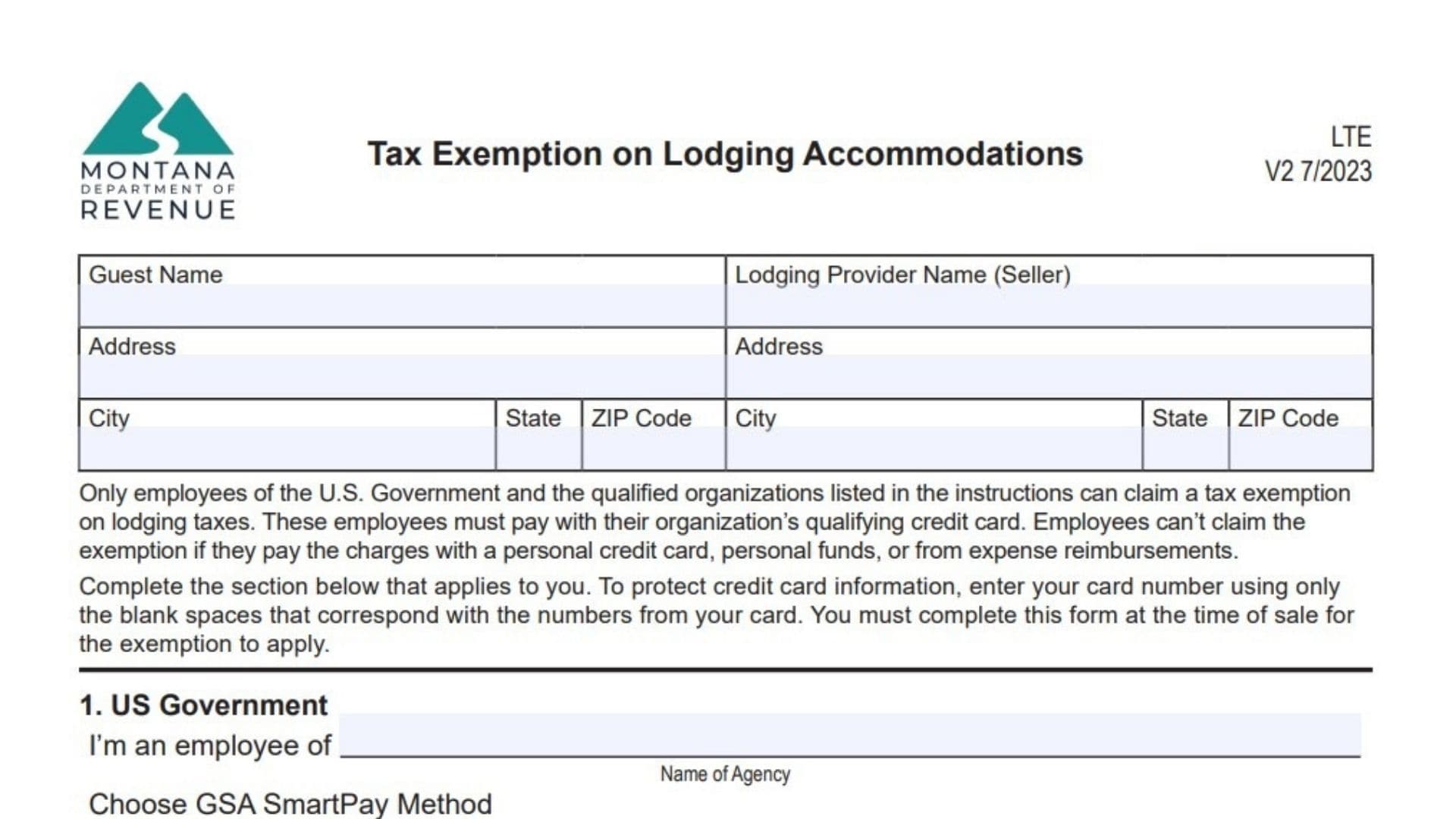
Montana Form LTE, “Tax Exemption on Lodging Accommodations,” is a specialized certificate used by hotel and lodging operators to validate and document tax-exempt stays. While Montana does not have a general statewide sales tax, it does levy specific “lodging facility sales and use taxes” (often totaling 8%) on overnight guests. However, certain guests—specifically U.S. government employees on official business and designated qualified organizations—are legally exempt from paying these taxes. This form serves as the “proof of exemption” that the hotel must collect at the time of check-in or payment. Without a completed and signed Form LTE on file for that specific transaction, the state requires the lodging provider to charge the full tax amount. It protects the hotel from liability during an audit and ensures the guest isn’t wrongfully charged for taxes they are federally or legally excused from paying.
How To File Montana Form LTE
Unlike many tax forms, you do not mail this document to the Department of Revenue immediately. Instead, this form is completed at the time of sale (check-in/check-out) and kept by the lodging provider (the seller) as part of their internal business records. The guest fills out their portion, signs it, and hands it to the hotel clerk. The hotel then retains this form for at least 3 to 5 years (the standard audit lookback period) to prove why they didn’t collect tax on that specific room revenue. If you are the guest, you simply fill it out and give it to the front desk. If you are the hotelier, you file it in your daily receipts or tax records folder for that month’s business.

How To Complete Montana Form LTE
Guest Name / Address / City, State, ZIP
Enter the full name and home/business address of the individual staying in the room.
Lodging Provider Name (Seller) / Address / City, State, ZIP
Enter the name and physical address of the hotel, motel, or campground where the stay is occurring.
1. US Government Section
- I’m An Employee Of: Write the specific federal agency (e.g., “Department of Interior,” “FBI”). Note that state of Montana employees do not qualify for this exemption—only federal.
- Choose GSA SmartPay Method: Check the box corresponding to the credit card being used. This is critical because only centrally billed cards (where the government pays the bill directly) are fully exempt.
- Integrated Card: (Gold) Always exempt.
- Purchase Card: (Red) Always exempt.
- Tax Advantage Card: (Silver) Exempt.
- Travel Card: (Blue) Only exempt if the 6th digit is 0, 6, 7, 8, or 9. If the 6th digit is 1, 2, 3, or 4, the card is individually billed, and the guest must pay the tax.
- Enter Credit Card Number: You must enter the card number (masking all but the relevant digits for security is common practice, but the instructions ask to “enter your card number using only the blank spaces” to verify eligibility).
2. Qualified Organizations And/Or Persons Section
This section is for non-federal entities that are specifically exempt under Montana law.
- Check The Box: Identify the type of organization:
- American Red Cross
- Enrolled Tribal Member: (Exempt only if staying on their own reservation).
- Health Care Facilities / Rest Homes: (For patient/resident stays).
- 501(c)(3) Nonprofit: (Exempt only if the organization holds a specific Montana tax-exempt designation letter).
- Diplomats: (Must have a Tax Exemption Card from the U.S. State Department).
- Youth Camps / Dormitories: (Under specific conditions).
- Type Of Card: Check the brand of the credit card used (Visa, MasterCard, etc.). Crucial: The card must be billed directly to the organization. If an employee pays with a personal card to be reimbursed later, they do not qualify for the exemption.
- Enter Credit Card Number: Record the organization’s payment card number.
Certification
- Guest Signature: The guest must sign to certify under penalty of law that the information is true.
- Driver’s License Number & State: Enter the guest’s ID details for verification.
- Work Phone Number: Provide a contact number for the guest/agency.
- Date: Enter the date of the transaction.