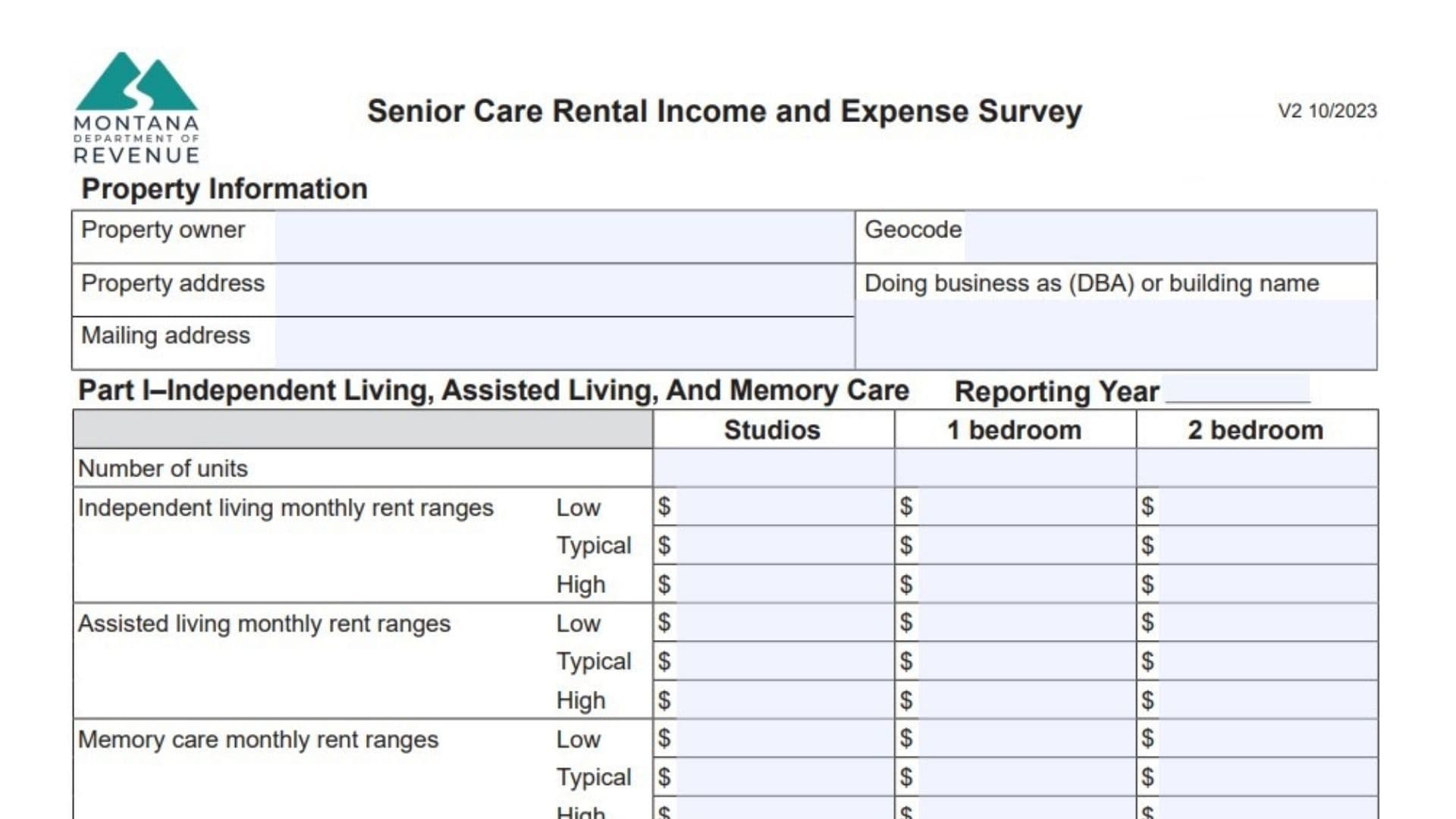
For owners of senior care facilities in Montana, ensuring your property is accurately assessed requires transparent reporting of your financial data. Montana Form IE-NH, known as the Senior Care Rental Income and Expense Survey, is the specialized tool used by the Department of Revenue to gather this critical market information. The state uses the data collected from this survey to determine fair market rents, expense ratios, and capitalization rates, which directly influence the property tax valuation of Independent Living, Assisted Living, Memory Care, and Skilled Nursing facilities. This form allows you to report detailed income streams—from resident rents to Medicaid payments—and operational costs like dietary services, nursing wages, and utilities. While the form asks for comprehensive financial details, submitting it is a strategic move; providing actual income and expense data helps appraisers value your property based on reality rather than general market assumptions. It is separated into two main parts: Part I covers Independent Living, Assisted Living, and Memory Care, while Part II focuses specifically on Skilled Nursing.
How To File Form IE-NH
This survey is typically requested by the Department of Revenue for data collection purposes.
- Preparation: Gather your profit and loss statements, rent rolls, and occupancy reports for the reporting year.
- Completion: Fill out the sections relevant to your specific facility type (Part I, Part II, or both).
- Submission: The form does not list a specific mailing address on the face, but it is generally returned to the local Department of Revenue office that requested it, or submitted electronically if instructed by your appraisal notice.
- Assistance: If you have questions during the process, you can call the Department at (406) 444-6900.

How to Complete Montana Form IE-NH
Property Information
This section identifies the facility being surveyed.
- Property Owner: Enter the legal name of the entity or individual who owns the real estate.
- Geocode: Enter the 17-digit property identifier found on your tax assessment notice.
- Property Address: Enter the physical street address of the facility.
- Doing Business As (DBA): Enter the operating name of the senior care facility.
- Mailing Address: Enter the address for official correspondence.
Part I – Independent Living, Assisted Living, And Memory Care
Complete this section if your facility offers these specific levels of care.
Unit and Rent Data:
- Number of units: Enter the total count of Studios, 1-Bedroom, and 2-Bedroom units.
- Monthly Rent Ranges: For each care level (Independent, Assisted, Memory Care), enter the Low, Typical, and High monthly rent charged.
- Secondary Occupancy: Enter the number of units with a second occupant and the additional rent charged for them.
- Amenities: List what is included in the rent (e.g., cable, utilities) and check if furnishing is provided.
- Concessions: Note any rent specials or discounts given.
Annual Income:
- Resident Income: Total income from rent payments.
- Miscellaneous Income: Income from guest meals, application fees, forfeited deposits, etc.
- Average Occupancy: Enter the percentage of units occupied during the year.
Annual Operating Expenses:
Enter the annual dollar amount for each category:
- Resident Services: Wages/supplies for transport, activities, and social services.
- Dietary: Food, supplements, and kitchen staff wages.
- Housekeeping: Wages and supplies for cleaning and laundry.
- Management: Fees paid to a third-party management company.
- Administrative & General: Office wages, legal fees, accounting, and marketing costs.
- Maintenance: Repairs, landscaping, snow removal, and maintenance staff.
- Utilities: Gas, electric, water, sewer, trash.
- Insurance: Property insurance premiums.
- Property Taxes: Actual taxes paid.
- Reserves for Replacement: Funds set aside for short-lived items (flooring, appliances).
Part II – Skilled Nursing
Complete this section specifically for nursing home operations.
Bed and Census Data:
- Bed Counts: Enter the number of Private, Semi-Private, and Total Licensed beds.
- Bed Days: Enter the total annual bed days for Medicaid, Medicare, and Private/Insurance patients.
Annual Income:
- Medicaid/Medicare Part A: Enter income received from these government programs.
- Private/Insurance Income: Income from private pay or insurance providers.
- Ancillary Income: Revenue from pharmacy, therapy supplies, or Medicare Part B services.
Annual Operating Expenses:
- Nursing: Wages for RNs, LPNs, CNAs, and agency staff.
- Ancillary (Medical): Costs for therapy supplies, pharmaceuticals, and medical equipment.
- Dietary/Laundry/Maintenance/Utilities: (Same definitions as Part I).
- Central Office Admin: Corporate management fees or overhead allocated to this facility.
- Bad Debt: Uncollected rent/fees.
Furniture, Fixtures, and Equipment (FF&E)
- Personal Property List: List items like beds, computers, and TVs that are essential to business but not attached to the building.
- Install Cost: The original purchase price.
- Depreciated Cost: The current value after depreciation.
Sign-Off
- Survey Completed By: The person filling out the form must sign and provide their Title, Phone, Email, and the Date.
- Reporting Year: Clearly indicate which calendar year this financial data represents.