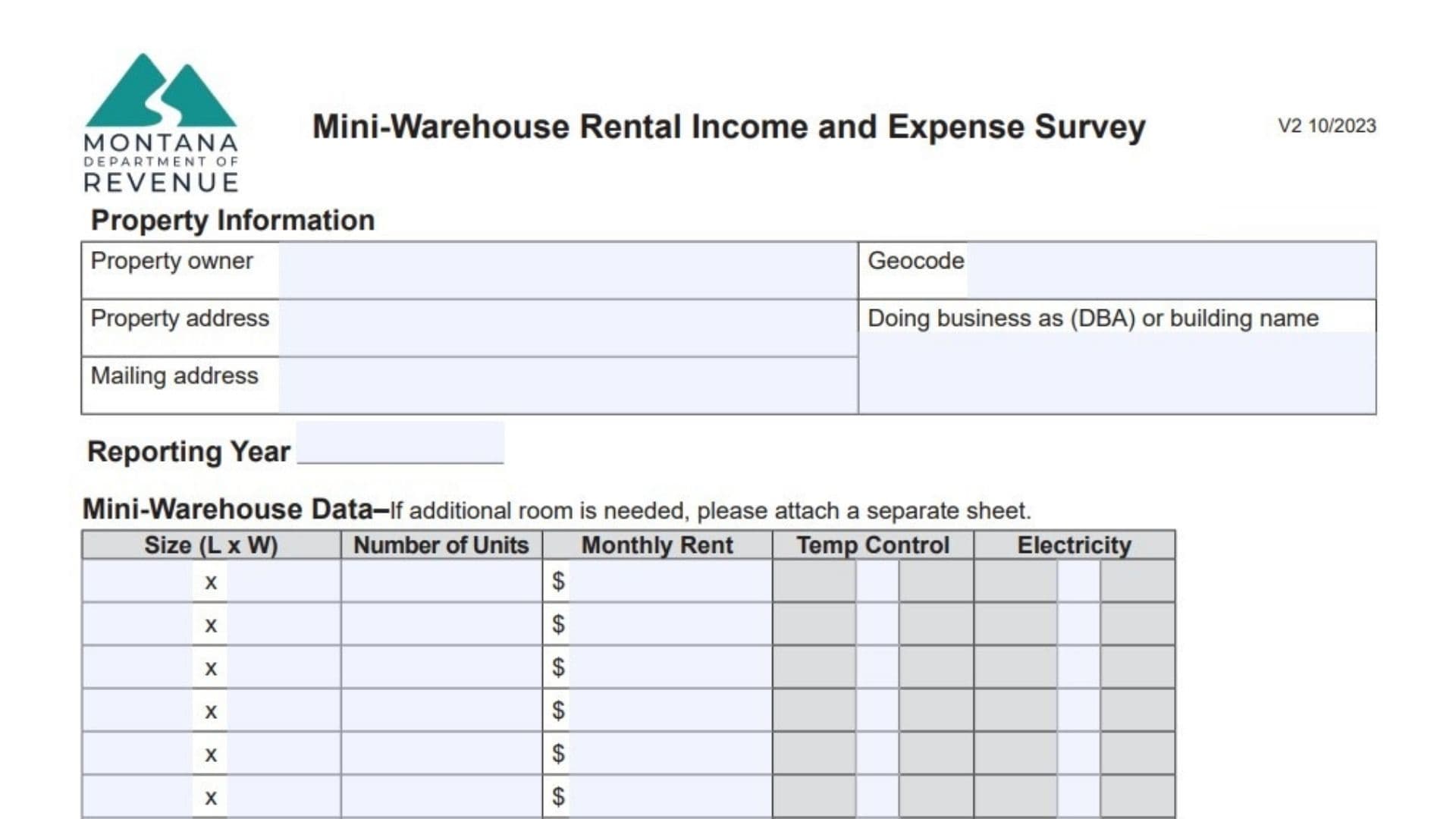
The Montana Mini-Warehouse Rental Income and Expense Survey is a designated document used by the Montana Department of Revenue to gather essential financial and physical data regarding self-storage facilities and mini-warehouses across the state. The primary objective of this survey is to collect accurate, market-based information on rental rates, vacancy levels, and operating costs specific to the storage industry, which assists the department in determining fair and equitable property valuations for tax purposes. Property owners are required to disclose detailed specifics about their facility, such as the dimensions of storage units, the presence of climate control or electricity, and the income generated from outdoor parking, alongside a comprehensive report of annual income and operating expenses. By submitting this form, owners help ensure that assessment models reflect the actual economic conditions of the self-storage market rather than estimated or generalized data.
How To File Montana Form IE-MW
After filling out every relevant section of the document, review your entries to ensure all figures are precise and legible. If you encounter difficulties or have specific questions about the reporting process, the form provides a direct phone number for the Montana Department of Revenue. Once completed, the survey should be submitted according to the department’s current filing guidelines, which typically involve mailing the physical form to the address listed on the document or verifying if an online submission portal is available for your specific account.

How to Complete Montana Form IE-MW
Section 1: Property Information And Reporting Year
Start by entering the fundamental details that identify the facility and the time period covered.
- Property Owner: Write the full legal name of the individual or company that owns the storage facility.
- Property Address: Enter the physical street address where the mini-warehouse complex is located.
- Mailing Address: Provide the address where you wish to receive official mail and notifications.
- Geocode: Input the unique geocode identification number assigned to this specific property parcel.
- Doing Business As (DBA) Or Building Name: List the commercial trade name of the facility if it operates under a name different from the owner’s legal name.
- Reporting Year: Specify the calendar year that the financial data in this report represents.
Section 2: Mini-Warehouse Data
This grid is for detailing the different types of storage units you offer. If you have more unit sizes than lines available, attach a separate page.
- Size (L x W): For each row, enter the dimensions (Length and Width) of a specific unit type (e.g., 10×10, 10×20).
- Number Of Units: Write the total count of units available for this specific size.
- Monthly Rent: Enter the standard monthly rental rate charged for one unit of this size.
- Temp Control: Indicate whether this unit type offers temperature control or climate regulation features.
- Electricity: Indicate whether this unit type includes access to electricity or power outlets.
- Total Number Of Units: Add up all the figures in the “Number of Units” column and write the grand total here.
- Average Occupancy: Calculate the average percentage of units that were rented out during the reporting year and enter it here.
Section 3: Rental Parking Data
Fill this section out if your facility rents out outdoor space for vehicles, RVs, or boats.
- Number Of Outdoor Parking Spaces: Enter the total count of outdoor spots available for rent.
- Parking Space Rental Rates: Provide the rental fees charged for these spaces, broken down by Daily, Weekly, and Monthly rates.
- Amenities: Check the appropriate boxes to indicate if the parking area includes Gated access, an On-site manager, or Surveillance systems.
Section 4: Concessions And Comments
- Comments Box: Use this large space to explain any rent discounts, move-in specials, or specific terms that might affect your income figures.
Section 5: Annual Income
It is advisable to refer to your federal income tax returns when completing this financial section to ensure consistency.
- Potential Gross Income: Calculate and enter the total revenue the facility would generate if every unit were rented at full price for the entire year.
- Actual Rent Collected: Record the total dollar amount of rent actually received from tenants during the year.
- Vacancy And/Or Collection Loss: Enter the amount of revenue lost due to unrented units or non-payment by tenants.
- Miscellaneous Income: List any additional revenue earned from sources like application fees, late fees, or administrative charges.
Section 6: Annual Operating Expenses
Input the yearly totals for each expense category associated with running the facility.
- Advertising: Include costs for online marketing, print ads, promotional items, and sponsorships used to attract tenants.
- Cleaning: Record expenses for janitorial work, snow removal, landscaping, and general upkeep of common areas.
- Commissions: List any fees paid to agents or third parties for leasing services.
- Insurance: Enter the annual premium paid for property and liability insurance policies.
- Legal And Accounting Fees: Include payments made to attorneys, CPAs, or bookkeepers for professional business services.
- Management Fees: Record fees paid to professional management companies for overseeing daily operations.
- Payroll And Benefits: Sum the total costs for employee wages, salaries, taxes, and workers’ compensation.
- Mortgage Interest: Enter only the interest portion of loan payments paid to financial institutions; exclude principal payments.
- Maintenance And Repairs: List costs for routine fixes to keep the property operational, such as gate repairs, lighting, or security system maintenance.
- Supplies: Enter the cost of consumable items like office stationery and cleaning products.
- Property Taxes: Record the total amount paid in property taxes for the reporting year.
- Utilities: Sum the costs for electricity, gas, water, sewer, trash, internet, and phone services paid by the owner.
- Depreciation Expense: Enter the non-cash annual deduction taken for the loss of asset value.
- Reserves For Replacement: List funds specifically set aside for replacing short-lived assets that wear out over time.
- Capital Expenses: Record major one-time costs, such as replacing a roof, paving the lot, or installing new security gates.
- Other Expenses: Use the provided blank lines to list and label any legitimate business costs that do not fit into the standard categories.
Section 7: Clarification And Signatures
- Clarification Box: Provide a written explanation for any data points that might appear irregular or require context for the reviewer.
- Survey Completed By: Print the name of the individual who filled out the form.
- Title: Enter the professional title of the person completing the survey.
- Email Address: Write a valid email address for contact purposes.
- Date: Enter the date on which the form was finished.
- Phone: Provide a direct telephone number for any follow-up inquiries.