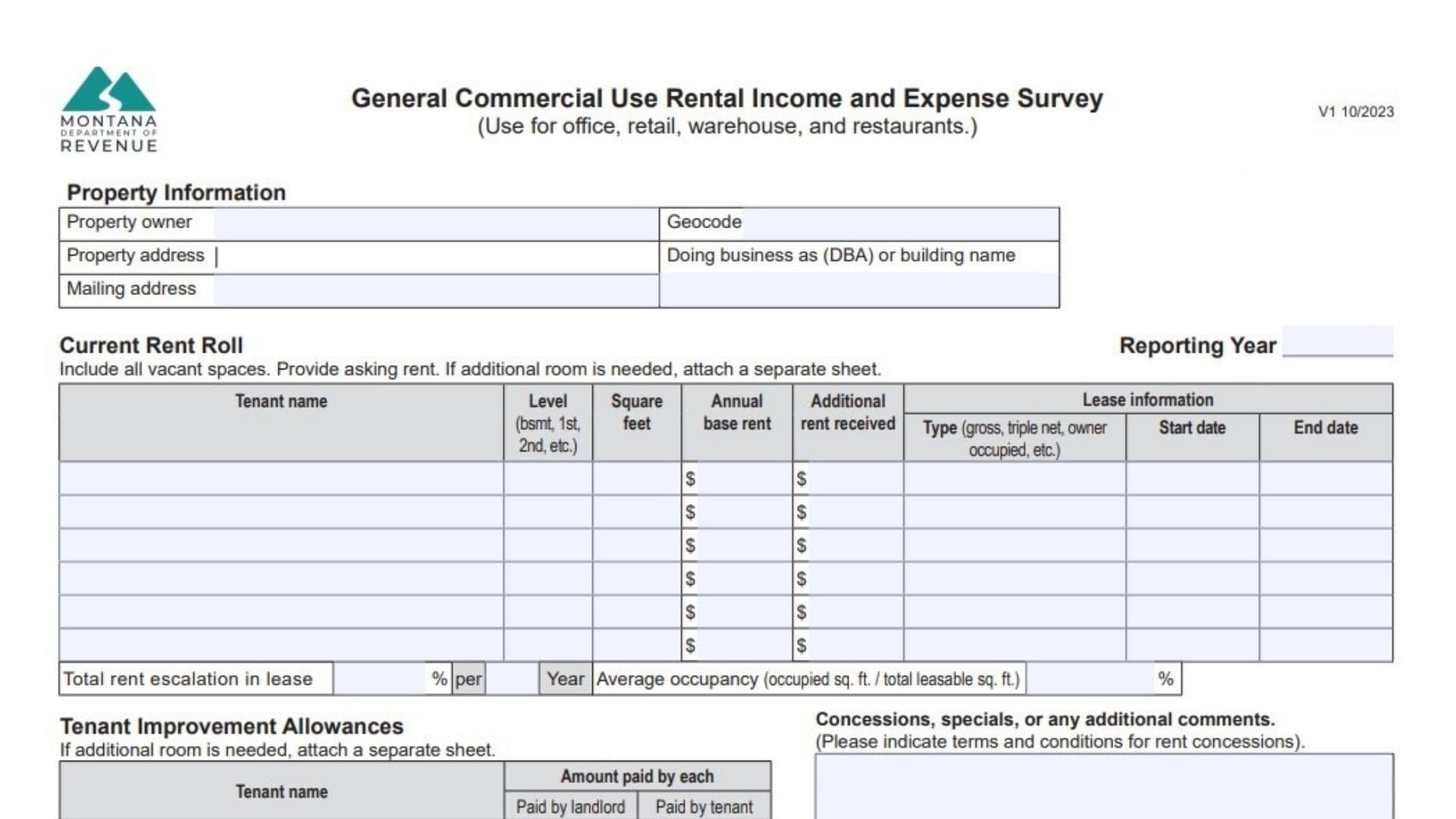
Montana Form IE-GEN serves as the General Commercial Use Rental Income and Expense Survey, designed specifically for income-producing commercial properties including office buildings, retail stores, warehouses, and restaurants to provide a standardized financial overview for a designated reporting year. Owners or managers use it to document the current rent roll (covering all tenants and vacant spaces with asking rents), lease details like type and dates, tenant improvement allowances split by who paid, property occupancy rates, total rent escalations, concessions with terms, and a comprehensive breakdown of annual operating income versus expenses. The form distinguishes between potential versus actual rent collected, vacancy losses, miscellaneous income, and reimbursements from tenants under different lease structures (gross where landlord covers most costs versus triple net where tenants share expenses), while categorizing expenses like advertising, cleaning, commissions, insurance, management fees, maintenance, utilities, property taxes, capital items, and more. It requires clarity on who bears responsibility for each expense category and captures nuances like ground rent paid or received for land separate from buildings, reserves for short-lived replacements, and depreciation if tracked. By organizing this data consistently across multiple pages, IE-GEN enables assessors or reviewers to compare properties fairly, spot irregularities through a dedicated clarification section, and understand overall performance without needing full accounting ledgers, making it essential for property tax, valuation, or compliance reporting in Montana.

How To Complete Form IE-GEN
Gather your rent roll, lease summaries, annual profit/loss statements, and expense ledgers before starting, as many figures align with tax forms. Use additional sheets matching the table formats if space runs out. Fill in all sections accurately for the specified reporting year, noting lease types (gross: tenant pays base rent only; triple net/NNN: tenant pays base plus expenses), occupancy averages, and who reimburses what. Sign off with contact details at the end. Submit as required by your assessor or authority.
Property Owner
Enter the full legal name of the property owner.
Geocode
Input the property’s assigned geocode if available.
Property Address
Provide the complete street address of the property.
Doing Business As (DBA) or Building Name
List any trade name, center name, or common building identifier.
Mailing Address
Give the address for mail related to this property.
Reporting Year
Specify the calendar or fiscal year for all income and expense data.
Total Rent Escalation in Lease per Year
Calculate and enter the aggregate annual rent increase amount across all leases.
Average Occupancy
Report occupied square feet divided by total leasable square feet, using year averages.
Concessions, Specials, or Any Additional Comments
Describe free rent periods, discounts, or specials, including exact terms and conditions.
Current Rent Roll Table (Page 1)
Include every tenant and vacant space.
- Tenant Name: Name of renter or “Vacant”.
- Level (Bsmt, 1st, 2nd, etc.): Floor or level occupied.
- Square Feet: Rentable area for that space.
- Annual Base Rent: Yearly base amount charged.
- Additional Rent Received: Extra charges like CAM or pass-throughs collected.
- Lease Information – Type: Gross, NNN, owner occupied, vacant, etc.
- Start Date: Lease commencement.
- End Date: Lease expiration.
Tenant Improvement Allowances Table (Page 1)
Detail improvements funded during leasing.
- Tenant Name: Recipient tenant.
- Amount Paid by Each: Total allowance.
- Paid by Landlord: Landlord’s share.
- Paid by Tenant: Tenant’s share.
Annual Operating Expenses Section (Page 2)
For each category, note responsibility (landlord/tenant) and tenant reimbursements.
- Advertising: Marketing, ads, promotions.
- Cleaning: Janitorial, common areas, landscaping.
- Commissions: Leasing agent fees.
- Insurance: Property insurance premiums.
- Legal and Accounting Fees: Professional services.
- Management Fee: Oversight company charges.
- Payroll and Benefits: Staff wages and related costs.
- Mortgage Interest: Interest portion only.
- Maintenance and Repairs: Routine upkeep (not capital).
- Supplies: Operational materials.
- Property Taxes: Annual tax bill.
- Utilities: All services like electric, water, trash.
- Depreciation Expense: Non-cash asset value loss.
- Reserves for Replacement: Funds for short-life items.
- Capital Expenses: Major one-time costs like roofs.
- Ground Rent Paid: Land lease payments.
- Other Expenses: Uncategorizable items (list three if needed).
Annual Income and Operating Expenses Summary (Page 2)
Tally year totals.
- Potential Gross Income: Full occupancy rent projection.
- Actual Rent Collected (Total Rents Received): Cash received.
- Vacancy and/or Collection Loss: Uncollected potential.
- Miscellaneous Income: Fees, parking, vending.
- Ground Rent Received: Land-only rents.
Provide Clarification for Any Irregularities
Explain anomalies like high vacancies or repairs.
Survey Completed By
Name of preparer.
Date
Completion date.
Title
Your position.
Phone
Contact number.
Email Address
Email for queries.
SEO-Friendly Related Keywords
- Montana IE-GEN form
- Commercial rental income survey
- IE-GEN rent roll instructions
- Montana property expense reporting
- Triple net lease expense breakdown
- Commercial property occupancy form
- Montana assessor rental survey
Frequently Asked Questions (FAQs)
What properties use IE-GEN?
Office, retail, warehouse, restaurant spaces.
Gross vs. NNN lease?
Gross: landlord pays expenses; NNN: tenant reimburses.
Include vacant spaces?
Yes, list with asking rent.
Capital expenses definition?
Major replacements like roofs, not routine repairs.