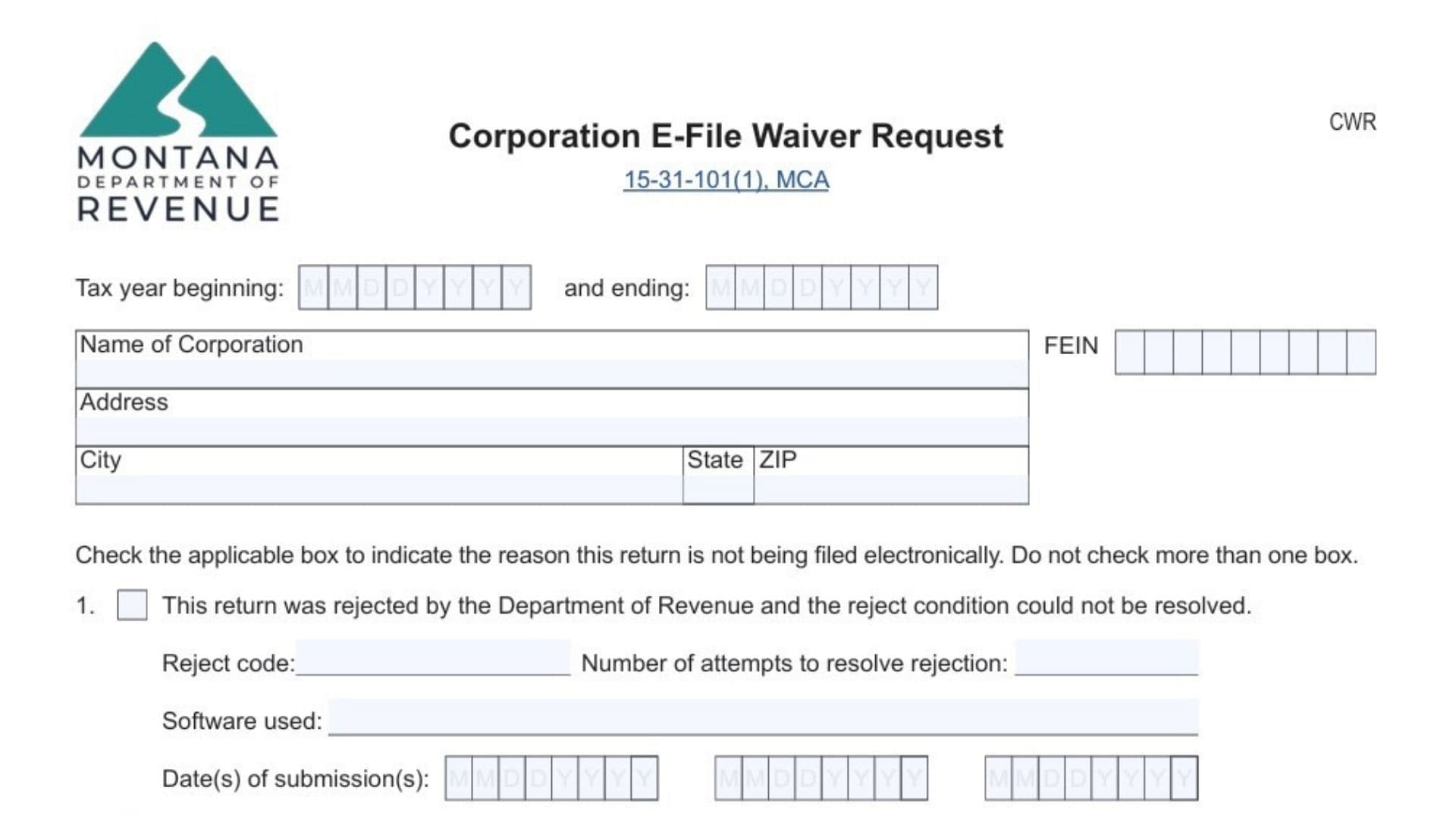
Montana Form CWR, officially known as the Corporation E-File Waiver Request, is used by corporations to request permission from the Montana Department of Revenue to file their Montana Corporate Income Tax Return (Form CIT) on paper instead of electronically. While Montana generally requires corporations with more than $750,000 in gross receipts to e-file their returns, Form CWR exists to address situations where electronic filing is not possible or would cause an unreasonable burden. These situations may include repeated electronic filing rejections that cannot be resolved, the lack of available e-filing software for a specific tax period, or significant hardships that make compliance impractical. By submitting Form CWR, a corporation formally explains why it cannot meet the e-filing requirement and requests approval to submit a paper return without facing penalties or rejection. This form is especially important because failing to e-file without an approved waiver can result in filing issues, delays, or noncompliance with Montana tax law.
Who Must File Montana Form CWR?
A corporation must file Form CWR if:
- It is required to e-file Form CIT under Montana law
- It cannot successfully file electronically
- It experiences technical, software-related, or hardship-based barriers
Corporations with $750,000 or less in gross receipts for the tax year are exempt from mandatory e-filing and do not need to file this form.
How To File Montana Form CWR
Montana Form CWR must be submitted together with a paper-filed Form CIT, unless the waiver is based on unavailable software for tax years after December 31, 2024. In most cases, Form CWR should be placed as the first page of the paper tax return submission. The completed and signed form must be mailed to the Montana Department of Revenue by the same due date as the corporate tax return, including any approved extensions.

How To Complete Montana Form CWR
Below is a clear explanation of every line and field on Montana Form CWR, rewritten in plain language while preserving the original intent.
Tax Year Information
Tax Year Beginning
Enter the starting date of the corporation’s tax year. This should match the tax period used for federal and Montana tax reporting.
Tax Year Ending
Enter the ending date of the tax year. Ensure this date aligns with both federal and state filings.
Corporation Identification Information
Name Of Corporation
Provide the corporation’s full legal name exactly as it appears on official tax records.
FEIN
Enter the corporation’s Federal Employer Identification Number assigned by the IRS.
Address
List the corporation’s complete mailing address, including street address or P.O. box.
City
Enter the city associated with the mailing address.
State
Provide the two-letter state abbreviation.
ZIP Code
Enter the full ZIP code for the mailing address.
Reason For Waiver Request
Select only one reason. Do not check more than one box.
Reason 1: Rejected Electronic Filing
Choose this option if the corporation attempted to e-file but the return was rejected and the issue could not be fixed.
- Reject Code: Enter the rejection code received during e-filing (commonly shown as CIT-E followed by numbers).
- Number Of Attempts: State how many times you tried to submit the return electronically.
- Software Used: Name the tax preparation software used during the filing attempts.
- Dates Of Submission: List the date or dates when electronic filing attempts were made.
This option applies only to tax periods beginning between January 1, 2023, and December 31, 2024.
Reason 2: No Available E-Filing Software
Select this option if no suitable electronic filing software exists for your filing needs.
This reason is valid only for tax periods beginning after December 31, 2024. If selected, Form CWR must be submitted at least 30 days before the filing deadline and sent separately from Form CIT.
Reason 3: Hardship
Choose this option if electronic filing would create an undue burden for the corporation.
- Hardship Description: Clearly explain the circumstances that prevented electronic filing. Provide enough detail to justify the request, such as financial limitations, operational constraints, or other significant obstacles.
Signature And Declaration Section
Signature
An authorized individual must sign the form to confirm the request is valid.
Date
Enter the date the form is signed.
Printed Name
Print the full name of the person signing the form.
Title
Enter the signer’s official job title or position within the corporation.
Provide a valid email address for follow-up or correspondence.
Phone Number
Enter a phone number where the signer can be reached during business hours.
The signature certifies that the information provided is true, accurate, complete, and submitted by an authorized representative.
Mailing Instructions
Mail the completed Form CWR along with the paper-filed Form CIT to:
Montana Department of Revenue
P.O. Box 8021
Helena, MT 59604-8021
Ensure the form is included as the first page of the paper submission unless otherwise required.
Important Filing Notes
- Unsigned forms are not valid
- Only one waiver reason may be selected
- Information must match Form CIT exactly
- Keep a copy of the completed form for your records
Where To Get Help
For additional guidance, visit MTRevenue.gov or contact the Montana Department of Revenue at (406) 444-6900. Hearing-impaired taxpayers may use Montana Relay by dialing 711.