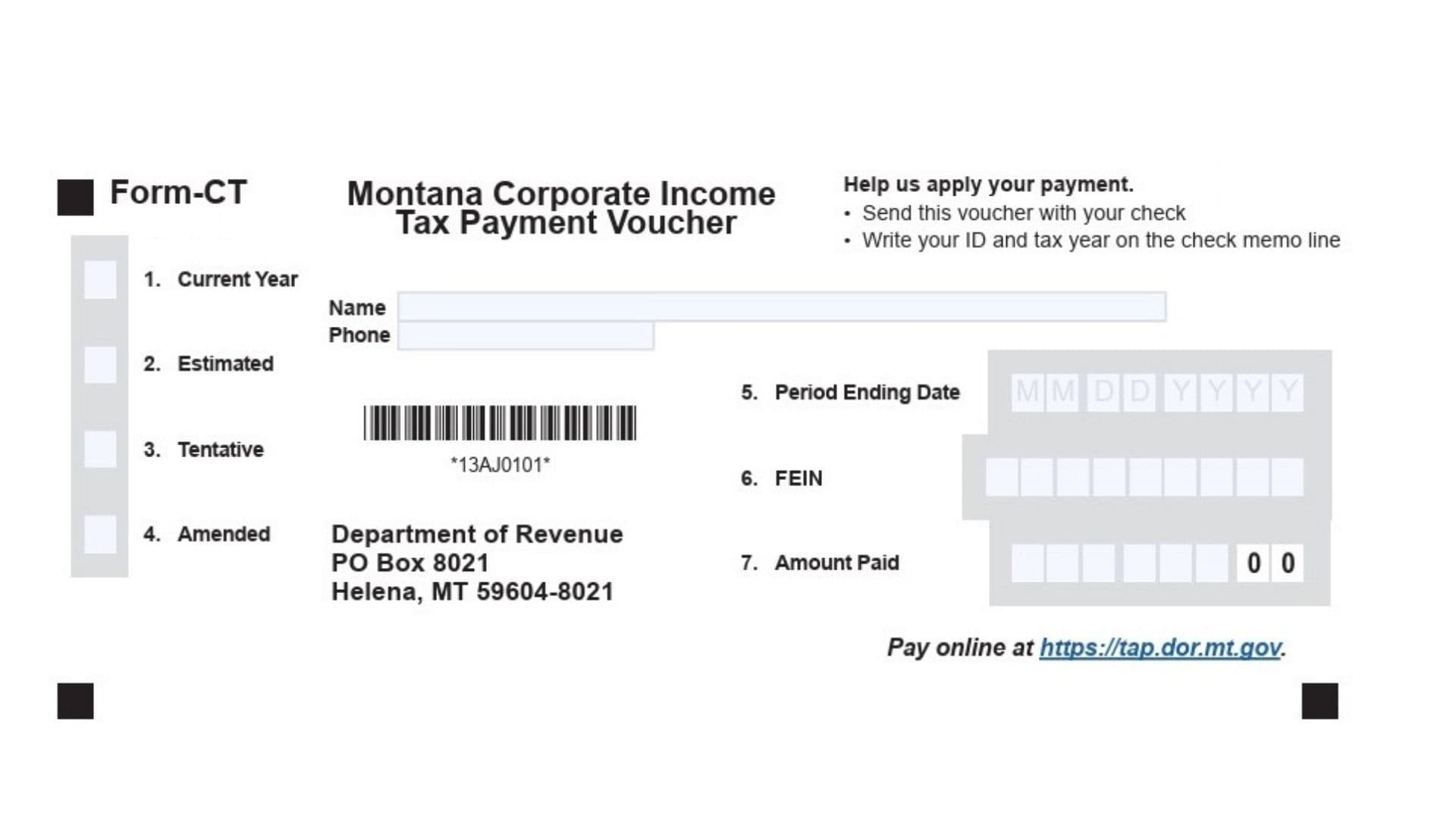
Montana Form CT is the official Corporate Income Tax Payment Voucher issued by the Montana Department of Revenue. It serves a critical function for businesses operating within the state by acting as a transmittal document that accompanies check payments for corporate income taxes. Its primary purpose is to ensure that your payment is accurately identified and credited to the correct corporate account and tax period. Whether you are making a standard payment for the current year, submitting an estimated tax installment, paying a tentative tax amount, or settling a balance due from an amended return, this voucher directs the funds appropriately. While the state encourages and sometimes requires electronic payments—specifically mandating them for amounts of $500,000 or more—this form remains essential for any corporation choosing or required to pay their tax liability via a physical check sent through the mail.
How To File Montana Form CT
You have several options for filing and making your payment associated with Form CT. The method you choose depends on your preference for digital versus paper processing, though large payments must be electronic.
Electronic Filing Options
The Montana Department of Revenue strongly encourages electronic payments for efficiency and security.
- TransAction Portal (TAP): You can visit the state’s TransAction Portal (https://tap.dor.mt.gov) to pay your corporate income tax. This platform allows you to pay using an e-check (which is free of charge) or via a credit/debit card (which typically incurs a small processing fee). This can be done for both e-filed returns and paper-filed returns.
- Tax Software: If you use commercial tax software to prepare your corporate return, most programs allow you to make a payment directly at the time of filing. Alternatively, some software allows you to schedule the payment for a future date. Check your specific software to see what features are available.
- Mandatory Electronic Payments: It is important to note that if your payment amount is $500,000 or more, you are required to make the payment electronically; you cannot use the paper voucher and check method.
Paper Filing By Check
If you choose to pay by check, you must use the physical Form CT voucher.
- Preparation: Complete the voucher fully and detach it from the instruction sheet (if attached).
- Multiple Periods: If you are paying for more than one tax period, you must complete and send a separate voucher for each specific period. Do not combine them.
- Check Writing: Make your check payable to the “Montana Department of Revenue.” On the memo line of your check, clearly write your Federal Employer Identification Number (FEIN) and the tax year the payment covers.
- Assembly: Do not staple, tape, or paperclip the voucher to your check or your tax return. They should be loose in the envelope to facilitate processing.
- Mailing Address: Send the completed voucher and your check to:
Montana Department of Revenue
PO Box 8021
Helena, MT 59604-8021

How To Complete Montana Form CT
Below are the detailed instructions for filling out each section of the Form CT payment voucher. Please ensure all information is legible and accurate to avoid processing delays.
Entity Information
- Name: Enter the full legal name of the corporation or entity as it is registered with the Montana Secretary of State.
- Phone: Provide a current telephone number where a representative of the company can be reached if there are questions regarding the payment.
Payment Type Selection (Lines 1–4)
You must identify what kind of payment you are making. Select the box that corresponds to the nature of your payment.
- 1. Current Year: Select this option if you are making a standard payment for the current tax year’s liability.
- 2. Estimated: Select this option if this payment is an installment towards your estimated tax liability for the year.
- 3. Tentative: Select this option if you are making a tentative tax payment, often used when requesting an extension to file the full return.
- 4. Amended: Select this option if this payment is to settle additional tax owed resulting from an amended tax return you have filed or are filing.
Tax Period And Identification (Lines 5–6)
- 5. Period Ending Date: Enter the specific end date of the tax period for which you are making this payment. This should be formatted clearly (e.g., MM/DD/YYYY) to ensure the money is applied to the correct fiscal or calendar year.
- 6. FEIN: Enter your Federal Employer Identification Number. This is the unique nine-digit number assigned to your business by the IRS. This is crucial for matching the payment to your tax account.
Payment Amount (Line 7)
- 7. Amount Paid: Enter the exact dollar amount of the payment you are enclosing. This number must match the amount written on your check.