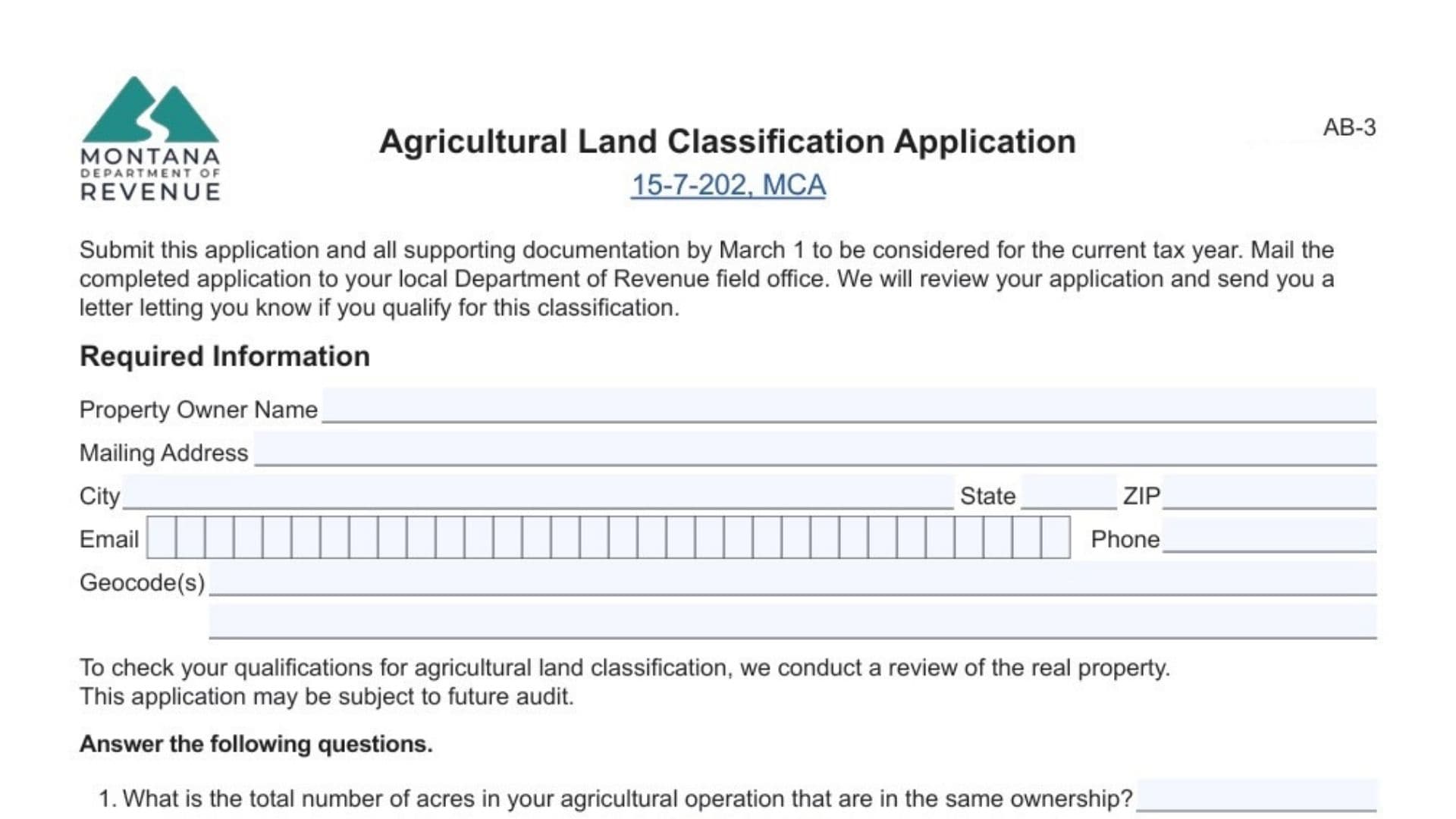
Form AB-3, the Agricultural Land Classification Application, is an official document used by the Montana Department of Revenue to determine if a property qualifies for agricultural land tax status. This classification is vital for property owners seeking to have their land taxed based on its agricultural productivity rather than its market value. The form collects essential data about the property’s use, including crop production, livestock grazing, and any income generated from farming activities. It is designed for landowners who are actively using their land for agricultural purposes, including family farms, provisional orchards, or vineyards. The application must be submitted by March 1 to be considered for the current tax year, and it serves as the primary tool for the state to audit and verify agricultural eligibility.
How To File Form AB-3
To file this form, you must complete it fully and gather all required supporting documentation, such as sales receipts, income tax returns, or production records. The completed application and documents must be mailed to your local Montana Department of Revenue field office. You can find the specific address for your local office on the Department’s website (MTRevenue.gov). The deadline for submission is strictly March 1 for the classification to apply to the current tax year. If you are submitting this application as part of a request for review of a property reclassification (Form AB-26), the deadline is within 30 days of the date on your classification notice.

How To Complete Montana Form AB-3
Below are the detailed instructions for every section of the form.
Required Information
Property Owner Name: Enter the full legal name of the property owner.
Mailing Address: Provide the address where you receive mail.
City, State, ZIP: Enter the city, state, and ZIP code for your mailing address.
Email: Provide a valid email address for contact purposes.
Phone: Enter a reliable telephone number.
Geocode(s): List the unique geocode(s) assigned to your property (found on your property tax bill or assessment notice).
General Questions (Page 1)
Question 1: Enter the total number of acres in your entire agricultural operation that are under the same ownership.
Question 2: Check “Yes” or “No” to indicate if there are multiple separate parcels under this single ownership.
Question 3: Check “Yes” or “No” to indicate if all parcels are in the same county. If you check “No,” list the other counties where parcels are located.
Question 4: List every agricultural crop or product that was grown, raised, or produced on the land during the previous year.
Question 5: Check “Yes” or “No” to indicate if livestock grazed on your land last year. If “Yes,” list the specific types of livestock (e.g., cattle, sheep). Note: Eligibility for grazing land is based on carrying capacity determined by soil surveys, not just the presence of animals.
Question 6: Check “Yes” or “No” to indicate if you lease the land to someone else. If “Yes,” write the name of the lessee.
Question 7: Check “Yes” or “No” to indicate if any part of the land is used for commercial or industrial purposes.
Question 8: Check “Yes” or “No” to indicate if the land is irrigated. If “Yes,” enter the number of acres that are irrigated.
Question 9: Select the method used for growing crops: in the ground, raised beds, self-contained pots/bags, or “not applicable.”
Income Section (Page 2)
Note: Skip this section if your land is used for livestock or if you are applying for “provisional” classification. Otherwise, you must complete it and attach proof (receipts, tax returns).
Agricultural Products Marketed:
- Product: List the product name (e.g., wheat, honey).
- Total Production: Enter the amount produced (bushels, tons, etc.).
- Total Income: Enter the gross income received from selling this product.
Agricultural Products Currently In Storage or Consumed By Livestock:
- Product: List the product name.
- Total Production: Enter the amount produced.
- Status: State whether it is “In Storage” or “Consumed.”
- Estimated Value: Enter the estimated dollar value of the product.
Income From Leases Or Governmental Payments:
- Product: List the crop associated with the lease or payment.
- Payment Amount: Enter the total income received from leases or government ag programs.
Family Farm Section (Page 3)
Complete this only if the land is part of a family operation but under a different ownership name. The parcel must be between 20 and 160 acres.
Question 1: Enter the exact acreage of the parcel (must be 20+ acres).
Question 2: Check “Yes” or “No” to confirm if the parcel is within 15 air miles of the main family operation.
Question 3: Enter the name of the main family agricultural operation entity.
Question 4: Describe your relationship to that entity (e.g., partner, shareholder) and attach proof.
Question 5: Complete either Column A or Column B:
- Column A: Use this if the landowner is personally involved in production. Answer if 51% of your income comes from ag production.
- Column B: Use this if the landowner is a shareholder/partner in the family entity. Answer if 51% of the owner’s OR the entity’s income comes from ag production.
Provisional Agricultural Land Classification Section (Page 4)
Complete this only if applying for a 5-year provisional status for new orchards, vineyards, or Christmas tree farms.
Fruit Orchard:
- 1: Enter number of live trees.
- 2: Enter the year planted.
- 3: Check all management practices used (weeding, fencing, etc.).
Vineyard:
- 1: Enter number of live vines.
- 2: Enter the year planted.
- 3: Check all management practices used (pruning, trellising, etc.).
Christmas Tree Farm:
- 1: Enter number of live trees.
- 2: Enter the year planted.
- 3: Check all management practices used (cultivation, shearing).
Affirmation And Signature
Signature: Sign the form as the owner or authorized agent.
Date: Enter the date of signature.