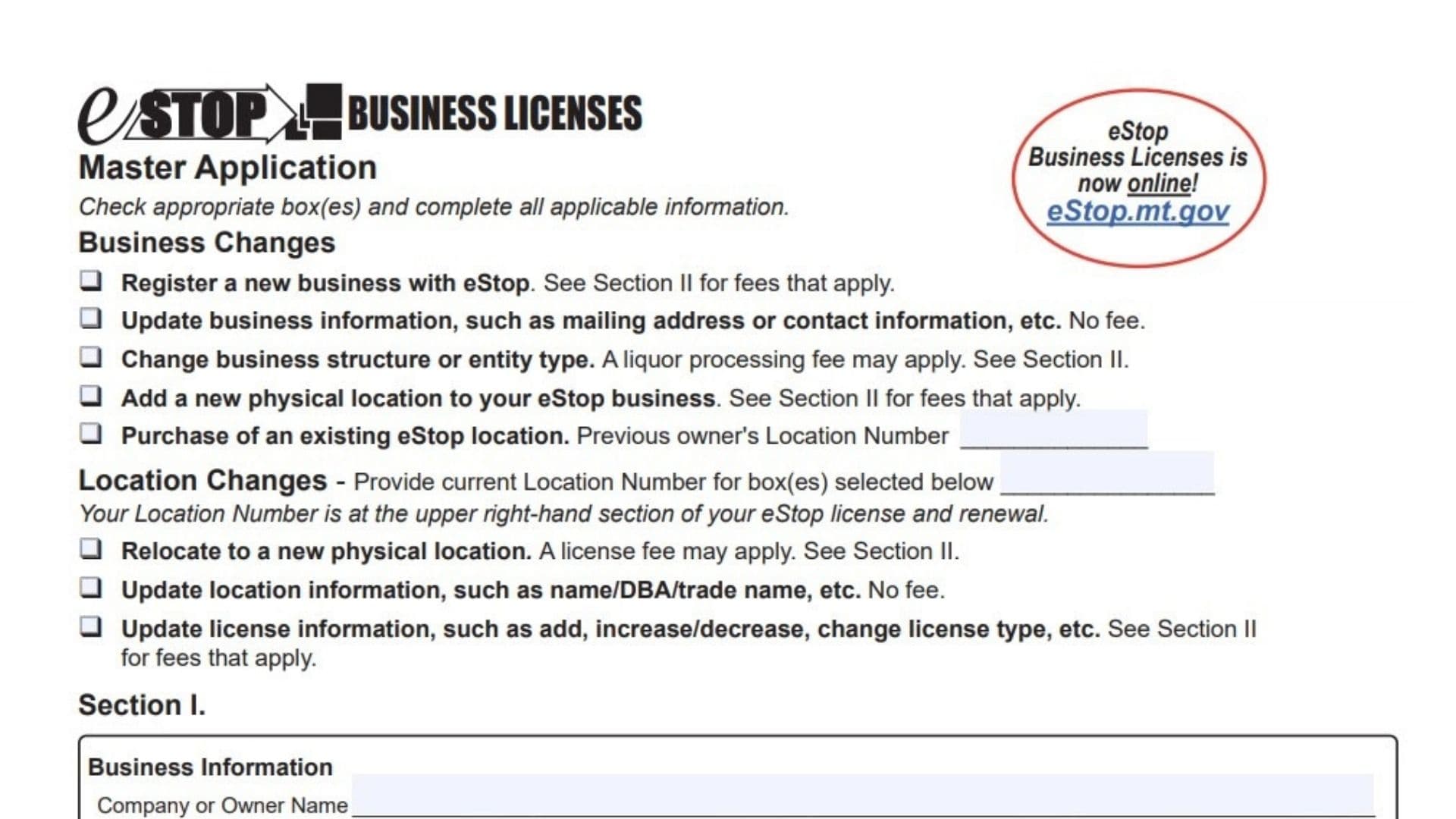
The eStop Business Licenses Master Application is a multi-purpose document designed by the Montana Department of Revenue to streamline the regulatory process for business owners. It serves as the primary tool for a wide variety of administrative actions, allowing you to register a completely new business, update existing contact details, or modify your legal business structure. Beyond basic registration, this form is essential for managing physical location changes, adding new storefronts, or transferring ownership when purchasing an existing eStop location. The document is divided into two main sections: Section I focuses on the vital statistics of the business entity and its physical operations, while Section II acts as a detailed worksheet for calculating specific license fees across diverse industries, including retail food establishments, tobacco sales, nursery operations, underground storage tanks, and weighing devices. By completing this form accurately, you ensure compliance with state regulations and maintain valid licensure for your specific trade.
How To File Montana eStop Master Application Form
Once you have completed the form, you have a few options for submission. The most direct method is to mail the signed document along with your payment to the specific Post Office Box in Helena designated for eStop Business Licenses. Alternatively, if you have questions or need to submit documentation quickly, fax numbers are available for the department. For those who prefer digital processing, the state encourages applicants to visit the official eStop website to apply and pay online, which can often expedite the process.

How to Complete Montana eStop Master Application Form
The following instructions walk you through every field of the application to ensure nothing is overlooked.
Selecting Business And Location Changes
At the very top of the form, you must indicate the purpose of your application by checking the appropriate boxes.
Business Changes
- Register a new business: Check this box if you are establishing a brand new entity. You will need to refer to Section II to determine the applicable fees.
- Update business information: Select this if you are simply changing your mailing address or contact details. There is no fee for this update.
- Change business structure: Use this option if your legal entity type is changing (e.g., from a partnership to a corporation). Note that a liquor processing fee may apply.
- Add a new physical location: Check this if you are expanding an existing business to a new site. Fees will apply based on Section II.
- Purchase of an existing location: Select this if you are buying a business that is already licensed. You must enter the Previous Owner’s Location Number in the provided blank line.
Location Changes
- Location Number Box: Before selecting an option below, write your current Location Number in the designated line. This number can be found on the upper right-hand corner of your existing license.
- Relocate to a new physical location: Check this if you are moving your operations entirely. A license fee may apply.
- Update location information: Select this for minor updates like changing a trade name (DBA). This action is free.
- Update license information: Use this box to add, increase, decrease, or change specific license types.
Completing Section I: Business And Location Details
Business Information
- Company or Owner Name: Print the full legal name of the business entity or the individual owner.
- Identification Number: You must provide your Federal Employer Identification Number (FEIN). If you do not have one, you must provide your Social Security Number. This field is mandatory.
- Business Mailing Address: Enter the complete street address or PO Box where you want to receive general mail, followed by the City, State, and ZIP Code.
- Type of Business: Check exactly one box that best describes your legal structure. Options include Sole proprietorship, Limited liability company (LLC), C corporation, Nonprofit C corporation, S corporation, Association, Limited liability partnership (LLP), Partnership, Governmental, Limited partnership (LP), or Other.
Location Information
- Assumed Business Name: If you operate under a name different from your legal name (often called a “Doing Business As” or DBA name), write it here.
- Physical Location Address: Enter the actual physical address of the shop or office. Do not use a PO Box here. Include the City, State, and ZIP Code.
- County: Write the name of the county where the physical location is situated.
- Contact Numbers: Provide the phone number and fax number specifically for this location.
Contact Information
- Name: Print the name of the primary contact person for this application.
- Phone Number: Enter the direct phone number for the contact person.
- Email Address: Provide a valid email address for digital correspondence.
Finalizing The Application With Your Signature
Signature Section
- Declaration: Read the statement affirming that you are authorized to sign and that all information is true and complete under penalty of false swearing.
- Signature: Sign your name on the first line.
- Title: Print your official job title (e.g., Owner, Manager, President).
- Date: Write the current date you signed the form.
Completing Section II: Calculating License Fees
This section is a table used to calculate what you owe. Find the rows that apply to your business, fill in the quantity where necessary, and write the specific fee in the “Total Amount” column.
Montana Lottery
- Traditional Lottery: Enter $50.00 if applying for a standard lottery license.
- Sports Bet (Wagering): Enter $50.00 if applying for a sports betting license.
Retail Food Establishment
- Small Establishments: If you have one or two employees working at any one time, the fee is $85.00. (Note: An inspection is required).
- Large Establishments: If you have more than two employees working at a time, the fee is $115.00.
Tobacco Products And Vapor Products
- Retailer – Tobacco: Enter $50.00 to sell standard tobacco products.
- Retailer – Vendor < 10 machines: Enter $50.00 if you have fewer than 10 cigarette vending machines.
- Vendor ≥ 10 machines: Enter $50.00 if you have 10 or more machines.
- Wholesaler: Enter $50.00 if you operate as a wholesaler.
- Subjobber: Enter $50.00 if you operate as a subjobber.
- Retailer – Alternative Nicotine/Vapor: Enter $20.00 to sell vape or alternative nicotine products.
Off-Premises Beer/Wine
- Processing Fee: Enter $200.00 for new applicants or structural changes (nonrefundable).
- Addition of License: Enter $100.00 if adding beer or wine to a current license.
- Background Check: Enter $30.00 for the processing fee.
- Beer Only: Enter $200.00.
- Wine Only: Enter $200.00.
- Beer/Wine Combo: Enter $400.00.
Nursery License
- New Application Fee: Enter $25.00 for a new business.
- Landscape Service: Enter $150.00.
- Sod Farmer: Enter $220.00.
- Sales Tiers: Select the fee based on your gross annual sales:
- $5,000 or less: $25.00
- $5,001 to $75,000: $135.00
- $75,001 to $150,000: $200.00
- $150,001 to $250,000: $300.00
- $250,000 or greater: $400.00
Underground Storage Tanks
- Role: Check either the “Owner” or “Operator” box.
- Tanks ≤1,100 gallons: Enter $36.00 per tank.
- Tanks >1,100 gallons: Enter $108.00 per tank.
Meters – Petroleum Dealers
- PA (≤ 20 gal/min): Enter $21.00 per meter.
- PB (> 20 and ≤ 130 gal/min): Enter $70.00 per meter.
- PC (> 130 gal/min): Enter $83.00 per meter.
- PD (LPG/Propane): Enter $102.00 per meter.
Scales – Weighing Devices
- S1/SA (0-499 lbs): Enter $20.00 per scale.
- S2/SB (500-1,999 lbs): Enter $33.00 per scale.
- S3/SC (2,000-7,999 lbs): Enter $64.00 per scale.
- S4/SD (8,000-60,000 lbs): Enter $165.00 per scale.
- S5/SE (60,001 lbs or greater): Enter $280.00 per scale.
Total Amount Due
Add all the numbers you entered in the “Total Amount” column and write the final sum in the Total Amount Due box at the bottom right.
Making Your Payment
If applying by mail, write a check payable to eStop Business Licenses. It is critical that you write your Location Number on the memo line of your check to ensure the payment is credited to the correct account. Mail the check and the completed form to the address listed on the document. If you prefer, you can go to the website listed on the form to apply and pay online.
Add to follow-up
Check sources
View in file