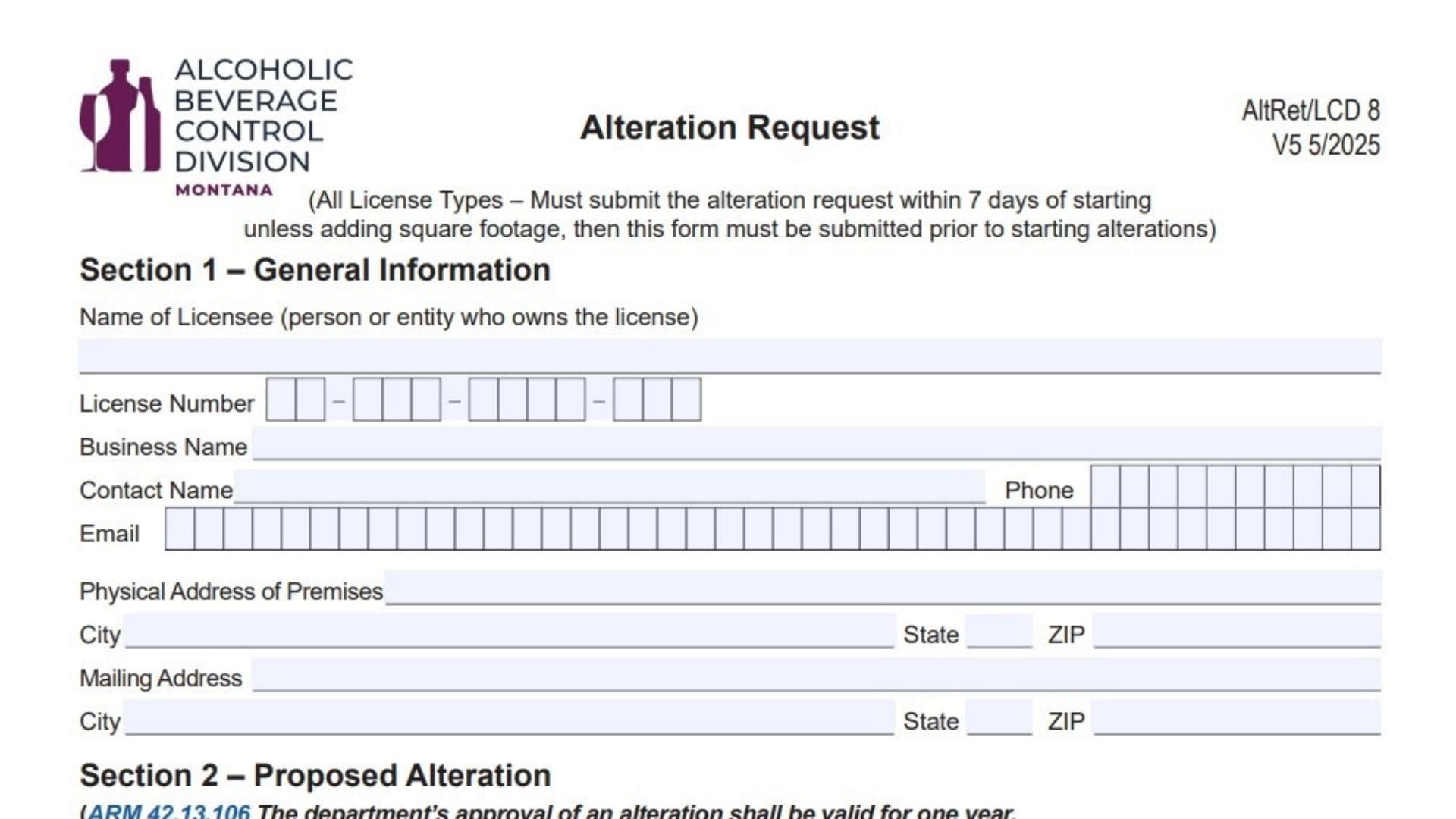
The Montana Alteration Request form (AltRet/LCD 8, Version 5 5/2025) is a mandatory document used by liquor licensees to notify the Montana Department of Revenue’s Alcoholic Beverage Control Division of planned physical changes to their licensed premises. This form applies to all license types—including all-beverages, beer and wine, restaurant, off-premises, wholesaler, and manufacturer licenses. The submission deadline depends on the nature of the work: if you are adding square footage to your licensed area, you must submit this form and receive approval prior to starting any alterations. For all other alterations (remodeling without expanding), you must submit the request within seven days of starting the work. Under Administrative Rules of Montana (ARM) 42.13.106, the department’s approval is valid for one year; if your project isn’t finished within that year, you must resubmit for approval. Importantly, licensees are strictly prohibited from using any new area until they have received explicit department approval.
How To File The Montana Alteration Request
You can submit the completed form by email or standard mail.
- Email: Send the form and required attachments to DORAlcoholicBeverageControl@mt.gov.
- Mail: Send to Montana Department of Revenue, Alcoholic Beverage Control Division, PO Box 1712, Helena, MT 59624-1712.
If you have questions, you can call the division at (406) 444-6900.

How to Complete Montana Alteration Request Form
Section 1: General Information
Name of Licensee
Enter the full legal name of the person or entity that owns the license (e.g., “John Smith” or “Smith Enterprises LLC”). This must match the name on your current liquor license.
License Number
Enter your state-issued liquor license number in the designated boxes.
Business Name
Enter the “Doing Business As” (DBA) name of your establishment (e.g., “The Montana Taphouse”).
Contact Name, Phone, Email
Provide the name, phone number, and email address of the person the department should contact regarding this request.
Physical Address of Premises
Enter the physical street address, city, state, and ZIP code of the licensed location where alterations will occur.
Mailing Address
Enter the mailing address where you receive official correspondence, if different from the physical address.
Section 2: Proposed Alteration
Proposed Dates
Enter the “Proposed Start Date of Alteration” and the “Expected Completion Date of Alteration” in MM/DD/YYYY format. Remember, you have one year from approval to complete the work.
Building Permit Question
Check “Yes” or “No” to indicate if a building permit is required for your project. You should verify this with your local building officials before answering.
Description
Provide a brief narrative description of the work you plan to do. Be specific about what is changing (e.g., “Expanding patio by 200 sq. ft.,” “Moving the main bar,” “Adding a wall to separate dining area”). If you are adding square footage, explicitly state the amount here.
Warning Note: There is a reminder not to use any new area until you have received department approval.
Section 3: Proposed Alteration (Operations Status)
You must check one of two boxes to indicate your operational status during construction.
Option 1: Continue Operations
Check this box if you plan to stay open while remodeling. By checking this, you acknowledge that you must continue to meet all suitability requirements for your specific license type (citations to relevant statutes and rules are provided).
Option 2: Discontinue Operations
Check this box if you will close the business during renovations. You must then place your license on “nonuse status.”
- Date of Nonuse Requested: Enter the date you will close operations.
- Seasonal Status: Check “Yes” or “No” if you are a seasonal licensee.
- Completion During Seasonal Closure: If you are seasonal, indicate if you expect to finish the work while closed for the season.
Section 4: Required Documents
Check the boxes to confirm you are attaching the mandatory documents. Without these, your application is incomplete.
Current Floor Plan
You must attach a floor plan showing the current layout as it is licensed today. It must include approximate dimensional measurements, external dimensions, and the general layout.
Proposed Floor Plan
You must attach a new floor plan showing what the premises will look like after the alteration. It must show all areas of the proposed licensed premises, including dimensions and layout. The form references a “Floor Plan Specifications Fact Sheet” if you need detailed guidance on drawing these plans.
Proof of Possessory Interest
Check this box only if you are adding square footage. You must prove you have the legal right to occupy the new space (e.g., a lease amendment, deed, or updated rental agreement).
Section 5: Declaration And Affidavit
Signature
The owner of the license or a duly authorized representative must sign the form.
Date
Enter the date of signature.
Printed Name and Title
Print the name of the signer and their title (e.g., Owner, Manager, President).
Final Reminder: The form notes that you (the licensee) are responsible for notifying the department when the project is done. Unless you attested that no building permit was required, you must also ensure the department receives notification of building, health, and fire code approval before final sign-off. For on-premises licenses, ensure no new entrances are created within 600 feet of a school or church on the same street.