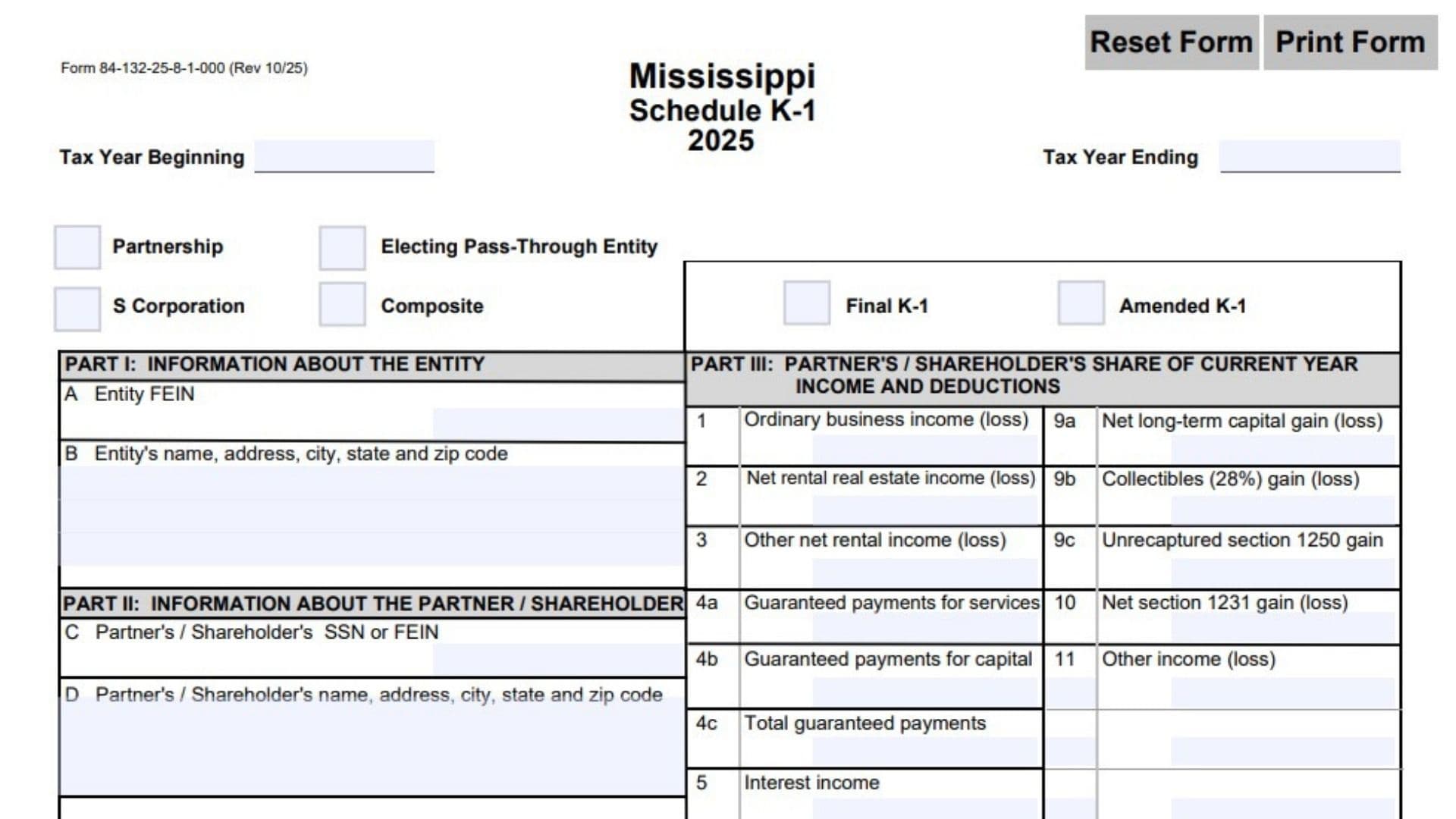
Mississippi Schedule K-1 is a tax reporting document used to report a partner’s or shareholder’s allocated share of income, losses, deductions, credits, and other tax-related information from a pass-through entity. The form is issued for the 2025 tax year by the Mississippi Department of Revenue and is designed for partnerships, S corporations, and electing pass-through entities. It provides individual partners or shareholders with the financial information they need to report their share of the entity’s tax-related activities. Unlike a regular individual income tax return, Schedule K-1 focuses on the portion of business income and other tax items attributable to a particular partner or shareholder rather than the entity’s entire financial results. It identifies the business entity, the recipient’s personal or business identification details, ownership and allocation percentages, capital account activity, and the recipient’s share of current-year income and deductions. It also reports applicable Mississippi tax credits and any pass-through entity tax paid on behalf of the partner. The information on this schedule helps partners and shareholders understand how their participation in a business affects their individual tax reporting obligations. Completing and reporting the information accurately is important because different types of income, deductions, and credits may receive different tax treatment. The schedule also identifies whether the document is a final or amended K-1 and whether the entity has made an election to be taxed as a pass-through entity.
84132258.pdf
Who Receives Mississippi Schedule K-1?
Mississippi Schedule K-1 is intended for individuals or entities receiving an allocated share of income, losses, deductions, or credits from certain pass-through business entities.
The form identifies the following entity classifications:
- Partnerships.
- S corporations.
- Electing pass-through entities.
- Composite filings, where applicable.
A partner or shareholder may receive this schedule to understand the financial amounts allocated to them for the tax year.
The schedule is particularly relevant when:
- You are a partner in a partnership.
- You are a shareholder in an S corporation.
- You receive income or deductions allocated through a pass-through entity.
- You are entitled to a share of Mississippi tax credits.
- An electing pass-through entity has paid tax on your allocated share of income.
- You need information about your ownership percentage, capital account, or Mississippi apportionment ratio.
How To File Mississippi Schedule K-1
Mississippi Schedule K-1 is generally prepared by the partnership, S corporation, or applicable pass-through entity and provided to the partner or shareholder.
The recipient uses the information reported on the schedule when preparing their applicable tax filings.
Where To Submit Mississippi Schedule K-1
Schedule K-1 is an informational tax schedule rather than a standalone individual income tax return.
The form itself does not provide a separate mailing address or independent submission instructions.
As a recipient:
- Obtain your completed Schedule K-1 from the business entity.
- Review the entity and recipient identification information.
- Verify your allocated income, deductions, and credits.
- Use the reported information when preparing your applicable Mississippi income tax return.
- Follow the applicable Mississippi tax return instructions to determine whether the schedule must be attached to your return or retained with your tax records.
The entity should provide the completed schedule to the appropriate partner or shareholder.
Information To Prepare Before Completing The Form
The entity preparing Schedule K-1 should have the following information available:
- Entity identification: Federal Employer Identification Number (FEIN), legal business name, and complete address.
- Partner or shareholder identification: Social Security number (SSN) or FEIN, legal name, and address.
- Entity classification: Partnership, S corporation, electing pass-through entity, or applicable composite status.
- Tax year information: Beginning and ending dates of the tax year.
- Ownership information: Profit, loss, and capital allocation percentages.
- Income information: The recipient’s allocated share of business income and other income categories.
- Deduction information: Guaranteed payments, charitable contributions, Section 179 deductions, and other applicable deductions.
- Capital account records: Beginning capital, contributions, current-year income or loss, other changes, and distributions.
- Tax credit information: The partner’s share of Mississippi tax credits reported on Form 84-401.
- Pass-through entity tax information: The amount of tax paid by the electing pass-through entity on the partner’s share of income, if applicable.
- Mississippi apportionment information: The applicable apportionment ratio for the tax year.

These records help ensure that the amounts allocated to each partner or shareholder are reported correctly.
How To Complete Mississippi Schedule K-1
The 2025 Mississippi Schedule K-1 contains five main parts.
- Part I: Information About The Entity.
- Part II: Information About The Partner / Shareholder.
- Part III: Partner’s / Shareholder’s Share Of Current Year Income And Deductions.
- Part IV: Mississippi Tax Credits.
- Part V: Partner’s Pass-Through Entity Tax Paid.
Before completing these sections, identify the applicable tax year and entity classification.
Tax Year And Entity Classification
Tax Year Beginning
Enter the beginning date of the tax year covered by the Schedule K-1.
Use the actual beginning date of the entity’s tax year.
Tax Year Ending
Enter the ending date of the tax year covered by the schedule.
Make sure the beginning and ending dates correctly identify the reporting period.
Partnership Checkbox
Check this box if the entity is classified as a partnership.
This identifies the business entity type associated with the Schedule K-1.
Electing Pass-Through Entity Checkbox
Check this box if the entity is an electing pass-through entity.
This classification is relevant to the pass-through entity tax information reported in Part V.
S Corporation Checkbox
Check this box if the entity is an S corporation.
This identifies the entity as an S corporation for purposes of the schedule.
Composite Checkbox
Select this checkbox when the schedule is associated with the applicable composite filing classification.
Final K-1 Checkbox
Check this box if the schedule represents the final K-1 being issued for the partner or shareholder.
This identifies the document as the final schedule rather than a regular continuing-year statement.
Amended K-1 Checkbox
Check this box if the schedule is an amended K-1.
An amended K-1 identifies a corrected or revised schedule issued after an earlier version.
If the schedule is amended, make sure the revised information is used when reviewing the recipient’s tax reporting.
Part I: Information About The Entity
Part I identifies the partnership, S corporation, or other applicable entity issuing the Schedule K-1.
The information in this section connects the reported income, deductions, and credits to the correct business entity.
Box A: Entity FEIN
Enter the Federal Employer Identification Number (FEIN) assigned to the business entity.
The FEIN is the federal identification number used to identify the entity for tax reporting purposes.
Check the number carefully to avoid associating the schedule with the wrong business.
Box B: Entity’s Name, Address, City, State, And ZIP Code
Enter the complete legal name and business address of the entity issuing the Schedule K-1.
Include:
- Entity’s legal name.
- Street address.
- City.
- State.
- ZIP code.
Use the entity’s correct registered or business mailing information.
Make sure the information matches the entity’s tax records.
Part II identifies the individual or business receiving the allocated income, deductions, credits, and other information from the entity.
This section also records the recipient’s classification, disregarded entity information, and ownership details.
Box C: Partner’s / Shareholder’s SSN Or FEIN
Enter the recipient’s Social Security Number (SSN) or Federal Employer Identification Number (FEIN), as applicable.
Use the SSN when the recipient is an individual and the FEIN when the recipient is an entity.
Verify that the identification number belongs to the partner or shareholder named in Box D.
Box D: Partner’s / Shareholder’s Name, Address, City, State, And ZIP Code
Enter the complete name and mailing address of the partner or shareholder receiving the schedule.
Provide:
- Full legal name.
- Street address.
- City.
- State.
- ZIP code.
The information should correctly identify the recipient of the allocated tax items.
Box E: Partner Or Shareholder Classification
Select the appropriate checkbox to identify the recipient’s classification.
The form provides two options:
- General partner or LLC member-manager: Select this option when the recipient is classified as a general partner or LLC member-manager.
- Limited partner or other LLC member: Select this option when the recipient is classified as a limited partner or another LLC member.
Choose the classification that accurately reflects the recipient’s status in the entity.
Box F: Information About A Disregarded Entity Partner
Complete this section if the partner is a disregarded entity (DE).
The form provides two fields:
- TIN: Enter the applicable taxpayer identification number.
- Name: Enter the corresponding name.
Use these fields to provide the disregarded entity partner’s identification information as requested by the form.
If the partner is not a disregarded entity, this section does not apply.
Box G: Estimated Tax Payment Remitted On Behalf Of The Partner
Check this box if 5% of the partner’s net gain or profit was remitted as an estimated tax payment on the partner’s behalf using Form 84-387.
The checkbox identifies whether the applicable estimated tax payment was made.
Below the checkbox, the form provides a separate amount field.
Enter Amount Of Payment Remitted
Enter the actual amount of estimated tax payment remitted on behalf of the partner.
Use the amount associated with the payment made through Form 84-387.
Do not enter an estimated or assumed payment amount. Use the entity’s payment records.
Box H: Partner’s Share Of Profit, Loss, And Capital
This section reports the partner’s allocation percentages for profit, loss, and capital at the beginning and end of the tax year.
The form provides two columns:
- Beginning.
- Ending.
Enter the applicable percentage in each column.
The section contains three separate categories.
Profit Percentage
Enter the partner’s share of the entity’s profits at the beginning and ending of the tax year.
Use the appropriate percentage for each period.
Loss Percentage
Enter the partner’s allocated share of the entity’s losses at the beginning and ending of the tax year.
These percentages identify the partner’s share of losses under the entity’s allocation records.
Capital Percentage
Enter the partner’s share of the entity’s capital at the beginning and ending of the tax year.
Report the beginning and ending percentages separately.
Make sure all three categories reflect the entity’s applicable allocation records.
Box I: Partner’s Mississippi Capital Account Analysis
This section provides a summary of changes in the partner’s capital account during the tax year.
It includes beginning capital, contributions, current-year income or loss, other changes, withdrawals, distributions, and ending capital.
Enter the applicable dollar amounts in the designated spaces.
Beginning Capital Account
Enter the partner’s capital account balance at the beginning of the tax year.
This represents the opening capital balance before recording the current year’s contributions, income, losses, and distributions.
Capital Contributed During The Year
Enter the total amount of capital contributed by the partner during the tax year.
Include the applicable contributions reflected in the entity’s capital account records.
Current Year Net Income (Loss)
Enter the partner’s share of current-year net income or loss.
Use the amount allocated to the partner for the reporting period.
Income increases the capital account, while a loss may decrease it.
Other Increase (Decrease)
Enter other changes that increased or decreased the partner’s capital account during the year.
Use the amount reflected in the entity’s capital account analysis.
The form does not provide a separate breakdown of these other changes.
Withdrawals And Distributions
Enter the total amount of withdrawals and distributions made to the partner during the tax year.
The form places this amount in parentheses to distinguish it from positive capital account activity.
Use the actual distribution and withdrawal information maintained by the entity.
Ending Capital Account
Enter the partner’s ending capital account balance for the tax year.
This amount represents the capital account after accounting for the beginning balance, contributions, current-year income or loss, other increases or decreases, and withdrawals or distributions.
The general calculation is:
Ending Capital Account = Beginning Capital Account + Capital Contributions + Current-Year Net Income (Loss) + Other Increases (Decreases) − Withdrawals And Distributions.
Use the entity’s actual capital account records to verify the ending balance.
Box J: Shareholder’s Percentage Of Stock Ownership For Tax Year
Enter the shareholder’s percentage of stock ownership for the tax year.
This field specifically refers to the shareholder’s ownership percentage in the corporation.
Report the percentage applicable to the reporting year.
Use the entity’s stock ownership records to determine the correct amount.
Box K: Mississippi Apportionment Ratio For Tax Year
Enter the Mississippi apportionment ratio applicable to the tax year.
Report the percentage in the space provided.
This ratio identifies the applicable Mississippi apportionment percentage associated with the entity’s tax reporting.
Use the entity’s calculated apportionment information rather than estimating the percentage.
Part III reports the recipient’s allocated share of income, gains, losses, and deductions for the current tax year.
This section is important because it separates different types of income and deductions instead of combining everything into one total.
Enter the applicable amounts in the corresponding fields.
Business Income And Rental Income
Line 1: Ordinary Business Income (Loss)
Enter the partner’s or shareholder’s allocated share of ordinary business income or loss for the tax year.
This amount represents the recipient’s share of the entity’s ordinary business operating results.
Report income as a positive amount and losses as applicable.
Line 2: Net Rental Real Estate Income (Loss)
Enter the recipient’s share of net income or loss from rental real estate activities.
Use the amount allocated to the partner or shareholder for the tax year.
Line 3: Other Net Rental Income (Loss)
Enter the recipient’s share of net income or loss from rental activities other than rental real estate.
Keep this amount separate from the rental real estate income or loss reported on Line 2.
Guaranteed Payments
Line 4a: Guaranteed Payments For Services
Enter guaranteed payments allocated to the partner for services provided to the entity.
These payments are reported separately from ordinary business income.
Use the amount recorded by the entity for the reporting year.
Line 4b: Guaranteed Payments For Capital
Enter guaranteed payments allocated to the partner for the use of capital.
Report these payments separately from guaranteed payments for services.
Line 4c: Total Guaranteed Payments
Enter the total guaranteed payments reported on Lines 4a and 4b.
Calculate the amount as follows:
Total Guaranteed Payments = Line 4a + Line 4b.
Check that the total agrees with the entity’s payment and allocation records.
Interest, Dividends, And Royalties
Line 5: Interest Income
Enter the partner’s or shareholder’s allocated share of interest income.
Use the amount reported by the entity for the current tax year.
Line 6a: Ordinary Dividends
Enter the recipient’s allocated share of ordinary dividends.
Report the total ordinary dividend amount separately from qualified dividends and dividend equivalents.
Line 6b: Qualified Dividends
Enter the recipient’s allocated share of qualified dividends.
Keep this amount separate from ordinary dividends reported on Line 6a.
Line 6c: Dividend Equivalents
Enter the recipient’s allocated share of dividend equivalents.
Use the amount identified in the entity’s tax reporting records.
Line 7: Royalties
Enter the partner’s or shareholder’s allocated share of royalty income.
Report the applicable royalty amount for the tax year.
Capital Gains And Losses
Line 8: Net Short-Term Capital Gain (Loss)
Enter the recipient’s allocated share of net short-term capital gains or losses.
Report the amount separately from long-term capital gains and losses.
Use the amount provided in the entity’s tax records.
Line 9a: Net Long-Term Capital Gain (Loss)
Enter the recipient’s allocated share of net long-term capital gains or losses.
This field is separate from the short-term capital gain or loss reported on Line 8.
Line 9b: Collectibles (28%) Gain (Loss)
Enter the recipient’s share of gains or losses relating to collectibles subject to the 28% capital gains category identified on the form.
Report the amount separately from other long-term capital gains.
Line 9c: Unrecaptured Section 1250 Gain
Enter the recipient’s allocated share of unrecaptured Section 1250 gain.
This category is reported separately because it has its own tax classification.
Use the amount provided by the entity.
Line 10: Net Section 1231 Gain (Loss)
Enter the recipient’s allocated share of net gain or loss under Section 1231.
Keep this amount separate from the capital gains reported on Lines 8 and 9.
Line 11: Other Income (Loss)
Enter other income or losses allocated to the partner or shareholder that are not specifically identified in the preceding income categories.
Use the applicable amount reported by the entity.
Do not combine amounts that already belong in a separately identified category.
Deductions And Contributions
Line 12: Charitable Contributions
Enter the recipient’s allocated share of charitable contributions made or reported through the entity.
Use the amount assigned to the partner or shareholder for the tax year.
Line 13: Section 179 Deduction
Enter the recipient’s allocated share of the Section 179 deduction.
Report the amount separately from other deductions.
Use the entity’s allocation records to determine the applicable deduction amount.
Line 14: Other Deductions
Enter other deductions allocated to the partner or shareholder that are not specifically listed on Lines 12 and 13.
Use the amount reported by the entity for the tax year.
Keep separately identified deductions out of this category.
Part IV: Mississippi Tax Credits
Part IV reports Mississippi tax credits allocated to the partner or shareholder.
The form specifically instructs the preparer to enter the partner’s share of credits from Form 84-401.
This section contains three columns:
- Credit Code.
- Credit Name.
- Amount.
The form provides multiple rows so that different credits can be reported separately.
Credit Code
Enter the applicable credit identification code associated with the Mississippi tax credit.
Use the code provided on the applicable Form 84-401 or supporting credit information.
Credit Name
Enter the name of the Mississippi tax credit associated with the corresponding credit code.
Make sure the credit name matches the credit being reported.
Amount
Enter the partner’s or shareholder’s allocated share of the corresponding tax credit.
Use the amount reported for that recipient rather than the total credit claimed by the entity.
Additional Credit Entries
If the partner or shareholder is allocated multiple Mississippi tax credits, use separate rows for each applicable credit.
For each entry, provide the corresponding code, name, and amount.
Do not combine different credits into one entry when separate reporting information is available.
Part V: Partner’s Pass-Through Entity Tax Paid
Part V reports the amount of Mississippi tax paid by the electing pass-through entity on behalf of the partner’s share of income.
This section is relevant when the entity has elected to be taxed as an electing pass-through entity.
Partner’s Pass-Through Entity Tax Paid
If the election was made to be taxed as an electing pass-through entity, enter the amount of tax paid by the entity on the partner’s share of income.
Use the amount actually paid by the entity that is attributable to the specific partner.
Do not enter the entity’s entire tax payment if it includes amounts attributable to other partners or shareholders.
If the entity did not make the election described in this section, the entry does not apply.
The amount should agree with the entity’s pass-through tax payment and allocation records.
Important Notes About Mississippi Schedule K-1
Final K-1 And Amended K-1 Are Different
A Final K-1 identifies the final schedule being issued for the partner or shareholder.
An Amended K-1 identifies a revised schedule that replaces or corrects previously reported information.
Make sure the appropriate checkbox is selected when preparing the schedule.
Keep Income And Deductions Separately Classified
Part III contains several different income and deduction categories.
Do not combine all income into Line 1 or all deductions into Line 14.
Each amount should be reported in its corresponding category.
Verify Ownership And Allocation Percentages
Boxes H and J report important ownership and allocation information.
Make sure profit, loss, capital, and stock ownership percentages agree with the entity’s records for the tax year.
Review Mississippi Tax Credits Carefully
Part IV requires the recipient’s share of credits from Form 84-401.
Use the applicable credit codes, names, and allocated amounts.
Distinguish Pass-Through Entity Tax From Other Tax Payments
Part V is specifically for tax paid by an electing pass-through entity on the partner’s share of income.
Do not confuse this amount with the estimated tax payment reported in Box G.
Box G refers to the estimated tax payment remitted for the partner on Form 84-387, while Part V reports tax paid by an electing pass-through entity.
Final Review Before Filing
Before finalizing Mississippi Schedule K-1 for the 2025 tax year, review the following checklist.
Tax Year And Entity Classification
- Tax year beginning date is correct.
- Tax year ending date is correct.
- Partnership checkbox is selected when applicable.
- Electing pass-through entity checkbox is selected when applicable.
- S corporation checkbox is selected when applicable.
- Composite checkbox is selected when applicable.
- Final K-1 checkbox is marked when applicable.
- Amended K-1 checkbox is marked when applicable.
Part I: Entity Information
- Box A contains the correct entity FEIN.
- Box B contains the correct legal entity name.
- Entity street address is complete.
- City, state, and ZIP code are accurate.
- Box C contains the correct SSN or FEIN.
- Box D contains the correct recipient name and address.
- Box E identifies the correct partner or LLC member classification.
- Box F is completed if the partner is a disregarded entity.
- Box G is checked when the specified estimated tax payment was remitted.
- The amount of payment remitted in Box G is accurate.
- Box H contains the correct beginning and ending profit percentages.
- Box H contains the correct beginning and ending loss percentages.
- Box H contains the correct beginning and ending capital percentages.
- Box I contains the correct beginning capital account balance.
- Capital contributions are reported accurately.
- Current-year net income or loss is correct.
- Other increases or decreases are included.
- Withdrawals and distributions are reported correctly.
- Ending capital account balance is accurate.
- Box J contains the correct shareholder stock ownership percentage.
- Box K contains the correct Mississippi apportionment ratio.
Part III: Income And Deductions
- Line 1 reports ordinary business income or loss.
- Line 2 reports net rental real estate income or loss.
- Line 3 reports other net rental income or loss.
- Line 4a reports guaranteed payments for services.
- Line 4b reports guaranteed payments for capital.
- Line 4c correctly totals guaranteed payments.
- Line 5 reports interest income.
- Line 6a reports ordinary dividends.
- Line 6b reports qualified dividends.
- Line 6c reports dividend equivalents.
- Line 7 reports royalties.
- Line 8 reports net short-term capital gains or losses.
- Line 9a reports net long-term capital gains or losses.
- Line 9b reports collectibles gains or losses.
- Line 9c reports unrecaptured Section 1250 gain.
- Line 10 reports net Section 1231 gain or loss.
- Line 11 reports other income or loss.
- Line 12 reports charitable contributions.
- Line 13 reports the Section 179 deduction.
- Line 14 reports other deductions.
Part IV: Mississippi Tax Credits
- Credit codes are correct.
- Credit names match the applicable credits.
- The partner’s or shareholder’s allocated credit amounts are accurate.
- Multiple credits are listed separately when applicable.
- Credit information agrees with Form 84-401.
Part V: Pass-Through Entity Tax Paid
- The entity’s election status has been verified.
- The tax paid on the partner’s share of income is entered when applicable.
- The amount reflects the partner’s allocated share rather than the entity’s total payment.
- The reported amount agrees with the entity’s tax payment records.
Final Filing Checks
- All applicable identification fields have been completed.
- All relevant income and deduction categories have been reviewed.
- Ownership and capital account information has been verified.
- Mississippi tax credit information has been checked.
- Any applicable estimated tax payment information has been verified.
- The recipient has received the completed Schedule K-1.
- The information has been reviewed before being used on the applicable Mississippi income tax return.
- The applicable Mississippi return instructions have been checked for attachment and recordkeeping requirements.
Final Reminder: Mississippi Schedule K-1 provides important information about a partner’s or shareholder’s share of business income, deductions, credits, ownership, and capital activity. The entity should ensure that every applicable section is completed accurately and that the recipient receives the correct schedule. Partners and shareholders should review the reported information carefully and use it when preparing their applicable tax filings.