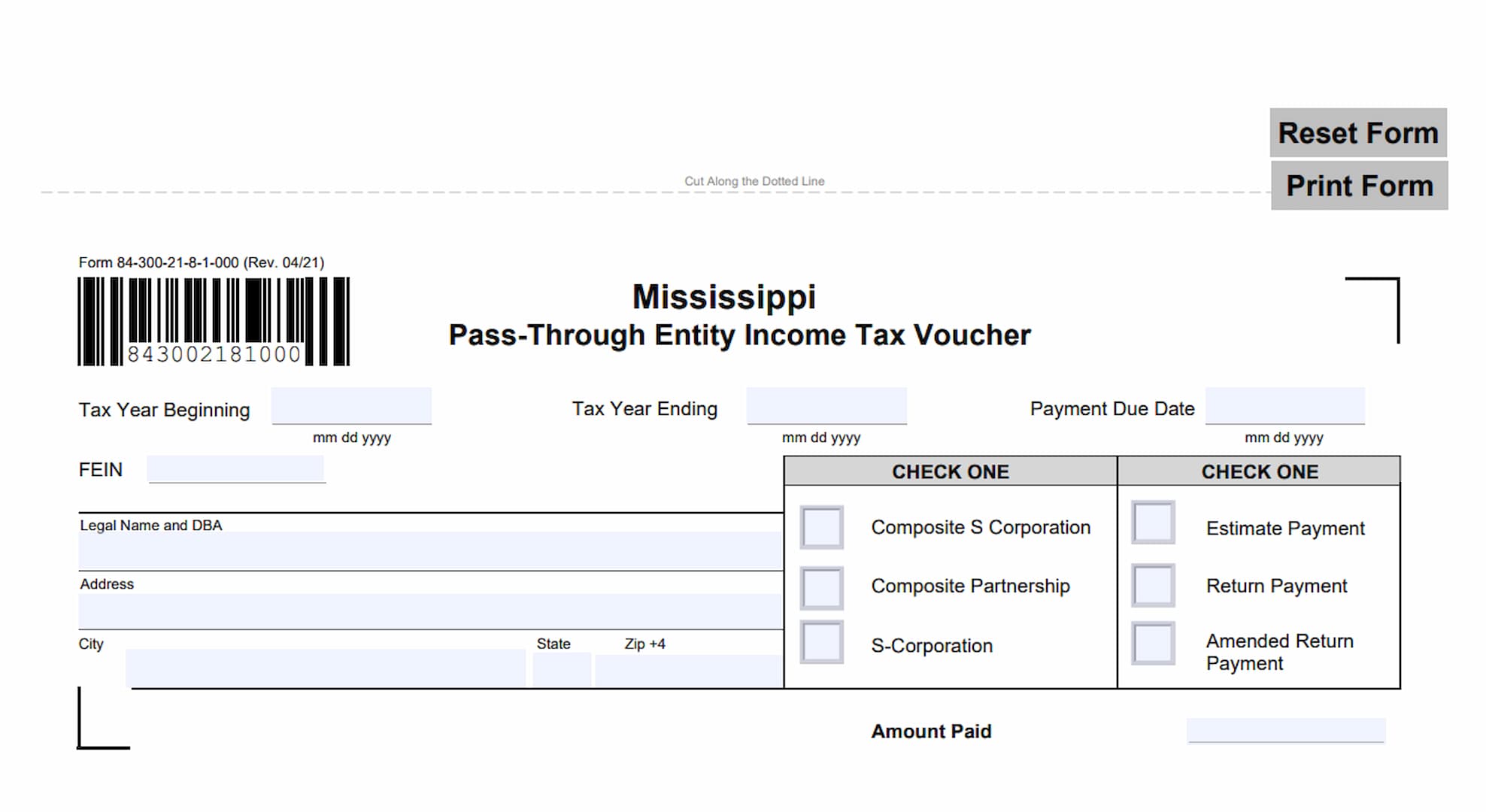
Form 84-300, Mississippi Pass-Through Entity Income Tax Voucher, is a payment form issued by the Mississippi Department of Revenue. It is used by qualifying pass-through entities to submit certain Mississippi income tax payments, including estimated tax payments and payments accompanying composite income tax returns.
The voucher is designed for composite S corporations and composite partnerships that need to remit income tax payments to the state. It also includes a separate classification for S corporations and allows taxpayers to identify whether a payment is an estimated tax payment, a regular return payment, or a payment associated with an amended return.
Form 84-300 collects important information about the business and its tax payment. This includes the tax year beginning and ending dates, payment due date, Federal Employer Identification Number (FEIN), legal business name, doing-business-as (DBA) name, mailing address, entity classification, payment type, and amount being submitted.
The form also provides instructions for taxpayers who need to make estimated payments. Every taxpayer filing a composite return with an annual income tax liability exceeding $200 must make estimated tax payments. The voucher provides payment options for these taxpayers, including electronic payments through the Mississippi Department of Revenue’s Taxpayer Access Point (TAP) and payments by check or money order.
Using the correct voucher is important because different business types and payment arrangements may require different forms. For example, corporations making applicable income tax payments should use Form 83-300, while partnerships electing to withhold and remit 5% of their net gain or profit to each partner’s tax account should use Form 84-387. Selecting the correct form and providing accurate payment information helps ensure that payments are properly directed and processed.
How To File Form 84-300
Form 84-300 is used to submit estimated tax payments and certain return payments for qualifying pass-through entities in Mississippi. The appropriate payment procedure depends on the type of payment being made and the entity submitting it.
Estimated Tax Payments
Every taxpayer filing a composite return with an annual income tax liability exceeding $200 must make estimated tax payments.
For additional information about estimated income tax payments for corporations, taxpayers should consult the instructions for Mississippi Form 83-100.
Return Payments
Use Form 84-300 to submit return payments for composite S corporations and composite partnerships.
However, certain businesses must use different payment vouchers:
- Corporations: Use Form 83-300, Corporate Income Tax Voucher.
- Partnerships electing to withhold and remit 5% of partnership net gain or profit to each partner’s tax account: Use Form 84-387, Partnership Income Tax Withholding Voucher.
Make sure the payment arrangement and entity classification match the form being submitted.
Payment Options
The Mississippi Department of Revenue provides two payment methods for Form 84-300.
Electronic Payment
Taxpayers can submit payments online through the Mississippi Department of Revenue website.
Visit www.dor.ms.gov, select Taxpayer Access Point (TAP), and follow the provided payment instructions.
Payment by Check or Money Order
Taxpayers who prefer to pay by mail must complete the payment coupon at the bottom of Form 84-300.
Follow these instructions when submitting a mailed payment:
- Make the check or money order payable to the Department of Revenue.
- Complete the payment voucher and select the appropriate payment classification.
- Mark the amended return payment checkbox when submitting a payment with an amended return.
- Write the business’s identification number on the check or money order.
- Mail the completed payment coupon and payment to the following address:
Mississippi Department of Revenue
P.O. Box 23192
Jackson, MS 39225-3192
The payment coupon must accompany the check or money order so the department can identify the payment and associate it with the appropriate business.
Information to Prepare Before Completing Form 84-300
Before filling out the voucher, gather the following information:
- The beginning and ending dates of the applicable tax year.
- The payment due date.
- The business’s Federal Employer Identification Number (FEIN).
- The legal business name and DBA, if applicable.
- The complete business mailing address.
- The appropriate entity classification.
- The type of payment being submitted.
- The amount being paid.
- The business identification number for inclusion on the check or money order, if paying by mail.
Having this information available will make it easier to complete the voucher accurately and avoid unnecessary payment processing delays.
How To Complete Form 84-300
Form 84-300 contains two main parts. The upper portion provides payment instructions, while the lower portion contains the detachable payment coupon that taxpayers complete and submit.
The following explanations cover each field, checkbox, and payment instruction on the form.
Tax Year and Payment Information
The payment coupon begins with three date fields identifying the applicable tax period and payment deadline.
Tax Year Beginning
Enter the starting date of the tax year covered by the payment.
Use the month, day, and four-digit year format indicated beneath the field (MM/DD/YYYY). Make sure the date corresponds to the applicable tax period.
Tax Year Ending
Enter the ending date of the tax year associated with the payment.
Use the same month, day, and four-digit year format. The beginning and ending dates should accurately identify the tax year for which the payment is being made.
Payment Due Date
Enter the date the payment is due.
Use the MM/DD/YYYY format shown on the voucher. Make sure the date corresponds to the applicable payment obligation.
Business Identification
The next group of fields identifies the entity making the payment. Complete these fields using the business’s official tax and mailing information.
FEIN: Federal Employer Identification Number
Enter the business’s nine-digit Federal Employer Identification Number.
Use the FEIN associated with the entity filing the payment voucher. This number helps the Mississippi Department of Revenue identify the business and associate the payment with its tax account.
Legal Name and DBA
Enter the legal name of the business.
If the business operates under a different name, include its Doing Business As (DBA) name in this field as applicable. Use the appropriate business identification information associated with the tax payment.
Address
Enter the business’s complete mailing address.
Include the street number, street name, and any applicable suite or unit information. Make sure the address is accurate and sufficiently complete for correspondence.
City
Enter the city associated with the business’s mailing address.
State
Enter the two-letter postal abbreviation for the state in which the mailing address is located.
ZIP +4
Enter the ZIP code for the business’s mailing address, including the additional four-digit ZIP code extension when available.
The ZIP+4 field provides a more specific mailing address for the business.
Entity Classification
The voucher contains a section labeled CHECK ONE with three available entity classifications. Select the checkbox that corresponds to the type of entity associated with the payment.
Only select the applicable classification.
Composite S Corporation
Check this box when submitting a payment associated with a composite S corporation.
This classification identifies the payment as relating to an S corporation filing a composite return.
Composite Partnership
Check this box when submitting a payment associated with a composite partnership.
Select this option when the payment relates to the applicable composite partnership tax filing.
S-Corporation
Check this box when the payment is being submitted under the S-Corporation classification rather than one of the composite classifications.
Make sure the selected classification corresponds to the entity and payment being reported.
Payment Type
The second CHECK ONE section identifies the reason for the payment. Three options are available. Select the appropriate checkbox based on the payment you are submitting.
Estimate Payment
Select this option when making an estimated income tax payment.
This applies to taxpayers filing composite returns who are required to make estimated tax payments because their annual income tax liability exceeds $200.
Return Payment
Select this option when submitting a payment associated with the applicable income tax return.
Form 84-300 is specifically identified for return payments made by composite S corporations and composite partnerships.
Amended Return Payment
Select this option when submitting a payment associated with an amended return.
Make sure this box is checked when paying an amount due with an amended return, as required by the voucher instructions.
Payment Amount
Amount Paid
Enter the total amount of money being submitted with the payment voucher.
The amount should match the check or money order enclosed with the coupon or the payment being reported through the applicable payment process.
Check the amount carefully before submitting the voucher to avoid discrepancies between the payment information and the actual amount remitted.
Additional Payment Instructions
The upper portion of Form 84-300 contains several instructions that apply to taxpayers making payments by mail or electronically.
Online Payment Through Taxpayer Access Point (TAP)
To make a payment electronically, visit www.dor.ms.gov and select Taxpayer Access Point (TAP).
Follow the instructions provided by the Mississippi Department of Revenue to complete the payment.
Check or Money Order Payable To
When paying by check or money order, make the payment payable to the Department of Revenue.
Use the department’s designated name rather than making the payment payable to an individual or another organization.
Mailing Address for Payments
Send the completed payment coupon together with the check or money order to:
Mississippi Department of Revenue
P.O. Box 23192
Jackson, MS 39225-3192
Do not send the payment without the completed coupon, as the voucher provides the identifying information needed to associate the payment with the correct entity.
Identification Number on the Check or Money Order
Write the business’s identification number on the check or money order.
This instruction applies to mailed payments and helps the department identify which business is making the payment.
Additional Form Controls
The electronic version of Form 84-300 includes controls that allow users to reset and print the payment voucher.
Reset Form
The Reset Form option allows users to clear the information entered into the fillable form fields.
Use this option carefully because it may remove information that has already been entered.
Cut Along the Dotted Line
The form includes a dotted horizontal line separating the payment instructions from the detachable payment coupon.
When preparing a paper submission, separate the payment coupon along this line and send the completed coupon with the check or money order.
Print Form
Use the Print Form option to print the completed payment voucher.
Review the information before printing to ensure that the business details, payment classification, and amount are correct.
Final Review Before Filing
Before submitting Form 84-300 to the Mississippi Department of Revenue, review the following checklist to make sure the payment voucher is complete and ready for processing.
- Correct form: Confirm that you are using Form 84-300 for the applicable pass-through entity payment.
- Correct payment method: Decide whether you are paying electronically through Taxpayer Access Point (TAP) or by check or money order.
- Tax year beginning: Verify that the starting date of the applicable tax year is correct.
- Tax year ending: Confirm that the ending date matches the reporting period.
- Payment due date: Check that the payment due date is accurate.
- FEIN: Verify that the business’s Federal Employer Identification Number is entered correctly.
- Business name: Make sure the legal name and DBA, when applicable, are accurate.
- Mailing address: Check the street address, city, state, and ZIP+4 information.
- Entity classification: Select the appropriate option: Composite S Corporation, Composite Partnership, or S-Corporation.
- Payment type: Select the correct option: Estimate Payment, Return Payment, or Amended Return Payment.
- Estimated tax requirement: Confirm whether estimated payments are required. Taxpayers filing composite returns with annual income tax liabilities exceeding $200 must make estimated tax payments.
- Payment amount: Make sure the amount entered matches the payment being submitted.
- Payee information: Confirm that any check or money order is payable to the Department of Revenue.
- Identification number: Write the business identification number on the check or money order.
- Additional payment form: Verify that you are not required to use Form 83-300 or Form 84-387 instead.
- Amended return: When applicable, make sure the Amended Return Payment checkbox is selected.
- Mailing address: Confirm that mailed payments are addressed to Mississippi Department of Revenue, P.O. Box 23192, Jackson, MS 39225-3192.
- Payment coupon: Make sure the completed coupon is separated along the dotted line and included with the mailed payment.