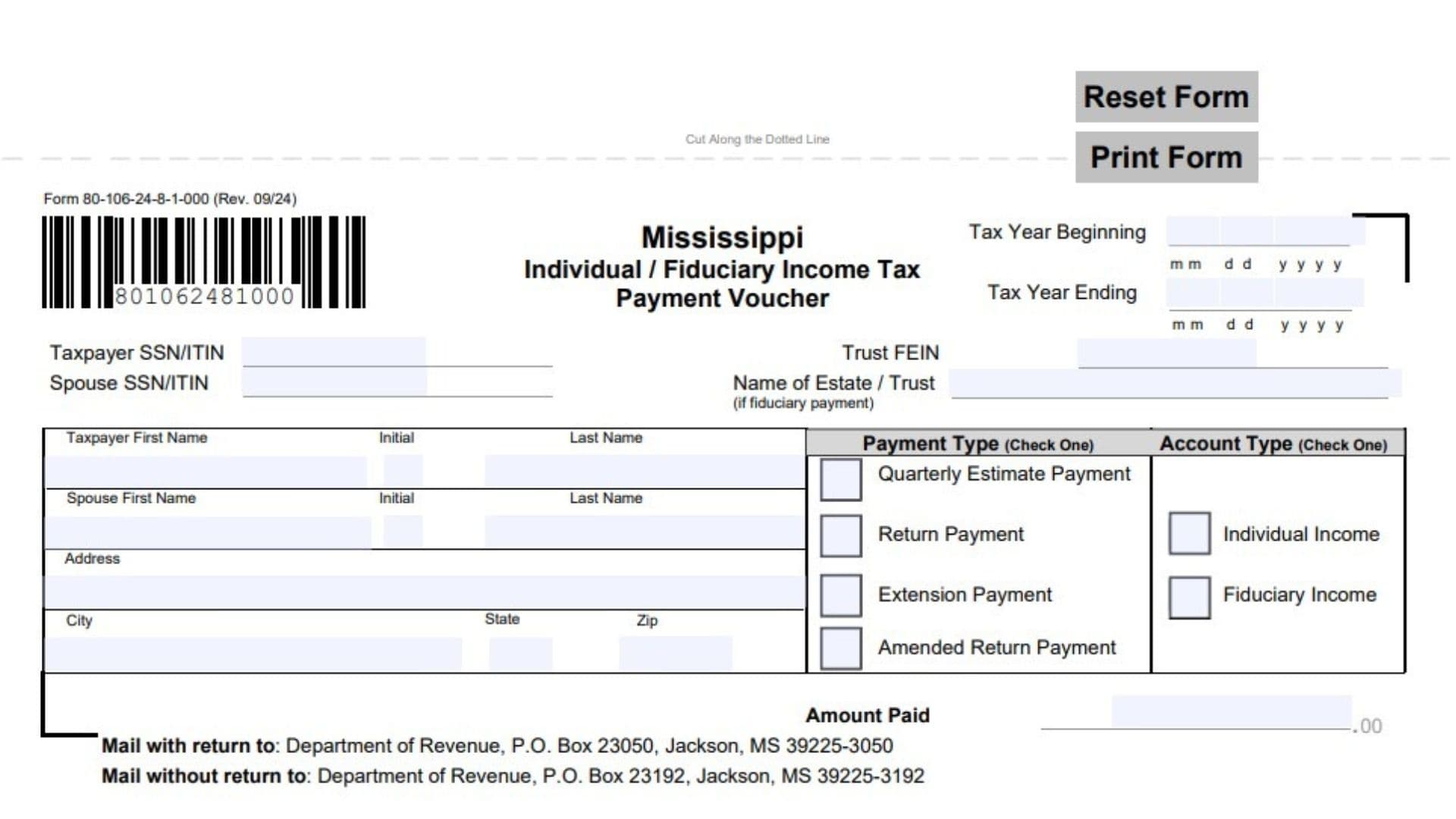
Mississippi Form 80-106, officially titled Individual / Fiduciary Income Tax Payment Voucher, is a payment document issued by the Mississippi Department of Revenue. It is used by individuals, estates, and trusts to submit payments for Mississippi income tax obligations. The voucher supports several types of payments, including quarterly estimated tax payments, payments accompanying an income tax return, extension payments, and payments submitted with amended returns. Individual taxpayers may need to make estimated tax payments when less than 80% of their annual tax liability is prepaid through withholding and their expected annual tax liability exceeds $200. The voucher also accommodates fiduciary income tax payments made on behalf of an estate or trust. It collects essential taxpayer identification information, including the taxpayer’s Social Security number or Individual Taxpayer Identification Number, the spouse’s identification number when applicable, and the trust’s Federal Employer Identification Number for fiduciary payments. It also requests the taxpayer’s name, spouse’s name, mailing address, applicable tax year beginning and ending dates, payment category, account classification, and amount being submitted. The completed payment coupon helps the Mississippi Department of Revenue identify the taxpayer, determine the purpose of the payment, and apply the money to the appropriate tax account. Taxpayers can submit payments electronically through the department’s Taxpayer Access Point (TAP) or by mailing the completed voucher with a check or money order. Using the correct payment category and account type is important because it helps ensure that the payment is properly associated with the intended income tax obligation. Form 80-106 can be used with Mississippi Individual Income Tax Return Form 80-105, Non-Resident Income Tax Return Form 80-205, and Fiduciary Income Tax Return Form 81-110. It also provides separate mailing instructions depending on whether the payment is submitted with a tax return or sent independently.
Who Needs to Use Form 80-106?
Form 80-106 is intended for individuals and fiduciaries who need to submit payments toward applicable Mississippi income tax obligations.
The voucher supports the following payment situations:
- Quarterly Estimated Tax Payments: Individuals who must make estimated income tax payments during the tax year.
- Return Payments: Taxpayers submitting an outstanding balance with their income tax return.
- Extension Payments: Individuals or fiduciaries making payments when requesting additional time to file their tax return.
- Amended Return Payments: Taxpayers submitting additional payments with an amended income tax return.
Who Must Make Estimated Tax Payments?
Mississippi requires an individual taxpayer to make estimated tax payments when both of the following conditions apply:
- Less than 80% of the taxpayer’s annual income tax liability is prepaid through withholding.
- The taxpayer’s annual income tax liability exceeds $200.
Both conditions must be satisfied for the estimated payment requirement described in the voucher instructions.
For additional information about calculating estimated income tax payments, consult the Individual Income Tax Return Instructions, Form 80-100.
How To File Form 80-106
Form 80-106 can be submitted electronically or by mailing the completed payment coupon with a check or money order.
Online Payment Method
Taxpayers who want to pay electronically can use the Mississippi Department of Revenue’s online payment system.
Follow these steps:
- Visit the Mississippi Department of Revenue website.
- Open the Taxpayer Access Point (TAP).
- Follow the online payment instructions.
- Enter the required taxpayer and payment information.
- Complete the payment according to the system’s instructions.
Payment by Check or Money Order
If paying by check or money order, complete the payment coupon located below the instruction section.
Follow these requirements:
- Make the check or money order payable to the Department of Revenue.
- Write the applicable taxpayer identification number on the check or money order.
- Select the correct payment type on the voucher.
- Mark the amended return option when making a payment with an amended return.
- Include the payment coupon with the check or money order.
- Use the correct mailing address depending on whether the payment accompanies a return.
Where To Mail Form 80-106
The voucher provides two mailing addresses.
Payments Submitted With a Tax Return
Mail the completed payment coupon and check or money order with the tax return to:
Department of Revenue
P.O. Box 23050
Jackson, MS 39225-3050
Payments Submitted Without a Tax Return
Mail the completed payment coupon and check or money order without the tax return to:
Department of Revenue
P.O. Box 23192
Jackson, MS 39225-3192
Make sure you use the correct address for your payment situation.
Important Filing Requirement
The Mississippi Department of Revenue does not accept duplex forms or photocopies of this voucher.
Use an acceptable original, single-sided form when submitting the payment coupon.

How To Complete Form 80-106
The payment voucher consists of two main sections: instructions and the detachable payment coupon.
The instruction section explains payment eligibility, available payment methods, and mailing requirements. The lower section contains the fields that taxpayers must complete when submitting a payment by mail.
Complete the applicable identification information and select the correct payment and account categories before entering the payment amount.
Tax Year Information
Tax Year Beginning
Enter the starting date of the tax year for which the payment is being made.
Use the MMDDYYYY format.
For example, if the applicable tax year begins on January 1, 2025, enter 01012025.
Tax Year Ending
Enter the ending date of the corresponding tax year.
Use the MMDDYYYY format.
For example, if the applicable tax year ends on December 31, 2025, enter 12312025.
Make sure both dates identify the correct tax period associated with the payment.
Taxpayer Identification Information
Taxpayer SSN/ITIN
Enter the taxpayer’s Social Security Number (SSN) or Individual Taxpayer Identification Number (ITIN).
Use the identification number associated with the individual responsible for the income tax payment.
Spouse SSN/ITIN
If the payment relates to a joint individual income tax account, enter the spouse’s Social Security Number or Individual Taxpayer Identification Number.
Make sure the number belongs to the spouse identified in the name section.
Trust FEIN
For fiduciary income tax payments, enter the Federal Employer Identification Number (FEIN) assigned to the estate or trust.
Use the applicable trust or estate identification number rather than an individual taxpayer’s SSN.
Name of Estate / Trust
If making a fiduciary payment, enter the legal name of the estate or trust associated with the payment.
Complete this field when the payment is being submitted on behalf of an estate or trust.
Taxpayer And Spouse Name Information
Taxpayer First Name
Enter the taxpayer’s legal first name.
Use the name associated with the SSN or ITIN entered above.
Initial
Enter the taxpayer’s middle initial, if applicable.
Last Name
Enter the taxpayer’s complete legal last name.
Verify that the name matches the taxpayer’s identification and tax records.
Spouse First Name
If applicable, enter the spouse’s legal first name.
Spouse Initial
Enter the spouse’s middle initial, if applicable.
Spouse Last Name
Enter the spouse’s complete legal last name.
Make sure the spouse’s information corresponds to the spouse identification number entered in the previous section.
Mailing Address Information
Address
Enter the complete mailing street address where the taxpayer receives correspondence.
Include the house or building number and street name.
City
Enter the name of the city associated with the mailing address.
State
Enter the two-letter abbreviation for the state.
ZIP
Enter the ZIP Code associated with the mailing address.
Check the address carefully to ensure that it is complete and accurate.
Payment Type: Check One
This section identifies the purpose of the payment being submitted.
Select only one payment category that matches your situation.
Quarterly Estimate Payment
Mark this option when submitting an estimated income tax payment for a particular quarter.
This category applies to individuals who are required to make estimated tax payments because their withholding does not cover the required portion of their annual tax liability and their annual tax liability exceeds $200.
Return Payment
Mark this option when submitting a payment for tax due on an applicable Mississippi income tax return.
The voucher can be used for payments associated with:
- Form 80-105, Individual Income Tax Return.
- Form 80-205, Non-Resident Income Tax Return.
- Form 81-110, Fiduciary Income Tax Return.
Extension Payment
Mark this option when submitting a payment with an extension for an applicable Mississippi income tax return.
The voucher supports extension payments for Form 80-105, Form 80-205, and Form 81-110.
Extension payments should be filed and paid on or before April 15.
Amended Return Payment
Mark this option when submitting a payment associated with an amended income tax return.
Select this category when the payment accompanies a corrected return and represents an additional amount being paid.
Make sure the payment category accurately reflects the reason for submitting the money.
Account Type: Check One
This section identifies whether the payment belongs to an individual income tax account or a fiduciary income tax account.
Select only one option.
Individual Income
Mark this checkbox when the payment is being made for an individual’s Mississippi income tax obligation.
This generally applies to taxpayers using Form 80-105 or Form 80-205.
Fiduciary Income
Mark this checkbox when the payment is being submitted for an estate or trust’s Mississippi fiduciary income tax obligation.
Use the estate or trust identification information in the applicable fields above.
Choose the account type that corresponds to the taxpayer or entity responsible for the payment.
Amount Paid
Amount Paid
Enter the total dollar amount being submitted with the payment voucher.
Write the amount in the designated space, including the cents when applicable.
For example, if the payment is $1,250.75, enter 1250.75.
Make sure the amount entered on the voucher matches the check or money order enclosed with it.
If paying electronically, enter the payment amount through the online payment system.
Important Payment And Filing Instructions
Estimated Income Tax Payments
Individual taxpayers who do not have at least 80% of their annual tax liability prepaid through withholding must make estimated payments when their annual tax liability exceeds $200.
For additional information about calculating estimated payments, refer to Form 80-100.
Return Payments
The voucher may be used to submit payments due with the following Mississippi returns:
- Form 80-105, Individual Income Tax Return.
- Form 80-205, Non-Resident Income Tax Return.
- Form 81-110, Fiduciary Income Tax Return.
Extension Payments
Extension payments can be submitted using Form 80-106 for the same three income tax returns.
The voucher instructions state that extension payments should be filed and paid on or before April 15.
Remember that making an extension payment does not change the purpose of the voucher. Select Extension Payment when that is the reason for submitting the payment.
Check Or Money Order Requirements
When paying by mail:
- Make the payment payable to the Department of Revenue.
- Write the taxpayer’s applicable identification number on the payment.
- Include the completed payment coupon.
- Select the appropriate payment category.
- Use the correct mailing address.
- Do not submit a duplex form or photocopy.
Final Review Before Filing
Before submitting Mississippi Form 80-106, review the following checklist to ensure that the payment information is complete and accurate.
Tax Year And Identification
- Enter the correct tax year beginning date.
- Enter the correct tax year ending date.
- Provide the taxpayer’s SSN or ITIN.
- Enter the spouse’s SSN or ITIN when applicable.
- Provide the trust FEIN for fiduciary payments.
- Enter the estate or trust name when applicable.
- Verify the taxpayer’s first name, initial, and last name.
- Enter the spouse’s name when applicable.
Mailing Address
- Enter the complete mailing address.
- Provide the correct city.
- Enter the state abbreviation.
- Verify the ZIP Code.
Payment Classification
- Select only one payment type.
- Mark Quarterly Estimate Payment when submitting an estimated payment.
- Mark Return Payment when paying tax due with a return.
- Mark Extension Payment when submitting an extension payment.
- Mark Amended Return Payment when paying with an amended return.
- Select Individual Income or Fiduciary Income as applicable.
Payment Amount And Submission
- Enter the correct amount paid.
- Verify that the voucher amount matches the check or money order.
- Make the payment payable to the Department of Revenue.
- Write the applicable identification number on the payment.
- Use the correct mailing address depending on whether the payment accompanies a return.
- Confirm that the payment coupon is included.
- Use an acceptable original, single-sided voucher rather than a photocopy or duplex form.
- If paying online, follow the Taxpayer Access Point instructions.
Correctly completing Mississippi Form 80-106 helps ensure that individual and fiduciary income tax payments are properly identified and applied to the appropriate tax accounts. Verify the tax year, identification information, payment category, account type, and amount before submitting the voucher to the Mississippi Department of Revenue.