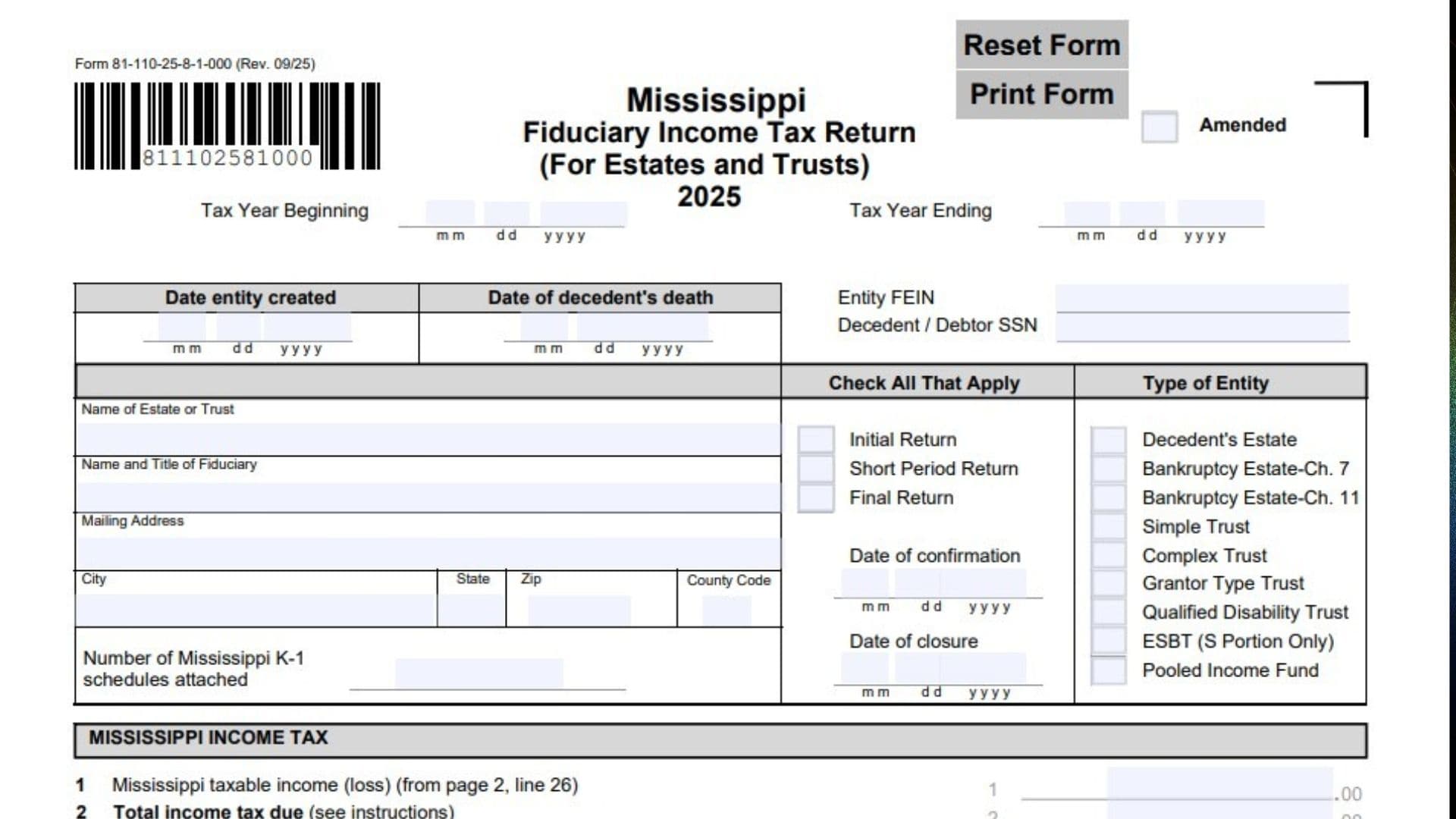
Mississippi Form 81-110, Fiduciary Income Tax Return, is a state tax form used by estates and trusts to report income, calculate Mississippi taxable income, determine the amount of state income tax owed, and report payments, refunds, or outstanding balances. The form is administered by the Mississippi Department of Revenue and applies to fiduciaries responsible for filing income tax returns on behalf of estates and trusts. A fiduciary may be responsible for managing the tax affairs of a decedent’s estate, a simple trust, a complex trust, a grantor-type trust, a qualified disability trust, an electing small business trust (ESBT), or another eligible entity listed on the return. The form collects information about the estate or trust, its creation date, the decedent’s information when applicable, the fiduciary’s identity, federal adjusted total income, Mississippi income adjustments, deductions, beneficiary distributions, exemptions, and tax payments. It also provides a calculation for determining Mississippi taxable income and the final amount due or refundable. The return consists of two pages. Page 1 contains the entity identification section, Mississippi income tax calculation, payment information, refund or balance due calculation, and signature details. Page 2 contains the Fiduciary Net Taxable Income Schedule, which calculates Mississippi taxable income through additions, deductions, beneficiary allocations, and exemptions. Completing Form 81-110 accurately is important because the information determines the estate’s or trust’s Mississippi income tax liability. Errors in income calculations, deductions, credits, payments, or entity classification can result in an incorrect tax balance, delayed refund, or filing problems.
How To File Form 81-110
Form 81-110 must be completed for the applicable Mississippi tax year and submitted to the Mississippi Department of Revenue. The 2025 return is designed for estates and trusts reporting their Mississippi fiduciary income tax information.
The form provides different mailing addresses depending on whether the return includes a refund.
Mailing address for refund returns:
Mississippi Department of Revenue
P.O. Box 23058
Jackson, MS 39225-3058
Mailing address for all other returns:
Mississippi Department of Revenue
P.O. Box 23050
Jackson, MS 39225-3050
The return should be completed using the appropriate federal fiduciary income tax information and supporting Mississippi schedules. The form includes references to federal Form 1041, Form 80-107, Form 80-160, Form 80-161, Form 80-401, and Schedule K, Form 81-131, where applicable.
Before completing the return, prepare the following information:
- The estate’s or trust’s legal name and mailing address.
- The entity’s Federal Employer Identification Number (FEIN).
- The decedent’s or debtor’s Social Security number, if applicable.
- The date the entity was created.
- The date of the decedent’s death, if applicable.
- The fiduciary’s name, title, contact information, and identification details.
- The applicable federal Form 1041.
- Federal adjusted total income from Form 1041, Line 17.
- Information about state, local, and foreign government taxes.
- Details of applicable income additions and deductions.
- Information about income allocated to beneficiaries.
- Mississippi income tax withholding and estimated tax payments.
- Supporting information for tax credits and payments.
- Mississippi K-1 schedules and other applicable supporting forms.
- Previous return information if filing an amended return.
The form also requires the appropriate entity classification, filing-period information, and fiduciary or preparer signatures.
Important: The form states that duplex copies and photocopies are not acceptable. Use an acceptable original form when submitting a paper return. Consult the applicable Mississippi tax instructions for eligibility rules, detailed calculations, and requirements not explained directly on the return.

How To Complete Form 81-110
The Mississippi Fiduciary Income Tax Return contains identification fields, filing-status checkboxes, 16 numbered lines on the first page, and a Fiduciary Net Taxable Income Schedule containing Lines 17 through 26 on the second page.
Follow the instructions below in the same order as the form.
Entity and Taxpayer Identification Information
The first section identifies the estate or trust, the fiduciary responsible for the return, and the applicable tax period.
Amended Return
Mark the Amended checkbox if you are submitting a corrected version of a previously filed return.
If you are filing an amended return, provide the information requested for the original return and follow the applicable Mississippi amended-return instructions.
Tax Year Beginning
Enter the beginning date of the tax year covered by the return.
Use the required month, day, and year format. Make sure the date matches the accounting period used by the estate or trust.
Tax Year Ending
Enter the ending date of the tax year covered by the return.
The beginning and ending dates should accurately reflect the reporting period.
Date Entity Created
Enter the date the estate or trust was legally created or established.
Use the month, day, and year format shown on the form.
Date of Decedent’s Death
If the return relates to a decedent’s estate, enter the date of the decedent’s death.
Provide the date in the required format. If the field does not apply to the entity, follow the applicable filing instructions.
Entity FEIN
Enter the Federal Employer Identification Number assigned to the estate or trust.
Make sure the number matches the entity’s federal tax identification records.
Decedent / Debtor SSN
Enter the Social Security number of the decedent or debtor, as applicable.
This field identifies the individual associated with the estate or bankruptcy-related entity.
Name of Estate or Trust
Enter the complete legal name of the estate or trust.
Use the entity name consistently with its federal fiduciary income tax return and other relevant tax records.
Name and Title of Fiduciary
Enter the full name and official title of the person responsible for managing the estate or trust’s tax affairs.
This may be the executor, administrator, trustee, or another authorized fiduciary, depending on the entity.
Mailing Address
Enter the complete mailing address where tax correspondence for the estate or trust should be sent.
Include the street address and any applicable apartment, suite, or other address details.
City
Enter the city associated with the mailing address.
State
Enter the state abbreviation for the mailing address.
ZIP Code
Enter the ZIP code associated with the mailing address.
County Code
Enter the applicable county code for the estate or trust as required by the Mississippi filing instructions.
Number of Mississippi K-1 Schedules Attached
Enter the total number of Mississippi K-1 schedules included with the return.
Count the applicable schedules attached and report the total in the space provided.
Filing Status and Entity Classification
This section contains checkboxes identifying the type of return and the legal classification of the estate or trust.
Initial Return
Check this box if the return is the first return being filed for the estate or trust.
Short Period Return
Check this box if the return covers a short tax period rather than the entity’s normal full tax year.
Enter the applicable tax-year beginning and ending dates in the identification section.
Final Return
Check this box if the return is the final fiduciary income tax return for the estate or trust.
Use the applicable instructions to determine whether the entity’s filing obligations have ended.
Date of Confirmation
Enter the date of confirmation when applicable to the entity’s filing situation.
Use the month, day, and year format provided.
Date of Closure
Enter the date the estate or trust was closed, when applicable.
This field is relevant when the entity has completed its administration or otherwise reached the applicable closure point.
Type of Entity: Decedent’s Estate
Check this box if the return is being filed for a decedent’s estate.
Type of Entity: Bankruptcy Estate – Chapter 7
Check this box if the return relates to a bankruptcy estate under Chapter 7.
Type of Entity: Bankruptcy Estate – Chapter 11
Check this box if the return relates to a bankruptcy estate under Chapter 11.
Type of Entity: Simple Trust
Check this box if the entity is classified as a simple trust for the applicable tax year.
Type of Entity: Complex Trust
Check this box if the entity is classified as a complex trust.
Type of Entity: Grantor Type Trust
Check this box if the entity is classified as a grantor-type trust.
Type of Entity: Qualified Disability Trust
Check this box if the entity qualifies as a qualified disability trust.
Type of Entity: ESBT (S Portion Only)
Check this box if the return relates to the S portion of an Electing Small Business Trust (ESBT).
Type of Entity: Pooled Income Fund
Check this box if the entity is classified as a pooled income fund.
Select the appropriate entity classification based on the entity’s actual legal and federal tax status. Do not select a classification simply because it appears similar to another entity type.
Mississippi Income Tax Calculation
This section appears on Page 1 and contains Lines 1 through 5. It calculates the estate’s or trust’s Mississippi income tax after applicable credits.
Line 1: Mississippi Taxable Income (Loss)
Enter the Mississippi taxable income or loss calculated on Page 2, Line 26.
Transfer the amount directly from the Fiduciary Net Taxable Income Schedule.
If the calculation results in a loss, report it according to the applicable Mississippi tax instructions.
Line 2: Total Income Tax Due
Enter the total Mississippi income tax calculated on the taxable income reported on Line 1.
Use the applicable Mississippi tax rates and calculation instructions to determine the amount.
Line 3: Credit From Tax Paid to Another State
Enter the credit for income taxes paid to another state.
Use the amount from Form 80-160, Line 12.
Attach the other state’s income tax return as required by the form. Make sure the credit amount agrees with the supporting documentation.
Line 4: Other Credits
Enter any additional Mississippi income tax credits that apply to the estate or trust.
Attach Form 80-401 to support the credits reported on this line.
Use the applicable instructions to determine which credits qualify.
Line 5: Net Income Tax Due
Subtract the credits on Lines 3 and 4 from the total income tax on Line 2.
The calculation is:
Line 2 − Line 3 − Line 4 = Line 5
Enter the resulting net income tax due.
This amount represents the Mississippi income tax liability after accounting for the credits reported on the return.
Payments
The Payments section contains Lines 6 through 10. It records Mississippi tax withholding, estimated payments, applicable pass-through entity tax credits, and amounts associated with an amended return.
Line 6: Mississippi Income Tax Withheld
Enter the total Mississippi income tax withheld for the estate or trust.
Complete Form 80-107 as required by the return instructions.
Use the withholding information shown on the applicable tax statements and supporting records.
Line 7: Estimated Tax Payments, Extension Payments, and Original Return Payments
Enter the total applicable tax payments made toward the estate’s or trust’s Mississippi income tax liability.
Include:
- Estimated tax payments.
- Extension payments.
- Amounts paid with the original return.
Make sure the total agrees with the payment records for the applicable tax year.
Line 8: Credit for Tax Paid on an Electing Pass-Through Entity Tax Return
Enter the credit for tax paid through an electing Pass-Through Entity Tax Return.
Use the amount from Form 80-161, Line 3D.
Transfer the amount accurately from the referenced form.
Line 9: Refund Received or Amount Carried Forward From Original Return
Complete this line only when filing an amended return.
Enter the refund already received from the original return and/or the amount previously carried forward from that return.
This amount is subtracted when calculating total payments on Line 10.
If you are not filing an amended return, follow the form instructions and leave this line blank.
Line 10: Total Payments
Calculate the total payments by adding Lines 6, 7, and 8, then subtracting Line 9.
The calculation is:
Line 6 + Line 7 + Line 8 − Line 9 = Line 10
Enter the result on Line 10.
This amount represents the total payments and credits available to cover the net income tax due.
Refund or Balance Due
This section contains Lines 11 through 16. It determines whether the estate or trust has overpaid its Mississippi income tax or owes an additional amount.
Line 11: Overpayment
Complete this line if Line 10 is greater than Line 5.
Subtract Line 5 from Line 10.
The calculation is:
Line 10 − Line 5 = Line 11
Enter the difference as the overpayment.
If total payments do not exceed the net income tax due, there is no overpayment to report.
Line 12: Overpayment Applied to Next Year’s Estimated Tax Account
Enter the portion of the overpayment from Line 11 that you want applied to the next year’s estimated tax account.
This amount reduces the overpayment available for a refund.
If you do not want to apply any amount to the next year’s estimated tax account, enter zero or follow the applicable form instructions.
Line 13: Overpayment Refund
Subtract Line 12 from Line 11.
The calculation is:
Line 11 − Line 12 = Line 13
Enter the remaining overpayment on Line 13.
This is the amount requested as a refund from the Mississippi Department of Revenue.
Line 14: Balance Due
Complete this line if Line 5 is greater than Line 10.
Subtract Line 10 from Line 5.
The calculation is:
Line 5 − Line 10 = Line 14
Enter the difference as the remaining tax balance due.
If total payments are equal to or greater than the net income tax due, there is no additional balance to report.
Line 15: Interest and Penalty
Enter the applicable interest and penalty amount, if any.
Use the Mississippi tax instructions to determine whether interest or penalties apply and how much must be reported.
Do not estimate this amount without checking the applicable requirements.
Line 16: Total Due
Add the balance due on Line 14 to the interest and penalty amount on Line 15.
The calculation is:
Line 14 + Line 15 = Line 16
Enter the result on Line 16.
This is the total amount owed to the Mississippi Department of Revenue.
Preparer Authorization and Declaration
The bottom portion of Page 1 contains the authorization question, legal declaration, and signature information.
This Return May Be Discussed With the Preparer
Select Yes or No to indicate whether the Mississippi Department of Revenue may discuss the return with the paid preparer.
- Select Yes if you authorize the department to discuss the return with the preparer.
- Select No if you do not provide this authorization.
Choose the option that reflects the fiduciary’s authorization.
Declaration of Fiduciary
The fiduciary must review the return and accompanying schedules before signing.
The signature confirms that the information is declared to be true, correct, and complete to the best of the signer’s knowledge and belief.
Signature of Fiduciary or Officer Representing Fiduciary
Enter the signature of the fiduciary or the officer authorized to represent the fiduciary.
The person signing should have the authority to submit the estate’s or trust’s tax return.
Date
Enter the date the fiduciary or authorized officer signs the return.
Phone Number
Enter a telephone number where the fiduciary or authorized representative can be contacted.
FEIN of Fiduciary
Enter the Federal Employer Identification Number of the fiduciary, where applicable.
This is a separate identification field from the entity FEIN provided in the upper section.
Paid Preparer Signature
If a paid tax preparer completed the return, the preparer should sign this section.
Paid Preparer Date
Enter the date the paid preparer signed the return.
Paid Preparer Phone Number
Enter the telephone number of the paid preparer or their office.
Paid Preparer PTIN
Enter the preparer’s Preparer Tax Identification Number (PTIN).
Use the identification number assigned to the paid preparer.
Paid Preparer Address
Enter the business mailing address of the paid preparer.
City
Enter the city where the preparer’s business address is located.
State
Enter the state abbreviation for the preparer’s address.
ZIP Code
Enter the ZIP code associated with the preparer’s business address.
Mailing Instructions
The bottom of Page 1 provides two separate mailing addresses.
Mail Refund Returns To
Mississippi Department of Revenue
P.O. Box 23058
Jackson, MS 39225-3058
Use this address when mailing a return requesting a refund.
Mail All Other Returns To
Mississippi Department of Revenue
P.O. Box 23050
Jackson, MS 39225-3050
Use this address for all other returns.
Original Form Requirement
The form specifically states that duplex copies and photocopies are not acceptable. Follow this requirement when preparing a paper filing.
Mississippi Fiduciary Net Taxable Income Schedule (Page 2)
Page 2 contains the Fiduciary Net Taxable Income Schedule. It is used to calculate the estate’s or trust’s taxable income for Mississippi income tax purposes.
The calculation begins with federal adjusted total income from Form 1041, adds the required Mississippi income adjustments, subtracts allowable deductions, and then accounts for beneficiary allocations and the applicable exemption.
Enter the entity’s FEIN at the top of Page 2 to identify the return.
Computation of Taxable Income
Line 17: Federal Adjusted Total Income (Loss)
Enter the federal adjusted total income or loss from federal Form 1041, Line 17.
Use the amount reported on the federal fiduciary income tax return.
This figure serves as the starting point for calculating Mississippi taxable income.
Additions
Lines 18a through 18i identify amounts that must be added to federal adjusted total income when calculating Mississippi income.
Enter each applicable amount in its corresponding field. If an item does not apply, follow the applicable instructions for entering zero or leaving the field blank.
Line 18a: State, Local, and Foreign Government Taxes Based on Income
Enter the amount of state, local, and foreign government taxes based on income that must be added back for Mississippi tax purposes.
Use the amount determined under the applicable Mississippi tax instructions.
Line 18b: Depletion in Excess of Cost Basis
Enter the amount of depletion claimed that exceeds the property’s cost basis, if applicable.
Calculate the adjustment using the relevant property and depletion information.
Line 18c: Interest on Obligations of Other States or Political Subdivisions
Enter interest income earned from obligations issued by other states or their political subdivisions.
This includes applicable interest from government obligations outside Mississippi.
Line 18d: Expenses Applicable to Earning Interest on U.S. Government Obligations
Enter expenses associated with earning interest on U.S. Government obligations, as required by the form instructions.
Use the applicable calculation rules to determine the amount that must be added back.
Line 18e: Itemized Deductions Claimed on Federal Form 1041
Enter the applicable itemized deductions claimed on federal Form 1041.
The form also provides an instruction concerning the standard deduction: if the standard deduction is claimed, the relevant amount should be added on Line 21e instead.
Review the applicable instructions to determine the correct treatment and avoid reporting the same amount incorrectly.
Line 18f: Mississippi Source QSST Income
Enter the applicable Mississippi-source income from a Qualified Subchapter S Trust (QSST).
Use the amount attributable to Mississippi under the relevant tax rules.
Line 18g: Other Additions
Enter any additional income adjustments that must be added to federal adjusted total income but are not specifically listed in Lines 18a through 18f.
Itemize each addition as required by the form.
Line 18h: Additional Addition
Use this line for another applicable addition that needs to be separately identified.
Provide the description and amount as required by the applicable instructions.
Line 18i: Additional Addition
Use this line for any further applicable addition that cannot be included in the preceding entries.
Identify the item and enter its corresponding amount.
Line 19: Total Additions
Add all applicable amounts from Lines 18a through 18i.
The calculation is:
Line 18a + Line 18b + Line 18c + Line 18d + Line 18e + Line 18f + Line 18g + Line 18h + Line 18i = Line 19
Enter the total on Line 19.
Line 20: Total Income
Add federal adjusted total income from Line 17 to total additions from Line 19.
The calculation is:
Line 17 + Line 19 = Line 20
Enter the result on Line 20.
This amount represents total income after applying the additions required for Mississippi tax purposes.
Deductions
Lines 21a through 21i identify deductions that may be subtracted from total income when calculating Mississippi adjusted net income.
Report each applicable deduction in the corresponding field.
Line 21a: Interest on U.S. Government Obligations
Enter the qualifying interest income from obligations of the United States government.
Use the amount eligible for deduction under Mississippi tax rules.
Line 21b: Wages Reduced by Federal Employment Tax Credits
Enter qualifying wages that were reduced by federal employment tax credits.
Use the applicable calculation and supporting employment tax information to determine the amount.
Line 21c: Amount Under Miss. Code Ann. § 27-7-9(f)(10)
Enter the applicable amount under Mississippi Code Annotated Section 27-7-9(f)(10) that was included on Line 4 of Page 1 of federal Form 1041.
Refer to the applicable Mississippi instructions to determine the amount that qualifies for this deduction.
Line 21d: Expenses Applicable to Earning Interest Income on Line 18c
Enter qualifying expenses associated with earning the interest income reported on Line 18c.
Use the applicable instructions to calculate the deductible expenses.
Line 21e: Standard Deduction
Enter the applicable standard deduction amount.
The form specifically refers to the standard deduction treatment associated with Line 18e. If the standard deduction is claimed, follow the instructions for reporting it correctly in the additions and deductions sections.
Line 21f: Non-Mississippi Income (Net of Expenses)
This line applies only to nonresident fiduciary returns.
Enter income that is not sourced to Mississippi after subtracting the expenses applicable to that income.
Calculate the net amount using the relevant income and expense records.
Line 21g: Other Deductions
Enter additional allowable deductions that are not specifically listed in Lines 21a through 21f.
Itemize each deduction as required by the form instructions.
Line 21h: Additional Deduction
Use this line for another applicable deduction that needs to be separately identified.
Provide the required description and corresponding amount.
Line 21i: Additional Deduction
Use this line for any further applicable deduction that cannot be included in the preceding entries.
Identify the deduction and enter its corresponding amount.
Line 22: Total Deductions
Add all applicable amounts from Lines 21a through 21i.
The calculation is:
Line 21a + Line 21b + Line 21c + Line 21d + Line 21e + Line 21f + Line 21g + Line 21h + Line 21i = Line 22
Enter the total on Line 22.
This amount represents the deductions used to calculate Mississippi adjusted net income.
Taxable Income
The final section of Page 2 calculates the estate’s or trust’s adjusted net income and Mississippi taxable income.
Line 23: Adjusted Net Income (Loss) for Mississippi Purposes
Subtract total deductions on Line 22 from total income on Line 20.
The calculation is:
Line 20 − Line 22 = Line 23
Enter the resulting adjusted net income or loss.
This amount reflects the Mississippi income adjustments and deductions reported in the preceding sections.
Line 24: Amount Allocated to Beneficiaries
Enter the amount of income allocated to beneficiaries.
Attach Schedule K, Form 81-131, as required by the form.
Use the amount supported by the beneficiary allocation information and the applicable schedule.
Line 25: Exemption
Enter the applicable exemption amount for the estate or trust.
Refer to the Mississippi tax instructions to determine the correct exemption.
Do not assume that every estate or trust qualifies for the same exemption amount.
Line 26: Mississippi Taxable Income (Loss)
Subtract the amount allocated to beneficiaries on Line 24 and the exemption on Line 25 from adjusted net income on Line 23.
The calculation is:
Line 23 − Line 24 − Line 25 = Line 26
Enter the resulting Mississippi taxable income or loss.
Transfer this amount to Page 1, Line 1, of Form 81-110.
This completes the Fiduciary Net Taxable Income Schedule and provides the starting figure for the Mississippi income tax calculation.
Final Review Before Filing
Before submitting the 2025 Mississippi Fiduciary Income Tax Return, review the following checklist to make sure all required information and calculations are complete.
Entity Information
- Enter the correct tax-year beginning and ending dates.
- Verify the entity creation date.
- Enter the decedent’s date of death, when applicable.
- Confirm the entity FEIN.
- Verify the decedent’s or debtor’s Social Security number, when applicable.
- Enter the correct legal name of the estate or trust.
- Provide the fiduciary’s name and title.
- Check the mailing address, city, state, ZIP code, and county code.
- Report the correct number of Mississippi K-1 schedules attached.
- Select the appropriate initial, short-period, final, or amended return status.
- Select the correct entity classification.
- Enter the confirmation and closure dates when applicable.
Income and Tax Calculations
- Verify Page 2, Line 17, against federal Form 1041, Line 17.
- Review all applicable additions on Lines 18a through 18i.
- Confirm the total additions on Line 19.
- Verify total income on Line 20.
- Review all applicable deductions on Lines 21a through 21i.
- Confirm total deductions on Line 22.
- Verify adjusted net income or loss on Line 23.
- Confirm beneficiary allocations on Line 24.
- Verify the applicable exemption on Line 25.
- Check the final Mississippi taxable income or loss on Line 26.
- Transfer Line 26 correctly to Page 1, Line 1.
Credits and Payments
- Verify the total income tax on Line 2.
- Confirm the credit for tax paid to another state on Line 3.
- Attach the applicable other-state income tax return.
- Verify other credits on Line 4 and attach Form 80-401.
- Check the net income tax due on Line 5.
- Verify Mississippi income tax withholding on Line 6.
- Confirm estimated tax, extension, and original return payments on Line 7.
- Verify the pass-through entity tax credit on Line 8, if applicable.
- Complete Line 9 only when filing an amended return.
- Recalculate total payments on Line 10.
- Verify the overpayment or balance due calculation on Lines 11 through 16.
Signature and Supporting Documents
- Select Yes or No for authorization to discuss the return with the preparer.
- Ensure the fiduciary or authorized officer signs and dates the return.
- Provide the fiduciary’s phone number and FEIN, as applicable.
- Complete the paid preparer information if a preparer was used.
- Attach all applicable supporting forms and schedules.
- Confirm that Schedule K, Form 81-131, is attached when required.
- Check that all financial amounts are entered accurately.
- Confirm that the return is mailed to the correct address based on whether a refund is requested.
- Make sure you are not submitting a duplex copy or photocopy.
Final Filing Reminder: Mississippi Form 81-110 is a fiduciary income tax return for estates and trusts, not an individual income tax return. Complete both pages, transfer the taxable income calculation correctly, attach applicable supporting schedules, and ensure the authorized fiduciary signs the return before mailing it to the Mississippi Department of Revenue. Always consult the instructions for the applicable tax year when determining eligibility, deductions, credits, exemptions, and other tax-specific requirements.