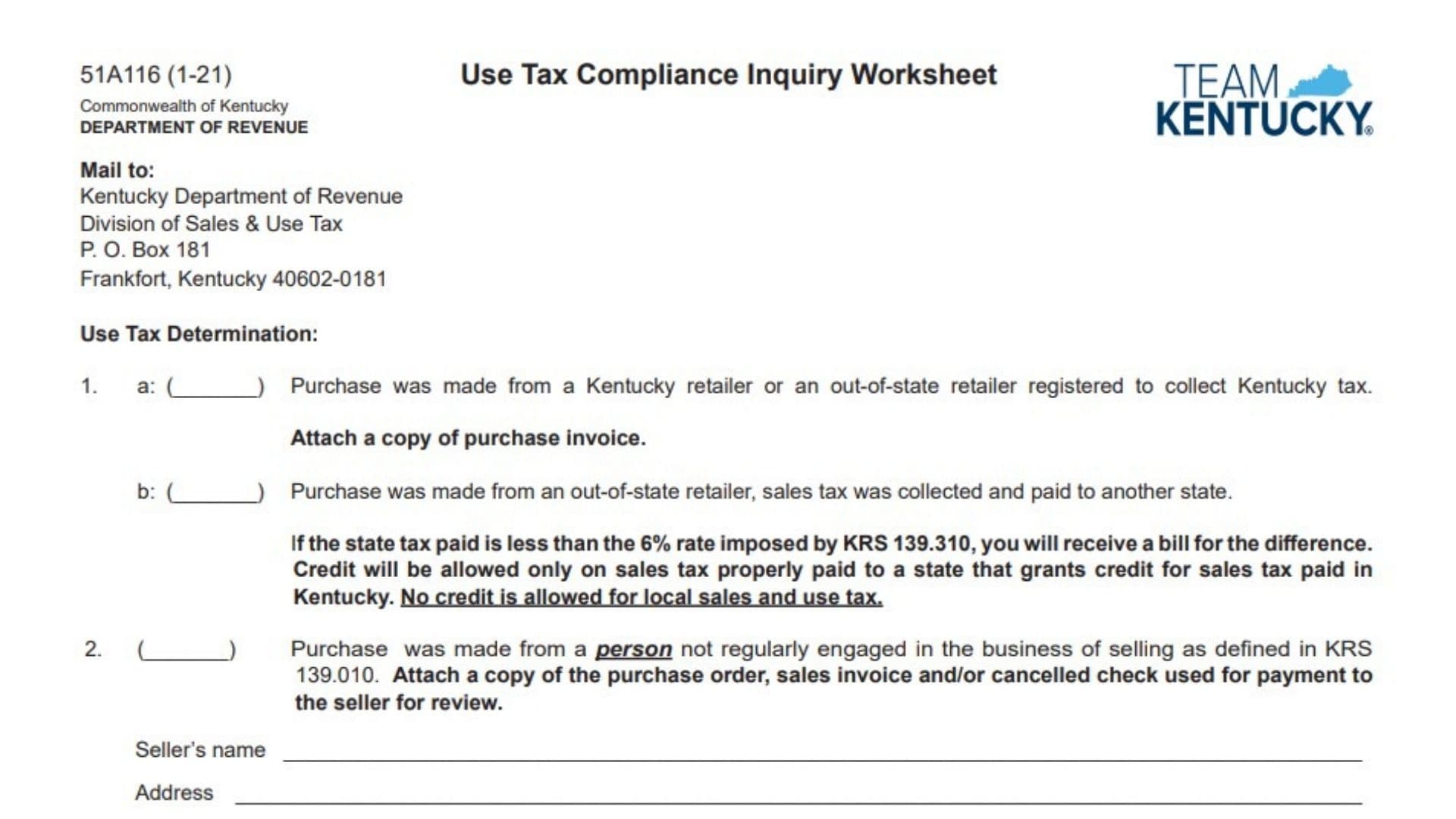
The Kentucky Use Tax Compliance Inquiry Worksheet, Form 51A116, is used to explain the tax treatment of a purchase that may be subject to Kentucky use tax. It allows the purchaser to identify how the transaction occurred, whether Kentucky or another state’s sales tax was collected, whether the seller was regularly engaged in business, and whether any tax remains due to Kentucky. Depending on the circumstances, the purchaser may show that Kentucky tax was already collected, request credit for qualifying sales tax paid to another state, document an occasional purchase from a person who is not regularly engaged in selling, pay Kentucky use tax on an untaxed out-of-state purchase, request that the Department of Revenue issue a bill, or provide another detailed explanation. The worksheet also identifies the supporting records that should be submitted, such as invoices, purchase orders, canceled checks, and seller information. If Kentucky use tax is due, the taxable amount generally includes the purchase price, qualifying accessories attached at delivery, and delivery charges, reduced by an allowable like-kind trade-in when applicable. The person completing the worksheet must provide identifying and contact information so the Department of Revenue can review the transaction, verify the supporting documents, and contact the purchaser if additional information or payment is needed.
Who Should Complete The Kentucky Use Tax Compliance Inquiry Worksheet?
Complete this worksheet when the Kentucky Department of Revenue asks for information about a purchase that may not have been fully taxed.
The worksheet may apply when:
- A Kentucky retailer collected tax on the purchase.
- An out-of-state retailer collected Kentucky sales tax.
- Sales tax was paid to another state.
- Property was purchased from an occasional seller.
- Property was purchased from an out-of-state retailer that did not collect tax.
- The transaction has unusual circumstances that require an explanation.
Both individuals and businesses may need to complete the worksheet. The identification field allows the respondent to provide a driver’s license number, federal employer identification number, or Kentucky sales tax account number, depending on the type of purchaser.
How To File The Kentucky Use Tax Compliance Inquiry Worksheet
Review the purchase and choose the use tax determination that most accurately describes it. Do not select an option merely because it produces the lowest tax. The selected option must agree with the invoice, payment records, seller information, and actual transaction.
Gather the following information before completing the worksheet:
- The purchase invoice.
- The purchase order, when one exists.
- Proof of sales tax paid.
- A canceled check or other payment record.
- The seller’s name and address.
- The purchase price.
- Delivery charges.
- Charges for accessories attached when the property was delivered.
- Information about an allowable like-kind trade-in.
- Your current name, address, telephone number, and email address.
- Your driver’s license number, federal employer identification number, or Kentucky sales tax number.
Attach the documents required for the option you select. If the purchase was made from an out-of-state retailer that did not collect tax, either include the Kentucky use tax payment and a copy of the invoice or submit the invoice alone so the Department of Revenue can calculate and bill the amount due. An invoice-only submission may result in interest and a possible penalty.
Sign the worksheet and mail it with all attachments and any required payment to:
Kentucky Department of Revenue
Division of Sales & Use Tax
P.O. Box 181
Frankfort, Kentucky 40602-0181
Keep a copy of the completed worksheet, supporting documents, and payment record.

How To Complete The Kentucky Use Tax Compliance Inquiry Worksheet
Form And Mailing Information
Line 1: Form Number And Revision Date: This identifies the document as Form 51A116, revised in January 2021. Nothing needs to be entered in this area.
Line 2: Use Tax Compliance Inquiry Worksheet: This is the title of the form. Use it to explain the sales or use tax treatment of the purchase under review.
Line 3: Commonwealth Of Kentucky: This identifies Kentucky as the issuing jurisdiction. No entry is required.
Line 4: Department Of Revenue: This identifies the state agency reviewing the transaction. Leave this printed information unchanged.
Line 5: Mail To: This heading introduces the address where the completed worksheet should be sent.
Line 6: Kentucky Department Of Revenue: Address the submission to the Kentucky Department of Revenue.
Line 7: Division Of Sales & Use Tax: Direct the envelope and correspondence to the Division of Sales & Use Tax.
Line 8: P.O. Box 181: Use this post office box as the first mailing address line.
Line 9: Frankfort, Kentucky 40602-0181: Enter this city, state, and ZIP code on the mailing envelope.
Use Tax Determination Instructions
Select the determination that accurately describes the purchase. Attach the required evidence for the selected option.
Option 1a, Tax Collected By A Kentucky-Registered Retailer
Line 10: Use Tax Determination: Review all available options before marking the worksheet. Select the option that matches the purchase.
Line 11: Option 1a Checkbox: Mark this option when the purchase was made from either:
- A Kentucky retailer, or
- An out-of-state retailer registered to collect Kentucky tax.
Use this option when the seller charged and collected the appropriate Kentucky sales or use tax.
Line 12: Purchase Invoice Attachment: Attach a complete copy of the purchase invoice.
The invoice should clearly show:
- The seller’s name.
- The purchaser’s name, when available.
- The property purchased.
- The purchase date.
- The purchase price.
- Delivery or accessory charges.
- The Kentucky tax charged.
- The total amount paid.
Do not submit only a credit card statement when an itemized invoice is available. A payment statement may show the total paid but may not establish that Kentucky tax was properly collected.
Option 1b, Sales Tax Paid To Another State
Line 13: Option 1b Checkbox: Mark this option when the purchase was made from an out-of-state retailer and the seller collected sales tax for another state.
Do not use this option when the retailer collected Kentucky tax. In that situation, Option 1a generally provides the better description.
Line 14: Tax Paid Below Six Percent: When the qualifying state sales tax paid was less than Kentucky’s stated 6 percent rate, the purchaser may be billed for the difference.
Calculate the possible difference as follows:
Kentucky tax at 6 percent minus qualifying sales tax paid to the other state equals the possible Kentucky use tax balance.
For example, if the taxable purchase amount was $1,000 and qualifying tax of 4 percent was paid to another state:
- Kentucky tax at 6 percent is $60.
- Tax paid to the other state is $40.
- The possible Kentucky difference is $20.
The Department of Revenue will determine whether the payment qualifies for credit and whether an additional amount is due.
Line 15: Credit For Tax Paid To Another State: Credit is available only for sales tax properly paid to a state that allows corresponding credit for Kentucky sales tax.
The payment must be an actual state sales tax. A fee or charge that is not legally a sales tax may not qualify.
Include documentation showing:
- The state to which tax was paid.
- The taxable amount.
- The tax rate.
- The amount collected.
- The seller that collected the tax.
Line 16: No Credit For Local Tax: Do not include county, city, municipal, district, or other local sales or use tax when calculating the credit.
Only qualifying state-level tax may be considered under this worksheet’s instructions.
A local tax payment does not reduce the Kentucky amount shown by the state tax comparison.
Option 2, Purchase From An Occasional Seller
Line 17: Option 2 Checkbox: Mark this option when the property was purchased from a person who is not regularly engaged in the business of selling that type of property.
This may describe a private or occasional transaction rather than a sale made by a retailer operating an ongoing business.
Examples may include:
- A one-time purchase from a private individual.
- Property purchased from someone disposing of a personally owned item.
- An isolated transaction by a seller who does not normally sell similar property.
Do not select this option solely because the seller did not collect tax. A business retailer may remain a retailer even when it fails to charge tax.
Line 18: Required Purchase Records: Attach documentation supporting the transaction.
The worksheet requests one or more of the following:
- A purchase order.
- A sales invoice.
- A canceled check used to pay the seller.
Submit the clearest available records showing what was purchased, the amount paid, the date of purchase, and the seller’s identity.
Line 19: Review Of Occasional-Seller Transaction: The Department of Revenue will review the documents to determine whether the seller was not regularly engaged in selling and whether the transaction receives the claimed treatment.
Provide enough information to show the nature of the sale. A simple statement that the seller was a private individual may not be sufficient without supporting records.
Seller Information For Option 2
Line 20: Seller’s Name: Enter the seller’s complete legal name.
For an individual, enter the first and last name. For a business or organization, enter its full legal or recognized business name.
The name should match the invoice, canceled check, bill of sale, title, or other purchase record.
Line 21: Seller’s Address, First Line: Enter the seller’s street address or post office box.
Include an apartment, suite, unit, or rural route when applicable.
Line 22: Seller’s Address, Second Line: Enter the seller’s city, state, and ZIP code or continue a long street address.
Line 23: Seller’s Address, Third Line: Use this line for additional address information, a foreign address, county information, or another detail needed to identify the seller.
When the seller’s full address is unknown, provide all information available and explain why the remaining information cannot be obtained.
Option 3, Untaxed Purchase From An Out-Of-State Retailer
Line 24: Option 3 Checkbox: Mark this option when the property was purchased from an out-of-state retailer and no sales tax was collected.
This option generally applies when the property was delivered, stored, used, or otherwise consumed in Kentucky without the seller collecting tax.
The worksheet provides two ways to proceed.
Pay The Use Tax With The Worksheet
Line 25: Enclose Six Percent Kentucky Use Tax: Calculate the Kentucky use tax using the taxable purchase amount and the 6 percent rate stated on the worksheet.
Use this basic calculation:
Taxable purchase amount multiplied by 0.06 equals Kentucky use tax.
For example:
$2,500 multiplied by 0.06 equals $150.
Include a check for the calculated amount and attach a copy of the invoice.
Do not calculate tax only on the item’s base price when taxable accessories or delivery charges must also be included.
Request A Department Bill
Line 26: Invoice-Only Billing Option: Instead of calculating and enclosing payment, attach the invoice and request that the Department of Revenue bill you.
The bill may include:
- The use tax.
- Interest.
- A possible penalty.
Submitting the invoice without payment does not stop tax, interest, or penalty from applying when the amount was already due.
Include clear contact information so the department can send the bill or request additional records.
Option 4, Other Circumstances
Line 27: Option 4 Checkbox: Mark this option when none of the first three choices accurately explains the transaction.
Use this option for unusual or mixed circumstances, such as:
- Part of the purchase was taxed and part was not.
- The purchase was canceled or returned.
- The invoice contains an error.
- The property was delivered outside Kentucky.
- The purchaser claims a specific exemption.
- Tax was collected after the original transaction.
- The transaction involved several sellers or states.
- The amount under review differs from the actual purchase amount.
Line 28: Detailed Explanation Requirement: Explain the circumstances completely. State what was purchased, when it was purchased, where it was delivered, how it was used, who sold it, what tax was paid, and why you believe a particular tax result applies.
Line 29: Explanation Line 1: Begin with a direct summary of the situation.
Example:
“The invoice was canceled and the full purchase amount was refunded before delivery.”
Line 30: Explanation Line 2: Add the transaction date, seller, invoice number, and purchase amount.
Line 31: Explanation Line 3: Explain the tax that was collected or why no Kentucky tax is due.
Line 32: Explanation Line 4: Identify the supporting documents attached to the worksheet.
When the available lines are insufficient, attach a separate statement. Include your printed name and identify it as an attachment to Option 4 of the Use Tax Compliance Inquiry Worksheet.
Purchaser Identification And Contact Information
Printed Name And Signature
Line 33: Print Name: Print or type the full legal name of the person completing the worksheet.
For an individual purchase, enter the purchaser’s name.
For a business purchase, enter the name of the authorized employee, owner, officer, or representative completing the response.
Do not enter only the business name in this field when an individual is expected to sign below.
Line 34: Signature: Sign the worksheet after reviewing all entries and attachments.
The signature should be made by:
- The individual purchaser.
- An authorized business owner.
- An authorized company officer.
- An employee or representative authorized to respond for the purchaser.
Do not submit the worksheet unsigned.
Contact Information
Line 35: Phone Number: Enter a daytime telephone number, including the area code.
Use a number where the Department of Revenue can reach someone familiar with the transaction and supporting records.
Line 36: Email Address: Enter an active email address.
Review the spelling carefully. An incorrect email address may delay questions about the worksheet.
For a business, use an email address monitored by the accounting, tax, finance, or administrative department when possible.
Purchaser Address
Line 37: Address, First Line: Enter the purchaser’s current street address or post office box.
For a business, use the address associated with the purchase or tax account.
Line 38: Address, Second Line: Enter the city, state, and ZIP code or continue a long address.
Line 39: Address, Third Line: Use this line for an apartment, suite, county, foreign address, or other necessary information.
Make sure the address is complete enough for the Department of Revenue to mail a bill or correspondence.
Identification Number
Line 40: Driver’s License Number, FEIN, Or Kentucky Sales Tax Number: Enter the identification number appropriate for the purchaser.
Use one of the following:
- A driver’s license number for an individual.
- A federal employer identification number for a business.
- A Kentucky sales tax account number for a registered taxpayer.
Do not enter all three unless the Department of Revenue requests them.
Review the number carefully before mailing the worksheet. An incorrect number may prevent the response from being matched to the correct person, business, or inquiry.
Taxable Purchase Price Instructions
Line 41: Purchase Price: Begin with the amount paid for the property.
Use the actual purchase price shown on the invoice, sales agreement, bill of sale, or other transaction record.
Do not use the property’s current value, loan balance, or insured value.
Line 42: Accessories Attached At Delivery: Include charges for other accessories attached to the property when it was delivered to the purchaser.
Examples may include:
- Installed optional equipment.
- Add-on components.
- Attached accessories.
- Dealer-installed features.
- Other items included as part of the delivered property.
Review the invoice to determine whether accessory charges were separated from the base purchase price.
Line 43: Delivery Charges: Include delivery charges when calculating the taxable purchase amount under the worksheet’s instructions.
Delivery may include shipping, freight, transportation, or similar charges associated with delivering the property to the purchaser.
Line 44: Like-Kind Trade-In Allowance: Subtract an allowable like-kind trade-in amount when the transaction qualifies.
A like-kind trade-in generally involves trading property of the same general type as the property being purchased. Do not subtract a trade-in that does not qualify.
The trade-in allowance should be shown on the invoice or purchase agreement.
Line 45: Use Tax Calculation: Calculate the amount using this general formula:
Purchase price
Plus taxable accessories attached at delivery
Plus delivery charges
Minus allowable like-kind trade-in
Equals taxable purchase amount
Taxable purchase amount multiplied by 6 percent equals the use tax shown under Option 3.
Use Tax Calculation Example
Assume the transaction includes:
- Purchase price: $12,000
- Attached accessories: $500
- Delivery charge: $200
- Allowable like-kind trade-in: $2,000
Calculate the taxable purchase amount:
$12,000 + $500 + $200 – $2,000 = $10,700
Calculate the use tax:
$10,700 multiplied by 0.06 = $642
The example is only a calculation illustration. Use the actual invoice amounts and confirm that any claimed trade-in allowance qualifies.
Supporting Document Instructions
Purchase Invoice
Attach a legible copy showing:
- Seller information.
- Purchaser information.
- Purchase date.
- Property description.
- Purchase price.
- Accessories.
- Delivery charges.
- Trade-in allowance.
- Sales tax charged.
- Total paid.
Proof Of Tax Paid
When tax was paid to Kentucky or another state, provide documentation showing the state, rate, and amount.
An invoice showing only “tax” without identifying the taxing state may require additional explanation.
Purchase Order
For an occasional-seller transaction, include the purchase order when one was used.
The document should agree with the purchase price and property description reported on the worksheet.
Canceled Check
A canceled check should identify:
- The payer.
- The payee.
- The amount.
- The payment date.
- Bank processing information.
When the check amount covers several purchases, explain how much relates to the transaction under review.
Additional Explanation
Use a separate attachment when the worksheet does not provide enough space. Each attachment should include:
- The purchaser’s name.
- The identification number entered on the worksheet.
- A reference to the selected determination.
- The invoice or transaction number.
- The purchase date.
Final Review Checklist
Before mailing the Kentucky Use Tax Compliance Inquiry Worksheet, confirm that:
- The correct use tax determination is selected.
- Only the option that accurately describes the purchase is marked.
- The purchase invoice is attached when required.
- Proof of tax paid to another state is included when applicable.
- Local tax has not been claimed as a state tax credit.
- The seller’s full name is entered for an occasional sale.
- The seller’s address is complete.
- The purchase order, invoice, or canceled check is attached for Option 2.
- The 6 percent use tax is correctly calculated when payment is enclosed.
- Accessories attached at delivery are included when required.
- Delivery charges are included in the taxable amount.
- Only an allowable like-kind trade-in is subtracted.
- The invoice is attached when requesting a bill.
- Option 4 contains a complete explanation when selected.
- The printed name is entered.
- The worksheet is signed.
- The telephone number and email address are current.
- The purchaser’s mailing address is complete.
- The appropriate identification number is entered.
- All attachments are legible.
- Any required payment is enclosed.
- A copy of the complete submission is retained.