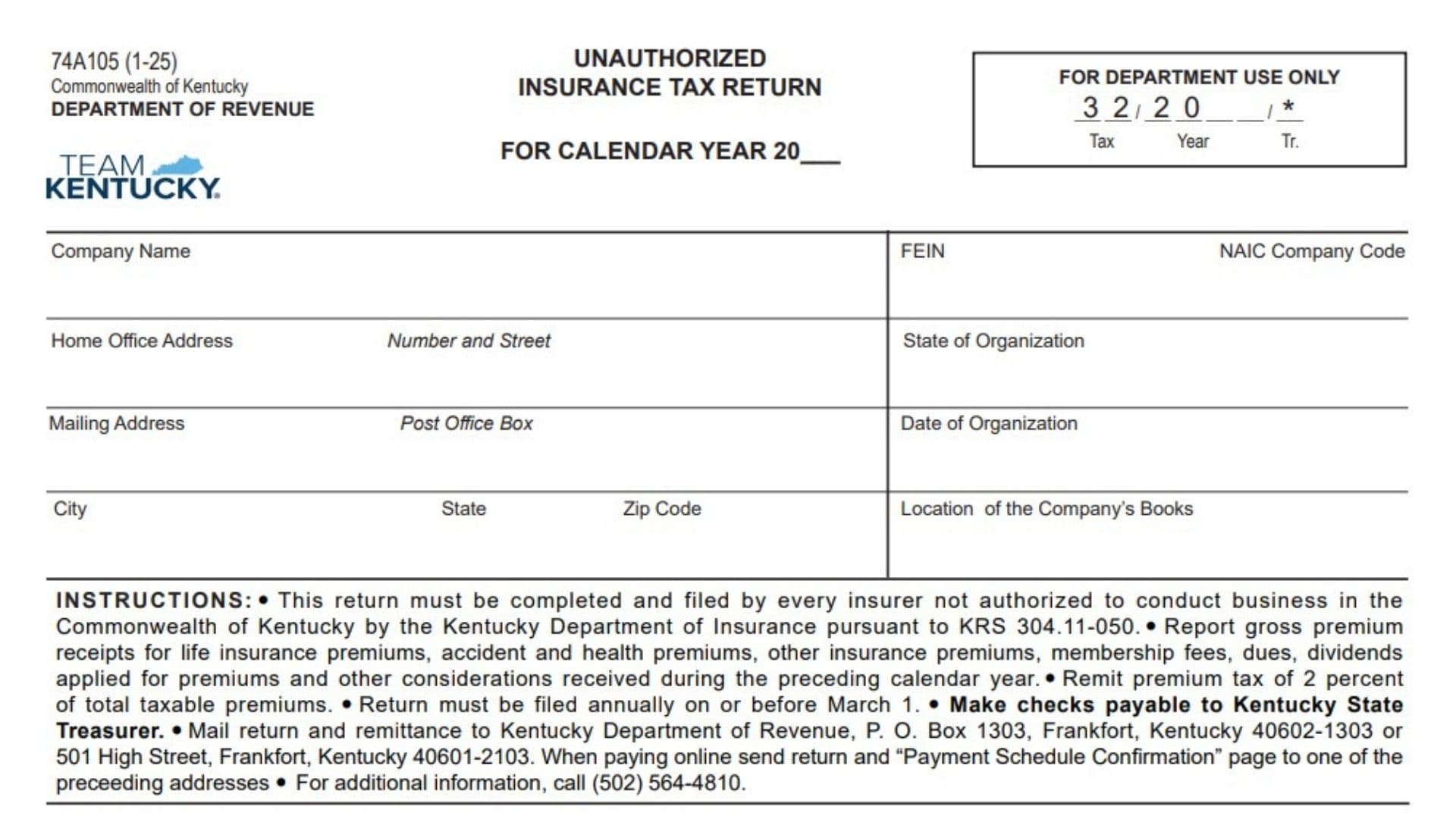
Kentucky Form 74A105 is the Unauthorized Insurance Tax Return used by an insurer that is not authorized by the Kentucky Department of Insurance to conduct insurance business in the Commonwealth of Kentucky under KRS 304.11-050. The return reports insurance-related money received during the preceding calendar year, including gross premiums from life insurance, accident and health insurance, other types of insurance, dividends applied toward premiums or additions, membership fees, assessments, dues, and other consideration received in exchange for insurance coverage. The form separates reportable amounts into two categories: life, health, and accident insurance, and all other insurance. Each category must be calculated independently before the applicable totals are combined for payment purposes. The tax imposed on an unauthorized insurer is 2% of total taxable premiums, and the return must be filed annually by March 1. The company must provide its legal and tax identification information, home-office and mailing addresses, state and date of organization, and the location where its accounting books are kept. The company’s president or another principal officer and its chief accounting officer must review and sign the return, confirming that the information is accurate, complete, and prepared in good faith for the taxable period.
The return must be filed by every insurer that is not authorized by the Kentucky Department of Insurance to conduct business in Kentucky under KRS 304.11-050.
The filing requirement concerns insurance activity and consideration received during the preceding calendar year.
Before completing the return, confirm that:
- The company is an insurer.
- The company was not authorized to conduct insurance business in Kentucky.
- The company received reportable insurance premiums or other insurance-related consideration during the preceding calendar year.
- The company can separate its receipts between life, health, and accident insurance and all other insurance.
What Must Be Reported?
The return requires the company to report amounts received during the preceding calendar year from:
- Life insurance premiums
- Accident insurance premiums
- Health insurance premiums
- Premiums for all other types of insurance
- Dividends applied toward premiums
- Dividends applied toward additions
- Membership fees
- Assessments
- Dues
- Other consideration received for insurance
Report the amounts in the proper insurance category rather than combining everything in one column.
When Is The Return Due?
The Unauthorized Insurance Tax Return must be filed annually on or before March 1.
The return reports amounts received during the preceding calendar year. For example, receipts collected during one calendar year are reported on the return due by March 1 of the following year.
Enter the applicable reporting year in the calendar-year field at the top of the return.
How To File The Return
Gather The Required Information
Before completing the return, gather:
- The company’s legal name
- Federal Employer Identification Number
- NAIC company code
- Home-office address
- Mailing address
- State and date of organization
- Location of the company’s accounting books
- Gross premium receipt records
- Records of dividends applied toward premiums or additions
- Records of membership fees, assessments, and dues
- Records of other insurance consideration received
- Online payment confirmation, when applicable
- Contact information for the signing officers
Separate Receipts By Insurance Category
The financial section contains two columns:
- Life, Health, And Accident Insurance
- All Other Insurance
Review each receipt and place it in the correct column.
Do not report an amount in both columns. If the company received money from both categories, complete both columns separately.
Calculate The Premium Tax
Add Lines 1, 2, and 3 in each applicable column.
Enter the result on Line 4.
Multiply each Line 4 amount by 2%.
Enter the resulting premium tax on Line 5.
The calculation is:
Total Taxable Premiums × 0.02 = Premium Tax Due

How To Complete The Header Section
Form Year
The revision date printed on the form identifies the version of the return.
No entry is required in the form-version area.
Calendar Year
Enter the four-digit calendar year covered by the return.
The year should be the year in which the reportable premiums and other insurance consideration were received.
Do not enter the filing year unless it is also the calendar year being reported.
For Department Use Only
Leave this entire box blank.
The tax period, year, transaction, and related processing fields are reserved for the Kentucky Department of Revenue.
Do not write over or alter the printed processing information.
How To Complete The Company Information Section
Company Name
Enter the insurer’s complete legal name.
Use the same name associated with the company’s federal tax identification number and organizational records.
Do not use only a trade name unless it is also the company’s legal name.
FEIN
Enter the company’s nine-digit Federal Employer Identification Number.
Use the number assigned to the legal entity filing the return.
Confirm that all nine digits are accurate before submitting the form.
NAIC Company Code
Enter the company’s National Association of Insurance Commissioners company code.
Use the code assigned to the insurer named on the return.
Do not enter the NAIC code of a parent company, subsidiary, or affiliated insurer unless that entity is the filer.
Home Office Address
Enter the street address of the company’s home office.
Include:
- Street number
- Street name
- Suite, floor, or unit number when applicable
The form provides separate space for the number and street.
State Of Organization
Enter the state or jurisdiction in which the company was legally organized.
This may be different from the state where the company’s main office is located.
Use the company’s formation or organizational records to confirm the correct jurisdiction.
Mailing Address
Enter the address where the company receives official mail.
When the mailing address is different from the home-office address, provide the complete mailing location.
When both addresses are the same, enter the address according to the company’s normal filing practice rather than leaving required identifying information unclear.
Post Office Box
Enter the company’s post-office box when it uses one as part of its mailing address.
Do not enter a post-office box as the home-office street address.
Date Of Organization
Enter the date on which the company was legally organized.
Use the date appearing in the company’s formation, incorporation, charter, or organizational documents.
Enter the complete date in a clear format.
City
Enter the city associated with the mailing address.
State
Enter the state abbreviation for the mailing address.
ZIP Code
Enter the complete ZIP Code.
Include any applicable additional ZIP Code digits when normally used in the company’s address.
Location Of The Company’s Books
Enter the physical location where the company’s accounting records and books are maintained.
This may be:
- The home office
- A separate administrative office
- An accounting department
- An authorized recordkeeping location
Provide enough information to identify the location clearly.
How To Complete The Financial Section
The financial section must be completed across the two insurance columns.
Life, Health, And Accident Insurance Column
Use this column for amounts connected with:
- Life insurance
- Health insurance
- Accident insurance
Complete Lines 1 through 5 using only the amounts attributable to these types of coverage.
All Other Insurance Column
Use this column for insurance receipts that do not belong in the life, health, and accident insurance category.
Complete Lines 1 through 5 using the amounts attributable to all other insurance.
How To Complete Line 1: Gross Premium Receipts
Life, Health, And Accident Insurance
Enter the total gross premium receipts collected during the preceding calendar year for life, health, and accident insurance.
Use the gross amount before adding the separate items reported on Lines 2 and 3.
Report actual premium receipts belonging to this insurance category.
All Other Insurance
Enter the total gross premium receipts received during the preceding calendar year from all other insurance.
Do not include life, health, or accident premiums in this column.
Reviewing Line 1
Confirm that:
- The amounts relate to the correct calendar year.
- Each receipt appears in only one insurance column.
- Life, health, and accident premiums are separated from all other premiums.
- The amounts represent gross premium receipts.
How To Complete Line 2: Dividends Applied For Premiums And Additions
Line 2 reports dividends that were not paid directly to the recipient but were instead applied toward insurance premiums or additions.
Life, Health, And Accident Insurance
Enter dividends applied toward premiums or additions related to life, health, and accident insurance.
Include only the amounts belonging to this insurance category.
All Other Insurance
Enter dividends applied toward premiums or additions related to all other insurance.
Do not enter the same dividend in both columns.
Reviewing Line 2
Confirm that the amount represents a dividend applied for:
- Insurance premiums
- Policy additions
- Another qualifying addition connected to insurance
Do not combine this amount with gross premium receipts on Line 1 when the form requires it to be reported separately.
How To Complete Line 3: Membership Fees, Assessments, Dues, And Other Consideration
Enter membership fees, assessments, dues, and any other consideration received in exchange for insurance.
“Other consideration” covers reportable insurance-related value received that does not belong on Lines 1 or 2.
Life, Health, And Accident Insurance
Enter membership fees, assessments, dues, and other consideration connected with life, health, and accident insurance.
All Other Insurance
Enter membership fees, assessments, dues, and other consideration connected with all other types of insurance.
Reviewing Line 3
Before entering an amount, determine:
- Whether the payment was received for insurance
- Which insurance category it belongs to
- Whether it has already been reported on Line 1 or Line 2
- Whether it was received during the calendar year being reported
Do not report the same amount more than once.
How To Complete Line 4: Total Taxable Premiums
Line 4 is the total taxable amount for each insurance category.
Life, Health, And Accident Insurance
Add the amounts entered in the life, health, and accident insurance column on:
- Line 1
- Line 2
- Line 3
Enter the result on Line 4 in the same column.
The calculation is:
Line 1 + Line 2 + Line 3 = Line 4
All Other Insurance
Add the amounts entered in the all-other-insurance column on:
- Line 1
- Line 2
- Line 3
Enter the result on Line 4 in that column.
The calculation is:
Line 1 + Line 2 + Line 3 = Line 4
Reviewing Line 4
Check each column separately.
Do not add the two insurance columns together before calculating the tax. The form requires a separate taxable total for each category.
The premium tax is 2% of the total taxable premiums reported on Line 4.
Life, Health, And Accident Insurance Tax
Multiply the Line 4 amount in the life, health, and accident insurance column by 2%.
Enter the result on Line 5 in that column.
The calculation is:
Life, Health, And Accident Line 4 × 0.02 = Line 5
The printed tax code for this category is 01.
All Other Insurance Tax
Multiply the Line 4 amount in the all-other-insurance column by 2%.
Enter the result on Line 5 in that column.
The calculation is:
All Other Insurance Line 4 × 0.02 = Line 5
The printed tax code for this category is 02.
Example Of The Tax Calculation
Suppose the company reports:
- $40,000 on Line 4 under life, health, and accident insurance
- $25,000 on Line 4 under all other insurance
The calculations would be:
$40,000 × 0.02 = $800
$25,000 × 0.02 = $500
The company would enter $800 under tax code 01 and $500 under tax code 02.
The example is only an illustration. Use the company’s actual figures when preparing the return.
How To Complete The Online Payment Section
Paid Online Checkbox
Check the “Paid online” box when the tax was paid or scheduled through an accepted electronic payment method.
Leave this box blank when submitting payment by check.
Confirmation Number
Enter the confirmation number issued for the online payment.
Confirm that the number is connected with:
- The correct company
- The correct tax account
- The correct calendar year
- The correct payment amount
Copy the confirmation number accurately.
Payment Schedule Confirmation Page
Attach the Payment Schedule Confirmation page when payment is made online.
The confirmation page documents the scheduled electronic payment.
Submitting an online payment does not remove the requirement to submit the completed return.
How To Pay By Check
Make the check payable to:
Kentucky State Treasurer
Confirm that the payment agrees with the total tax calculated on Line 5 for all applicable insurance categories.
Include the completed return with the payment.
Where To Mail The Return
Regular Mailing Address
Kentucky Department of Revenue
P.O. Box 1303
Frankfort, Kentucky 40602-1303
Street Or Overnight Address
Kentucky Department of Revenue
501 High Street
Frankfort, Kentucky 40601-2103
When paying online, send the completed return and Payment Schedule Confirmation page to one of these addresses.
How To Complete The Certification Section
The certification must be completed by the company’s president or another principal officer and by the company’s chief accounting officer.
The two officers certify jointly and individually that:
- They examined the return.
- The information is true to the best of their knowledge and belief.
- The return is correct and complete.
- The return was prepared in good faith.
- The information applies to the stated taxable period.
Both officers should review the complete return before signing.
How To Complete The Principal Officer Fields
Signature Of President Or Other Principal Officer
The company’s president or another authorized principal officer must sign this field.
The signer should have authority to certify the return on behalf of the company.
Print Name
Print or type the full name of the principal officer who signed the return.
The printed name must identify the signer clearly.
Date
Enter the date on which the principal officer signed the return.
Use the actual signing date.
How To Complete The Chief Accounting Officer Fields
Signature Of Chief Accounting Officer
The company’s chief accounting officer must sign the return.
This signature is separate from the signature of the president or other principal officer.
The same person should not complete both signature lines unless that person legally holds both positions and is permitted to sign in both capacities.
Print Name
Print or type the full name of the chief accounting officer.
The printed name should match the person who signed the corresponding field.
Date
Enter the date on which the chief accounting officer signed the return.
How To Complete The Contact Information Fields
Title
Enter the appropriate title connected with the signing officer or contact person.
Use the person’s formal company position.
Examples may include:
- President
- Chief executive officer
- Treasurer
- Controller
- Chief financial officer
- Chief accounting officer
Telephone Number
Enter a working telephone number for the company or responsible officer.
Include the area code.
Use a number where questions about the return can be answered.
E-Mail Address
Enter a current email address for the company or responsible officer.
Use an email account that is monitored regularly.
How To Obtain Additional Information
For additional information about completing or filing the return, contact the Kentucky Department of Revenue at:
(502) 564-4810
Final Review Checklist
Before submitting the Unauthorized Insurance Tax Return, confirm that:
- The company is an unauthorized insurer required to file.
- The correct calendar year is entered.
- The Department-use box has been left blank.
- The company’s complete legal name is provided.
- The FEIN is accurate.
- The correct NAIC company code is entered.
- The home-office address is complete.
- The state of organization is correct.
- The mailing address is complete.
- The date of organization is entered.
- The location of the company’s books is identified.
- Life, health, and accident receipts are reported in the correct column.
- All other insurance receipts are reported in the separate column.
- Line 1 includes the proper gross premium receipts.
- Line 2 includes dividends applied toward premiums and additions.
- Line 3 includes applicable membership fees, assessments, dues, and other insurance consideration.
- Line 4 equals Lines 1, 2, and 3 combined in each column.
- Line 5 equals 2% of Line 4 in each column.
- Tax code 01 is associated with life, health, and accident insurance.
- Tax code 02 is associated with all other insurance.
- The online-payment box is checked only when applicable.
- The online confirmation number is entered correctly.
- The Payment Schedule Confirmation page is attached for an online payment.
- A check is payable to the Kentucky State Treasurer when paying by mail.
- The return is filed on or before March 1.
- The president or another principal officer has signed and dated the return.
- The chief accounting officer has signed and dated the return.
- Both officers’ printed names are complete.
- The title, telephone number, and email address are provided.
- The payment agrees with the tax calculated on Line 5.
- A copy of the completed return and payment records is retained for the company’s files.