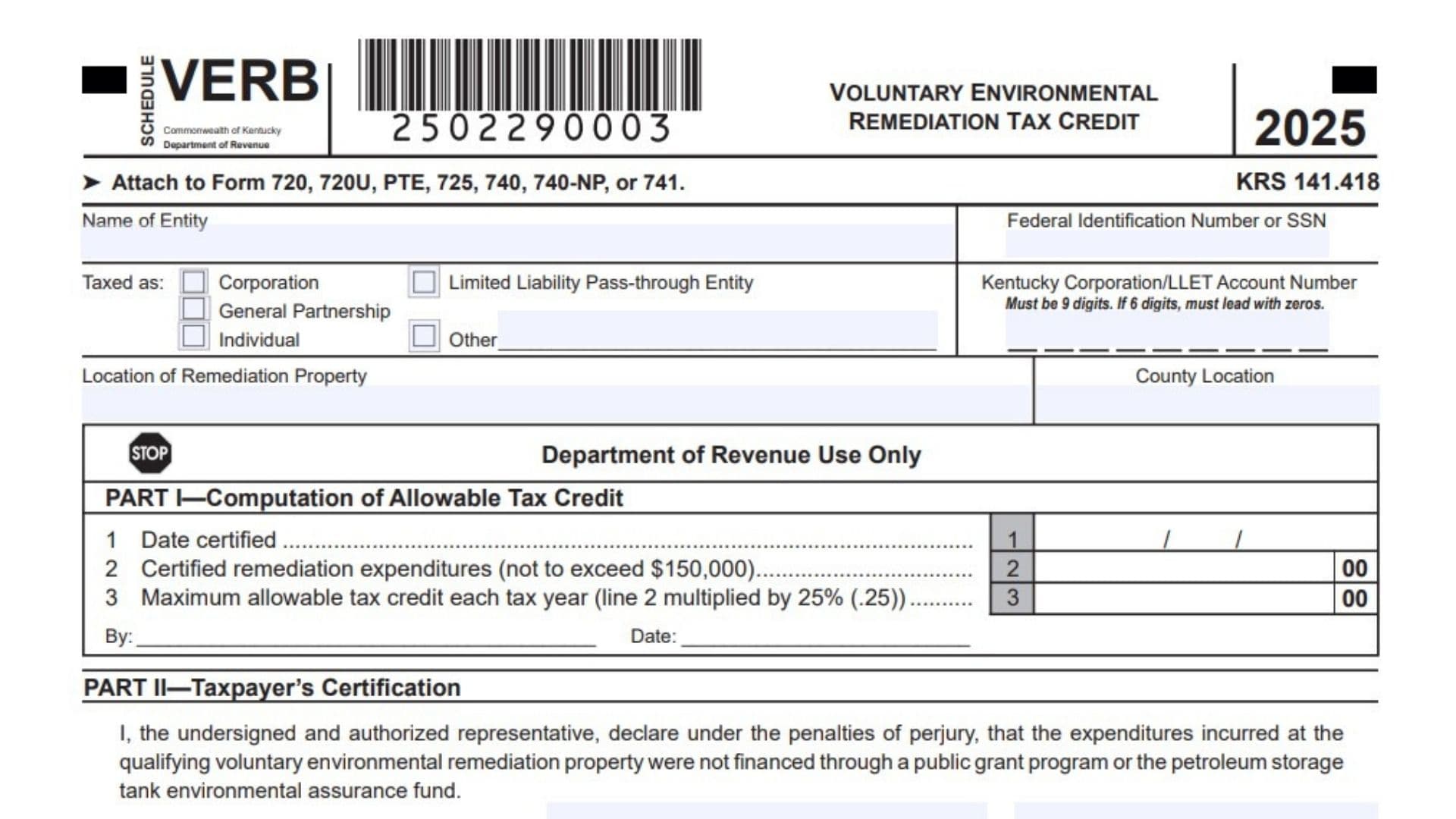
Kentucky Schedule VERB is a tax credit schedule used to claim the Kentucky Voluntary Environmental Remediation Tax Credit for approved costs paid on a qualifying voluntary environmental remediation property. This credit is designed for taxpayers who have eligible environmental cleanup expenses connected to real property that meets Kentucky’s qualifying remediation rules. The credit is nonrefundable, which means it can reduce eligible Kentucky tax liability, but it cannot create a refund by itself. It may apply against Kentucky individual income tax, corporation income tax, and the limited liability entity tax, also called LLET. The same approved credit must be tracked separately for income tax and LLET, because a remaining balance for one tax type cannot be moved to the other. The approved remediation expenditures are limited to a maximum of $150,000, and the credit that may be used in a taxable year is limited to 25 percent of the approved amount. Any unused allowed credit may generally be carried forward for up to 10 years. Taxpayers use this schedule to report the certified credit, certify that the expenses were not paid through certain public funding sources, claim the current year credit, and track how much of the credit has been used over time.
How To File Kentucky Schedule VERB
Attach Schedule VERB to the Kentucky tax return that applies to your filing situation. The schedule may be attached to Form 720, Form 720U, Form PTE, Form 725, Form 740, Form 740-NP, or Form 741. Before claiming the credit, make sure the remediation expenses have been reviewed and certified through the proper Kentucky process. The taxpayer must submit receipts as proof of the claimed expenditures, and those receipts must be verified. After verification, the taxpayer must be notified of eligibility for the credit before the credit can be claimed. A completed copy of Schedule VERB must be attached each year the Voluntary Environmental Remediation Tax Credit is claimed. If the taxpayer is a pass-through entity, the approved credit must also be reported to each partner, member, shareholder, or beneficiary based on that person’s pro rata share.

How To Complete Kentucky Schedule VERB
Header Line: Schedule VERB
Use this schedule for the Kentucky Voluntary Environmental Remediation Tax Credit.
Header Line: Commonwealth Of Kentucky Department Of Revenue
This identifies the Kentucky tax authority connected with the schedule.
Header Line: Voluntary Environmental Remediation Tax Credit
This shows that the schedule is specifically for the environmental remediation credit.
Header Line: Tax Year 2025
Use this version for the 2025 tax year.
Header Line: KRS 141.418
This identifies the Kentucky law connected with the credit.
Attachment Line: Attach To Form 720, 720U, PTE, 725, 740, 740-NP, Or 741
Attach the completed schedule to the Kentucky return that matches your tax filing type.
Name Of Entity
Enter the legal name of the business, organization, trust, estate, or individual claiming the credit.
Federal Identification Number Or SSN
Enter the taxpayer’s federal employer identification number or Social Security number.
Taxed As: Corporation
Check this box if the taxpayer is taxed as a corporation.
Taxed As: Limited Liability Pass-Through Entity
Check this box if the taxpayer is treated as a limited liability pass-through entity for Kentucky tax purposes.
Kentucky Corporation/LLET Account Number
Enter the Kentucky Corporation/LLET account number if this applies to the taxpayer.
Account Number Formatting Line
The Kentucky Corporation/LLET account number must contain 9 digits. If the number has only 6 digits, add leading zeros at the beginning.
Taxed As: General Partnership
Check this box if the taxpayer is taxed as a general partnership.
Taxed As: Individual
Check this box if the taxpayer is an individual claiming the credit.
Taxed As: Other
Check this box if none of the listed taxpayer types apply, then write the correct entity type on the blank line.
Location Of Remediation Property
Enter the street address or clear location details for the qualifying remediation property.
County Location
Enter the Kentucky county where the remediation property is located.
Department Of Revenue Use Only
Leave this area blank. It is reserved for Department of Revenue processing.
Part I, Computation Of Allowable Tax Credit
Part I Note
This section is completed by the Department of Revenue and mailed to the taxpayer. Do not complete this part unless you are instructed to do so.
Line 1: Date Certified
This line shows the date the credit was certified. Use the month, day, and year format shown on the form.
Line 2: Certified Remediation Expenditures
This line shows the certified remediation expenses for the project. The amount cannot be more than $150,000.
Line 3: Maximum Allowable Tax Credit Each Tax Year
This line shows the maximum credit that may be allowed for one tax year. It is calculated by multiplying Line 2 by 25 percent.
By
This line is for the authorized Department of Revenue representative who completes or approves the section.
Date
This line shows the date the Department of Revenue representative completed or approved the section.
Part II, Taxpayer’s Certification
Certification Statement
The authorized taxpayer or representative must certify, under penalties of perjury, that the remediation expenses for the qualifying voluntary environmental remediation property were not paid through a public grant program or the petroleum storage tank environmental assurance fund.
Signature
The authorized taxpayer or representative must sign this line.
Title
Enter the signer’s title, such as owner, officer, partner, member, trustee, authorized representative, or another proper role.
Date
Enter the date the certification is signed.
Part III, Current Year Credit
Line 1: LLET Credit
Enter the current year credit claimed against the limited liability entity tax. This amount is also reported on Schedule TCS, Part II, Column E. The credit cannot reduce the LLET below the $175 minimum tax.
Line 2: Corporation Income Tax Credit
Enter the current year credit claimed against Kentucky corporation income tax. This amount is also reported on Schedule TCS, Part II, Column F.
Line 3: Individual Income Tax Credit
Enter the current year credit claimed against Kentucky individual income tax. This amount is entered on Form 740, Form 740-NP, or Form 741, whichever applies.
Pass-Through Entity Reporting Line
If the taxpayer is a pass-through entity, report each owner’s, partner’s, member’s, shareholder’s, or beneficiary’s share of the approved credit on that person’s Schedule K-1.
Part IV, Amount Of Credit Claimed
Part IV Purpose
Complete this section to track the credit taken over time. It helps show the taxable year, the remaining credit balance, and the amount of credit used.
Column A: Taxable Year Credit Taken
Enter the month and year when the credit is used for this remediation project.
Column B: Balance Of VERB, LLET
For the first year, enter the allowable credit amount from Part I, Line 2 for LLET tracking. For later years, enter the remaining LLET balance after subtracting the prior credit used.
Column B: Balance Of VERB, Income Tax
For the first year, enter the allowable credit amount from Part I, Line 2 for income tax tracking. For later years, enter the remaining income tax balance after subtracting the prior credit used.
Column C: Amount Of Credit Used, LLET
Enter the amount of credit used against LLET for that year. If no credit is used, enter zero.
Column C: Amount Of Credit Used, Income Tax
Enter the amount of credit used against income tax for that year. If no credit is used, enter zero.
Line 1: First Taxable Year Credit Taken
Enter the month and year for the first year the credit is taken, then complete the LLET balance, income tax balance, LLET credit used, and income tax credit used.
Line 2: Second Taxable Year Credit Taken
Enter the month and year for the second year the credit is taken, then update the remaining balances and credit amounts used.
Line 3: Third Taxable Year Credit Taken
Enter the month and year for the third year the credit is taken, then report the updated balance and used credit amounts.
Line 4: Fourth Taxable Year Credit Taken
Enter the month and year for the fourth year the credit is taken, then complete the LLET and income tax tracking columns.
Line 5: Fifth Taxable Year Credit Taken
Enter the month and year for the fifth year the credit is taken, then record the remaining credit balances and the credit used.
Line 6: Sixth Taxable Year Credit Taken
Enter the month and year for the sixth year the credit is taken, then update the balance and credit used columns.
Line 7: Seventh Taxable Year Credit Taken
Enter the month and year for the seventh year the credit is taken, then complete the LLET and income tax amounts.
Line 8: Eighth Taxable Year Credit Taken
Enter the month and year for the eighth year the credit is taken, then report the credit balance and credit used for each tax type.
Line 9: Ninth Taxable Year Credit Taken
Enter the month and year for the ninth year the credit is taken, then update the LLET and income tax tracking amounts.
Line 10: Tenth Taxable Year Credit Taken
Enter the month and year for the tenth year the credit is taken, then complete all balance and credit used columns.
Line 11: Eleventh Taxable Year Credit Taken
Enter the month and year for the eleventh tracking line if needed, then record the remaining balance and credit used amounts for LLET and income tax.
Important Completion Rules
Nonrefundable Credit Rule
The Kentucky Voluntary Environmental Remediation Tax Credit can reduce eligible Kentucky tax, but it does not create a refund.
Separate Tax Tracking Rule
Track the income tax credit balance and LLET credit balance separately. A remaining income tax credit balance cannot be used for LLET, and a remaining LLET credit balance cannot be used for income tax.
Zero Balance Rule
When the available balance for income tax or LLET reaches zero, no more credit may be claimed against that tax type.
Approved Expenditure Limit Rule
The approved remediation expenditure amount is limited to $150,000.
Annual Credit Limit Rule
The credit allowed for a taxable year is limited to 25 percent of the approved maximum credit amount.
Carryforward Rule
Unused credit may be carried forward for up to 10 years.
Certification Year Rule
The taxpayer may begin claiming the credit on the tax return for the taxable year in which the credit was certified.
Other Entity Rule
If the taxpayer’s entity type is not listed in the checkboxes, select “Other” and write the correct entity type.
Receipt Verification Rule
Keep proof of the remediation expenses and make sure the required receipts have been verified before claiming the credit.
Attachment Rule
Attach Schedule VERB to the applicable Kentucky tax return every year the credit is claimed.