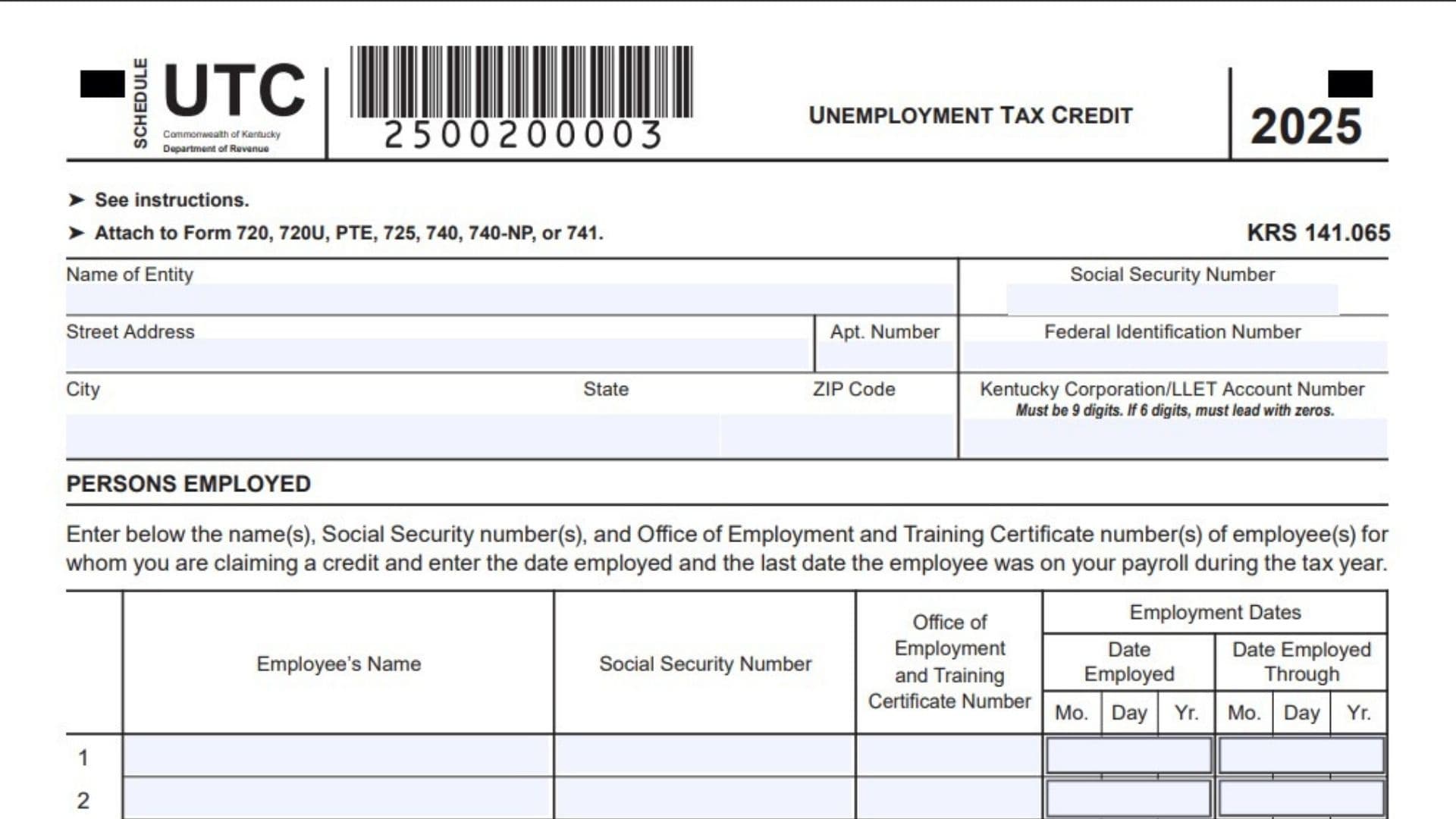
Kentucky Schedule UTC is the Kentucky Unemployment Tax Credit schedule used by eligible taxpayers who hired qualified employees who were previously unemployed. The schedule helps Kentucky individuals, corporations, limited liability entities, pass-through entities, estates, and trusts report the employees for whom they are claiming the unemployment tax credit. The credit is generally $100 for each qualified person hired by the taxpayer. To qualify, the employee must have been classified as unemployed by the proper Kentucky workforce agency for at least 60 days before being hired, and the employee must stay on the taxpayer’s payroll for at least 180 consecutive days during the tax year in which the credit is claimed. The form also requires the employee’s name, Social Security number, employment dates, and Office of Employment and Training certificate number, so the taxpayer can clearly support the credit being claimed. The credit is not allowed in certain cases, such as when the taxpayer receives federally funded payments for on-the-job training for that employee, when the employee is a close related person or dependent under the applicable tax rules, when certain corporation ownership relationships exist, or when the taxpayer is a tax-exempt organization. Related corporations and related unincorporated businesses are treated as one employer for this credit, and the same qualified employee cannot be used more than once for the same tax year. For pass-through entities, the credit is first applied at the entity level against the limited liability entity tax and then distributed to owners based on their ownership share. For estates and trusts, the credit is divided between the estate or trust and its beneficiaries based on income allocation.
How To File Kentucky Schedule UTC
Complete Kentucky Schedule UTC after confirming that each employee meets the unemployment and employment-period requirements. Gather each employee’s name, Social Security number, certificate number from the Office of Employment and Training, date hired, and last payroll date during the tax year. Enter the taxpayer or entity information at the top of the schedule, list each qualified employee on Lines 1 through 23, total the number of employees on Line 24, carry that total to Line 25, and multiply by $100 on Line 26. After calculating the credit, transfer the amount to the proper Kentucky tax return or schedule depending on the return being filed. Attach the completed schedule to Form 720, 720U, PTE, 725, 740, 740-NP, or 741, whichever applies to the taxpayer. Keep payroll records, unemployment certification details, and any related support documents with your tax records in case the credit must be verified later.
Before You Start Completing The Lines
Enter the taxpayer information at the top of the schedule before moving to the employee lines. Write the name of the entity or taxpayer, Social Security number if applicable, street address, apartment number if any, federal identification number if applicable, city, state, ZIP Code, and Kentucky Corporation/LLET Account Number if required. The Kentucky Corporation/LLET Account Number must contain 9 digits. If the account number has only 6 digits, add leading zeros so the number becomes 9 digits.

How To Complete Kentucky Schedule UTC Line By Line
Line 1: Enter the first qualified employee’s full name, Social Security number, Office of Employment and Training certificate number, the date the employee was hired, and the last date the employee was employed through during the tax year.
Line 2: Enter the second qualified employee’s full name, Social Security number, certificate number, hire date, and employment-through date.
Line 3: Enter the third qualified employee’s identifying information and employment dates in the same format.
Line 4: Use this line for the fourth qualified employee and include all required employee and certificate details.
Line 5: Enter the fifth qualified employee’s name, Social Security number, certificate number, date employed, and date employed through.
Line 6: Use this line for the sixth qualified employee who meets the credit requirements.
Line 7: Enter the seventh qualified employee’s full details, including the month, day, and year for both employment date fields.
Line 8: Use this line for the eighth qualified employee and complete every column across the row.
Line 9: Enter the ninth qualified employee’s information only if that employee qualifies for the unemployment tax credit.
Line 10: Use this line for the tenth qualified employee and make sure the certificate number matches the employee being claimed.
Line 11: Enter the eleventh qualified employee’s name, Social Security number, certificate number, hire date, and employment-through date.
Line 12: Use this row for the twelfth qualified employee and complete the employment dates using month, day, and year.
Line 13: Enter the thirteenth qualified employee’s required information in the correct columns.
Line 14: Use this line for the fourteenth qualified employee and confirm the employee remained employed long enough to qualify.
Line 15: Enter the fifteenth qualified employee’s information, including the Office of Employment and Training certificate number.
Line 16: Use this line for the sixteenth qualified employee and complete all employment date boxes.
Line 17: Enter the seventeenth qualified employee’s full details if you are claiming the credit for that employee.
Line 18: Use this line for the eighteenth qualified employee and make sure the Social Security number is accurate.
Line 19: Enter the nineteenth qualified employee’s name, Social Security number, certificate number, and employment dates.
Line 20: Use this row for the twentieth qualified employee who qualifies for the credit.
Line 21: Enter the twenty-first qualified employee’s required information across the row.
Line 22: Use this line for the twenty-second qualified employee and complete every column.
Line 23: Enter the twenty-third qualified employee’s full information if you are claiming the credit for that person.
Line 24: Count the total number of qualified employees entered on Lines 1 through 23 and write that number on Line 24.
Line 25: Enter the total number from Line 24. This carries the employee count forward to the calculation section.
Line 26: Multiply the number on Line 25 by $100. Enter the result as the unemployment tax credit.
Line 27: If filing Form 720 or Form 720U, enter the credit on Schedule TCS, Part II, Columns E and F.
Line 28: If filing Form PTE, enter the credit on Schedule TCS, Part II, Column E, and also on Form PTE, Schedule K. General partnerships should enter the amount only on Form PTE, Schedule K.
Line 29: If filing Form 725, enter the credit on Schedule TCS, Part II, Column E.
Line 30: If filing Form 740, enter the credit on Schedule ITC, Section A, Line 7.
Line 31: If filing Form 740-NP, enter the credit on Schedule ITC, Section A, Line 7.
Line 32: If filing Form 741, enter the credit on Form 741, Line 18.
Final Check Before Filing
Review every employee entry to make sure the name, Social Security number, certificate number, and employment dates are complete and accurate. Confirm that each employee was unemployed for the required period before hiring and remained employed for at least 180 consecutive days during the tax year. Make sure no employee is being claimed twice, no disqualified related person is included, and the credit amount on Line 26 is transferred to the correct Kentucky form or schedule. Attach Kentucky Schedule UTC to the applicable Kentucky return before filing.