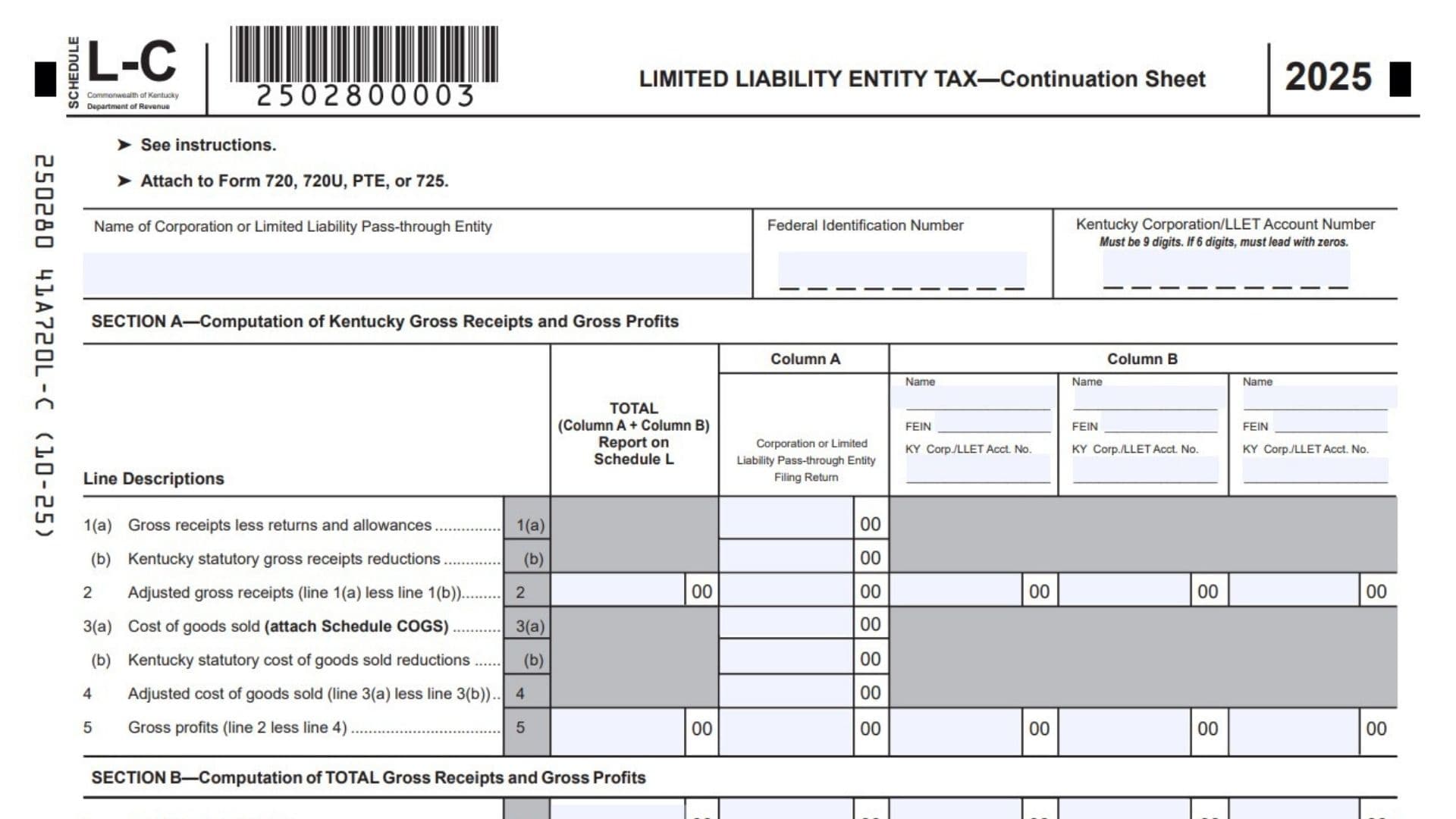
Kentucky Schedule L-C, Limited Liability Entity Tax Continuation Sheet, is used when a corporation or limited liability pass-through entity needs to include additional Limited Liability Entity Tax information connected to ownership interests in pass-through entities or general partnerships. The schedule helps a taxpayer report Kentucky gross receipts, Kentucky gross profits, total gross receipts, and total gross profits from the entity filing the return and from pass-through entities that provided Kentucky Schedule K-1 information. This matters because a corporation that is a partner or member of a limited liability pass-through entity or general partnership must include its proportionate share of sales when calculating Kentucky LLET. The rule also applies through multiple tiers of pass-through ownership, meaning ownership interests can flow through more than one entity level. Schedule L-C organizes the taxpayer’s own amounts in Column A and the amounts received from owned pass-through entities in Column B. The totals are then carried to Schedule L or to the appropriate unitary filing schedule. If the taxpayer calculates LLET using gross profits, Schedule COGS must be attached because cost of goods sold is part of the calculation. In simple terms, Schedule L-C is a supporting worksheet that expands the LLET calculation when one main Schedule L is not enough to show all entity-level and pass-through entity amounts clearly.
How To File Kentucky Schedule L-C
Attach Kentucky Schedule L-C to the applicable Kentucky return, Form 720, Form 720U, Form PTE, or Form 725. Use it when the taxpayer has Limited Liability Entity Tax information that must be continued or when pass-through entity Schedule K-1 information must be included in the LLET calculation. Complete the identifying information at the top, enter the filing entity’s own Kentucky and total amounts in Column A, enter pass-through entity information in Column B, then add Column A and Column B amounts in the Total column where required. If cost of goods sold is entered, attach Schedule COGS to the return. If more space is needed for additional pass-through entities, use continuation pages and complete the page number fields. After completing the schedule, carry the required totals to Schedule L of Form 720, Form PTE, or Form 725, or to Form 720U Schedule U8 for unitary filers.

How To Complete Kentucky Schedule L-C
Top Of Schedule
Page 1 Of: Enter the total number of Schedule L-C pages being filed. If you use only one page, enter page 1 of 1. If you attach additional continuation pages, number the pages in order.
Page Blank Of Blank On Continuation Pages: On each additional page, enter the current page number and the total number of pages being filed.
Name Of Corporation Or Limited Liability Pass-Through Entity: Enter the full legal name of the corporation or limited liability pass-through entity filing the schedule.
Federal Identification Number: Enter the federal identification number of the corporation or limited liability pass-through entity.
Kentucky Corporation/LLET Account Number: Enter the Kentucky Corporation/LLET account number. The number must be 9 digits. If the account number has only 6 digits, add leading zeros so it becomes 9 digits.
Attach To Form 720, 720U, PTE, Or 725: Attach the completed schedule to the applicable Kentucky return.
Main Columns On Schedule L-C
Total Column: Use this column to add the applicable amounts from Column A and Column B. The totals from this column are reported on Schedule L or on the applicable unitary schedule.
Column A: Use this column for the corporation or limited liability pass-through entity that is filing the Kentucky return.
Column B: Use this column for information received from limited liability pass-through entities owned by the filing entity. Each Column B box is used for a separate pass-through entity.
Column B Entity Name: Enter the name of each pass-through entity that provided Kentucky Schedule K-1 information.
Column B FEIN: Enter the federal identification number of each pass-through entity listed in Column B.
Column B Kentucky Corp./LLET Account Number: Enter the Kentucky Corporation/LLET account number for each pass-through entity listed in Column B, if applicable.
Section A: Computation Of Kentucky Gross Receipts And Gross Profits
Section A reports Kentucky gross receipts and Kentucky gross profits. Use Column A for the entity filing the return and Column B for Kentucky Schedule K-1 information received from owned pass-through entities.
Section A, Column A: Corporation Or Limited Liability Pass-Through Entity Filing Return
Line 1(a): Gross Receipts Less Returns And Allowances: Enter Kentucky gross receipts after subtracting returns and allowances. Gross receipts can include sales, rent, proceeds from selling real or tangible personal property, interest, dividends, and similar receipts.
Line 1(b): Kentucky Statutory Gross Receipts Reductions: Pass-through entities enter Kentucky gross receipts allocable to a qualified exempt organization. Corporations do not use this line.
Line 2: Adjusted Gross Receipts: Subtract Line 1(b) from Line 1(a). Enter the result as adjusted Kentucky gross receipts.
Line 3(a): Cost Of Goods Sold: Enter Kentucky cost of goods sold from Schedule COGS, Column A, Line 8. Attach Schedule COGS. Only costs from manufacturing, producing, reselling, retailing, or wholesaling may be included.
Line 3(b): Kentucky Statutory Cost Of Goods Sold Reductions: Pass-through entities enter Kentucky cost of goods sold allocable to a qualified exempt organization. Corporations do not use this line.
Line 4: Adjusted Cost Of Goods Sold: Subtract Line 3(b) from Line 3(a). Enter the result as adjusted Kentucky cost of goods sold.
Line 5: Gross Profits: Subtract Line 4 from Line 2. Enter the result as Kentucky gross profits.
Section A, Column B: Information From Owned Pass-Through Entities
Entity Information: For each pass-through entity that provided Kentucky Schedule K-1 information, enter the entity name, FEIN, and Kentucky Corporation/LLET account number in the Column B heading area.
Line 1(a): Gross Receipts Less Returns And Allowances: Do not enter an amount in this shaded Column B line.
Line 1(b): Kentucky Statutory Gross Receipts Reductions: Do not enter an amount in this shaded Column B line.
Line 2: Adjusted Gross Receipts: Enter the Kentucky gross receipts from Kentucky Schedule K-1, Section B, Line 1, for each pass-through entity listed in Column B.
Line 3(a): Cost Of Goods Sold: Do not enter an amount in this shaded Column B line.
Line 3(b): Kentucky Statutory Cost Of Goods Sold Reductions: Do not enter an amount in this shaded Column B line.
Line 4: Adjusted Cost Of Goods Sold: Do not enter an amount in this shaded Column B line.
Line 5: Gross Profits: Enter the Kentucky gross profits from Kentucky Schedule K-1, Section B, Line 3, for each pass-through entity listed in Column B.
Section A, Total Column
Line 1(a): Total Gross Receipts Less Returns And Allowances: Do not enter a total on this shaded line.
Line 1(b): Total Kentucky Statutory Gross Receipts Reductions: Do not enter a total on this shaded line.
Line 2: Total Adjusted Gross Receipts: Add Section A, Line 2 amounts from Column A and Column B. Enter the total here and carry it to Schedule L, Section A, Line 2.
Line 3(a): Total Cost Of Goods Sold: Do not enter a total on this shaded line.
Line 3(b): Total Kentucky Statutory Cost Of Goods Sold Reductions: Do not enter a total on this shaded line.
Line 4: Total Adjusted Cost Of Goods Sold: Do not enter a total on this shaded line.
Line 5: Total Gross Profits: Add Section A, Line 5 amounts from Column A and Column B. Enter the total here and carry it to Schedule L, Section A, Line 5.
Section B: Computation Of Total Gross Receipts And Gross Profits
Section B reports total gross receipts and total gross profits. Use Column A for the filing entity’s own total amounts and Column B for totals received from owned pass-through entities.
Section B, Column A: Corporation Or Limited Liability Pass-Through Entity Filing Return
Line 1: Adjusted Gross Receipts: Enter total adjusted gross receipts for the entity filing the return. Gross receipts can include sales, rent, proceeds from selling real or tangible personal property, interest, dividends, and similar receipts.
Line 2: Cost Of Goods Sold: Enter total cost of goods sold from Schedule COGS, Column B, Line 8. Attach Schedule COGS. Only costs from manufacturing, producing, reselling, retailing, or wholesaling may be claimed.
Line 3: Gross Profits: Subtract Line 2 from Line 1. Enter the result as total gross profits.
Section B, Column B: Information From Owned Pass-Through Entities
Line 1: Adjusted Gross Receipts: Enter total gross receipts from Kentucky Schedule K-1, Section B, Line 2, for each pass-through entity listed in Column B.
Line 2: Cost Of Goods Sold: Do not enter an amount in this shaded Column B line.
Line 3: Gross Profits: Enter total gross profits from Kentucky Schedule K-1, Section B, Line 4, for each pass-through entity listed in Column B.
Section B, Total Column
Line 1: Total Adjusted Gross Receipts: Add Section B, Line 1 amounts from Column A and Column B. Enter the total here and carry it to Schedule L, Section B, Line 1.
Line 2: Total Cost Of Goods Sold: Do not enter a total on this shaded line.
Line 3: Total Gross Profits: Add Section B, Line 3 amounts from Column A and Column B. Enter the total here and carry it to Schedule L, Section B, Line 3.
How To Carry Totals To Schedule L
Section A, Line 2 Total: Carry this amount to Schedule L, Section A, Line 2.
Section A, Line 5 Total: Carry this amount to Schedule L, Section A, Line 5.
Section B, Line 1 Total: Carry this amount to Schedule L, Section B, Line 1.
Section B, Line 3 Total: Carry this amount to Schedule L, Section B, Line 3.
Instructions For Unitary Filers
Section A, Line 2 Total: Carry this amount to Form 720U, Schedule U8, Section A, Line 2, in the applicable column.
Section A, Line 5 Total: Carry this amount to Form 720U, Schedule U8, Section A, Line 5, in the applicable column.
Section B, Line 1 Total: Carry this amount to Form 720U, Schedule U8, Section B, Line 1, in the applicable column.
Section B, Line 3 Total: Carry this amount to Form 720U, Schedule U8, Section B, Line 3, in the applicable column.
Final Review Before Filing
Review the taxpayer name, federal identification number, Kentucky Corporation/LLET account number, and page numbering before filing. Make sure Column A includes only the amounts for the corporation or limited liability pass-through entity filing the return. Make sure Column B includes the correct Schedule K-1 information from each owned pass-through entity. Confirm that Section A reports Kentucky gross receipts and Kentucky gross profits, while Section B reports total gross receipts and total gross profits. Attach Schedule COGS if cost of goods sold is used. Finally, verify that the required Total column amounts are carried to Schedule L or to Form 720U Schedule U8 for unitary filers.