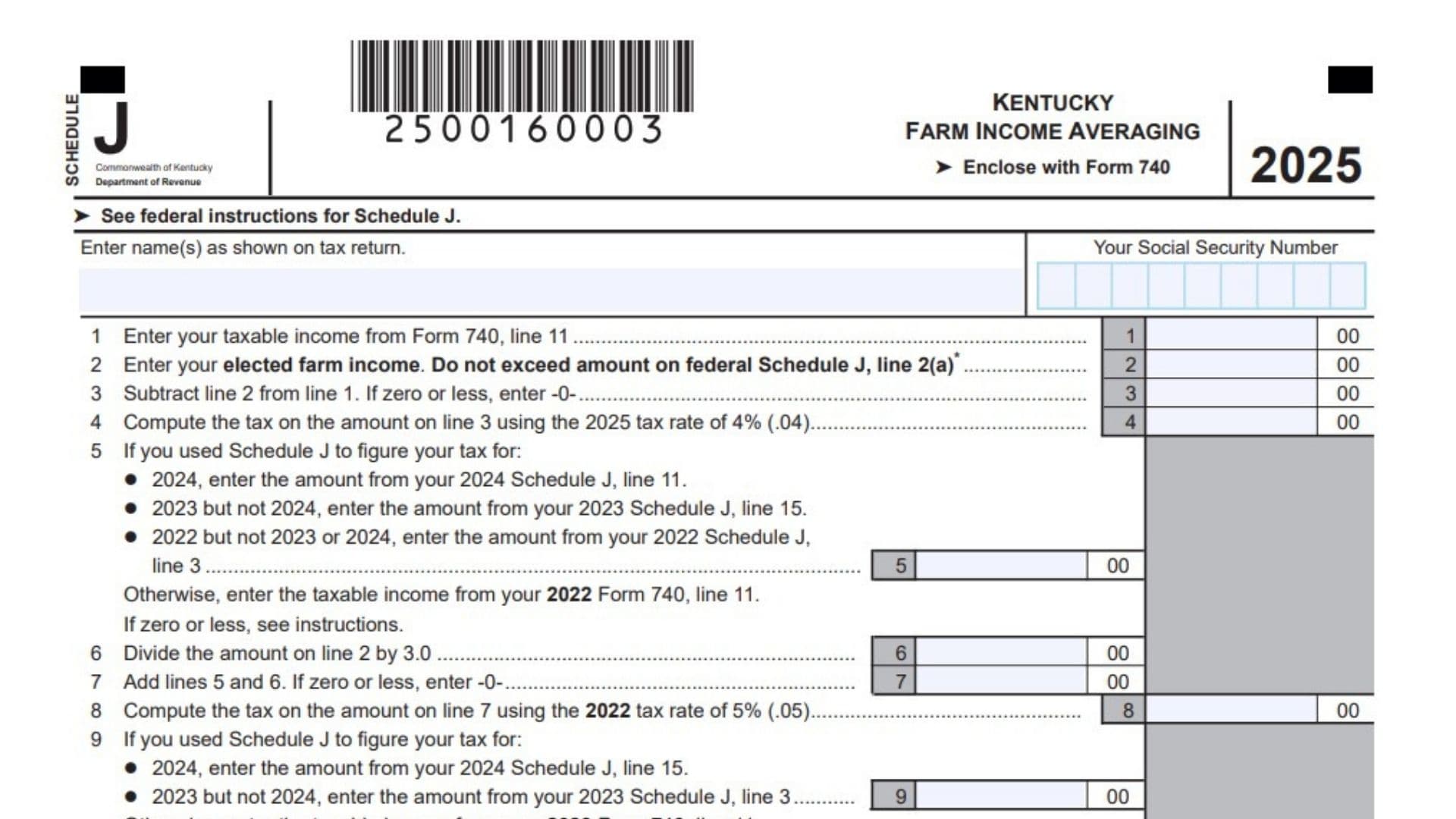
The Kentucky Schedule J, titled Farm Income Averaging, is a specialized tax form designed to help individuals engaged in the trade or business of farming or fishing manage their state income tax burden. Farming and fishing incomes are notoriously unpredictable, often fluctuating wildly from year to year due to weather, market prices, or other uncontrollable factors. This schedule allows qualifying taxpayers to average all or part of their current year’s farming or fishing income over the previous three years. By spreading a high-income year across past years where income might have been lower, taxpayers can potentially lower their overall tax liability. To use this form, you must have also filed a federal Schedule J, and you must use your specific Kentucky figures rather than federal figures when completing the state form. Keep in mind that different tax years have different flat tax rates in Kentucky, such as 5 percent for 2022, 4.5 percent for 2023, and 4 percent for 2024 and 2025. This form must be enclosed with your Form 740 when you file your state taxes.

How to Complete Kentucky Schedule J
Line 1: Taxable Income
Enter your current year taxable income directly from your Form 740, line 11.
Line 2: Elected Farm Income
Enter the portion of your farm or fishing income you are choosing to average. This amount cannot exceed the figure you entered on your federal Schedule J, line 2(a). If this elected income includes earnings from another state, you will need to do a separate computation to figure out your state tax limitation for the credit for taxes paid to other states.
Line 3: Subtract Elected Income
Subtract the amount on line 2 from the amount on line 1. If the resulting number is zero or less, simply enter zero.
Line 4: Compute Current Year Tax
Calculate the tax on the amount you just entered on line 3. Multiply the line 3 amount by the current year’s tax rate, which is 4 percent, or 0.04.
Line 5: Base Year 2022 Income
Determine your base income for 2022. If you used Schedule J in 2024, enter the amount from your 2024 Schedule J, line 11. If you used it in 2023 but not 2024, enter the amount from your 2023 Schedule J, line 15. If you used it in 2022 but not in 2023 or 2024, enter the amount from your 2022 Schedule J, line 3. If you did not use Schedule J in any of those years, enter your taxable income from your 2022 Form 740, line 11.
Line 6: Divide Elected Income
Take the elected farm income from line 2 and divide it by 3.0. Enter the result here.
Line 7: Add Base Income and Divided Income
Add the amounts from line 5 and line 6. If the result is zero or less, enter zero.
Line 8: Compute 2022 Tax
Calculate the tax on the amount you entered on line 7 using the 2022 tax rate. Multiply the line 7 amount by 5 percent, or 0.05.
Line 9: Base Year 2023 Income
Determine your base income for 2023. If you used Schedule J in 2024, enter the amount from your 2024 Schedule J, line 15. If you used it in 2023 but not 2024, enter the amount from your 2023 Schedule J, line 3. Otherwise, enter your taxable income from your 2023 Form 740, line 11.
Line 10: Enter Divided Income
Enter the exact same amount you calculated on line 6.
Line 11: Add Base Income and Divided Income
Add the amounts from line 9 and line 10. If the result is less than zero, you must enter it as a negative amount.
Line 12: Compute 2023 Tax
Calculate the tax on the amount you entered on line 11 using the 2023 tax rate. Multiply the line 11 amount by 4.5 percent, or 0.045.
Line 13: Base Year 2024 Income
Determine your base income for 2024. If you used Schedule J in 2024, enter the amount from your 2024 Schedule J, line 3. Otherwise, enter your taxable income from your 2024 Form 740, line 11.
Line 14: Enter Divided Income
Enter the exact same amount you calculated on line 6.
Line 15: Add Base Income and Divided Income
Add the amounts from line 13 and line 14. If the result is less than zero, you must enter it as a negative amount.
Line 16: Compute 2024 Tax
Calculate the tax on the amount you entered on line 15 using the 2024 tax rate. Multiply the line 15 amount by 4 percent, or 0.04.
Line 17: Total Tax Computed
Add the calculated tax amounts from lines 4, 8, 12, and 16. Enter the combined total here.
Line 18: Previous Tax for 2022
Identify the tax you previously figured for 2022. If you used Schedule J in 2024, enter the amount from your 2024 Schedule J, line 12. If you used it in 2023 but not 2024, enter the amount from your 2023 Schedule J, line 16. If you used it in 2022 but not in 2023 or 2024, enter the amount from your 2022 Schedule J, line 4. Otherwise, enter the tax from your 2022 Form 740, line 12.
Line 19: Previous Tax for 2023
Identify the tax you previously figured for 2023. If you used Schedule J in 2024, enter the amount from your 2024 Schedule J, line 16. If you used it in 2023 but not 2024, enter the amount from your 2023 Schedule J, line 4. Otherwise, enter the tax from your 2023 Form 740, line 12.
Line 20: Previous Tax for 2024
Identify the tax you previously figured for 2024. If you used Schedule J in 2024, enter the amount from your 2024 Schedule J, line 4. Otherwise, enter the tax from your 2024 Form 740, line 12.
Line 21: Total Previous Taxes
Add the previous tax amounts from lines 18, 19, and 20. Enter the combined total here.
Line 22: Final Tax Calculation
Subtract the total previous taxes on line 21 from the total computed tax on line 17. If this resulting number is less than the normal tax calculated on your total taxable income from line 1, enter this new averaged tax amount on your Form 740, line 12, and check the corresponding box.