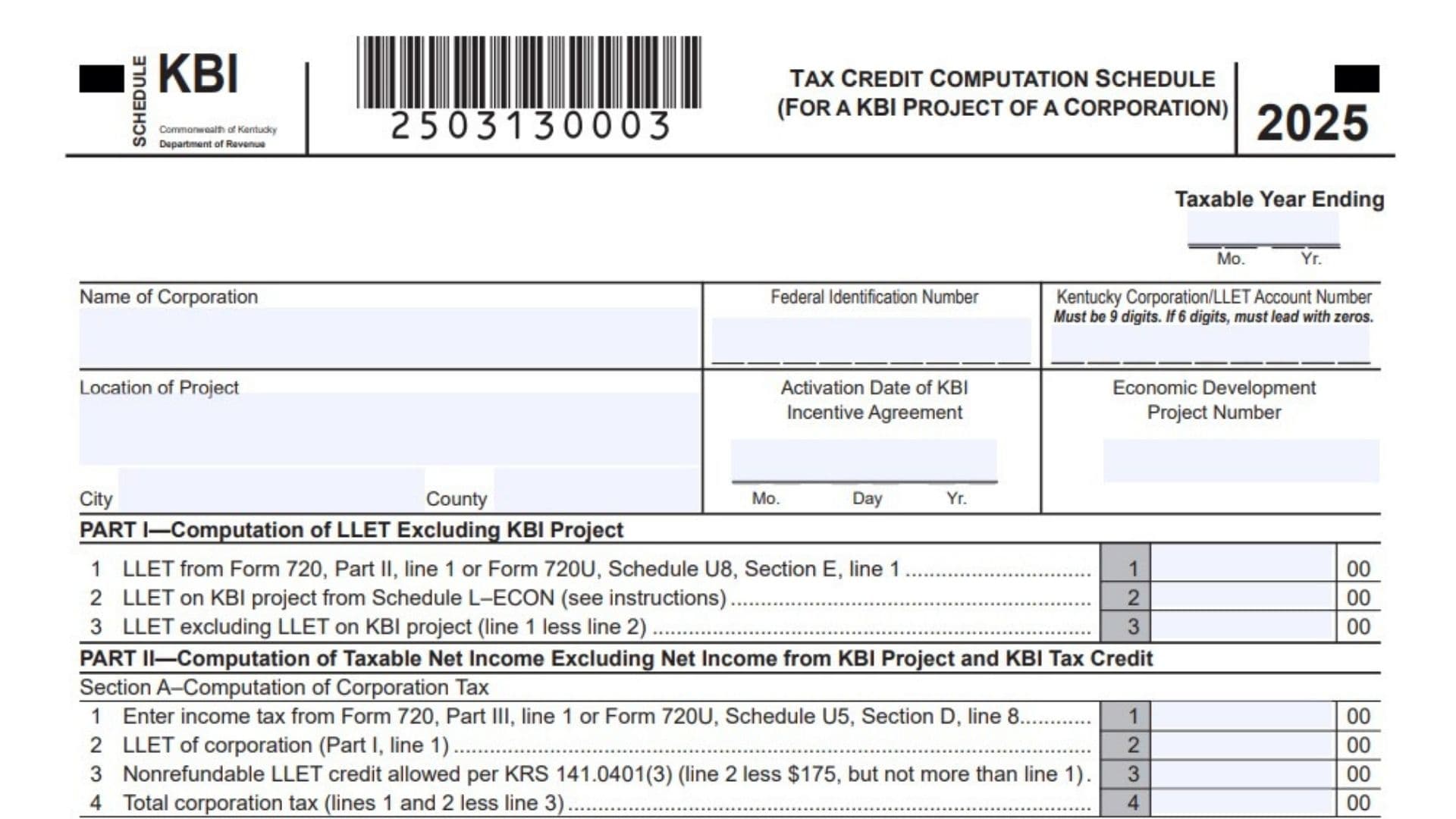
Kentucky PKG KBI is the Kentucky Business Investment Program package used by an approved business entity to report and track KBI tax incentives for the 2025 tax year. This package is only for businesses that have received preliminary or final approval for the KBI credit through the Cabinet for Economic Development under the Kentucky Business Investment Program rules. The package helps the business calculate the credit allowed against Kentucky corporation income tax, limited liability entity tax, or the tax due on a KBI project for a pass-through entity. It also includes a tracking schedule that records approved costs, wage assessment credits, KBI credit limitations, and credit claimed each year during the incentive agreement. Corporations use Schedule KBI and Schedule KBI-T, while pass-through entities and general partnerships use Schedule KBI-SP and Schedule KBI-T. Each KBI package should cover only one approved incentive project, so a business with more than one approved project must prepare a separate package for each project.
How To File Kentucky PKG KBI
Use this package only if your business has been approved for the Kentucky Business Investment Program credit. If your business has not received approval, you should not use this package to claim the credit.
Attach the completed package to the Kentucky return that matches your business type. Corporations filing Form 720 or Form 720U should complete Schedule KBI and Schedule KBI-T. Pass-through entities filing Form PTE or Form 725 should complete Schedule KBI-SP and Schedule KBI-T.
Only report one KBI incentive project in each package. If your business has more than one approved economic development project, prepare a separate package and separate schedules for each project.
For the first and last year of the incentive agreement, claim the tax incentive only for the part of the year covered by the agreement. Separate period accounting is preferred. If separate period accounting is not available, use a proration factor based on the number of eligible days in the taxable year.
For the first year, divide the number of days from the activation date through the end of the taxable year by the total days in the taxable year. Multiply total income by that factor to determine project income when separate period accounting is not used.
For the last year, divide the number of days from the first day of the taxable year through the end of the incentive agreement by the total days in the taxable year. Multiply total income by that factor to determine project income when separate period accounting is not used.

How To Complete Kentucky PKG KBI
Package-Level Instructions
Line 1: Package Name: Use Kentucky PKG KBI for the Kentucky Business Investment Program. This package is used to claim and track approved KBI project incentives.
Line 2: Tax Year: Confirm that the package is for the 2025 tax year before completing the schedules.
Line 3: Approval Requirement: Use this package only if the business has received approval for the KBI credit. The approval must relate to the Kentucky Business Investment Program.
Line 4: Review Instructions Before Filing: Read the package instructions before entering amounts. This package has different schedules depending on whether the filer is a corporation or a pass-through entity.
Line 5: Return Attachment: Attach the completed package to Form 720, Form 720U, Form PTE, or Form 725, depending on the return your business files.
Line 6: One Project Per Package: Include only one approved KBI incentive project in each package. Do not combine multiple approved projects in one package.
Line 7: Corporation Filing Rule: If the business files Form 720 or Form 720U, complete Schedule KBI and Schedule KBI-T.
Line 8: Pass-Through Entity Filing Rule: If the business files Form PTE or Form 725, complete Schedule KBI-SP and Schedule KBI-T.
Line 9: First Year Proration: If this is the first year of the incentive agreement, claim the incentive only for the days beginning with the activation date and ending with the last day of the taxable year.
Line 10: Last Year Proration: If this is the final year of the incentive agreement, claim the incentive only for the days from the first day of the taxable year through the end of the agreement term.
Line 11: Separate Period Accounting: Use separate period accounting when possible to identify income, costs, receipts, and profits that belong to the eligible KBI period.
Line 12: Proration Factor: If separate period accounting is not available, use the proper proration factor to calculate the project income for the eligible part of the year.
Schedule KBI Instructions For Corporations
Line 1: Taxable Year Ending: Enter the month and year when the corporation’s taxable year ends.
Line 2: Name Of Corporation: Enter the full legal name of the corporation claiming the KBI credit.
Line 3: Federal Identification Number: Enter the corporation’s federal identification number.
Line 4: Kentucky Corporation/LLET Account Number: Enter the Kentucky Corporation or LLET account number. The number must be 9 digits. If the number has only 6 digits, add zeros at the beginning to make it 9 digits.
Line 5: Location Of Project: Enter the street or physical location of the approved KBI project.
Line 6: City: Enter the city where the KBI project is located.
Line 7: County: Enter the Kentucky county where the KBI project is located.
Line 8: Activation Date Of KBI Incentive Agreement: Enter the month, day, and year when the KBI incentive agreement became active.
Line 9: Economic Development Project Number: Enter the project number assigned to the approved KBI project.
Schedule KBI, Part I, Computation Of LLET Excluding KBI Project
Line 10: Part I, Line 1, LLET From Form 720 Or Form 720U: Enter the LLET amount from Form 720, Part II, line 1, or from Form 720U, Schedule U8, Section E, line 1.
Line 11: Part I, Line 2, LLET On KBI Project: Enter the LLET amount for the KBI project from Schedule L-ECON. Schedule L-ECON should be prepared using only the Kentucky gross receipts and Kentucky gross profits from the KBI project.
Line 12: Part I, Line 3, LLET Excluding KBI Project: Subtract Part I, line 2 from Part I, line 1. Enter the result as the corporation’s LLET excluding the KBI project.
Schedule KBI, Part II, Section A, Computation Of Corporation Tax
Line 13: Part II, Section A, Line 1, Income Tax: Enter the income tax from Form 720, Part III, line 1, or from Form 720U, Schedule U5, Section D, line 8.
Line 14: Part II, Section A, Line 2, LLET Of Corporation: Enter the LLET amount from Part I, line 1.
Line 15: Part II, Section A, Line 3, Nonrefundable LLET Credit: Subtract $175 from Section A, line 2. Enter the result, but do not enter more than the amount on Section A, line 1.
Line 16: Part II, Section A, Line 4, Total Corporation Tax: Add Section A, lines 1 and 2, then subtract Section A, line 3. Enter the corporation’s total tax.
Schedule KBI, Part II, Section B, Computation Of Tax Excluding KBI Project
Line 17: Part II, Section B, Line 1, Taxable Net Income: Enter taxable net income from Form 720, Part I, line 43, or from Form 720U, Schedule U5, Section D, line 7.
Line 18: Part II, Section B, Line 2, Net Income From KBI Project: Enter the net income from the KBI project. If the KBI project has a loss, enter zero.
Line 19: Part II, Section B, Line 3, Taxable Net Income Excluding KBI Project: Subtract Section B, line 2 from Section B, line 1. If line 2 is greater than line 1, enter zero.
Line 20: Part II, Section B, Line 4, Income Tax Liability Excluding KBI Project: Multiply Section B, line 3 by 5%. Enter the result.
Line 21: Part II, Section B, Line 5, LLET Excluding LLET On KBI Project: Enter the amount from Part I, line 3.
Line 22: Part II, Section B, Line 6, LLET Credit Against Tax Excluding KBI Project: Subtract $175 from Section B, line 5. Enter the result, but do not enter more than Section B, line 4.
Line 23: Part II, Section B, Line 7, Total Tax Excluding KBI Project: Add Section B, lines 4 and 5, then subtract Section B, line 6.
Line 24: Part II, Section B, Line 8, Tax Attributable To KBI Project: Subtract Section B, line 7 from Section A, line 4. Enter this amount here and also carry it to Part III, line 1.
Schedule KBI, Part III, Limitation
Line 25: Part III, Line 1, Tax Liability Attributable To KBI Project: Enter the amount from Part II, Section B, line 8.
Line 26: Part III, Line 2, Credit Limitation From Schedule KBI-T: Enter the credit limitation from Schedule KBI-T, Column F.
Line 27: Part III, Line 3, Allowable KBI Tax Credit: Enter the smaller of Part III, line 1 or Part III, line 2. This is the allowable KBI tax credit for the corporation.
Line 28: Schedule TCS Entry: Enter the allowable credit on Schedule TCS, Part I, Column E and Column F.
Line 29: Multiple Corporation Projects: If the corporation has more than one approved economic development project, calculate the credit separately for each project using the correct schedule for each project.
Line 30: Alternative Method Attachment: If the corporation uses a method other than separate accounting to determine net income, Kentucky gross receipts, or Kentucky gross profits from the project, attach the approval letter from the Kentucky Department of Revenue.
Line 31: Separate Facility Rule: If the KBI project is a fully separate facility, determine project net income, Kentucky gross receipts, and Kentucky gross profits using separate accounting for that facility.
Line 32: Expansion Facility Rule: If the KBI project expands an existing facility, determine the entire facility’s amounts first, then use the approved formula to assign the correct part to the KBI project.
Schedule KBI-SP Instructions For Pass-Through Entities
Line 33: Taxable Year Ending: Enter the month and year when the pass-through entity’s taxable year ends.
Line 34: Name Of Pass-Through Entity: Enter the full legal name of the pass-through entity.
Line 35: Federal Identification Number: Enter the entity’s federal identification number.
Line 36: Kentucky Corporation/LLET Account Number: Enter the Kentucky Corporation or LLET account number. It must be 9 digits. If it has 6 digits, add leading zeros.
Line 37: Location Of Project: Enter the physical location of the KBI project.
Line 38: City: Enter the city where the project is located.
Line 39: County: Enter the county where the project is located.
Line 40: Activation Date Of KBI Incentive Agreement: Enter the month, day, and year the incentive agreement became active.
Line 41: Economic Development Project Number: Enter the assigned economic development project number.
Schedule KBI-SP, Part I, Computation Of KBI Tax Credit And Tax Due
Line 42: Part I, Line 1, Kentucky Taxable Income On KBI Project: Enter the Kentucky taxable income from the KBI project. If the entity’s only operation is the KBI project, use the net income or loss from Form PTE. If the entity has other operations, attach a schedule showing how the KBI project income or loss was calculated.
Line 43: Part I, Line 2, Net Operating Loss Deduction On KBI Project: Enter any net operating loss deduction from the KBI project that is being carried forward from prior years.
Line 44: Part I, Line 3, Kentucky Taxable Income After Net Operating Loss Deduction: Subtract line 2 from line 1. Enter the result.
Line 45: Part I, Line 4, Income Tax Liability Of KBI Project: Multiply line 3 by 5%. Enter the income tax liability for the project.
Line 46: Part I, Line 5, LLET On KBI Project: Enter the LLET on the KBI project from Schedule L-ECON. General partnerships should not complete this line.
Line 47: Part I, Line 6, Nonrefundable LLET Credit: Subtract $175 from line 5. Enter the result, but do not enter more than line 4. General partnerships should not complete this line.
Line 48: Part I, Line 7, Total Tax On KBI Project: Add lines 4 and 5, then subtract line 6. Enter the total tax on the KBI project.
Line 49: Part I, Line 8, Limitation: Enter the amount from Schedule KBI-T, Column F.
Line 50: Part I, Line 9(a), KBI Tax Credit: Enter the smaller of line 7 or line 8 if the entity is claiming the amount as a KBI tax credit.
Line 51: Part I, Line 9(b), Estimated Tax Payment: Enter the smaller of line 7 or line 8 if the entity elects to use the amount as an estimated tax payment instead of a KBI tax credit. If this line is used, complete Part II.
Line 52: Line 9 Entry Rule: Do not enter an amount on both line 9(a) and line 9(b). Choose only one treatment.
Line 53: Part I, Line 10, Tax Due On The Project: If line 7 is more than the amount entered on line 9(a) or line 9(b), enter the difference as tax due on the project. Add this liability to Form PTE, Part II, line 16, or Form 725, Part II, line 15.
Schedule KBI-SP, Part II, Estimated Tax Election
Line 54: Entity Name In Election Statement: Enter the name of the pass-through entity making the election.
Line 55: Taxable Year Ended In Election Statement: Enter the taxable year ending date for the election.
Line 56: Election Amount: The election applies the smaller of Part I, line 7 or Part I, line 8 as an estimated tax payment instead of a KBI tax credit.
Line 57: Signature Of Shareholder, Partner, Or Member: The authorized shareholder, partner, or member must sign the election.
Line 58: Print Name: Print the name of the person signing the election.
Line 59: Date: Enter the date the election is signed.
Line 60: Credit Does Not Pass Through: Do not pass the KBI credit through to partners, members, or shareholders. The credit belongs at the pass-through entity level.
Line 61: Form PTE(K) Adjustment: Use Form PTE(K) to remove the KBI project net income from the distributive share income of partners, members, or shareholders.
Line 62: Project Loss Rule: Losses from the KBI project also do not pass through to partners, members, or shareholders. Prior year KBI project net operating losses are used against KBI project income before the credit is calculated.
Line 63: General Partnership Rule: A general partnership is not subject to LLET, so it should not complete Schedule KBI-SP lines 5 and 6.
Line 64: Alternative Method For Pass-Through Entities: If separate accounting is not practical and an alternative method is used, attach the Department of Revenue approval letter.
Line 65: Expansion Formula Approval: If the KBI project is an expansion of an existing facility and an approved formula is used, attach the approval letter for that formula.
Schedule KBI-T Tracking Schedule Instructions
Line 66: Name Of Entity: Enter the legal name of the entity maintaining the KBI tracking schedule.
Line 67: Entity Type, Corporation: Check this box if the entity is a corporation.
Line 68: Entity Type, Limited Liability Pass-Through Entity: Check this box if the entity is a limited liability pass-through entity.
Line 69: Entity Type, General Partnership: Check this box if the entity is a general partnership.
Line 70: Entity Type, Other: Check this box if another entity type applies, and write the entity type on the line provided.
Line 71: Federal Identification Number: Enter the entity’s federal identification number.
Line 72: Kentucky Corporation/LLET Account Number: Enter the Kentucky Corporation or LLET account number. The number must be 9 digits. Add leading zeros if needed.
Line 73: Location Of Project: Enter the physical location of the KBI project.
Line 74: City: Enter the city where the project is located.
Line 75: County: Enter the county where the project is located.
Line 76: Activation Date Of KBI Incentive Agreement: Enter the month, day, and year when the KBI incentive agreement became active.
Line 77: Economic Development Project Number: Enter the project number assigned to the approved KBI project.
Line 78: Schedule KBI-T Purpose: Use Schedule KBI-T to keep a year-by-year record of approved costs, wage assessment credits, KBI credit limitations, and KBI credits claimed during the agreement.
Line 79: Separate Tracking Schedule Requirement: Keep a separate Schedule KBI-T for each approved KBI project for the full term of the agreement.
Line 80: Current Year Attachment: Attach the updated Schedule KBI-T to Schedule KBI or Schedule KBI-SP when filing the Kentucky tax return.
Line 81: Wage Assessment Attachment: Attach an updated copy of Schedule KBI-T to the Wage Assessment Report and Annual Reconciliation.
Line 82: Schedule TCS Credit Reporting: Report tax credits on Schedule TCS. Credits must be claimed in the required order, and total credits cannot reduce LLET below the $175 minimum or reduce income tax below zero.
Schedule KBI-T Columns
Line 83: Column A, Taxable Year Ended: Enter the month, day, and year for the end of each taxable year shown on the tracking schedule.
Line 84: Column B, Carry Forward Balance: Leave this column blank for the first taxable year of the agreement. For later years, enter the prior year Column F amount minus the prior year Column G amount if Column F was greater. If Column F and Column G were equal in the prior year, enter zero.
Line 85: Column B Overclaim Warning: If the prior year Column G amount was greater than Column F, too much credit was claimed. Review and correct the credit computation before continuing.
Line 86: Column C, Annual Approved Costs: Enter the total annual approved costs for the taxable year under the KBI agreement.
Line 87: Column D, State Wage Assessment Credit Claimed: Enter the total state wage assessment credit claimed for the taxable year.
Line 88: Column E, Local Wage Assessment Credit Claimed: Enter the total local wage assessment credit claimed for the taxable year, if the entity is eligible to claim it.
Line 89: Column F, KBI Credit Limitation: Add Columns B and C, then subtract Columns D and E. Enter the result as the KBI credit limitation.
Line 90: Column F Transfer For Corporations: If the filer is a corporation, carry Column F to Schedule KBI, Part III, line 2.
Line 91: Column F Transfer For Pass-Through Entities: If the filer is a pass-through entity, carry Column F to Schedule KBI-SP, Part I, line 8.
Line 92: Column G, KBI Credit Claimed On Return: Enter the greater of the KBI credit claimed against income tax or LLET for this project as shown on Schedule TCS. If no credit is claimed, enter zero.
Line 93: Year-By-Year Tracking: Use a separate row for each tax year in the incentive agreement. Continue updating the schedule each year until the agreement period is complete.
Line 94: Final Review: Before filing, confirm that the entity name, identification numbers, project location, activation date, project number, approved costs, wage assessment credits, credit limitation, and claimed credit are complete and consistent across all KBI schedules.
Line 95: Final Filing Step: Attach the required KBI schedules to the proper Kentucky return and make sure all transferred amounts match the related lines on Schedule KBI, Schedule KBI-SP, Schedule KBI-T, and Schedule TCS.