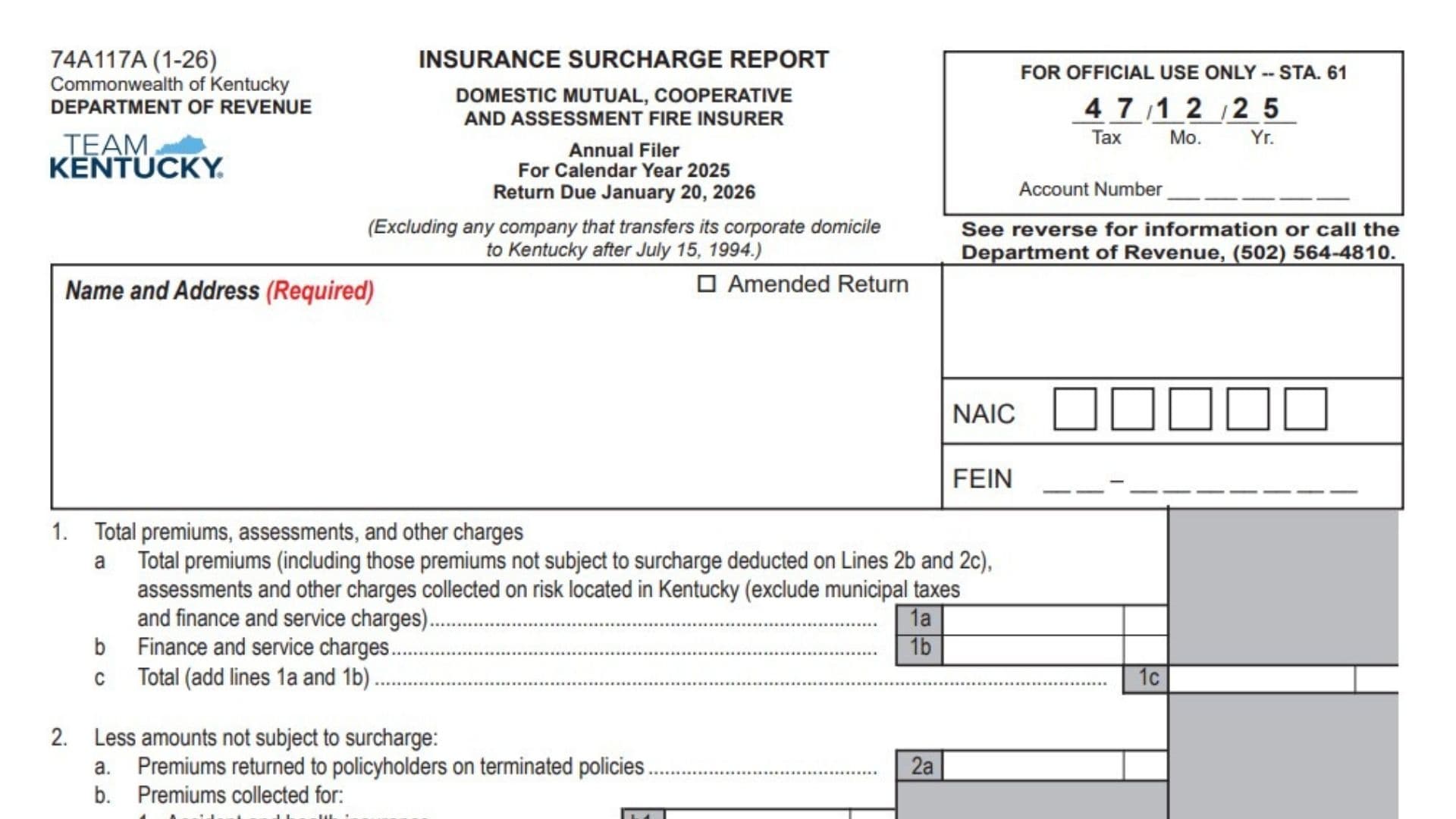
Kentucky Form 74A117A is an Insurance Surcharge Report used by qualifying domestic mutual, cooperative, and assessment fire insurers to report premiums, assessments, finance charges, service charges, and other amounts collected on insurance risks located in Kentucky. This version is an annual report for the 2025 calendar year and is due January 20, 2026. It generally applies to an insurer that qualifies for annual filing because its surcharge liability was less than $1,000 in each of the two preceding calendar years. The form begins with the insurer’s identifying information and then calculates the amount subject to Kentucky’s insurance premium surcharge. The insurer first reports its total collected premiums and related charges, including amounts that may later qualify for an exemption. It then subtracts returned premiums, exempt insurance categories, and amounts collected from qualifying governmental or nonprofit policyholders. The remaining amount is multiplied by the current surcharge rate of 0.018. Any applicable penalties, interest, or documented adjustments are then added or subtracted to determine the final balance due. The report must be filed even when no premiums were collected during the reporting period. An authorized principal officer must certify the report, and a paid preparer must complete the preparer section when someone other than the company prepares it.
Who Should File Form 74A117A?
This annual report is designed for a domestic mutual, cooperative, or assessment fire insurer that is required to collect the Kentucky insurance premium surcharge.
The annual filing option generally applies when the insurer’s surcharge liability was less than $1,000 in each of the previous two calendar years.
A qualifying annual filer reports and pays all surcharge amounts collected during the calendar year by January 20 of the following year.
This particular version excludes a company that transferred its corporate domicile to Kentucky after July 15, 1994.
Insurers Subject To The Surcharge
Kentucky’s surcharge requirement generally applies to domestic, foreign, and alien insurers other than life and health insurers when they are subject to, or exempt from, Kentucky insurance premiums taxes under the applicable insurance tax laws.
The surcharge must be collected from policyholders at the same time and in the same manner as the related insurance premium, assessment, or other insurance charge.
The insurer and its agents may not keep any part of the surcharge as a collection fee or commission.
Filing Is Required Even With No Premiums
Every insurer must file a report for each assigned reporting period, whether it files monthly or annually.
A report is still required when the insurer collected no premiums during the period. In that situation, complete the identifying information, enter zero where appropriate, sign the report, and file it by the deadline.
When To File Form 74A117A
For calendar year 2025, the annual report is due January 20, 2026.
An annual filer reports the surcharge collected during the entire calendar year and submits the corresponding payment with the report.
A company that does not qualify for annual filing generally reports and pays monthly. Monthly reports are normally due by the twentieth day of the following month.

How To File Form 74A117A
Review The Reporting Period
Confirm that the report covers calendar year 2025.
Do not combine amounts from a different reporting year with the figures reported on this return.
Gather The Required Records
Before completing the report, gather records showing:
- Premiums collected on risks located in Kentucky
- Assessments and other insurance charges collected
- Finance and service charges
- Premiums returned on terminated policies
- Premiums from exempt insurance categories
- Premiums collected from exempt or partially exempt policyholders
- Online payment confirmation information
- Supporting documents for any adjustment
- Penalty and interest calculations, when applicable
Report collected amounts rather than premiums that were only billed or recorded as receivables.
Complete The Report Even When No Amount Is Due
A zero balance does not remove the filing requirement.
When no premiums were collected, enter zero in the applicable financial fields and complete the certification section before filing.
Pay By Check
Make the check payable to:
Kentucky State Treasurer
Send the report and payment to the appropriate address.
Regular Mailing Address
Kentucky Department of Revenue
P.O. Box 1303
Frankfort, KY 40602-1303
Overnight Delivery Address
Kentucky Department of Revenue
501 High Street
Frankfort, KY 40601-2103
Pay Online
When paying electronically:
- Check the “Paid online” box.
- Enter the payment confirmation number.
- Attach the Payment Schedule Confirmation page.
- Send the report and confirmation page to one of the listed addresses.
Do not enter an online confirmation number unless the electronic payment has been successfully scheduled or completed.
How To Complete The Identification Section
For Official Use Only
Leave the box marked for official use blank.
Do not enter anything in the tax period, account number, station, month, or year fields located inside this box. These fields are reserved for processing by the Kentucky Department of Revenue.
Name And Address
Enter the insurer’s complete legal name and mailing address.
This field is required. Include:
- Legal company name
- Street number and street name
- Suite, floor, or unit number when applicable
- City
- State
- ZIP Code
Use the same legal name and address connected to the insurer’s Kentucky tax account.
Amended Return
Check the “Amended Return” box only when correcting a report that was filed previously for the same reporting period.
Leave the box blank when submitting the original annual report.
When filing an amended report, enter the corrected figures throughout the form rather than reporting only the difference between the original and revised amounts.
NAIC
Enter the insurer’s National Association of Insurance Commissioners identification number.
Use the five boxes provided and enter one digit in each box.
Confirm that the NAIC number belongs to the legal entity named on the report.
FEIN
Enter the insurer’s nine-digit Federal Employer Identification Number.
Enter the first two digits before the hyphen and the remaining seven digits after it.
Do not use an owner’s Social Security number in place of the company’s FEIN.
How To Complete Line 1: Total Premiums, Assessments, And Other Charges
Line 1 records the insurer’s total collections before the permitted exclusions and deductions are removed.
Line 1a: Total Premiums, Assessments, And Other Charges
Enter all premiums, assessments, and other insurance charges actually collected on risks located in Kentucky.
Include premiums that are not subject to the surcharge when those amounts will later be deducted on Lines 2b or 2c.
Include qualifying amounts collected for:
- Insurance premiums
- Assessments
- Other insurance-related charges
- Kentucky-located risks
Do not include municipal premium taxes on this line.
Do not include finance and service charges on Line 1a because they must be reported separately on Line 1b.
Report only amounts that were collected. Do not report premiums that were merely billed but had not yet been received.
Line 1b: Finance And Service Charges
Enter all finance charges and service charges collected in connection with the covered insurance transactions.
These charges must be reported separately, even though they are included when calculating the total collections on Line 1c.
Do not combine these charges with the premium amount entered on Line 1a.
Line 1c: Total Collections
Add Line 1a and Line 1b.
Enter the combined amount on Line 1c.
The calculation is:
Line 1a + Line 1b = Line 1c
This is the insurer’s total collected amount before subtracting returned premiums and exempt amounts.
How To Complete Line 2: Amounts Not Subject To The Surcharge
Line 2 removes amounts that are not subject to the Kentucky insurance premium surcharge.
Do not enter the same premium in more than one deduction category.
Line 2a: Premiums Returned On Terminated Policies
Enter premiums returned to policyholders because the related policies were terminated.
A policy may have been terminated by either the insured or the insurer.
Use this line only when the premium was returned to the policyholder and the corresponding surcharge was also returned.
Do not claim exempt premiums on this line merely because they were not subject to the surcharge.
A refund or credit is permitted for a returned premium on a terminated policy, not simply for an exempt insurance category.
Any separate refund request must be submitted in writing.
Line 2b: Premiums Collected For Exempt Insurance Categories
Use Lines 2b1 through 2b6 to report premiums collected from specified types of insurance that are not subject to the surcharge.
These premiums should generally have been included in the total reported on Line 1a before being deducted here.
Line 2b1: Accident And Health Insurance
Enter premiums collected for accident and health insurance.
Do not include unrelated property, casualty, or fire insurance premiums in this field.
Line 2b2: Federally Insured Crop Insurance
Enter premiums collected for crop insurance that is federally insured.
Do not enter crop insurance premiums here unless the coverage meets the federal insurance requirement.
Line 2b3: Federally Insured Flood Insurance
Enter premiums collected for flood insurance that is federally insured.
Keep this amount separate from other property coverage that may remain subject to the surcharge.
Line 2b4: Reinsurance
Enter premiums received for reinsurance.
Do not use this line for a direct insurance policy issued to an individual or business policyholder.
Line 2b5: Title Insurance
Enter premiums collected for title insurance.
Report only premiums related to qualifying title insurance coverage.
Line 2b6: Workers’ Compensation Insurance
Enter premiums collected for workers’ compensation insurance.
Workers’ compensation premiums are exempt from the surcharge and must not be treated as returned premiums on Line 2a.
Line 2b: Total Exempt Insurance Premiums
Add Lines 2b1 through 2b6.
Enter the combined total on Line 2b.
The calculation is:
Line 2b1 + Line 2b2 + Line 2b3 + Line 2b4 + Line 2b5 + Line 2b6 = Line 2b
Verify that each amount is included only once.
Line 2c: Premiums Collected From Exempt Policyholders
Use Lines 2c1 through 2c4 to report qualifying premiums collected from governmental or nonprofit policyholders.
The exemption may depend on both the policyholder’s status and the type of property covered.
Line 2c1: Federal Government
Enter premiums collected directly from the federal government.
Do not place premiums from a federal contractor on this line merely because the work relates to a federal project.
The identity of the policyholder is important when determining whether the exemption applies.
Line 2c2: Resident Nonprofit Educational And Charitable Institutions
Enter qualifying premiums collected from Kentucky resident educational or charitable institutions that have tax-exempt status under Section 501(c)(3) of the Internal Revenue Code.
Confirm both the institution’s resident status and its qualifying nonprofit classification.
Do not enter premiums from a for-profit school, business, or organization in this field.
Line 2c3: Resident Nonprofit Religious Institutions
Enter qualifying premiums collected from Kentucky resident nonprofit religious institutions.
The exemption on this line applies only to insurance covering:
- Real property
- Tangible property
- Intangible property
Do not include premiums for coverage that falls outside these property categories.
Line 2c4: State And Local Government
Enter qualifying premiums collected from state or local governmental entities for real property coverage.
The exemption applies only to the qualifying real property coverage described for these policyholders.
Do not automatically treat every policy involving a governmental entity as exempt.
Line 2c: Total Premiums From Exempt Policyholders
Add Lines 2c1 through 2c4.
Enter the combined amount on Line 2c.
The calculation is:
Line 2c1 + Line 2c2 + Line 2c3 + Line 2c4 = Line 2c
How To Complete Line 2d: Total Amount Not Subject To Surcharge
Add the following amounts:
- Line 2a
- Line 2b
- Line 2c
Enter the total on Line 2d.
The calculation is:
Line 2a + Line 2b + Line 2c = Line 2d
This line represents all returned premiums and qualifying exempt amounts deducted from total collections.
Review the entries carefully to make sure the same premium has not been deducted twice.
How To Complete Line 3: Amount Subject To Surcharge
Subtract Line 2d from Line 1c.
Enter the result on Line 3.
The calculation is:
Line 1c − Line 2d = Line 3
This is the net amount subject to the Kentucky insurance premium surcharge.
When the result is zero, enter zero rather than leaving the field blank.
How To Complete Line 4: Surcharge Due
Multiply the amount on Line 3 by 0.018.
Enter the result on Line 4.
The calculation is:
Line 3 × 0.018 = Line 4
A rate of 0.018 is equal to 1.8%.
Use the exact net amount from Line 3 and apply the rate before adding any penalty, interest, or adjustment.
How To Complete Line 5: Penalty
Enter any penalty that applies because the report or payment was late.
Two different penalties may apply:
- A late-filing penalty
- A late-payment penalty
Late-Filing Penalty
The penalty for filing the report after the due date is 2% of the surcharge due for each 30-day period, or part of a 30-day period, that the report remains late.
The maximum late-filing penalty is 20% of the surcharge due.
The minimum penalty is $10.
Late-Payment Penalty
The penalty for paying the surcharge after the due date is also 2% of the unpaid surcharge for each 30-day period, or part of a 30-day period, that the payment remains overdue.
The maximum late-payment penalty is 20%.
The minimum penalty is $10.
Enter the applicable total penalty on Line 5.
When both filing and payment are late, determine whether both penalties apply to the account.
How To Complete Line 6: Interest
Enter the interest due on surcharge liabilities that were not paid by the original due date.
Interest is calculated from the original report due date through the actual payment date.
Use Kentucky’s applicable tax interest rate for the relevant period.
Interest may continue to accumulate until the unpaid balance is paid in full.
Enter the calculated interest on Line 6.
Do not combine the interest with the penalty entered on Line 5.
How To Complete Line 7: Amount Due
Add Lines 4, 5, and 6.
Enter the result on Line 7.
The calculation is:
Line 4 + Line 5 + Line 6 = Line 7
This line combines the surcharge, penalties, and interest before any adjustment is applied.
How To Complete Line 8: Adjustments
Enter any approved or supportable adjustment that affects the amount due.
An adjustment may increase or decrease the balance.
Attach documentation explaining:
- The reason for the adjustment
- The reporting period affected
- How the amount was calculated
- Whether the adjustment increases or reduces the liability
- Any prior payment, notice, or correspondence related to it
Use a positive amount for an increase and clearly identify a subtraction or credit when the adjustment reduces the balance.
Do not enter an unsupported estimate.
How To Complete Line 9: Total Amount Due
Apply the Line 8 adjustment to the amount on Line 7.
Add Line 8 when the adjustment increases the liability.
Subtract Line 8 when it reduces the liability.
The calculation is:
Line 7 plus or minus Line 8 = Line 9
Enter the final amount due on Line 9.
This should match the payment being submitted or scheduled online.
How To Complete The Online Payment Section
Paid Online Checkbox
Check this box when the surcharge payment was made or scheduled electronically.
Leave it blank when paying by check.
Confirmation Number
Enter the payment confirmation number issued for the online transaction.
Copy the number carefully and confirm that it relates to the correct taxpayer, tax type, reporting period, and payment amount.
Payment Schedule Confirmation Page
Attach the Payment Schedule Confirmation page to the completed report.
The payment confirmation page supports the electronic transaction but does not replace the requirement to submit the report.
How To Complete The Certification Section
The report must be certified by a principal officer of the company.
By signing, the officer confirms that the report has been examined and is true, correct, and complete to the best of the officer’s knowledge and belief.
Review all identification details, deductions, calculations, and attachments before signing.
Principal Officer’s Signature
A principal officer of the insurer must sign this field.
The signer should have authority to certify the report on behalf of the company.
Do not use a typed name as a substitute for the required signature unless an accepted electronic filing method permits it.
Principal Officer’s Title
Enter the officer’s official company title.
Examples may include:
- President
- Vice president
- Treasurer
- Chief financial officer
- Controller
- Tax officer
Principal Officer’s Printed Name
Print or type the full name of the principal officer who signed the report.
Make sure the printed name clearly identifies the signer.
Date
Enter the date on which the principal officer signed the report.
Use the actual signing date.
Principal Officer’s Email Address
Enter a current email address for the signing officer or an appropriate company contact.
Use an address that is monitored regularly in case the Department of Revenue requests additional information.
Principal Officer’s Telephone Number
Enter a working telephone number for the principal officer or responsible company representative.
Include the area code.
How To Complete The Preparer Section
Complete this section when an accountant, tax professional, employee, or other preparer completed the report.
When the principal officer also prepared the report and no separate preparer was involved, follow the company’s normal filing procedures for any nonapplicable preparer fields.
Preparer’s Signature
The person who prepared the report should sign this field.
The signature identifies the individual responsible for preparing the reported figures.
Preparer’s Title
Enter the preparer’s professional or company title.
Examples may include accountant, tax manager, controller, return preparer, or authorized representative.
Preparer’s Printed Name
Print or type the preparer’s complete name.
The name should match the person who signed the preparer certification.
Preparer’s Date
Enter the date on which the preparer signed the report.
Preparer’s Email Address
Enter a current email address for the preparer.
Use an address where questions about the calculations and supporting records can be received.
Preparer’s Telephone Number
Enter the preparer’s telephone number, including the area code.
Special Rules For Returned Premiums
A deduction for returned premiums is allowed only when the premiums were returned to policyholders on terminated policies.
The associated surcharge must also be returned to the policyholder.
Do not claim a returned-premium deduction for an exempt premium merely because the original transaction was not subject to the surcharge.
For example, workers’ compensation premiums belong in the workers’ compensation exemption field rather than the returned-premium field.
Any request for a refund must be made in writing.
Exempt Insurance Categories
The following insurance premiums are identified as exempt from the surcharge:
- Accident and health insurance
- Federally insured crop insurance
- Federally insured flood insurance
- Reinsurance
- Title insurance
- Workers’ compensation insurance
- Premiums received by life and health insurers
- Municipal premium taxes
Report the applicable collected premiums in the designated exemption fields rather than omitting them from the initial total when the form requires them to be included on Line 1a.
Exempt Or Partially Exempt Policyholders
Qualifying exemptions may apply to premiums collected from:
- The federal government
- Resident nonprofit educational institutions with 501(c)(3) status
- Resident nonprofit charitable institutions with 501(c)(3) status
- Resident nonprofit religious institutions for qualifying property coverage
- State government for real property coverage
- Local governments for real property coverage
Check the policyholder’s legal status and the type of coverage before claiming an exemption.
An organization’s nonprofit or governmental connection does not automatically exempt every policy it purchases.
Surety And Bond Premiums On Public Works Projects
Premiums collected for surety coverage and bonds connected to public works projects are subject to the surcharge when the contractor is the policyholder.
The surcharge does not become exempt merely because a governmental entity is named as the obligee.
The determining factor is the identity of the policyholder, not only the party benefiting from the bond.
Report these premiums as taxable when the contractor is the insured policyholder.
Final Review Checklist
Before filing Form 74A117A, confirm that:
- The report covers calendar year 2025.
- The annual filing deadline is January 20, 2026.
- The company qualifies to use the annual report.
- The report is filed even when no premiums were collected.
- The required name and address field is complete.
- The amended-return box is checked only when correcting a prior report.
- The NAIC number is accurate.
- The FEIN contains all nine digits.
- Line 1a contains only premiums and related charges actually collected.
- Municipal taxes are excluded from Line 1a.
- Finance and service charges are entered on Line 1b.
- Line 1c equals Lines 1a and 1b combined.
- Returned premiums on Line 2a relate to terminated policies.
- The related surcharge was also returned to the policyholder.
- Lines 2b1 through 2b6 contain the correct exempt insurance premiums.
- Line 2b is the total of Lines 2b1 through 2b6.
- Lines 2c1 through 2c4 contain qualifying policyholder exemptions.
- Line 2c is the total of Lines 2c1 through 2c4.
- Line 2d equals Lines 2a, 2b, and 2c combined.
- Line 3 equals Line 1c minus Line 2d.
- Line 4 equals Line 3 multiplied by 0.018.
- Penalties are entered on Line 5 when applicable.
- Interest is entered separately on Line 6.
- Line 7 equals Lines 4, 5, and 6 combined.
- Every Line 8 adjustment has supporting documentation.
- Line 9 reflects Line 7 plus or minus Line 8.
- The online-payment box and confirmation number are completed when applicable.
- The Payment Schedule Confirmation page is attached for an online payment.
- A principal officer has signed and dated the report.
- The officer’s printed name, title, email, and telephone number are complete.
- The preparer section is completed when another person prepared the report.
- The payment amount agrees with the final balance on Line 9.
- The report is sent to the correct address by the filing deadline.