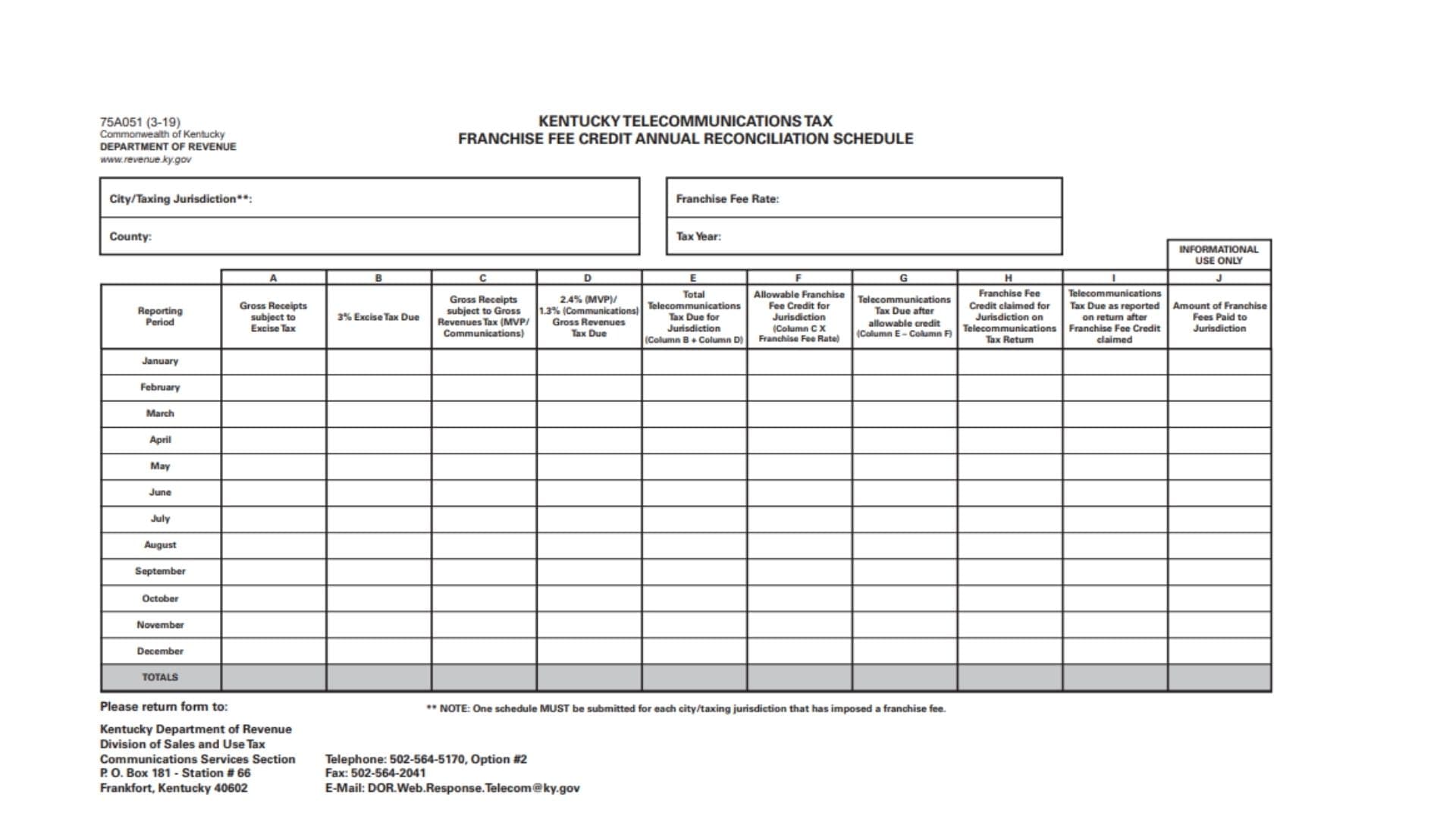
Kentucky Form 75A051, the Kentucky Telecommunications Tax Franchise Fee Credit Annual Reconciliation Schedule, is used to organize and reconcile telecommunications tax information for a city or other taxing jurisdiction that has imposed a franchise fee. The schedule provides a month-by-month comparison of gross receipts subject to Kentucky telecommunications taxes, the related excise and gross revenues taxes, the franchise fee credit calculated for the jurisdiction, the credit actually claimed on the telecommunications tax return, the resulting telecommunications tax due, and the amount of franchise fees paid to the jurisdiction. The form covers January through December and includes a final Totals row so the filer can reconcile the entire tax year. It separates gross receipts subject to the 3% excise tax from gross receipts subject to the gross revenues tax applicable to multichannel video programming, or MVP, and communications services. The gross revenues tax column identifies a 2.4% rate for MVP and a 1.3% rate for communications. The schedule also requires the filer to identify the city or taxing jurisdiction, county, franchise fee rate, and tax year before reporting monthly amounts. One of the most important filing requirements is that a separate schedule must be prepared for every city or taxing jurisdiction that has imposed a franchise fee. The form also contains an informational-use-only column for reporting the amount of franchise fees actually paid to the jurisdiction. Once the annual schedule is completed and checked, it is returned to the Kentucky Department of Revenue, Division of Sales and Use Tax, Communications Services Section.
Who Should Complete Kentucky Form 75A051?
This schedule applies when a telecommunications taxpayer needs to reconcile a franchise fee credit associated with a Kentucky city or taxing jurisdiction that imposed a franchise fee.
The form is organized around individual jurisdictions. It should not be used as one combined schedule covering multiple cities that each imposed separate franchise fees.
If your business has franchise fee activity in more than one applicable city or taxing jurisdiction, prepare a separate schedule for each one.
How To File Kentucky Form 75A051
Before completing the schedule, gather your monthly telecommunications tax records for the entire tax year.
You will need information about gross receipts, gross revenues, excise tax, gross revenues tax, franchise fee rates, franchise fee credits, amounts reported on telecommunications tax returns, and franchise fees paid to the jurisdiction.
Identify The Jurisdiction
Enter the city or taxing jurisdiction for which the schedule is being prepared.
Also enter the county, applicable franchise fee rate, and tax year.
Complete Each Monthly Row
The schedule provides separate rows for January through December.
For each month, enter the applicable figures across Columns A through J.
Use the same jurisdiction throughout the entire schedule.
Complete The Totals Row
After all applicable months have been entered, total each column and place the annual result in the Totals row.
Review the totals against your telecommunications tax returns and franchise fee records.
Prepare A Separate Schedule For Each Jurisdiction
One schedule must be submitted for each city or taxing jurisdiction that has imposed a franchise fee.
Do not combine multiple applicable jurisdictions into one annual reconciliation schedule.
Return The Completed Schedule
Send the completed form to:
Kentucky Department of Revenue
Division of Sales and Use Tax
Communications Services Section
P.O. Box 181 – Station #66
Frankfort, Kentucky 40602

How To Complete Kentucky Form 75A051 Line By Line
The following instructions cover each identification field, reporting-period row, and Columns A through J.
Form Identification
Form Number
The schedule is identified as Form 75A051 with a revision date of 3-19.
This information is already printed on the form and does not require an entry.
Kentucky Telecommunications Tax Franchise Fee Credit Annual Reconciliation Schedule
This title identifies the purpose of the schedule.
No information needs to be entered in the title area.
Jurisdiction Information
The first section identifies the location and tax year covered by the reconciliation schedule.
City/Taxing Jurisdiction
Enter the name of the city or other taxing jurisdiction for which the franchise fee credit is being reconciled.
Use only one applicable city or taxing jurisdiction on each schedule.
The form specifically requires a separate schedule for every city or taxing jurisdiction that has imposed a franchise fee.
County
Enter the Kentucky county associated with the city or taxing jurisdiction reported above.
Make sure the county corresponds with the jurisdiction covered by the schedule.
Franchise Fee Rate
Enter the franchise fee rate applicable to the jurisdiction.
This rate is important because it is used when calculating the allowable franchise fee credit in Column F.
Enter the rate accurately before completing the monthly calculations.
Tax Year
Enter the tax year covered by the annual reconciliation.
The monthly entries from January through December should all relate to this tax year.
Reporting Period
The first column of the table identifies the reporting period.
The schedule provides a separate row for every month of the year.
January
Enter all applicable January amounts across Columns A through J.
February
Enter all applicable February amounts across Columns A through J.
March
Enter the March figures for the same jurisdiction.
April
Enter the applicable April amounts.
May
Enter the applicable May amounts.
June
Enter the applicable June amounts.
July
Enter the applicable July amounts.
August
Enter the applicable August amounts.
September
Enter the applicable September amounts.
October
Enter the applicable October amounts.
November
Enter the applicable November amounts.
December
Enter the applicable December amounts.
Use the same reporting method throughout the year so the annual totals can be reconciled correctly.
Totals
After completing January through December, add the amounts in each applicable column.
Enter the annual total at the bottom of that column in the Totals row.
Check your arithmetic before submitting the schedule.
Column A — Gross Receipts Subject To Excise Tax
Enter the gross receipts for the reporting month that are subject to the Kentucky excise tax.
This column records the taxable receipts used in determining the excise tax shown in Column B.
Enter the applicable amount separately for each month.
At year-end, add the monthly Column A amounts and enter the result in the Totals row.
Column B — 3% Excise Tax Due
Enter the 3% excise tax due for the reporting period.
Column B corresponds with the gross receipts reported in Column A.
When determining the amount, apply the applicable 3% excise tax treatment to the gross receipts subject to that tax.
For each reporting period, make sure the amount in Column B corresponds with the taxable receipts shown in Column A.
Add all monthly Column B amounts to determine the annual total.
Column C — Gross Receipts Subject To Gross Revenues Tax
Enter gross receipts that are subject to the gross revenues tax for MVP or communications services.
MVP refers to multichannel video programming.
This column provides the gross-receipts base used in determining the gross revenues tax amount reported in Column D and the allowable franchise fee credit calculation in Column F.
Enter the applicable amount for each month.
At the end of the year, total all Column C entries.
Column D — 2.4% MVP Or 1.3% Communications Gross Revenues Tax Due
Enter the gross revenues tax due for the reporting period.
The column identifies two rates:
2.4% for MVP
and
1.3% for communications
Use the rate that applies to the type of gross receipts being reported.
The amount in this column relates to the gross receipts reported in Column C.
Make sure you use the applicable tax rate rather than automatically applying the same percentage to every type of telecommunications activity.
Complete Column D for each month and add the monthly figures for the annual total.
Column E — Total Telecommunications Tax Due For Jurisdiction
Column E combines the tax amounts from Columns B and D.
The form provides the following calculation:
Column B + Column D = Column E
Step 1
Take the 3% excise tax due reported in Column B.
Step 2
Add the applicable MVP or communications gross revenues tax due from Column D.
Step 3
Enter the result in Column E.
For example, if Column B contains one tax amount and Column D contains another, their combined total is the telecommunications tax due for the jurisdiction before the allowable franchise fee credit is subtracted.
Perform this calculation for every applicable month.
Then add the monthly Column E amounts for the annual total.
Column F — Allowable Franchise Fee Credit For Jurisdiction
Column F calculates the allowable franchise fee credit for the applicable city or taxing jurisdiction.
The form provides the following calculation:
Column C × Franchise Fee Rate = Column F
Step 1
Take the gross receipts subject to gross revenues tax entered in Column C.
Step 2
Use the franchise fee rate entered at the top of the schedule.
Step 3
Multiply the Column C amount by the applicable franchise fee rate.
Step 4
Enter the calculated allowable franchise fee credit in Column F.
Complete this calculation separately for each reporting month.
Make sure the same jurisdiction and corresponding franchise fee rate are used throughout the schedule.
At year-end, add the monthly Column F amounts and enter the result in the Totals row.
Column G — Telecommunications Tax Due After Allowable Credit
Column G shows the telecommunications tax remaining after subtracting the allowable franchise fee credit.
The calculation shown on the schedule is:
Column E − Column F = Column G
Step 1
Start with the total telecommunications tax due for the jurisdiction reported in Column E.
Step 2
Subtract the allowable franchise fee credit calculated in Column F.
Step 3
Enter the resulting amount in Column G.
Repeat the calculation for each month.
Then add the monthly Column G amounts to determine the annual total.
Column H — Franchise Fee Credit Claimed For Jurisdiction On Telecommunications Tax Return
Enter the amount of franchise fee credit that was actually claimed for the jurisdiction on the telecommunications tax return for that reporting period.
This column is based on the credit reported on the corresponding tax return, rather than merely repeating the allowable-credit calculation without checking the return.
Review the applicable telecommunications tax return for each month and enter the franchise fee credit claimed for this specific jurisdiction.
If the schedule is being used to reconcile annual activity, make sure the monthly amounts correspond with the amounts actually claimed during the year.
Add all monthly Column H entries for the annual total.
Column I — Telecommunications Tax Due As Reported On Return After Franchise Fee Credit Claimed
Enter the telecommunications tax due as it was reported on the applicable return after the franchise fee credit was claimed.
This column should reflect the amount appearing on the telecommunications tax return after application of the franchise fee credit.
Do not confuse Column I with Column G.
Column G is based on the schedule’s calculation of telecommunications tax due after the allowable credit, while Column I asks for the amount reported on the tax return after the franchise fee credit actually claimed.
Comparing these figures can help reconcile the calculated credit with the credit and resulting tax reported during the year.
Complete Column I for every applicable month and total the column at year-end.
Column J — Amount Of Franchise Fees Paid To Jurisdiction
Column J records the amount of franchise fees paid to the city or taxing jurisdiction.
This column is marked Informational Use Only.
Enter the amount of franchise fees actually paid to the jurisdiction for each applicable reporting period.
Do not treat this column as another tax calculation merely because it appears beside the tax columns.
The purpose of Column J is to provide information about the franchise fees paid.
Add the monthly amounts and enter the annual total in the Totals row.
Understanding The Informational Use Only Label
The Informational Use Only heading applies to Column J.
This means the column is used to report the amount of franchise fees paid to the jurisdiction as informational data on the reconciliation schedule.
Continue to complete the column when applicable, even though it is distinguished from the calculation columns.
How The Main Columns Work Together
The annual reconciliation follows a logical sequence.
Excise Tax Side
Column A reports gross receipts subject to excise tax.
Column B reports the related 3% excise tax due.
Gross Revenues Tax Side
Column C reports gross receipts subject to the MVP or communications gross revenues tax.
Column D reports the related tax due using the applicable 2.4% MVP or 1.3% communications rate.
Total Telecommunications Tax
Column E combines the amounts from Columns B and D:
B + D = E
Allowable Franchise Fee Credit
Column F calculates the jurisdiction’s allowable franchise fee credit:
C × Franchise Fee Rate = F
Tax Due After Allowable Credit
Column G subtracts the allowable credit from total telecommunications tax:
E − F = G
Credit Actually Claimed
Column H records the franchise fee credit actually claimed for that jurisdiction on the telecommunications tax return.
Tax Reported After Credit
Column I records the telecommunications tax due that appeared on the return after the claimed franchise fee credit was applied.
Franchise Fees Paid
Column J records the actual amount of franchise fees paid to the jurisdiction and is designated for informational use.
One Schedule Per City Or Taxing Jurisdiction
The schedule contains an important filing requirement.
One separate schedule must be submitted for each city or taxing jurisdiction that has imposed a franchise fee.
For example, if your business must reconcile franchise fee credits for several different qualifying jurisdictions, do not combine all of those jurisdictions into a single schedule.
Complete the identifying information, monthly activity, and annual totals separately for each jurisdiction.
This is especially important because the franchise fee rate can depend on the jurisdiction.
How To Complete The Totals Row
After all twelve monthly reporting periods have been completed, calculate the annual total for every applicable column.
Column A Total
Add the gross receipts subject to excise tax from January through December.
Column B Total
Add the monthly 3% excise tax amounts.
Column C Total
Add the gross receipts subject to the MVP or communications gross revenues tax.
Column D Total
Add the monthly gross revenues tax due amounts.
Column E Total
Add the monthly total telecommunications tax amounts.
Column F Total
Add the monthly allowable franchise fee credit amounts.
Column G Total
Add the monthly telecommunications tax due after allowable credits.
Column H Total
Add the franchise fee credits actually claimed for the jurisdiction.
Column I Total
Add the monthly telecommunications tax due amounts reported on the returns after franchise fee credits were claimed.
Column J Total
Add the franchise fees paid to the jurisdiction during the year.
Review the totals against your annual tax and franchise fee records before submitting the schedule.
Where To Send Kentucky Form 75A051
Return the completed schedule to:
Kentucky Department of Revenue
Division of Sales and Use Tax
Communications Services Section
P.O. Box 181 – Station #66
Frankfort, Kentucky 40602
Department Contact Information
The form also provides contact information for questions concerning the schedule.
Telephone
502-564-5170, Option #2
Fax
502-564-2041
DOR.Web.Response.Telecom@ky.gov
Use the Communications Services Section contact information when assistance concerning this reconciliation schedule is needed.
Final Review Before Submitting Kentucky Form 75A051
Before submitting the annual reconciliation schedule, verify that the correct City/Taxing Jurisdiction, County, Franchise Fee Rate, and Tax Year have been entered. Confirm that a separate schedule has been prepared for every applicable jurisdiction that imposed a franchise fee. Review each January-through-December row and make sure Column A contains gross receipts subject to excise tax, Column B contains the 3% excise tax due, Column C contains gross receipts subject to the applicable gross revenues tax, and Column D contains the applicable 2.4% MVP or 1.3% communications gross revenues tax due. Verify that Column E equals Column B plus Column D, Column F reflects Column C multiplied by the franchise fee rate, and Column G equals Column E minus Column F. Compare Column H with the franchise fee credit actually claimed on the telecommunications tax return, Column I with the telecommunications tax due reported after the credit was claimed, and Column J with the franchise fees actually paid to the jurisdiction. Finally, calculate the Totals row for every applicable column, compare the annual amounts with your records, and return the completed schedule to the Kentucky Department of Revenue, Division of Sales and Use Tax, Communications Services Section.