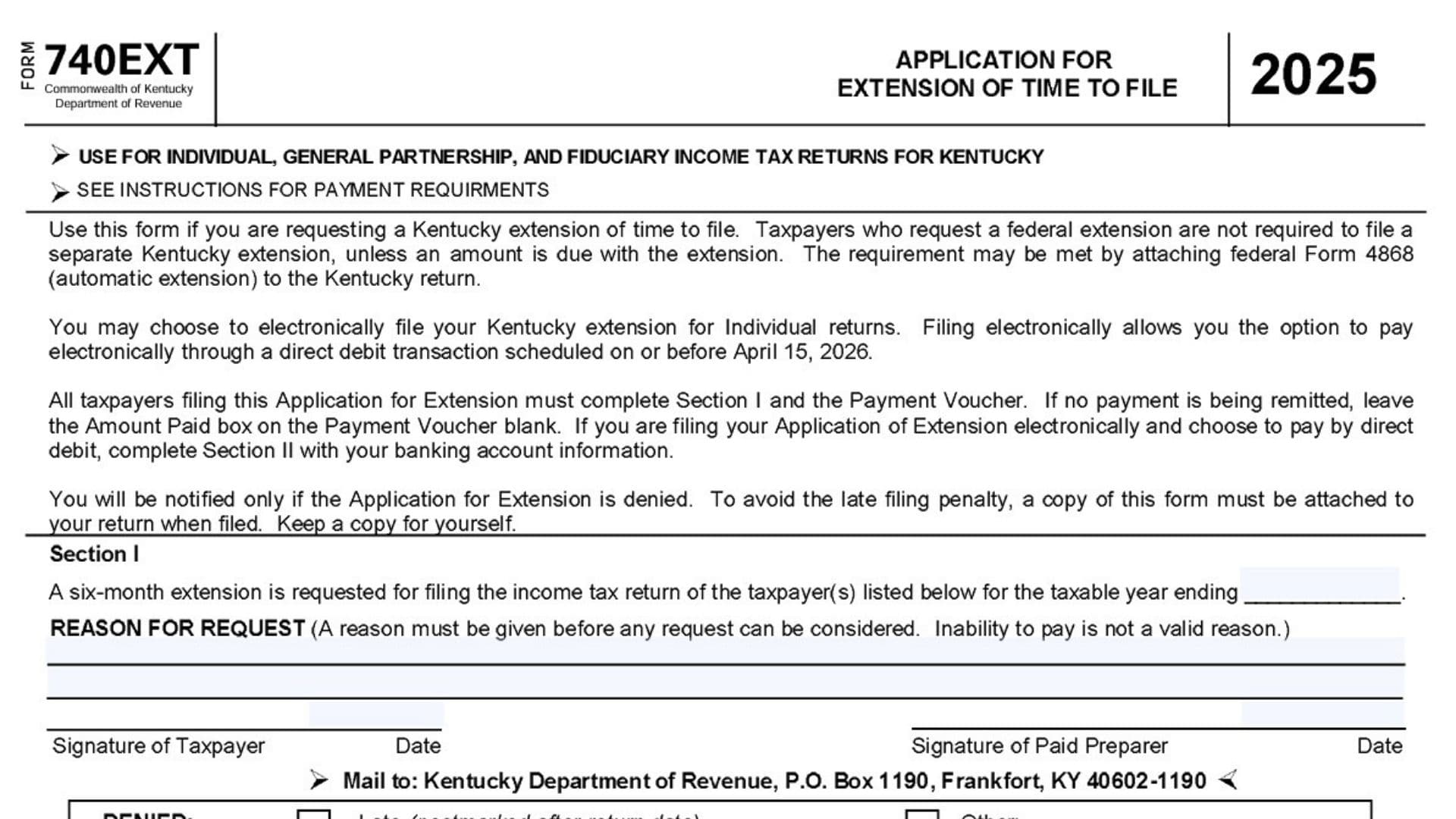
Kentucky Form 740EXT is the state application used to request extra time to file certain Kentucky income tax returns. It is generally used by individuals, fiduciaries, and general partnerships when they need more time beyond the original filing deadline to submit the return itself. This form is for an extension to file, not an extension to pay, which means any expected tax due should still be paid by the original due date to reduce the risk of penalties and interest. In many cases, taxpayers who already received a federal extension do not need to file a separate Kentucky extension unless they are sending a payment with the extension request. That detail is important because many filers assume that getting more time to file automatically means they can delay payment too, but that is not how extensions usually work. The form is also designed to work with both paper filing and certain electronic filing situations, especially for individual returns. If you are paying electronically, the form includes a direct debit section so the payment can be taken from your bank account on the scheduled date. If you are mailing a payment, you also need to complete the payment voucher portion and send it with the amount due. To avoid confusion later, it is smart to keep a copy of the completed extension for your records and attach a copy when you eventually file the return.
How To File Kentucky Form 740EXT
Before filing, decide whether you actually need to send this form. If you already have a federal extension and you do not owe Kentucky tax with the extension, you may not need to submit a separate state extension form.
If you do need to file it, complete Section I and the payment voucher. If you are mailing a payment, send the voucher with your check, but do not attach the check directly to the voucher. If you are filing an electronic extension for an individual return and want to pay through direct debit, complete Section II with your bank information and payment date.
Make sure the information is neat, complete, and consistent with your tax records. If the form is denied, the state will notify you, so if you do not hear anything, that usually means the request was not rejected.

How To Complete Kentucky Form 740EXT
Follow the form carefully and complete every field that applies to you. Here is a clear line-by-line guide in the same order the form is laid out.
Header Information
Line 1: Enter the tax year for which you are requesting the extension. Make sure the year ending date matches the tax year shown on the form.
Line 2: Check the type of return you are requesting the extension for. Choose Individual, Fiduciary, or General Partnership, whichever matches your filing situation.
Line 3: If you are completing the taxpayer identification area, enter your Social Security number if you are filing as an individual. If the return belongs to an entity that uses a federal employer identification number, enter the FEIN instead.
Line 4: If filing jointly or if spouse information is requested, enter the spouse’s Social Security number in the space provided.
Name And Address Section
Line 5: Enter the taxpayer’s last name. Use the legal last name that matches tax records.
Line 6: Enter the taxpayer’s first name. Write the full first name, not just a nickname.
Line 7: If the form asks for spouse information, enter the spouse’s name in the spouse name box. Use the name exactly as it appears on tax records.
Line 8: Enter the street address or post office box. Use the mailing address where you receive important tax correspondence.
Line 9: Enter the city, town, or post office name. Make sure it matches the mailing address you entered above.
Line 10: Enter the state abbreviation. Use the standard two-letter postal abbreviation.
Line 11: Enter the ZIP code. Double-check this field because mailing errors can cause delays.
Section I
Line 12: Complete the statement requesting a six-month extension for the taxable year ending on the date shown. This identifies the period for which the filing extension is being requested.
Line 13: In the Reason For Request area, explain why you need the extension. Give a real filing-related reason that is specific enough to be considered. Do not list inability to pay as the reason, because that is not considered a valid basis for the request.
Line 14: Sign on the Signature Of Taxpayer line. The taxpayer should personally sign unless an authorized signer is allowed to sign on their behalf.
Line 15: Enter the date next to the taxpayer signature. Use the date the form is actually signed.
Line 16: If a paid preparer completed the form and the preparer signature line applies, the preparer should sign there.
Line 17: Enter the date next to the paid preparer’s signature. This should be the date the preparer signed the form.
Payment Voucher Section
Line 18: Enter your Social Security number or FEIN again in the voucher area if requested there. This helps match the payment to the correct account.
Line 19: Enter the amount paid in the Amount Paid box. If you are not sending any payment with the extension, leave this box blank rather than entering zero unless your filing software or instructions require otherwise.
Line 20: Enter the taxpayer’s last name in the voucher section. This should match the name listed in the main part of the form.
Line 21: Enter the taxpayer’s first name in the voucher section. Keep it consistent with the rest of the document.
Line 22: Enter the spouse’s name if that line applies to your filing situation. If it does not apply, leave it blank.
Line 23: Enter the number and street or P.O. Box in the voucher address area. Use the same mailing address used in the upper section.
Line 24: Enter the city, town, or post office in the voucher area. Again, this should match your mailing address information.
Line 25: Enter the state in the voucher section. Use the correct abbreviation.
Line 26: Enter the ZIP code in the voucher section. Make sure it is complete and accurate.
Line 27: Review the payment instructions before mailing. If you are paying by check, make it payable to Kentucky State Treasurer.
Line 28: Do not attach the check directly to the voucher. Send both together as instructed, but keep the payment physically separate if required by the filing instructions.
Line 29: If you are mailing the form and payment, send it to the mailing address shown in the form’s mailing section. Make sure the envelope is addressed correctly before sending.
Return Type Notes
Line 30: If you checked Individual, confirm that the extension applies to an individual Kentucky income tax return.
Line 31: If you checked Fiduciary, confirm that the extension applies to the fiduciary return you are filing.
Line 32: If you checked General Partnership, note that the form allows this return type to request an extension. However, the form also indicates that general partnerships do not have a tax liability for this purpose, so payment may not apply the same way as it does for individual filers.
Section II Direct Debit Of Tax Due
This section is only for those filing electronically and choosing to pay by direct debit.
Line 33: Enter the Routing Transit Number, also called the RTN. Make sure it is the correct bank routing number and not the account number.
Line 34: Check the first two digits of the RTN before entering it. They must fall within the allowed ranges shown on the form.
Line 35: Enter the Depositor Account Number, also called the DAN. This is your bank account number from which the tax payment will be withdrawn.
Line 36: Check the Type Of Account box. Select either Savings or Checking, depending on the account you are using.
Line 37: Enter the Tax Due Debit Amount. This is the amount you authorize the state to withdraw for the extension payment.
Line 38: Enter the Debit Date in the requested month, day, and year format. Choose a valid payment date and make sure the funds will be available in the account.
Line 39: Read the authorization statement carefully before signing. By signing, you are allowing the state and its financial agent to process the electronic withdrawal from your bank account.
Line 40: Sign on the Your Signature line to authorize the direct debit. If the return is joint or combined and both signatures are required, make sure both parties sign.
Line 41: If the spouse signature line applies, the spouse should sign there.
Line 42: Enter the date next to the direct debit signature lines. Use the date the authorization was signed.
Denied Section
Line 43: If the form includes a Denied area with boxes such as Late or Other, that area is generally for administrative use. Do not complete it unless you are specifically instructed to do so by the tax authority.
Detach And Mail Area
Line 44: If the form includes a detachable voucher, separate it carefully along the indicated line before mailing it with your payment.
Line 45: If sending a payment by mail, include the voucher and the check together in the envelope. Follow the form layout so the payment can be processed correctly.
Line 46: Keep a copy of everything you send for your own records. This includes the extension request, the voucher details, and proof of mailing or payment.
Tips To Avoid Mistakes
Take a few minutes to review names, identification numbers, address details, and payment amounts before filing. Small entry errors can slow processing or cause the payment to be credited incorrectly.
Make sure your reason for requesting the extension is clear and valid. Also remember that filing an extension gives more time to file the return, but it does not erase the original deadline for paying tax due.
When This Form Matters Most
This form is especially useful when you are not ready to file your Kentucky return by the original due date but still want to stay compliant. It gives you a structured way to request additional time while also handling any payment that may need to go with the extension.
For many filers, the most important part is understanding that the extension request, payment information, and final return are all connected. If you complete each line carefully and keep your records organized, the process becomes much easier to manage.