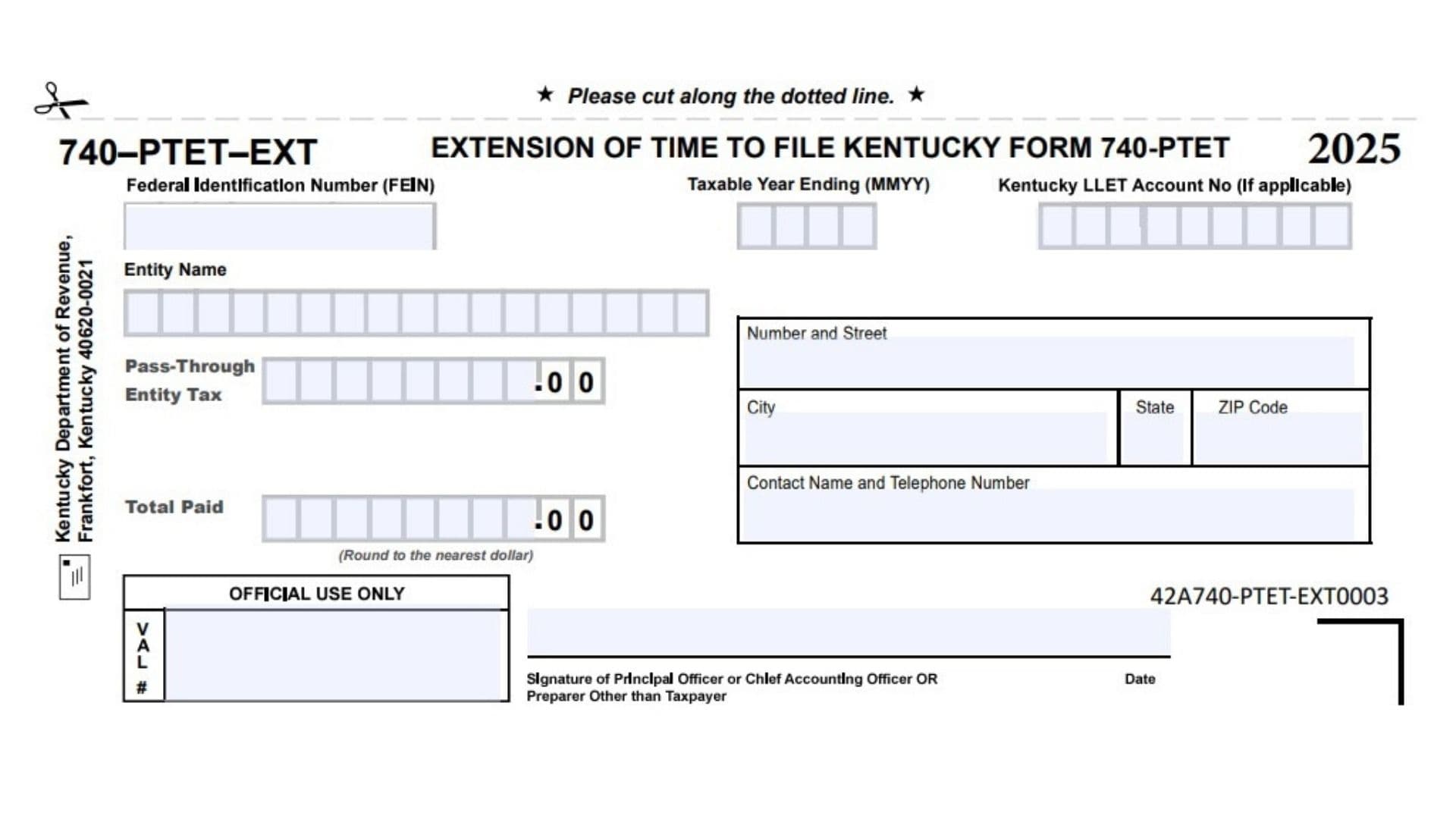
Kentucky Form 740-PTET-EXT is the extension form used by a pass-through entity that needs more time to file Kentucky Form 740-PTET for the 2025 tax year. This form helps the Kentucky Department of Revenue identify the entity requesting the extension, the taxable year involved, the entity’s federal identification number, any applicable Kentucky LLET account number, the estimated pass-through entity tax amount, and the payment being submitted with the extension request. It is not the full Kentucky pass-through entity tax return. Instead, it works as an extension and payment voucher connected to Form 740-PTET. The form also asks for the entity’s mailing address, contact person, telephone number, signature, and date so the department can process the extension correctly. Businesses should use this form carefully because incomplete or unclear information can delay processing, cause payment matching issues, or create confusion when the final Kentucky Form 740-PTET is filed later.
How To File Kentucky Form 740-PTET-EXT
Complete the required entity, tax year, account, payment, contact, and signature fields. Use whole-dollar amounts and round the payment figures to the nearest dollar. After completing the form, cut along the dotted line and submit the lower voucher section with any payment being made. Mail the completed extension voucher and payment to the Kentucky Department of Revenue in Frankfort, Kentucky 40620-0021. Keep a copy for your records so you can match the extension payment with the final Kentucky Form 740-PTET filing.

How To Complete Kentucky Form 740-PTET-EXT
Line 1: Form 740-PTET-EXT Identification: Use this form only for the Kentucky pass-through entity tax extension connected to Kentucky Form 740-PTET for the 2025 tax year.
Line 2: 740-PTET Extension Heading: Confirm that the form is for a Kentucky 740-PTET extension before entering any information.
Line 3: Tax Year 2025: Make sure the year shown on the form matches the taxable year for which the entity is requesting the extension.
Line 4: Cut Along The Dotted Line: Separate the voucher section from the rest of the page by cutting on the dotted line before mailing.
Line 5: Extension Of Time To File Kentucky Form 740-PTET: This section identifies the purpose of the form. It is used to request more time to file Kentucky Form 740-PTET.
Line 6: Federal Identification Number (FEIN): Enter the entity’s federal employer identification number in the boxes provided. Use the correct FEIN so the payment and extension are matched to the right pass-through entity.
Line 7: Taxable Year Ending (MMYY): Enter the month and year when the entity’s taxable year ends. Use the MMYY format. For example, a taxable year ending in December 2025 would be entered as 1225.
Line 8: Kentucky LLET Account Number, If Applicable: Enter the Kentucky Limited Liability Entity Tax account number if the entity has one. Leave this field blank only if it does not apply to the entity.
Line 9: Entity Name: Write the legal name of the pass-through entity. The name should match the entity name used on Kentucky tax records and the final Form 740-PTET.
Line 10: Pass-Through Entity Tax: Enter the estimated Kentucky pass-through entity tax amount for the taxable year. This should reflect the tax amount connected to the extension request.
Line 11: Total Paid: Enter the total payment being sent with the extension voucher. If the entity is paying the full estimated amount, this line should match the amount being remitted.
Line 12: Round To The Nearest Dollar: Report dollar amounts as whole dollars. Do not enter cents. Round amounts of 50 cents or more up to the next dollar and amounts under 50 cents down to the lower dollar.
Line 13: Number And Street: Enter the entity’s mailing street address. Include suite, unit, or office number if needed.
Line 14: City: Enter the city for the entity’s mailing address.
Line 15: State: Enter the two-letter state abbreviation for the entity’s mailing address.
Line 16: ZIP Code: Enter the correct ZIP Code for the mailing address. Use the ZIP+4 format if available.
Line 17: Contact Name And Telephone Number: Enter the name and phone number of the person the Kentucky Department of Revenue can contact if there is a question about the extension or payment.
Line 18: Kentucky Department Of Revenue Mailing Address: Mail the completed voucher and payment to the Kentucky Department of Revenue, Frankfort, Kentucky 40620-0021.
Line 19: Official Use Only: Do not write in this box. This area is reserved for processing by the Kentucky Department of Revenue.
Line 20: VAL Number Area: Leave the VAL number box blank. This section is for official processing only.
Line 21: Signature Of Principal Officer, Chief Accounting Officer, Or Preparer Other Than Taxpayer: An authorized person must sign the form. This may be a principal officer, chief accounting officer, or a preparer who is not the taxpayer.
Line 22: Date: Enter the date the form is signed. Use the actual signing date so the submission record is clear.
Line 23: Form Code 42A740-PTET-EXT0003: No entry is required for this printed form code. It identifies the version of the Kentucky Form 740-PTET-EXT voucher.
Final Review Before Mailing
Before sending the form, review the FEIN, taxable year ending, entity name, Kentucky LLET account number if applicable, pass-through entity tax amount, total payment amount, address, contact information, signature, and date. Make sure all payment amounts are rounded to the nearest dollar and that the official use areas are left blank. Attach the correct payment if money is being submitted with the extension voucher, then mail the completed voucher to the Kentucky Department of Revenue.