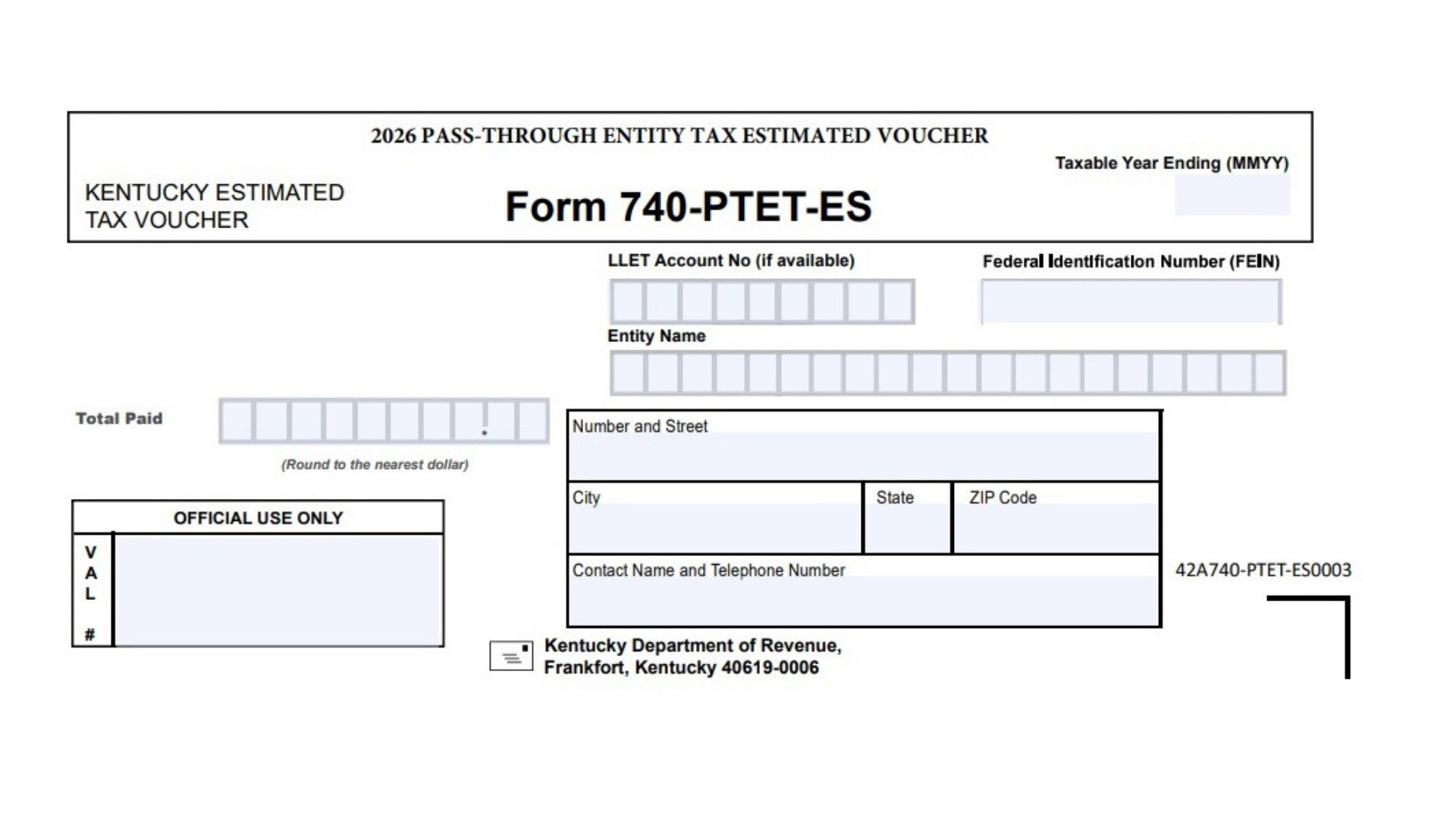
Kentucky Form 740-PTET-ES is the 2026 Pass-Through Entity Tax Estimated Voucher used to submit estimated Kentucky PTET payments. It is generally used by eligible pass-through entities that need to make estimated payments toward Kentucky pass-through entity tax for the taxable year. The voucher helps Kentucky correctly apply the payment to the entity’s tax account by collecting the taxable year ending date, LLET account number if available, Federal Employer Identification Number, entity name, payment amount, mailing address, and contact information. This form is not a full tax return. It is a payment voucher that should be sent with the estimated payment so the Department of Revenue can match the payment to the correct business entity and tax period. Because the form is payment-focused, accuracy is very important. The entity name, FEIN, payment amount, and taxable year ending date should match the tax records and estimated tax calculation. If the voucher is filled out incorrectly, the payment may be delayed, misapplied, or require correction later.
How To File Kentucky Form 740-PTET-ES
Complete the voucher with the entity’s correct identifying details and payment amount. Round the payment to the nearest dollar. Cut the voucher on the dotted line before mailing it. Send the completed voucher with the payment to Kentucky Department of Revenue, Frankfort, Kentucky 40619-0006. Keep a copy of the completed voucher and proof of payment for the entity’s records. Do not write in the official use only area, because that section is reserved for Kentucky processing.

How To Complete Kentucky Form 740-PTET-ES
Line 1: Taxable Year Ending (MMYY)
Enter the month and year when the entity’s taxable year ends. Use the MMYY format. For example, if the taxable year ends in December 2026, enter 1226.
Line 2: LLET Account No. If Available
Enter the entity’s Kentucky LLET account number if the entity has one. If the entity does not have this number available, leave this field blank unless you are able to confirm the correct account number.
Line 3: Federal Identification Number (FEIN)
Enter the entity’s Federal Employer Identification Number. Make sure the FEIN is accurate, because this is one of the main numbers used to match the payment to the correct entity.
Line 4: Entity Name
Enter the full legal name of the pass-through entity making the estimated PTET payment. Use the same name used on Kentucky tax filings and federal tax records.
Line 5: Total Paid
Enter the total amount being paid with the voucher. Round the amount to the nearest dollar. Do not enter cents.
Line 6: Number And Street
Enter the entity’s mailing street address. Include the building number, street name, suite number, unit number, or other address details needed for accurate mail delivery.
Line 7: City
Enter the city for the entity’s mailing address.
Line 8: State
Enter the state abbreviation for the entity’s mailing address.
Line 9: ZIP Code
Enter the ZIP Code for the entity’s mailing address. Use the full ZIP Code if available.
Line 10: Contact Name And Telephone Number
Enter the name and phone number of the person Kentucky may contact about the payment voucher. This may be the owner, officer, tax preparer, accountant, or another authorized contact.
Line 11: Official Use Only
Do not complete this section. It is reserved for Department of Revenue processing.
Line 12: Cut On The Dotted Line
Cut the voucher along the dotted line before mailing. Send only the payment voucher portion with the payment, unless another instruction applies to the entity’s filing situation.
Line 13: Mailing Address
Mail the completed voucher and payment to Kentucky Department of Revenue, Frankfort, Kentucky 40619-0006.
Final Review Before Mailing
Check that the taxable year ending date is correct. Confirm that the FEIN matches the entity’s tax records. Make sure the entity name is spelled correctly. Review the payment amount and confirm it is rounded to the nearest dollar. Confirm that the mailing address and contact information are complete. Do not write in the official use only box. Cut the voucher on the dotted line, attach the payment if mailing by check, and keep a copy for the entity’s records.