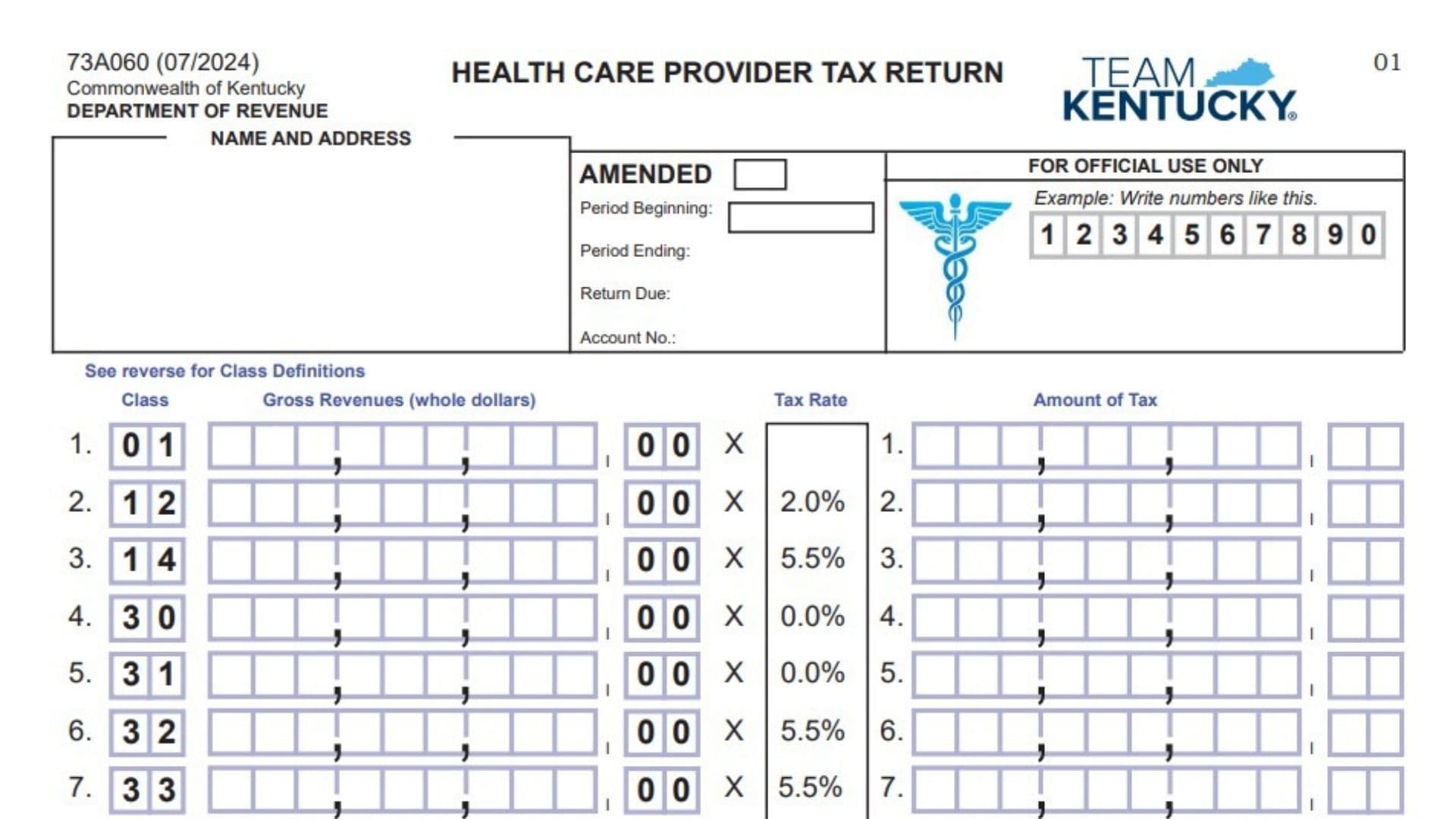
Kentucky Form 73A060, the Health Care Provider Tax Return, is used to report and calculate health care provider tax owed to the Commonwealth of Kentucky. The return covers several types of health care providers, including hospitals, home health agencies, ICF-MR services, certain community and behavioral health providers, Medicaid managed care organizations, and nursing facilities. Depending on the provider classification, the tax is calculated either from gross revenues or from non-Medicare patient bed days. The form also provides space for preauthorized credits, penalties, interest, and the final amount due. Providers must select or use the correct class code, report the proper activity for the taxable period, calculate the tax using the rate assigned to that class, and sign the return to certify that the information is complete and accurate. Using the wrong class, revenue amount, patient-day figure, or tax rate can change the amount of tax reported, so each section should be reviewed carefully before filing.
How To File Form 73A060
Form 73A060 is submitted directly to the Kentucky Department of Revenue. The return must be postmarked by the 20th day of the month following the taxable month to avoid the assessment of penalty and interest. If an amount is due, payment should accompany the return. Make the check payable to Kentucky State Treasurer and mail the return and payment to:
Department of Revenue
Frankfort, Kentucky 40619
Do not staple the check to the return.
If you are filing an amended return, check the Amended box near the top of the form and include supporting documentation explaining or substantiating the amendment.
Before completing the return, gather the information needed for your reporting period, including:
- Your Kentucky health care provider tax account number.
- The beginning and ending dates of the taxable period.
- Your provider’s correct class code.
- Gross revenues for applicable provider classes.
- Non-Medicare patient bed days if you operate a nursing facility.
- Details of any preauthorized tax credits.
- Information necessary to calculate any applicable penalties or interest.
- Supporting records if you are amending a previously filed return.
- Payment information if tax is due.

How To Complete Form 73A060
Provider And Return Information
Complete the identification section at the top of the return before calculating the tax.
Name And Address
Enter or verify the health care provider’s name and mailing address in the designated box. Make sure the information identifies the entity filing the return.
Amended Return Checkbox
Check this box only when correcting or changing a return that was previously filed for the same reporting period. An amended return must be accompanied by supporting documentation explaining the changes.
Period Beginning
Enter the first date of the taxable period covered by the return.
Period Ending
Enter the final date of the taxable period being reported.
Return Due
Enter or verify the due date for the return. The form states that the return must be postmarked by the 20th day of the month following the taxable month.
Account Number
Enter the Kentucky Department of Revenue account number assigned to the health care provider tax account.
Number Entry Format
Enter figures clearly in the designated boxes. Gross revenue amounts are reported in whole dollars, so the revenue portion of the return does not require cents.
For Official Use Only
Do not enter anything in areas identified as being for official use. These sections are reserved for Department of Revenue processing.
Class Code Definitions
The class code determines which provider category applies and, in most cases, which tax rate or calculation method must be used.
The gross-revenue provider classes are:
- Class 01 — Hospitals
- Class 12 — Home Health Agency Services
- Class 14 — ICF-MR Services
- Class 30 — Regional Community Mental Health & Mental Retardation Services
- Class 31 — Psychiatric Residential Treatment Facility Services
- Class 32 — Medicaid Managed Care Organization Services
- Class 33 — Supports for Community Living Services
The form identifies Classes 30, 31, and 32 as classes taxable for periods beginning July 1, 2005.
Nursing Facility Class Codes
Nursing facility taxes are calculated using non-Medicare patient bed days rather than gross revenues.
The nursing facility classifications are:
- Class 15 — Hospital-Based Nursing Facilities
- Class 77 — Certain Non-Hospital-Based Nursing Facilities
- Class 88 — Non-Hospital-Based Nursing Facilities With Total Patient Days Greater Than 60,000
- Class 99 — Non-Hospital-Based Nursing Facilities With Total Patient Days Of 60,000 Or Less
Class 77 applies to a non-hospital-based nursing facility with 60 or fewer beds that is designated as an intermediate care or nursing home facility, or to a non-hospital-based nursing facility with 40 or fewer beds.
Use the class that accurately describes the facility or service being reported.
Gross Revenue Tax Calculation
Lines 1 through 7 are used for provider classes whose tax is based on gross revenues.
Enter gross revenues in whole dollars and multiply the applicable amount by the tax rate shown or otherwise applicable to that class.
Line 1: Class 01 — Hospitals
Enter gross revenues attributable to hospital services for the reporting period.
The form does not print a specific percentage in the tax-rate box for Class 01. Use the tax rate that applies to the hospital for the applicable reporting period rather than assuming that one of the rates printed for another class applies.
Multiply the taxable gross revenue by the applicable rate and enter the resulting tax in the Amount of Tax column.
Line 2: Class 12 — Home Health Agency Services
Enter gross revenues attributable to Class 12 home health agency services.
Multiply the reported gross revenues by 2.0%.
Enter the resulting tax amount on line 2.
Line 3: Class 14 — ICF-MR Services
Enter the gross revenues attributable to Class 14 ICF-MR services.
Multiply the reported gross revenues by 5.5%.
Enter the result as the line 3 tax amount.
Line 4: Class 30 — Regional Community Mental Health & Mental Retardation Services
Enter the gross revenues attributable to Class 30 services.
The tax rate printed on the return is 0.0%.
Multiply the gross revenue by 0.0% and enter the resulting tax amount on line 4.
Even though the printed rate is zero, report the applicable gross revenue when required rather than using the tax amount field as a substitute for the revenue figure.
Line 5: Class 31 — Psychiatric Residential Treatment Facility Services
Enter gross revenues attributable to Class 31 psychiatric residential treatment facility services.
The rate printed on the form is 0.0%.
Apply that rate and enter the resulting amount of tax on line 5.
Line 6: Class 32 — Medicaid Managed Care Organization Services
Enter gross revenues attributable to Class 32 Medicaid managed care organization services.
Multiply the reported gross revenues by 5.5%.
Enter the calculated tax on line 6.
Line 7: Class 33 — Supports For Community Living Services
Enter gross revenues attributable to Class 33 supports for community living services.
Multiply the gross revenue by 5.5%.
Enter the resulting tax on line 7.
Nursing Facility Services Tax Calculation
Lines 8 through 11 use non-Medicare patient bed days instead of gross revenues.
For the nursing facility class that applies to your facility, enter the number of qualifying non-Medicare patient bed days for the reporting period. Multiply that figure by the fixed dollar rate shown for the applicable class.
Do not substitute total gross revenue for patient bed days in this section.
Line 8: Class 15 — Hospital-Based Nursing Facilities
Enter the number of non-Medicare patient bed days attributable to a Class 15 hospital-based nursing facility.
Multiply the number of patient bed days by $5.63.
Enter the resulting tax amount on line 8.
Line 9: Class 77 — Qualifying Non-Hospital-Based Nursing Facilities
Enter the applicable non-Medicare patient bed days for a facility meeting the Class 77 requirements.
Multiply the patient bed days by $2.82.
Enter the calculated amount on line 9.
Line 10: Class 88 — Non-Hospital-Based Nursing Facility With More Than 60,000 Total Patient Days
Enter the non-Medicare patient bed days attributable to a Class 88 facility.
Multiply the patient bed days by $6.38.
Enter the result on line 10.
Line 11: Class 99 — Non-Hospital-Based Nursing Facility With 60,000 Or Fewer Total Patient Days
Enter the non-Medicare patient bed days attributable to a Class 99 facility.
Multiply the patient bed days by $19.89.
Enter the calculated tax on line 11.
Tax Due, Credits, Penalties, And Interest
After completing the appropriate provider-class lines, use lines 12 through 17 to determine the amount that must be paid.
Line 12: Tax Due
Add the tax amounts entered on lines 1 through 11.
Enter the total on line 12.
Include amounts only from the lines that apply to the provider’s activities, but make sure every applicable class has been included in the calculation.
Line 13: Less — Preauthorized Credits
Enter any credit that has already been preauthorized for use against the health care provider tax.
The form also provides a date field for the credit. Enter the applicable date using the MM/DD/YY format.
Do not treat an anticipated or unapproved credit as a preauthorized credit.
Line 14: Net Tax Due
Subtract the preauthorized credit reported on line 13 from the tax due shown on line 12.
Enter the remaining net tax due on line 14.
Line 15: Penalties
Enter any applicable penalty.
The return warns that failure to have the return postmarked by the 20th day of the month following the taxable month can result in penalty and interest.
Because the face of the return does not provide the complete penalty calculation, use the applicable Kentucky penalty instructions when determining the amount rather than estimating it.
Line 16: Interest
Enter any interest that applies to the unpaid or late tax.
The return lists a daily interest rate of 0.000247. Use the applicable filing instructions to determine the correct number of days and interest calculation before entering the amount on this line.
Line 17: Total Amount Due
Add:
- Line 14, Net Tax Due;
- Line 15, Penalties; and
- Line 16, Interest.
Enter the total on line 17.
This is the total amount that should be remitted with the return when a payment is required. Do not staple the check to the return.
Payment And Mailing Information
If line 17 shows an amount due, prepare payment for that total.
Make the check payable to:
Kentucky State Treasurer
Mail the completed return and payment to:
Department of Revenue
Frankfort, Kentucky 40619
The return must be postmarked by the 20th of the month following the taxable month to avoid the assessment of penalty and interest.
Do not staple the payment check to the return.
Signature And Certification
The form includes a declaration that the person signing has examined the return and believes it to be true, correct, and complete.
Review the return carefully before signing.
Signature Of President Or Other Principal Officer, Partner Or Proprietor
The appropriate responsible person must sign the return in this space.
Depending on the business structure, this may be the president, another principal officer, a partner, or the proprietor.
Date
Enter the date the responsible officer, partner, or proprietor signs the return.
Signature Of Tax Return Preparer And Title
If a tax return preparer completed the return, the preparer signs this section and provides the appropriate title.
Preparer Date
Enter the date the tax return preparer signs the return.
Signing the return certifies, under penalty of perjury, that the information has been reviewed and is believed to be accurate and complete.
Official Use Areas
Several portions of Form 73A060 are reserved for Department of Revenue processing.
Top Official Use Box
Do not write in the large official-use area near the top of the return.
Bottom Official Use Section
Leave the processing boxes near the bottom of the form blank.
Do Not Write Below This Line
Do not enter information beneath the line specifically marked for Department use.
These areas are not part of the taxpayer’s reporting requirements.
Additional Information
Questions about the Health Care Provider Tax Return can be directed to the Kentucky Department of Revenue’s Excise Tax Section at (502) 564-6823.
Final Review Before Filing
Before submitting Form 73A060, verify the following:
- Confirm the provider’s name and address are correct.
- Confirm the health care provider tax account number.
- Check that the beginning and ending dates cover the correct taxable period.
- Verify the return due date.
- If this is an amended return, check the Amended box and include supporting documentation.
- Confirm that you used the correct provider class code.
- Make sure gross revenues were entered in whole dollars where required.
- Confirm that nursing facilities reported non-Medicare patient bed days instead of gross revenues on lines 8 through 11.
- Verify the applicable tax rate for every reported class.
- Recalculate each tax amount.
- Confirm that lines 1 through 11 were added correctly on line 12.
- Verify that any amount claimed on line 13 is a preauthorized credit.
- Confirm the date associated with the preauthorized credit.
- Recalculate line 14 after subtracting the credit from line 12.
- Include penalties on line 15 when applicable.
- Include interest on line 16 when applicable.
- Confirm that line 17 equals lines 14, 15, and 16 combined.
- Make sure the payment equals the total amount due.
- Make the check payable to Kentucky State Treasurer.
- Do not staple the check to the return.
- Make sure the responsible officer, partner, or proprietor has signed and dated the return.
- Obtain the preparer’s signature, title, and date when a tax return preparer completed the form.
- Leave all areas marked for official use blank.
- Make sure an amended return includes the required supporting documentation.
- Mail the return early enough for it to be postmarked by the 20th day of the month following the taxable month.