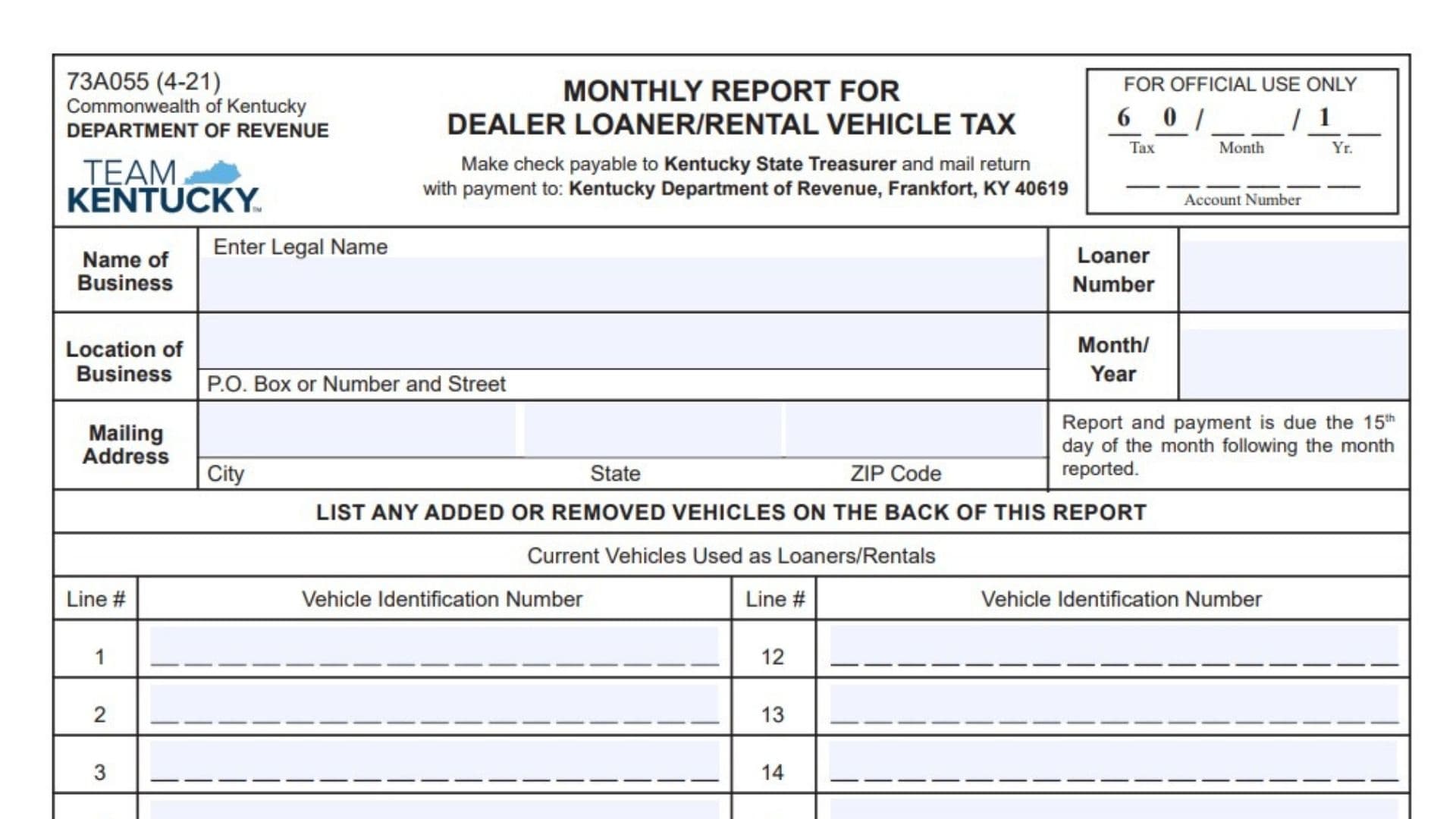
Form 73A055 is the Kentucky Department of Revenue Monthly Report for Dealer Loaner/Rental Vehicle Tax. It is used by approved dealerships to report the number of vehicles used as loaners or rentals and calculate the monthly tax amount due. The form collects business identification details, loaner number information, reporting month details, vehicle records, tax calculations, payment information, and certification from an authorized person.
Dealerships use this report to calculate the tax based on the number of loaner or rental vehicles maintained during the reporting period. The form also provides a section for reporting vehicles that have been added or removed from the loaner/rental fleet, including vehicle identification numbers and other details. Completing the report correctly helps ensure the proper tax amount is reported and submitted to the Kentucky Department of Revenue on time.
How To File Form 73A055
The completed report and payment should be mailed to the Kentucky Department of Revenue. Checks should be made payable to the Kentucky State Treasurer and mailed with the return and payment to:
Kentucky Department of Revenue
Frankfort, KY 40619
The report and payment are due on the 15th day of the month following the month being reported.
Before completing Form 73A055, prepare the dealership’s business information, loaner number, reporting month, current vehicle list, records of vehicles added or removed, adjustment documentation if applicable, and payment calculation details.

How To Complete Form 73A055
Business And Reporting Information
Name Of Business
Enter the legal name of the dealership submitting the monthly report.
Location Of Business
Provide the physical location of the dealership.
Mailing Address
Enter the dealership’s mailing address, including the P.O. box or street address, city, state, and ZIP code.
Loaner Number
Enter the dealership’s loaner number assigned for the Dealer Loaner/Rental Vehicle Tax program.
Month/Year
Enter the month and year covered by the report.
Tax Month Year
Enter the applicable tax reporting month and year information shown in the tax section.
Account Number
Provide the applicable account number associated with the tax report.
Current Vehicles Used As Loaners/Rentals
This section lists vehicles currently being used as loaners or rentals during the reporting period. The form provides spaces for vehicle identification numbers under the current vehicle section.
Line Number
Enter the assigned line number for each vehicle listed.
Vehicle Identification Number
Enter the complete VIN for each vehicle currently used as a loaner or rental.
Tax Calculation Section
The tax calculation section determines the amount due for the reporting period.
Line 1: Number Of Vehicles (Current + Added + Removed)
Enter the total number of vehicles used for the tax calculation. This figure includes the current vehicle count combined with vehicles added or removed as required by the report calculation.
Line 2: Tax Due
Multiply the number entered on line 1 by $25.00 to calculate the tax due. Enter the resulting amount in the space provided.
Line 3: Adjustments
Enter any adjustments that affect the amount due. Supporting documentation must be attached when adjustments are reported.
Line 4: Interest
Enter any interest amount due according to the applicable instructions.
Line 5: Penalty
Enter any penalty amount due according to the applicable instructions.
Total Amount Due
Enter the final amount owed after combining the applicable tax, adjustments, interest, and penalty amounts.
Added And Removed Vehicles
The back of the report is used to record vehicles added or removed from the dealership’s loaner/rental fleet. The form states that added and removed vehicles must also be updated in AVIS through the county clerk’s office.
Vehicles Added As Loaners/Rentals
This section records vehicles added to the loaner or rental fleet during the reporting period.
Line Number
Enter the line number for each added vehicle.
Vehicle Identification Number
Provide the VIN of the added vehicle.
Year
Enter the vehicle’s model year.
Make
Enter the manufacturer of the vehicle.
Model
Provide the vehicle model.
Mileage
Enter the vehicle mileage information requested for the added vehicle.
Vehicles Removed As Loaners/Rentals
This section records vehicles removed from the dealership’s loaner or rental fleet.
Line Number
Enter the line number for each removed vehicle.
Vehicle Identification Number
Provide the VIN of the removed vehicle.
Year
Enter the model year of the vehicle.
Make
Enter the vehicle manufacturer.
Model
Provide the vehicle model.
Mileage
Enter the mileage information for the removed vehicle.
Reason
Explain why the vehicle was removed from the loaner/rental fleet. The form provides a reason field for each removed vehicle entry.
Certification And Signature
Certification Statement
The signer confirms that the information provided on the report is correct to the best of their knowledge and that they are authorized to submit the report.
Signature
The authorized person must sign the report.
Title
Enter the title or position of the person signing the report.
Date
Enter the date the report is signed.
Final Review Before Filing
Before submitting Form 73A055, verify the following:
- Confirm the dealership name, location, and mailing address are correct.
- Check that the loaner number and reporting month/year are accurate.
- Review the current vehicle list and confirm all VINs are correct.
- Include all vehicles added or removed during the reporting period.
- Attach documentation for any reported adjustments.
- Calculate the tax using the correct number of vehicles.
- Confirm interest and penalty amounts are included if applicable.
- Verify the total amount due matches the calculation.
- Ensure the authorized person signs and dates the report.
- Mail the completed report with payment by the required deadline.
A complete and accurate Form 73A055 helps dealerships properly report their Dealer Loaner/Rental Vehicle Tax obligations and maintain compliance with Kentucky Department of Revenue requirements.