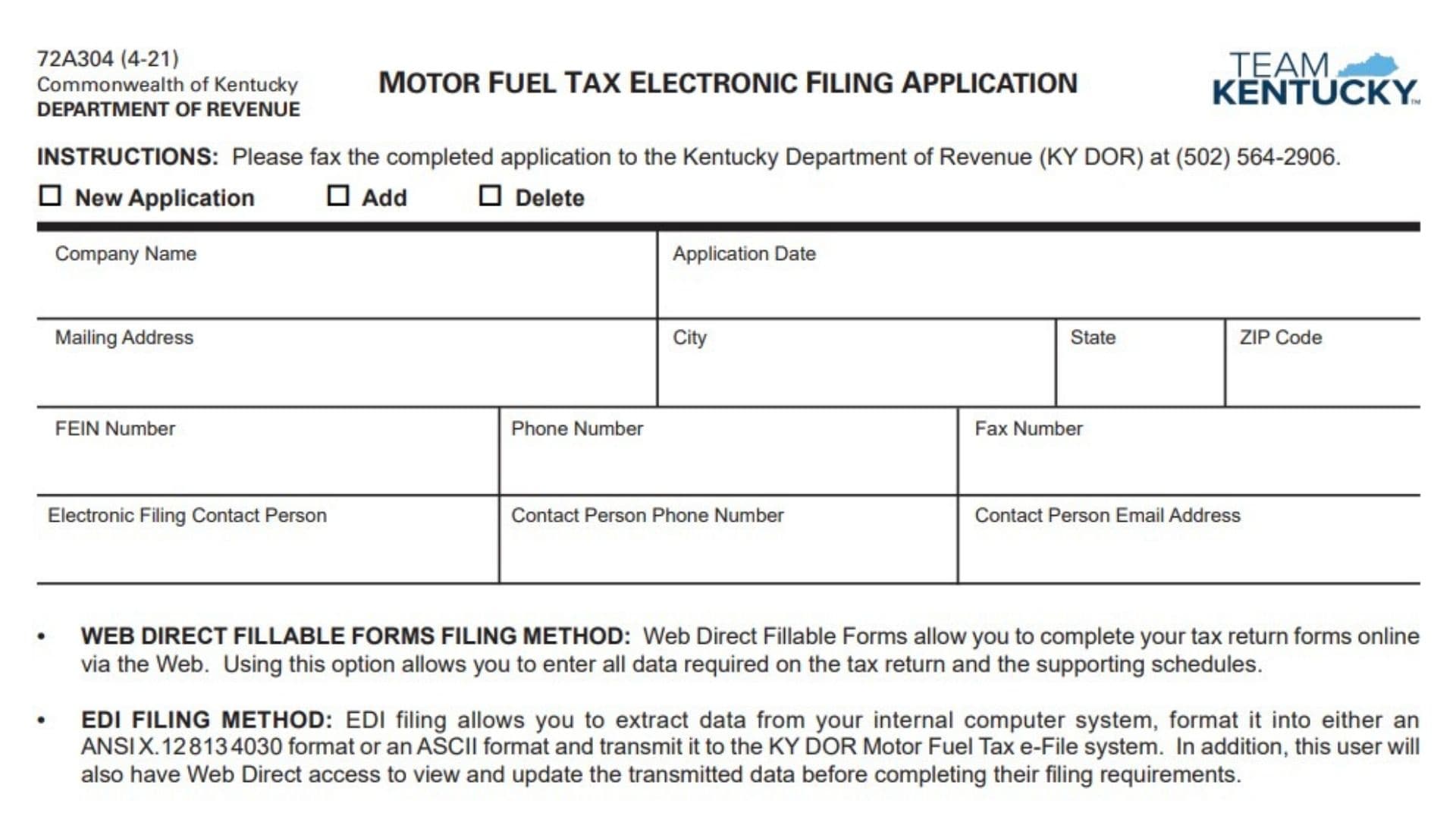
Form 72A304, Motor Fuel Tax Electronic Filing Application, is used by motor fuel taxpayers who want to register for electronic filing of motor fuel tax returns and supporting schedules with the Kentucky Department of Revenue (KY DOR). The application allows businesses to select an electronic filing method, provide contact information, and authorize individuals who will submit electronic tax information on behalf of the licensee.
The form is used to establish access to the Kentucky Department of Revenue Motor Fuel Tax e-File system. Businesses must choose the filing method they intend to use and provide the required user information before electronically submitting tax returns and supporting schedules.
Electronic filing options include Web Direct Fillable Forms, ANSI X.12 813 4030, and ASCII Flat File methods. Each option allows taxpayers to transmit required motor fuel tax information electronically, but the filing process and data preparation requirements differ depending on the method selected.
Completing this application correctly is important because the selected filing method determines how tax returns, supporting schedules, payment information, and related electronic data will be submitted to KY DOR.
How To File Form 72A304
Complete Form 72A304 when applying for electronic filing access, adding users or filing permissions, or deleting existing electronic filing access. Select the appropriate application type at the top of the form:
- New Application.
- Add.
- Delete.
The completed application should be faxed to the Kentucky Department of Revenue at the fax number provided in the instructions.
Before completing the application, gather:
- Company name.
- Mailing address.
- Federal identification number.
- Telephone and fax numbers.
- Electronic filing contact information.
- Filing method selection.
- Authorized user information.
- Authorized signature details.
The applicant should carefully select the correct filing method. If the business later wants to change its filing option, a new application must be completed, signed, and returned.

How To Complete Form 72A304
Application Information Section
Application Type
Select the reason for submitting the application:
- New Application for first-time electronic filing access.
- Add to add electronic filing users or permissions.
- Delete to remove electronic filing access.
Company Name
Enter the legal name of the business applying for electronic filing access.
Application Date
Enter the date the electronic filing application is completed and submitted.
Mailing Address
Enter the business mailing address used for correspondence.
City
Enter the city associated with the mailing address.
State
Enter the state associated with the mailing address.
ZIP Code
Enter the ZIP code for the mailing address.
FEIN Number
Enter the federal identification number assigned to the business.
Phone Number
Enter the business telephone number.
Fax Number
Enter the business fax number.
Electronic Filing Contact Person
Enter the name of the person responsible for electronic filing matters.
Contact Person Phone Number
Enter the telephone number for the electronic filing contact person.
Contact Person Email Address
Enter the email address of the electronic filing contact person.
Filing Method Selection
Select only one electronic filing method.
Web Direct Fillable Forms
Select this option if the business will complete motor fuel tax returns online through the web system. This method allows users to enter all information required on tax returns and supporting schedules directly online.
ANSI X.12 813 4030
Select this option if the business will use an Electronic Data Interchange (EDI) method. EDI allows data to be extracted from the company’s internal computer system, formatted into ANSI X.12 813 4030 format, and transmitted to the KY DOR Motor Fuel Tax e-File system.
ASCII Flat File
Select this option if the business will transmit tax data using an ASCII flat file format.
User Permission Section
This section identifies users and the electronic filing functions they are authorized to perform.
User Name
Enter the username assigned to the person who will access the electronic filing system.
Create Returns
Select this permission if the user will prepare tax returns electronically.
Send File
Select this permission if the user will transmit electronic filing data to KY DOR.
Pay Returns
Select this permission if the user will submit electronic payment information for tax returns.
Enter Bank Information
Select this permission if the user will enter banking information required for electronic payment processing.
All
Select this option if the user should have all available electronic filing permissions.
The form provides authorization options for users who may create returns, send files, pay returns, enter bank information, or have all permissions.
Internet Access And Security Requirements
Electronic Submission Security
All tax reports and supporting schedules are submitted through encrypted data transmissions using a secure website. Users receive a unique User ID and password for system access.
System Monitoring
Users acknowledge that system administrators may monitor the computer network periodically to protect against unauthorized use and ensure proper system operation.
Authorization Section
Authorized Signature
The authorized representative must sign the application. The signature authorizes electronic filing activity through the assigned User ID and password.
Print Name
Enter the printed name of the person signing the application.
Title
Enter the signer’s business title or position.
Date
Enter the date the authorized person signs the application.
Final Review Before Filing
Before submitting Form 72A304, confirm that:
- The correct application type is selected.
- Company information is complete and accurate.
- FEIN and contact details are correct.
- The electronic filing contact person is identified.
- Only one filing method is selected.
- User permissions match each person’s responsibilities.
- Authorized users have the correct access level.
- The application is signed by an authorized representative.
- The signature date is included.
- The completed form is faxed to the Kentucky Department of Revenue as instructed.
A properly completed Form 72A304 allows businesses to securely submit motor fuel tax returns and supporting schedules electronically through the Kentucky Department of Revenue Motor Fuel Tax e-File system.