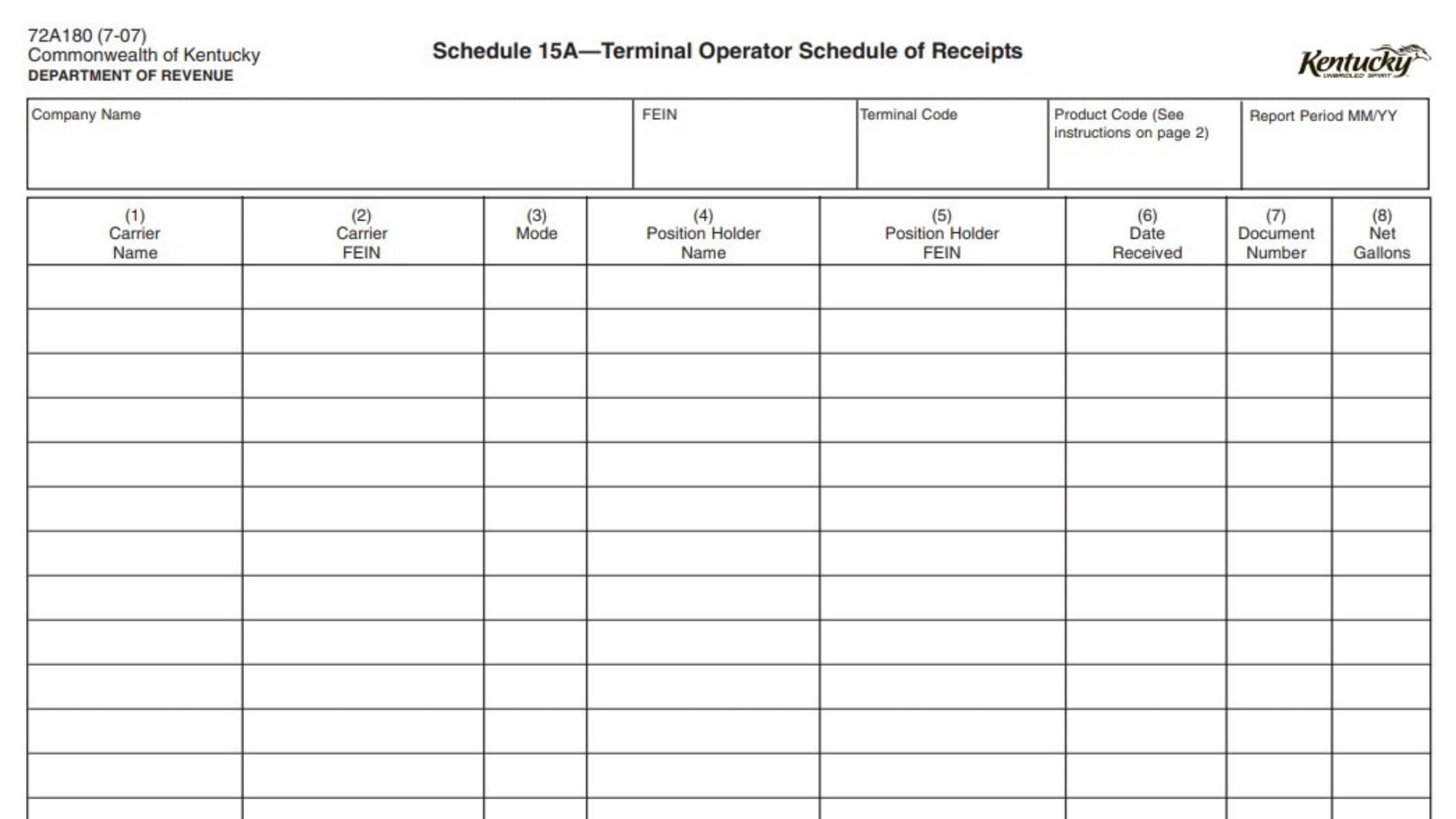
Form 72A180 Schedule 15A, also known as the Terminal Operator Schedule of Receipts, is a supporting schedule used with a terminal report to provide detailed information about product receipts recorded by a terminal operator. The schedule collects identifying information about the terminal operator, the product being reported, and each receipt transaction, including the carrier, transport method, product owner, receipt date, document identification, and gallons received. This form helps organize the receipt details that support the amounts reported on the terminal report.
Terminal operators use this schedule to report individual receipt transactions for fuel products handled at a terminal. Completing the form accurately is important because the total gallons reported on the schedule must match the receipt amounts reported on the related terminal report. The information entered allows the Department of Revenue to verify the reported receipts and confirm that the supporting details are complete.
The form requires both general identifying information and transaction-level details. The identifying section includes the company name, federal employer identification number (FEIN), terminal code, product code, and reporting period. The receipt section contains multiple columns where each transaction must be recorded separately.
How To File Form 72A180 Schedule 15A
Form 72A180 Schedule 15A is completed as a supporting schedule for the terminal report. The schedule should be prepared using the terminal operator’s records and should include all required receipt details for the reporting period.
Before completing the form, gather the following information:
- Terminal operator company name and FEIN.
- Terminal code.
- Product code for the reported product.
- Reporting period.
- Carrier information for each receipt.
- Transport mode used for delivery.
- Position holder information.
- Receipt dates.
- Document or ticket numbers.
- Net gallons received.
The completed schedule should contain enough detail to support the receipt amounts reported on the terminal report.

How To Complete Form 72A180 Schedule 15A
The form is divided into an identifying section and a receipt detail section. Each field should be completed using the terminal operator’s official records.
Identifying Information
The top portion of the form identifies the terminal operator, reporting period, and product being reported.
Company Name
Enter the legal name of the terminal operator responsible for the terminal report. The company name should match the terminal operator information used for reporting purposes.
FEIN
Enter the federal employer identification number of the terminal operator. The FEIN should correspond to the company listed on the form.
Terminal Code
Enter the terminal code using the applicable IRS Terminal Control Number. This identifies the terminal location associated with the reported receipts.
Product Code
Enter the correct product code for the fuel product being reported. Use the applicable product code listed for reporting purposes.
Report Period MM/YY
Enter the reporting month and year covered by the schedule.
Receipt Detail Columns
Each row in the receipt section represents a separate receipt transaction. Enter information for every product receipt included in the reporting period.
Column (1): Carrier Name
Enter the name of the company that transported the product into the terminal. This identifies the carrier responsible for bringing the product to the terminal.
Column (2): Carrier FEIN
Enter the FEIN of the carrier listed in Column (1). The number should identify the company that transported the product into the terminal.
Column (3): Mode
Enter the transportation method used for the product movement. Use the appropriate code for the type of transport.
Available transport codes include:
- J = Truck
- R = Rail
- B = Barge
- PL = Pipeline
- S = Ship (Great Lakes or ocean marine vessel)
- BA = Book Adjustment
- ST = Stationary Transfer
- CE = Summary
- RT = Removal from Terminal other than by truck or rail for sale or consumption
Column (4): Position Holder Name
Enter the name of the company that owns the product according to the terminal operator’s records. The position holder is the company recognized as owning the product at the terminal.
Column (5): Position Holder FEIN
Enter the FEIN of the position holder listed in Column (4). This identifies the company that owns the product according to terminal records.
Column (6): Date Received
Enter the date the product was received into the terminal. Use the actual receipt date shown in the terminal records.
Column (7): Document Number
Enter the identifying number from the manifest issued when the product was removed over the rack. For pipeline or barge movements, enter the pipeline or barge ticket number instead.
Column (8): Net Gallons
Enter the net number of gallons received into the terminal for the transaction. Add all amounts reported in this column, and the total must match the receipt amount shown on the terminal report.
Final Review Before Filing
Before submitting Form 72A180 Schedule 15A, review the completed schedule to confirm that:
- The company name and FEIN match the terminal operator information.
- The terminal code is correct.
- The correct product code is entered.
- The reporting period covers the correct month and year.
- Every receipt transaction is listed separately.
- Carrier names and FEINs are complete and accurate.
- The correct transportation mode code is used for each receipt.
- Position holder information matches terminal records.
- Receipt dates are entered correctly.
- Document numbers match the related manifests, pipeline tickets, or barge tickets.
- Net gallons are entered accurately.
- The total net gallons agree with the receipt amounts reported on the terminal report.
A complete and accurate Schedule 15A provides the required supporting detail for terminal receipts and helps ensure the terminal report is properly documented.