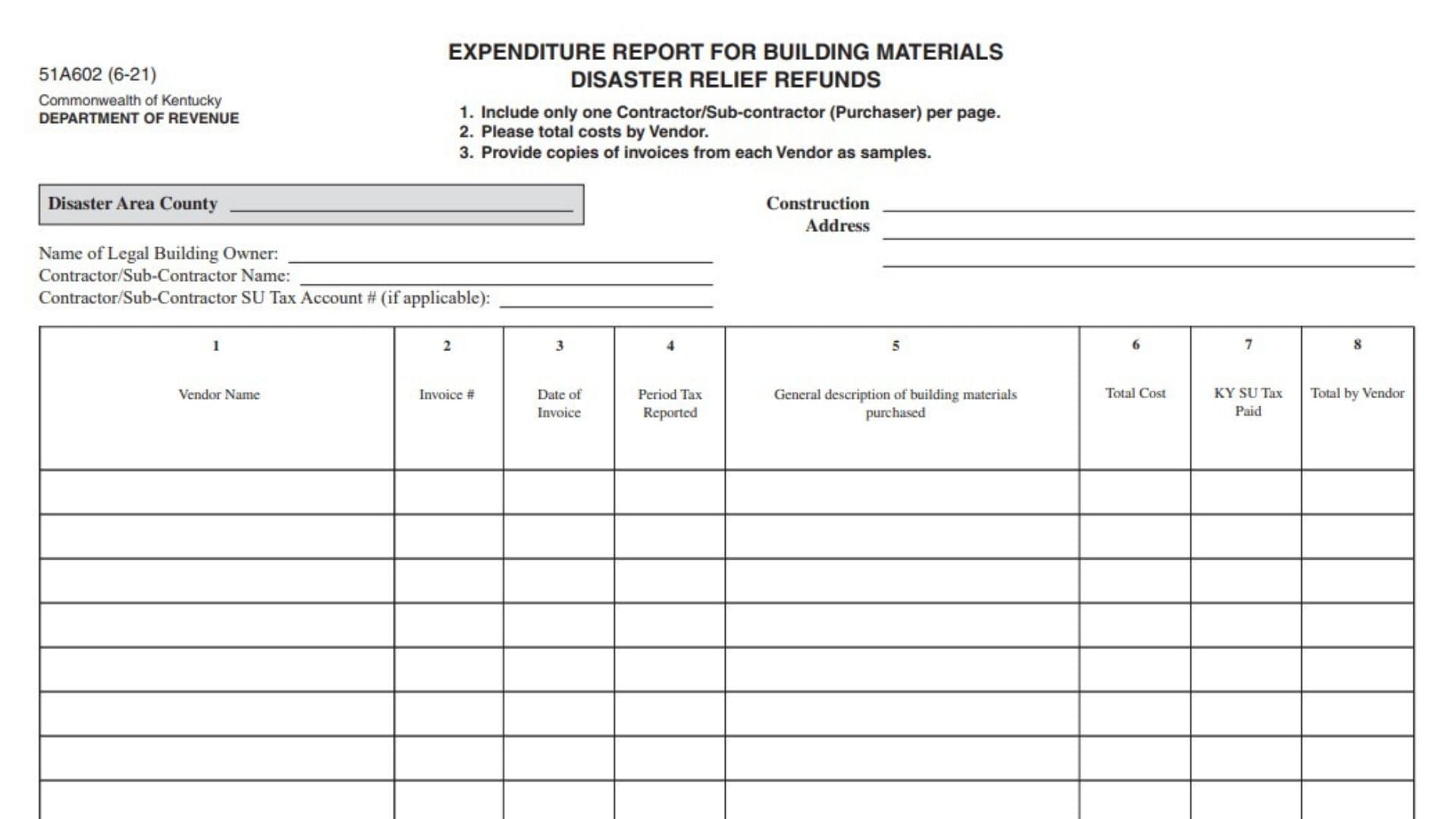
The Expenditure Report for Building Materials Disaster Relief Refunds is a Kentucky Department of Revenue form used to report building material purchases related to disaster relief refund claims. The form provides a detailed record of construction-related material expenses, including vendor information, invoice details, material descriptions, total costs, and Kentucky sales and use tax paid. This report helps document qualifying building material expenditures by connecting purchased materials with vendors, invoices, and tax amounts paid. Contractors or subcontractors completing this report must organize purchase information clearly and provide supporting documentation when required.
The form is designed to ensure that disaster relief refund requests are supported by accurate expenditure records. Proper completion allows the Kentucky Department of Revenue to review the reported costs and verify the related sales and use tax amounts.
How To File Form 51A602
Complete the expenditure report and include it with the required disaster relief refund documentation.
Before preparing the report, collect:
- Vendor invoices for purchased building materials.
- Vendor names and invoice numbers.
- Invoice dates.
- Tax reporting periods.
- Detailed descriptions of purchased materials.
- Total purchase costs.
- Kentucky sales and use tax paid amounts.
The form provides three important preparation instructions:
- Include only one contractor or subcontractor (purchaser) per page.
- Add costs together by vendor.
- Provide sample copies of invoices from each vendor.

How To Complete Form 51A602
Complete each section using information from your construction records and vendor invoices.
Project Information
This section identifies the disaster-related construction project and the parties involved.
Disaster Area County
Enter the county where the disaster-related construction project is located.
Construction Address
Provide the complete address of the construction site where the building materials were used.
Name of Legal Building Owner
Enter the full legal name of the person or entity that owns the building involved in the construction or repair project.
Contractor/Sub-Contractor Name
Provide the name of the contractor or subcontractor who purchased the building materials.
Contractor/Sub-Contractor SU Tax Account Number (If Applicable)
Enter the contractor or subcontractor’s sales and use tax account number if one applies.
Building Material Purchase Details
This table records each building material purchase and related tax information.
Vendor Information
Column 1: Vendor Name
Enter the name of the supplier or vendor that sold the building materials. Each vendor should be listed according to the invoice records.
Invoice Information
Column 2: Invoice Number
Enter the invoice number associated with the building material purchase. This number should match the supporting vendor invoice.
Invoice Date
Column 3: Date of Invoice
Enter the date shown on the vendor invoice for the purchase.
Tax Reporting Period
Column 4: Period Tax Reported
Enter the tax reporting period in which the related sales and use tax was reported.
Material Description
Column 5: General Description of Building Materials Purchased
Provide a clear description of the building materials purchased.
Examples of descriptions may include construction supplies, repair materials, lumber, fixtures, or other building-related items purchased for the disaster relief project.
The description should be detailed enough to identify the type of materials included in the expense record.
Cost Information
Column 6: Total Cost
Enter the total purchase cost of the building materials from the invoice.
Column 7: Kentucky Sales and Use Tax Paid
Enter the amount of Kentucky sales and use tax paid on the purchase.
Column 8: Total by Vendor
Calculate and enter the total amount reported for each vendor. Costs should be combined by vendor as instructed on the form.
Vendor Totals
Total by Vendor
After entering all purchases from a specific vendor, calculate the combined total for that vendor. This ensures that all expenses associated with the same supplier are summarized correctly.
Invoice Documentation Requirements
Applicants must provide copies of invoices from each vendor as samples. These invoices support the reported building material purchases and help verify the information entered on the report.
When preparing invoice samples:
- Ensure vendor names match the report.
- Make sure invoice numbers and dates are readable.
- Confirm that material descriptions support the reported expenses.
- Verify that tax amounts match the amounts entered on the form.
Final Review Before Filing
Before submitting the Expenditure Report for Building Materials Disaster Relief Refunds, verify that:
- Only one contractor or subcontractor is listed on the page.
- The disaster area county is correct.
- The construction address is complete.
- The legal building owner name is accurate.
- The contractor or subcontractor information is complete.
- The sales and use tax account number is included if applicable.
- Every vendor entry matches supporting invoices.
- Invoice numbers and dates are correct.
- Material descriptions clearly identify purchased items.
- Total costs are calculated correctly.
- Kentucky sales and use tax paid amounts are accurate.
- Vendor totals have been completed.
- Sample invoices from each vendor are attached.
A complete and accurate expenditure report provides the Kentucky Department of Revenue with the documentation needed to review building material disaster relief refund claims.