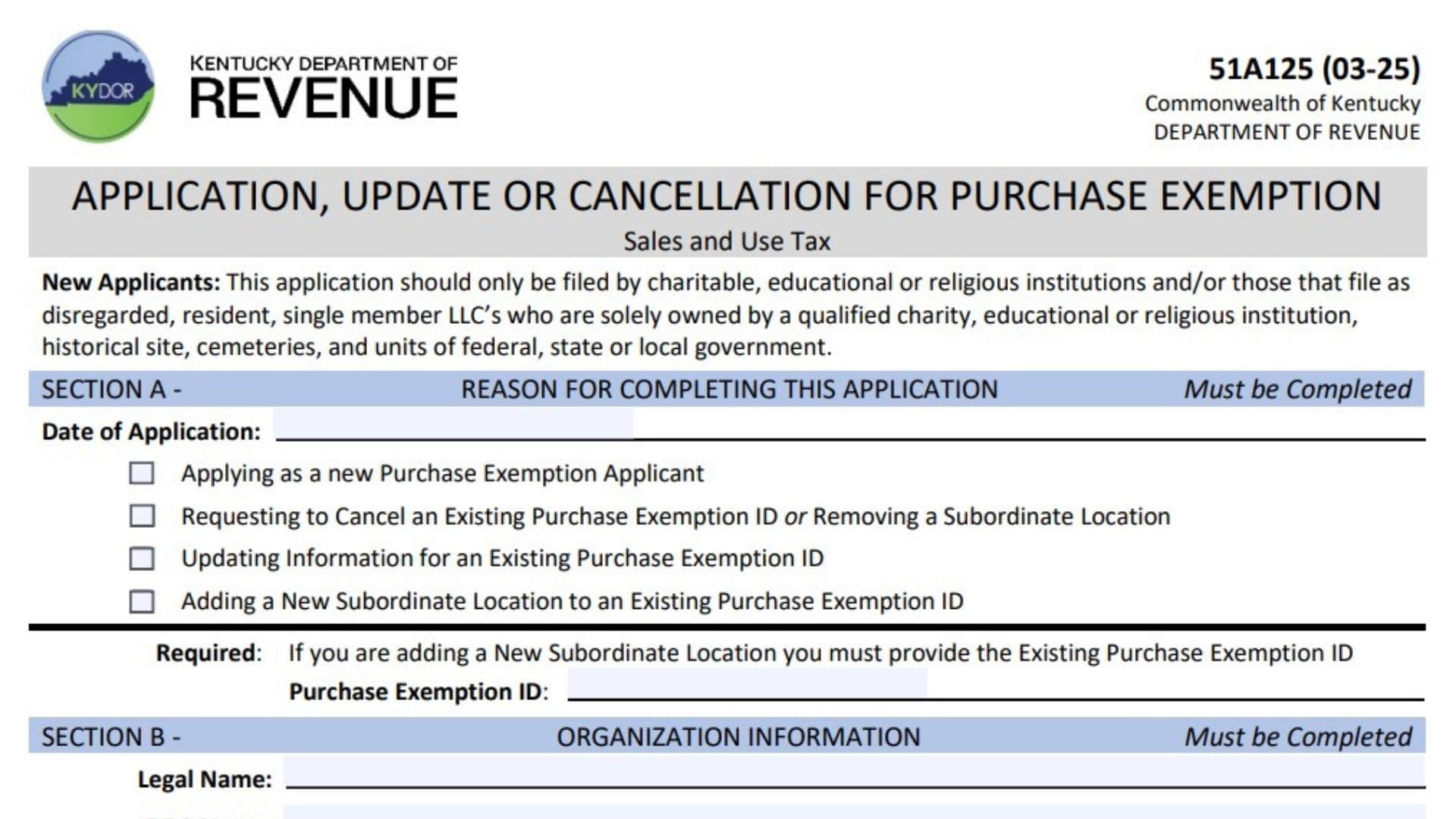
Kentucky Form 51A125 is the Application, Update or Cancellation for Purchase Exemption form issued by the Kentucky Department of Revenue. This form is used by eligible organizations that want to apply for a purchase exemption from Kentucky sales and use tax, update existing exemption information, cancel an exemption ID, or add a subordinate location under an existing exemption account. The form is mainly intended for qualifying organizations such as charitable institutions, educational institutions, religious organizations, historical sites, cemeteries, government entities, and certain disregarded resident single-member LLCs owned entirely by qualified exempt organizations. The application collects important information about the organization, including its legal identity, tax identification details, organization type, business activities, locations, contact information, and authorized representative details. The Kentucky Department of Revenue uses this information to determine whether the organization qualifies for a Purchase Exemption ID. If approved, the organization may purchase qualifying tangible personal property, digital property, or services without paying sales and use tax when those purchases are used within the organization’s exempt function. Purchases unrelated to the exempt purpose remain taxable.
How To File Form 51A125
Complete all required sections of the application and submit the form with the required supporting documentation based on the organization type selected in Section B.
Submit the completed application or update request to:
Division of Sales and Use Tax
PO BOX 181, Station 67
Frankfort, Kentucky 40602-0181
Fax: (502) 564-2041
Email: DOR.WebResponseSalesTax@ky.gov
Before completing the application, prepare:
- Organization legal name
- DBA name, if applicable
- Secretary of State ID, if applicable
- FEIN or responsible party information
- Organization classification
- Proof documents based on organization type
- Location and mailing addresses
- Contact information
- Authorized signer details
How To Complete Form 51A125
Section A: Reason For Completing This Application
Section A identifies why the organization is submitting the form. This section must be completed for every application.
Date Of Application
Enter the date the application is completed.
Applying As A New Purchase Exemption Applicant
Select this option when applying for a new Purchase Exemption ID.
Requesting To Cancel An Existing Purchase Exemption ID Or Removing A Subordinate Location
Select this option when cancelling an existing exemption account or removing an additional location linked to an existing exemption ID.
Updating Information For An Existing Purchase Exemption ID
Select this option when making changes to information already registered with the Kentucky Department of Revenue.
Adding A New Subordinate Location To An Existing Purchase Exemption ID
Select this option when adding another location under an existing Purchase Exemption ID.
If adding a subordinate location, the existing Purchase Exemption ID must be provided.
Purchase Exemption ID
Enter the existing Purchase Exemption ID when updating, cancelling, or adding a subordinate location.
Section B: Organization Information
Section B collects details about the organization applying for the exemption. This section must be completed.
Legal Name
Enter the organization’s official legal name.
DBA Name
Enter the “Doing Business As” name if the organization operates under another name.
SOS ID
Enter the Secretary of State organization identification number if applicable.
FEIN
Enter the organization’s Federal Employer Identification Number.
If the organization does not have a FEIN, provide the responsible party’s Social Security Number and name.
SSN
Enter the Social Security Number of the responsible party if a FEIN is unavailable.
RP Name
Enter the name of the responsible party.
Organization Questionnaire
Does The Organization Hold A Sales And Use Tax Account ID?
Select Yes if the organization already has a Kentucky Sales and Use Tax Account ID.
Select No if it does not.
Sales And Use Tax Account ID
If the organization has a Sales and Use Tax Account ID, enter the number provided by the Kentucky Department of Revenue.
Does The Organization Make Any Retail Sales?
Select Yes if the organization sells goods or services through retail activities.
Select No if the organization does not make retail sales.
Type Of Sales
If the organization makes retail sales, describe the type of sales conducted.
Location And Mailing Address
Location Address
Provide the physical address where the organization operates.
Do not enter a PO Box for the location address.
Include:
- Street address
- City
- County
- State
- ZIP code
Mailing Address Is The Same As Location Address
Check this box if official correspondence should be sent to the same address as the organization’s physical location.
Mailing Address
Enter the mailing address if different from the location address.
A PO Box may be used for mailing purposes.
Include:
- Street address or PO Box
- City
- County
- State
- ZIP code
Organization Phone Number
Enter the organization’s main telephone number.
Organization Email Address
Provide the organization’s email address.
Organization Type
This section identifies the category that best describes the organization. The organization must select the appropriate type.
Organization Located In Kentucky
Select Yes or No depending on whether the organization operates in Kentucky.
Educational – College Or Vo-Tech
Select this option for qualifying colleges or vocational-technical institutions.
Educational – Public
Select this option for public educational institutions.
Educational – Private School
Select this option for private schools.
Organization Or Association
Select this option for qualifying organizations or associations.
County Government
Select this option for county government entities.
City Government
Select this option for city government entities.
Charitable
Select this option for qualifying charitable organizations.
Religious
Select this option for qualifying religious organizations.
Federal Government
Select this option for federal government entities.
Historical Site
Select this option for qualifying historical sites.
Other State Or Local Funded
Select this option for qualifying state or locally funded organizations.
Federal Job Corp
Select this option for Federal Job Corps organizations.
Cemetery
Select this option for qualifying cemetery organizations.
Special District
Select this option for qualifying special districts.
State Government
Select this option for state government entities.
Primary Function Explanation
Describe the organization’s main activities and purpose.
If additional space is needed, attach a separate page.
Section C: Contact Information
Section C must include contact information for the person the Department of Revenue should contact regarding the application or additional information requests.
Organization Contact Name
Enter the name of the person responsible for handling communication.
Organization Contact Phone Number + Extension
Provide the contact telephone number and extension if applicable.
Organization Contact Email Address
Enter the email address for application-related communication.
Section D: Application Submission, Update, Cancellation, Or Subordinate Addition
This section provides instructions for submitting the completed application or requested update.
Send the completed form using the address, fax, or email provided by the Kentucky Department of Revenue.
Section E: Signatures
Section E confirms that the information provided is accurate and that the signer has authority to submit the application.
Signature
The authorized representative must sign the application.
Printed Name
Enter the printed name of the person signing.
Title
Enter the signer’s position or title within the organization.
Date
Enter the date the application is signed.
Required Supporting Documentation
The required documents depend on the organization type selected in Section B. Applications must include the supporting documents listed for the selected category.
Charitable Organization
Provide:
- Articles of Incorporation or By-Laws
- IRS 501(c)(3) Letter of Determination
- Financial Summary with detailed Schedule of Receipts and Disbursements
Acceptable financial documents may include a Treasurer’s Report, Annual Budget, or Profit/Loss statement.
Organization Or Association
Provide:
- Articles of Incorporation or By-Laws
- Financial Summary with detailed Schedule of Receipts and Disbursements
Educational Organization
For public schools, private schools, colleges, or vocational-technical institutions, provide the required organizational documentation and financial information listed for the applicable category.
Religious Organization
Provide:
- Articles of Incorporation or By-Laws
- Financial Summary with detailed receipts and disbursements
- Statement from a local county official confirming services are held at the listed location, or IRS 501(c)(3) Letter of Determination
Special District
Provide:
- Articles of Incorporation
- County Clerk registration documentation
Cemetery
Provide:
- Property tax exemption verification from the Property Valuation Administrator (PVA) office
- Articles of Incorporation
- Detailed Schedule of Receipts and Disbursements
Historical Site
Provide a letter from the Kentucky Heritage Commission confirming the organization’s listing in the National Register.
Other State Or Local Funded Organization
Provide an explanation describing how the organization is funded, including documentation showing all funding sources.
Government Entities And Federal Job Corps
Provide written documentation confirming the official status of the organization or agency.
Out-Of-State Organizations
Out-of-state organizations must provide proof of sales tax exemption from their home state in addition to other required documents based on organization type.
Final Review Before Filing
Before submitting Form 51A125, verify the following:
- Select the correct reason for filing the application.
- Provide an existing Purchase Exemption ID when required.
- Enter accurate organization information.
- Confirm FEIN or responsible party details are included.
- Answer the sales tax account and retail sales questions.
- Provide complete location and mailing addresses.
- Select the correct organization type.
- Explain the organization’s primary functions clearly.
- Attach all required supporting documentation.
- Provide accurate contact information.
- Ensure an authorized person signs and dates the application.
- Submit the completed application through an approved Kentucky Department of Revenue submission method.
- Keep a copy of the application and supporting documents for your records.