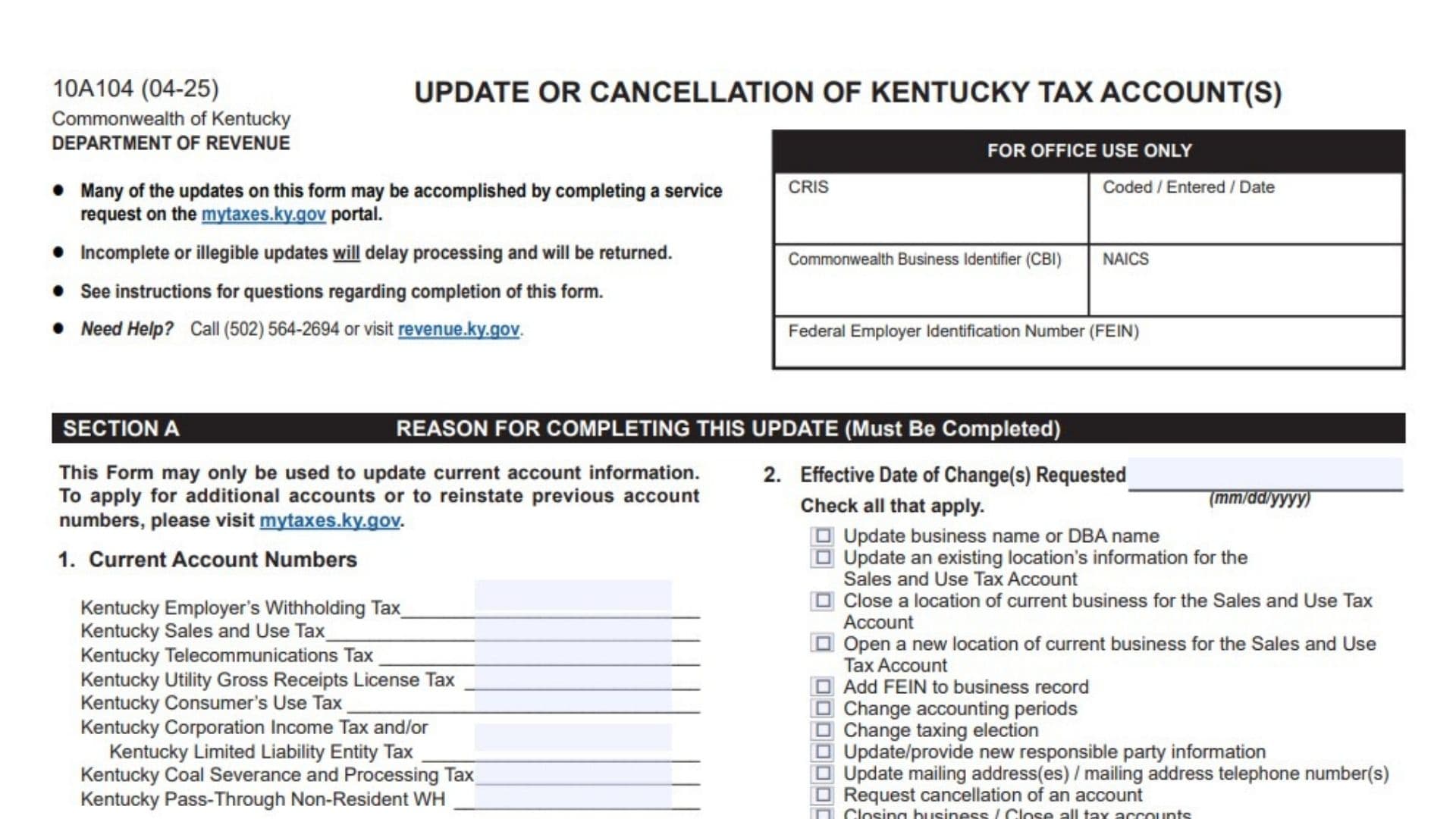
Kentucky Form 10A104, Update or Cancellation of Kentucky Tax Account(s), is used by an existing business or organization to notify the Kentucky Department of Revenue about changes affecting its current state tax records or to request the cancellation of specific tax accounts. Businesses may use the form to change a legal business name or DBA name, add a Federal Employer Identification Number, update contact information, change mailing addresses and telephone numbers, report changes to a sales and use tax location, open or close a branch location, update an accounting period, report a federal taxing-election change, add or remove responsible parties, close individual tax accounts, or close all Kentucky tax accounts connected with a business. The form can apply to Employer’s Withholding Tax, Sales and Use Tax, Transient Room Tax, Consumer’s Use Tax, Telecommunications Tax, Motor Vehicle Tire Fee, Utility Gross Receipts License Tax, Commercial Mobile Radio Service Prepaid Service Charge, Corporation Income Tax, Limited Liability Entity Tax, Coal Severance and Processing Tax, Coal Seller or Purchaser Certificate identification, and Pass-Through Non-Resident Withholding Tax. It is intended only for updating accounts that already exist. It should not be used to apply for an additional tax account, reactivate a previously closed account number, report a completely new owner when the change requires new registration, or replace existing account numbers after a change in legal business structure. Those registrations must generally be handled through mytaxes.ky.gov. Sections A and B are mandatory for every submission, while Sections C through F are completed only when they apply to the requested change. The form must be readable, complete, certified, and signed by an authorized person before it is submitted. Missing information, unclear handwriting, an omitted signature, or failure to complete the required section may delay processing or cause the submission to be returned.
How To File Kentucky Form 10A104
Before filing, complete Sections A and B and every additional section connected with the change you selected in Item 2. Review all account numbers, dates, names, identification numbers, addresses, and checkboxes for accuracy. Attach additional pages when the form does not provide enough space, and clearly identify the business and the related item number on each attachment.
Online Service Request Option
Many account updates may be handled through a service request at mytaxes.ky.gov. Check the available online services before submitting the paper form, especially when the requested change is straightforward.
The online service-request option does not mean that every possible change can be completed online. Use Form 10A104 when the requested update requires the information collected on this form or when the Department directs you to submit it.
Filing By Mail
Send the completed and signed form to:
Kentucky Department of Revenue
501 High Street, Station 20A
Frankfort, Kentucky 40601
Place any supporting schedules or additional information behind the main form. Make sure all pages belong to the same business and identify the relevant item number.
Filing By Fax
Fax the completed and signed form to:
502-564-0796
Confirm that all pages were transmitted successfully and that the signature page was included.
Filing By Email
Email the completed and signed form to:
DOR.WEBResponseDataIntegrity@ky.gov
Use a clear subject line that identifies the business and the type of update being requested. Include all required pages and attachments in a readable format.
Getting Help
For assistance with completing the form, contact the Kentucky Department of Revenue Data Quality Branch at 502-564-2694. Telecommunications Device for the Deaf assistance is also available through the Department.
The Department’s Ombudsman may be contacted at 502-564-7822 when a taxpayer needs help protecting or understanding their rights during a Kentucky tax matter.

How To Complete Kentucky Form 10A104
Form Header And Office-Use Area
The boxes labeled “For Office Use Only” are reserved for Kentucky Department of Revenue personnel. Do not enter information in the CRIS, coded or entered date, CBI, NAICS, or FEIN boxes located in that area.
Although your CBI and FEIN appear elsewhere on the form, the copies shown inside the office-use box should remain blank unless the Department specifically instructs you otherwise.
Section A: Reason For Completing This Update
Section A is required for every submission. It identifies the existing accounts affected by the request, the date the changes take effect, and the reason the form is being filed.
Item 1: Current Account Numbers
Enter the existing Kentucky account number beside each applicable tax account. Leave a line blank when your business does not have that account or the account is unrelated to the submission.
Do not enter a requested new account number. This item is for account numbers that have already been assigned to the business or organization.
Kentucky Employer’s Withholding Tax
Enter the account number used for withholding Kentucky income tax from employee wages.
Complete this line when the requested update affects the business’s employer withholding account, such as an address change, responsible-party update, cessation of employees, or cancellation request.
Kentucky Sales And Use Tax
Enter the existing Kentucky Sales and Use Tax account number.
Use this line when changing a sales location, opening or closing a branch, updating the business name, changing an address, or requesting cancellation of the sales and use tax account.
Kentucky Telecommunications Tax
Enter the account number assigned to the business for Kentucky telecommunications tax.
Complete this line only when the update or cancellation applies to that account.
Kentucky Utility Gross Receipts License Tax
Enter the Utility Gross Receipts License Tax account number associated with the business.
Use the line when changing information for that account or requesting that it be canceled.
Kentucky Consumer’s Use Tax
Enter the existing Consumer’s Use Tax account number.
Complete this line when the submission concerns purchases on which Kentucky sales tax was not collected, or when the account’s information or status needs to be changed.
Kentucky Corporation Income Tax And Limited Liability Entity Tax
Enter the account number used for Kentucky Corporation Income Tax, Limited Liability Entity Tax, or both.
The same line may cover both tax types when they are administered through the same business account.
Kentucky Coal Severance And Processing Tax
Enter the account number assigned for Coal Severance and Processing Tax.
Leave the line blank when the business is not registered for this tax.
Kentucky Pass-Through Non-Resident Withholding
Enter the account number used for withholding related to nonresident owners, partners, members, or shareholders of a pass-through entity.
Use this line only when that account is affected by the requested change.
Item 2: Effective Date Of Changes Requested
Enter the date on which the requested update became effective or will become effective. Use month, day, and four-digit year format.
The effective date should match the event being reported. For example, use the date a location moved, an officer’s position began or ended, a mailing address changed, or business activity stopped.
After entering the date, select every reason that applies. More than one checkbox may be selected when several related updates are being submitted together.
Update Business Name Or DBA Name
Select this option when changing the legal business name, the assumed business name, or both.
Complete Sections A and B. A legal name change for a business organized or qualified with the Kentucky Secretary of State must first be recorded with the Secretary of State.
Update An Existing Sales And Use Tax Location
Select this option when an existing business location has moved or when its location information has changed.
Complete Sections A, B, and C. Provide both the previous location information and the updated location information. A revised Sales and Use Tax Permit may be issued for the updated location.
Close A Current Sales And Use Tax Location
Select this option when one branch or business location is closing but the business or its other locations will continue operating.
Complete Sections A, B, and C. Identify the closing location and enter the date it stopped operating.
Do not select “Closing Business” unless the entire business and all applicable tax accounts are being closed.
Open A New Sales And Use Tax Location
Select this option when the same existing business opens an additional branch or physical location.
Complete Sections A, B, and C. Enter the new location’s physical address, opening date, telephone number, and business activity.
Businesses operating several locations that perform the same activity generally remain under the same sales tax account rather than receiving a separate account for each location.
Add FEIN To Business Record
Select this option when an existing business record does not currently show the FEIN assigned by the Internal Revenue Service.
Complete Sections A and B and enter the FEIN in Item 5.
This selection should not be used when the business has received a different FEIN because of an ownership or entity change. A changed FEIN generally requires new account registration.
Change Accounting Periods
Select this option when the business has changed its tax year or accounting year with the Internal Revenue Service.
Complete Sections A, B, and D. Enter the new calendar-year, fiscal-year, or 52/53-week accounting-period information in Item 12.
Change Taxing Election
Select this option when the entity’s legal business structure remains the same but its federal tax treatment has changed.
Complete Sections A, B, and D. Show both the previous federal taxing election and the new election.
A change in legal business structure is not handled as a simple taxing-election update. A new structure may require new Kentucky tax accounts.
Update Or Provide Responsible-Party Information
Select this option when adding a responsible party, changing an existing responsible party’s details, replacing a responsible party, or entering the date a responsible party’s role ended.
Complete Sections A, B, and D.
Update Mailing Addresses Or Mailing Telephone Numbers
Select this option when changing the mailing address, attention line, or mailing telephone number used for one or more Kentucky tax accounts.
Complete Sections A, B, and E. You may use the second address area when different groups of accounts need different mailing addresses.
Request Cancellation Of An Account
Select this option when one or more specific Kentucky tax accounts should be closed while other accounts may remain active.
Complete Sections A, B, and F.
Closing Business Or Closing All Tax Accounts
Select this option when the business has stopped operating and all applicable Kentucky tax accounts must be closed.
Complete Sections A, B, and F. Check every account that should be canceled and provide the final activity date and reason for closure.
Section B: Business And Contact Information
Section B is mandatory for every submission, even when the requested change does not directly involve the business name or contact person.
Item 3: Legal Business Name
Enter the business’s complete current legal name in the “Current Name” area.
Use the exact name under which the entity is legally registered. Include required designations such as LLC, Inc., Corporation, LP, or LLP when they are part of the registered name.
If the legal name is changing, enter the replacement name in the “New Name” area. If there is no legal name change, leave the new-name area blank.
A business organized or qualified through the Kentucky Secretary of State must complete the legal name change with that office before requesting the Kentucky Department of Revenue update.
Use the second line in each name area when the complete name does not fit on the first line.
Item 4: Doing Business As Name
Enter the business’s current trade name, assumed name, or “doing business as” name in the “Current DBA” field.
If the DBA is changing, enter the new trade name in the “New DBA” field.
Leave this item blank when the business has never used a DBA and is not adding one.
A DBA name is different from the entity’s legal name. Do not place the legal entity name in the DBA field unless the business actually uses the same name as its public-facing trade name.
Item 5: Federal Employer Identification Number
Enter the FEIN assigned to the business or organization by the Internal Revenue Service.
Use all nine digits and place them in the boxes provided. Verify the number carefully before filing.
This item may be used to add a previously omitted FEIN to an existing record. It cannot be used to replace an old FEIN with a new one. When the FEIN has changed, the business generally must apply for new Kentucky tax accounts through mytaxes.ky.gov.
A sole proprietor without an FEIN should not invent a number. Enter information only when an FEIN has actually been issued and the field applies.
Item 6: Kentucky Secretary Of State Organization Number
Enter the organization number assigned by the Kentucky Secretary of State.
This number generally applies to corporations, limited liability companies, limited partnerships, and other entities registered or qualified with the Secretary of State.
Sole proprietorships and general partnerships are not normally required to register with the Kentucky Secretary of State, so this field may not apply to them.
If the organization number has changed because the legal entity has changed, the number cannot simply be replaced on the existing accounts. New Kentucky account registration may be required.
Item 7: Commonwealth Business Identifier
Enter the business’s 10-digit Commonwealth Business Identifier, commonly called the CBI number.
Complete this field when a CBI has been assigned. Check notices, account records, or correspondence from Kentucky agencies to confirm the correct number.
Do not enter the FEIN, Secretary of State organization number, or an individual tax account number in this field.
Item 8: Person To Contact Regarding This Update
Provide the details of the person whom the Kentucky Department of Revenue may contact if it has questions about the submission.
Name
Enter the contact person’s last name, first name, and middle name or middle initial.
The contact may be an owner, officer, employee, accountant, attorney, payroll representative, or another person familiar with the requested changes.
Title
Enter the person’s role in relation to the business, such as Owner, President, Member, Manager, Treasurer, Controller, Accountant, or Authorized Representative.
Daytime Telephone Number
Enter a telephone number where the contact can be reached during normal business hours.
Include the area code.
Extension
Enter the telephone extension when one is needed to reach the contact person. Leave the field blank when there is no extension.
Email Address
Enter a current email address that the contact checks regularly.
Providing an email address gives the Department permission to communicate with the contact by email regarding the submission.
Section C: Sales And Use Tax Location Information
Complete Section C only when updating, moving, closing, or opening a physical location connected with an existing Kentucky Sales and Use Tax account.
Location addresses in this section must be physical business addresses. Do not use a post office box as a location address.
Item 9: Update Or Close An Existing Business Location
Item 9 contains a current-location area and a new-location area. How you complete the item depends on whether the location is closing or being updated.
Close Location Checkbox
Select “Close Location” when the identified branch or location has permanently stopped operating.
Complete the current-location information and enter the date the location closed. The new-location side may be left blank when the location is closing without moving.
Update Or Move Location Checkbox
Select “Update/Move Location” when the location remains active but its address or identifying information has changed.
Complete both the current-location area and the new-location area so the Department can connect the old record with the updated location.
Current Business Location Name
Enter the name used to identify the current branch or location.
This may be the legal business name, the DBA name, a store name, or a branch description.
Current Doing Business As Name
Enter the trade name used at the existing location when it differs from the legal name.
Current Street Address
Enter the complete physical street address of the existing location.
Do not enter a P.O. Box.
Current City
Enter the city in which the existing location is physically situated.
Current State
Enter the two-letter state abbreviation for the current location.
Current ZIP Code
Enter the full ZIP code for the current address.
Current County
If the location is in Kentucky, enter the Kentucky county where the location is situated.
Leave this field blank when the location is outside Kentucky.
Current Location Telephone Number
Enter the telephone number associated with the existing business location.
Date Location Closed
When closing the location, enter the final date on which that location conducted business. Use month, day, and four-digit year format.
When the location is moving rather than closing, use this field only when the previous address stopped operating on a specific date and that information is relevant to the update.
New Business Location Name
When updating or moving the location, enter the name that will be used at the new or corrected location.
New Doing Business As Name
Enter the DBA used at the updated location, if applicable.
New Street Address
Enter the complete physical street address of the new or corrected location.
Do not use a P.O. Box.
New City
Enter the city for the new physical address.
New State
Enter the appropriate two-letter state abbreviation.
New ZIP Code
Enter the ZIP code for the updated location.
New County
Enter the county when the new location is in Kentucky.
New Location Telephone Number
Enter the telephone number assigned to the new or updated location.
If more than one existing location needs to be updated or closed, attach a separate schedule containing the same information requested in Item 9 for each additional location.
Items 10 And 11: Open New Locations Of The Current Business
Items 10 and 11 provide space for two new locations. Complete one block for each new branch or physical business site.
If only one location is being added, complete one block and leave the other blank.
If more than two locations are being added, attach a separate schedule containing the same details for every additional location.
Business Location Name
Enter the name used to identify the new branch, store, office, warehouse, or other location.
Doing Business As Name
Enter the DBA or trade name used at the new location, if applicable.
Street Address
Enter the new location’s physical street address.
A P.O. Box is not acceptable for a business location in Section C.
City
Enter the city where the location is physically situated.
State
Enter the two-letter state abbreviation.
ZIP Code
Enter the ZIP code for the physical location.
County
If the new location is in Kentucky, enter the Kentucky county in which it is located.
Telephone Number
Enter the telephone number for the new location.
Date Location Opened
Enter the date the location opened or is scheduled to open. Use month, day, and four-digit year format.
Description Of Business Activity
Briefly explain what the business will do at the new location.
Examples may include retail sales, wholesale distribution, office administration, food service, equipment rental, manufacturing, warehousing, or another accurate description of the location’s activity.
Do not provide only a general statement such as “business.” Describe the actual activity performed at that site.
Section D: Accounting Period, Taxing Election, And Responsible Parties
Complete Section D when changing the business’s accounting period, reporting a federal taxing-election change, or updating responsible-party information.
Item 12: Accounting Period Change With The IRS
Complete this item only when the business has changed its accounting period with the Internal Revenue Service.
Select the option that describes the new accounting year.
Calendar Year
Select “Calendar Year” when the tax year ends on December 31.
No separate month-and-day entry is needed because the calendar-year ending date is already identified.
Fiscal Year
Select “Fiscal Year” when the business’s tax year ends on a date other than December 31.
Enter the month and day on which the fiscal year ends. Do not enter the beginning date of the fiscal year in this field.
52/53-Week Calendar Year
Select this option when the business uses a 52/53-week tax year that is tied to the end of December.
Enter the day of the week on which the year ends, such as Saturday or Sunday.
52/53-Week Fiscal Year
Select this option when the business uses a 52/53-week fiscal year that is not based on a standard December 31 ending.
Enter both the relevant month and the day of the week on which the accounting year ends.
Item 13: Taxing Election Change With The IRS
Complete Item 13 when the legal business entity remains the same but its federal tax classification or taxing election has changed.
Do not use this section to report a change from one legal ownership structure to another. A change in business structure may require new Kentucky tax accounts.
Part A: Current Business Structure
Enter the business’s present legal structure.
Examples include limited liability company, corporation, partnership, sole proprietorship, trust, cooperative, or another legally recognized structure.
The answer should describe the legal entity, not merely its federal tax treatment.
Part B: Current Taxing Election
In the left column, select the federal tax treatment that applied before the change.
Choose the option that matches the entity’s existing IRS classification.
Partnership
Select this option when the entity is currently taxed federally as a partnership.
Corporation
Select this option when the entity is currently taxed as a C corporation.
S Corporation
Select this option when the entity has a valid federal S corporation election.
Cooperative
Select this option when the entity is taxed as a cooperative.
Trust
Select this option when the entity is taxed as a trust and the more specific disregarded-entity choices do not apply.
Single-Member Disregarded Entity
Select this option when the legal entity is a single-member entity that is disregarded separately for federal income tax purposes.
After selecting it, identify how the member is federally taxed.
Individual Sole Proprietorship
Select this sub-option when the disregarded entity’s single member is an individual reporting the business as a sole proprietorship.
General Partnership Or Joint Venture
Select this sub-option when the single member or owning arrangement is treated as a general partnership or joint venture for federal purposes.
Estate
Select this sub-option when the member is an estate.
Non-Statutory Trust Or Business Trust
Select this sub-option when the member is a non-statutory trust or business trust.
Other
Select “Other” when none of the listed classifications accurately describes the current federal treatment. Write the specific classification on the line provided.
Part B: New Taxing Election
In the right column, select the federal tax treatment that applies after the change.
Use the same categories described for the current election: Partnership, Corporation, S Corporation, Cooperative, Trust, Single-Member Disregarded Entity, or Other.
When choosing Single-Member Disregarded Entity, also select or write the applicable federal treatment of the member.
The current and new selections should clearly show what changed. Do not select the same classification in both columns unless another part of the election genuinely changed and is clearly explained in an attachment.
Items 14 And 15: Ownership Disclosure And Responsible-Party Update
The form provides two responsible-party entry blocks. Use each block for one person or business whose information is being added, updated, replaced, or ended.
Attach a separate page when more than two responsible parties must be reported.
New Responsible Party
Select this box when adding someone who is not currently listed as a responsible party for the business’s Kentucky tax accounts.
Update Existing
Select this box when correcting or changing information for a responsible party who is already on the account.
End Date
Select this box when reporting that a responsible party’s authority, ownership, office, or business role has ended.
You may select more than one action when appropriate. For example, you may update a person’s information and provide the ending date of that person’s role.
Full Legal Name
Enter the person’s complete legal first, middle, and last name.
Do not use a nickname, shortened trade name, or informal title.
When the responsible party is another business, identify the business as directed and enter its FEIN in the appropriate field.
Social Security Number
Enter the responsible party’s Social Security number when the responsible party is an individual.
The Social Security number is required to establish the individual’s identity for tax administration purposes.
Do not replace the required SSN with a driver’s license number or business account number.
FEIN
Enter an FEIN when the responsible party is another business rather than an individual.
Do not enter both an SSN and an FEIN unless both are genuinely required for the reported relationship.
Date Of Birth
Enter the individual responsible party’s date of birth using month, day, and four-digit year format.
This field generally does not apply when the responsible party is another business.
Driver’s License State And Number
When applicable, enter the state that issued the responsible party’s driver’s license and the complete license number.
Verify the number before submitting the form.
Business Title
Enter the person’s role within the business, such as Owner, Member, Partner, Manager, President, Treasurer, Trustee, Director, or Officer.
Use the title that accurately reflects the person’s authority or ownership relationship.
Effective Date Of Title
Enter the date on which the person began serving in the listed position.
Use month, day, and four-digit year format.
Do not enter the form-signing date unless that is also the actual date the title became effective.
Residence Address
Enter the responsible party’s complete residential street address.
Do not enter only the business address unless it is also the person’s residence and is appropriate for the field.
City
Enter the city for the responsible party’s residence.
State
Enter the two-letter state abbreviation for the residence.
ZIP Code
Enter the residence ZIP code.
Telephone Number
Enter a current telephone number for the responsible party, including the area code.
County
If the residence is in Kentucky, enter the Kentucky county.
Leave the county field blank when the residence is outside Kentucky.
Replacement Of An Existing Responsible Party
Answer “Yes” when the person being added is taking the place of someone who is already listed on the business’s tax accounts.
Answer “No” when the person is being added without replacing anyone.
Existing Responsible Party’s Name
When the answer to the replacement question is “Yes,” enter the complete name of the person being replaced.
This field may also be used when ending the role of an existing responsible party.
End Date
Enter the date the previous responsible party stopped serving in the listed position.
Use month, day, and four-digit year format.
Responsible-Party Rules By Business Type
Sole Proprietorship Or LLC Taxed As An Individual
Provide updated information for the original owner.
A new owner generally cannot be substituted through an account update. When ownership transfers to a different person, the new owner must usually apply for new Kentucky tax accounts.
Single-Member LLC Treated As A Disregarded Entity
Enter the single member’s updated information in one responsible-party block.
When the LLC has managers, use the additional responsible-party block for a manager. Attach a separate page when more managers must be reported.
Partnership, Joint Venture, LLP, LLLP, Or Multi-Member LLC
Enter updated information for the affected partners or members.
This guidance applies to entities federally taxed as partnerships, corporations, S corporations, or nonprofit organizations when responsible partners or members must be updated.
Attach a separate page when more than two partners or members need to be reported.
Corporation, S Corporation, Government Entity, Association, REIT, RIC, REMIC, Trust, Or Nonprofit
Enter updated information for the affected officers or other responsible officials.
Attach a separate page when updates are needed for more than two officers.
Section E: Mailing Address And Telephone Number Updates
Complete Section E when changing the mailing address or mailing telephone number for one or more Kentucky tax accounts.
Unlike the physical locations reported in Section C, a mailing address in Section E may include a P.O. Box.
The section provides two address groups so different tax accounts may be assigned to different mailing addresses.
Item 16: Start Date For Address Change
Enter the date on which the first new mailing address or telephone number becomes effective.
Use month, day, and four-digit year format.
Item 17: Accounts Affected By The First Address Change
Select every tax account that should use the address and telephone information entered in Item 18.
Do not select an account that should continue using its current mailing address.
Employer’s Withholding Tax
Select this box when the new address applies to employer withholding correspondence.
Sales And Use Tax
Select this box when the new mailing information applies to the Sales and Use Tax account.
Transient Room Tax
Select this box when the change applies to the Transient Room Tax account.
Motor Vehicle Tire Fee
Select this box when the new address should be used for Motor Vehicle Tire Fee correspondence.
Commercial Mobile Radio Service Prepaid Service Charge
Select this box when the mailing update applies to the CMRS Prepaid Service Charge account.
Consumer’s Use Tax
Select this box when the new mailing address or telephone number applies to the Consumer’s Use Tax account.
Corporation Income Tax And Limited Liability Entity Tax
Select this box when the change applies to Corporation Income Tax, Limited Liability Entity Tax, or both.
Coal Severance And Processing Tax
Select this box when the address change applies to the Coal Severance and Processing Tax account.
Pass-Through Non-Resident Withholding
Select this box when the new mailing information applies to the Pass-Through Non-Resident Withholding account.
Item 18: First New Mailing Address
Enter the mailing information that should be used for every account selected in Item 17.
Care Of Or Attention
Enter the name of a person, department, company, or representative who should receive the business’s tax correspondence.
Examples include “Attn: Tax Department,” “c/o Accounting Office,” or the name of an authorized representative.
Leave the line blank when no care-of or attention designation is needed.
Address
Enter the complete mailing address.
A street address or P.O. Box may be used in this section.
City
Enter the mailing city.
State
Enter the two-letter state abbreviation.
ZIP Code
Enter the full ZIP code.
County
When the mailing address is in Kentucky, enter the Kentucky county.
Leave the field blank when the address is outside Kentucky.
Mailing Telephone Number
Enter the telephone number associated with this mailing address or the person responsible for correspondence sent there.
Item 19: Start Date For Additional Address Change
Complete Item 19 when a second group of tax accounts will use a different mailing address from the address entered in Item 18.
Enter the date on which the second mailing address becomes effective.
Leave Items 19 through 21 blank when all affected accounts will use the same new address.
Item 20: Accounts Affected By The Second Address Change
Select every account that should use the second mailing address entered in Item 21.
The available choices are:
Employer’s Withholding Tax, Sales and Use Tax, Transient Room Tax, Motor Vehicle Tire Fee, Commercial Mobile Radio Service Prepaid Service Charge, Consumer’s Use Tax, Corporation Income Tax and Limited Liability Entity Tax, Coal Severance and Processing Tax, and Pass-Through Non-Resident Withholding.
Do not select the same account in both Items 17 and 20 unless the Department has specifically instructed you to do so.
Item 21: Second New Mailing Address
Complete the second mailing-address block for the accounts selected in Item 20.
Enter the care-of or attention name, complete address, city, state, ZIP code, Kentucky county when applicable, and mailing telephone number.
A P.O. Box is permitted.
Section F: Request Cancellation Of Accounts
Complete Section F when closing one or more Kentucky tax accounts or when the entire business is ending its Kentucky activity.
Canceling a tax account does not automatically remove the obligation to file outstanding returns, submit final returns, or pay unpaid tax, penalties, or interest.
Item 22: Tax Accounts Requested For Cancellation
Select every account that should be canceled. Leave active accounts unchecked.
Employer’s Withholding Tax
Select this account when the business no longer needs its Kentucky employer withholding registration.
This may apply when the business has stopped paying employees subject to Kentucky withholding.
Consumer’s Use Tax
Select this account when the business no longer has activity requiring a Consumer’s Use Tax account.
Motor Vehicle Tire Fee
Select this account when the business has stopped the activity connected with the Kentucky Motor Vehicle Tire Fee.
Utility Gross Receipts License Tax
Select this account when the business no longer needs its Utility Gross Receipts License Tax registration.
Coal Severance And Processing Tax
Select this account when coal severance or processing activity has ended.
Commercial Mobile Radio Service Prepaid Service Charge
Select this account when the business has stopped activity requiring the CMRS Prepaid Service Charge account.
Sales And Use Tax
Select this account when the business has permanently stopped making taxable retail or wholesale sales connected with the account.
Do not cancel the entire Sales and Use Tax account merely because one location closed when other locations remain active. Use Section C to close an individual location.
Transient Room Tax
Select this account when the business has stopped activity requiring Transient Room Tax registration.
Telecommunications Tax
Select this account when telecommunications-tax activity has ended.
Corporation Income Tax And Limited Liability Entity Tax
Select this account when cancellation is appropriate for Corporation Income Tax, Limited Liability Entity Tax, or both.
The income tax or LLET account of a corporation or limited-liability pass-through entity is generally canceled through the filing of a final return. An entity organized in Kentucky should not file its final return before it has been formally dissolved under Kentucky law.
Pass-Through Non-Resident Withholding
Select this account when the entity no longer has a nonresident withholding obligation requiring the account.
Item 23: Reason For Cancellation
Select the reason that most accurately explains why the selected account or accounts should be canceled.
When different accounts are being canceled for different reasons, attach an explanation identifying the reason that applies to each account.
Business Closed With No Further Kentucky Activity
Select this option when the entire business has closed and will no longer conduct business or taxable activity in Kentucky.
Business Sold
Select this option when ownership of the business has been transferred to another person or entity.
Complete Item 25 with the new owner’s information.
The seller’s tax accounts do not automatically transfer to the buyer. The new owner may need to obtain separate Kentucky registrations.
Ceased Having Employees
Select this option when the business remains active but no longer has employees subject to Kentucky withholding.
This reason commonly applies to cancellation of an Employer’s Withholding Tax account.
Ceased Retail Or Wholesale Sales
Select this option when the business has permanently stopped selling tangible personal property, digital property, or other items connected with its sales tax registration.
Death Of Owner
Select this option when the account cancellation is required because the business owner has died.
Provide any additional ownership or successor information needed to explain the account’s status.
Converted To Another Ownership Type
Select this option when the business changed from one legal ownership structure to another and must apply for new Kentucky accounts.
Examples may include changing from a sole proprietorship to an LLC or from a partnership to a corporation.
Merged Out Of Existence
Select this option when the registered business ceased to exist because it merged into another entity.
Complete Item 26 with the surviving business’s information.
No Further Kentucky Activity
Select this option when the business may continue operating elsewhere but no longer conducts activity requiring the selected Kentucky tax accounts.
Other
Select “Other” when none of the listed reasons accurately describes the cancellation.
Write a brief but specific explanation on the lines provided. Avoid vague descriptions such as “not needed.”
Item 24: Effective Date To Cancel Accounts
Enter the final date of operations or taxable activity for the account types being canceled.
Use month, day, and four-digit year format.
The cancellation date should correspond with business records, final payroll, final sales, final purchases, the closing date, or the final date of the activity connected with the account.
Do not automatically use the date the form is signed unless that is also the true final activity date.
Item 25: Information About The New Owner
Complete this item when “Business Sold” was selected in Item 23.
The form provides space for two new owners. Enter all available information for each applicable owner.
Name
Enter the complete legal name of the new owner.
When the buyer is a business entity, enter its complete legal business name.
Address
Enter the new owner’s complete mailing or business address.
City
Enter the city associated with the address.
State
Enter the two-letter state abbreviation.
ZIP Code
Enter the ZIP code.
Telephone Number
Enter a current telephone number for the new owner, including the area code.
When there are more than two new owners, attach a separate schedule containing the same information for each additional owner.
Item 26: Information About The Surviving Business
Complete this item when the registered business merged out of existence.
Business Name
Enter the complete legal name of the business that survived the merger.
FEIN
Enter the surviving business’s Federal Employer Identification Number.
Telephone Number
Enter a current telephone number for the surviving business.
Address
Enter the surviving business’s complete address.
City
Enter the city associated with the surviving business’s address.
State
Enter the two-letter state abbreviation.
ZIP Code
Enter the ZIP code for the surviving business.
Certification And Signature Instructions
The form must be signed before it is submitted.
By signing, the authorized person certifies that the information on the form and any attached schedules is accurate to the best of that person’s knowledge and belief.
The form contains two signature areas. At least one applicable signature area should be completed by a person authorized to act for the business. The second area may be used when another authorized signer is required.
Printed Name
Print or type the authorized signer’s complete name.
The printed name should be readable and should identify the person whose signature appears below it.
Signature
The authorized person must sign the form.
A contact person listed in Item 8 should not sign unless that person is also authorized to certify the business’s tax information.
Title
Enter the signer’s business title, such as Owner, President, Member, Partner, Manager, Treasurer, Trustee, or Authorized Officer.
Date
Enter the date the form was signed using month, day, and four-digit year format.
Telephone Number
Enter a current telephone number where the signer may be reached.
Final Review Before Submission
Confirm that Sections A and B are complete, the correct reason boxes are selected, all affected account numbers are included, every relevant supplemental section has been completed, dates use the correct format, physical sales locations do not use P.O. Boxes, mailing addresses are assigned to the correct accounts, additional schedules are attached when necessary, and an authorized person has signed the certification.
Do not write in the office-use area. Make sure handwriting is readable and that no information is cut off when faxing, scanning, or emailing the form.
Equal Access And Non-Discrimination Notice
The Kentucky Department of Revenue provides employment and services without discrimination based on race, color, national origin, sex, age, religion, disability, sexual orientation, gender identity, veteran status, genetic information, or ancestry.