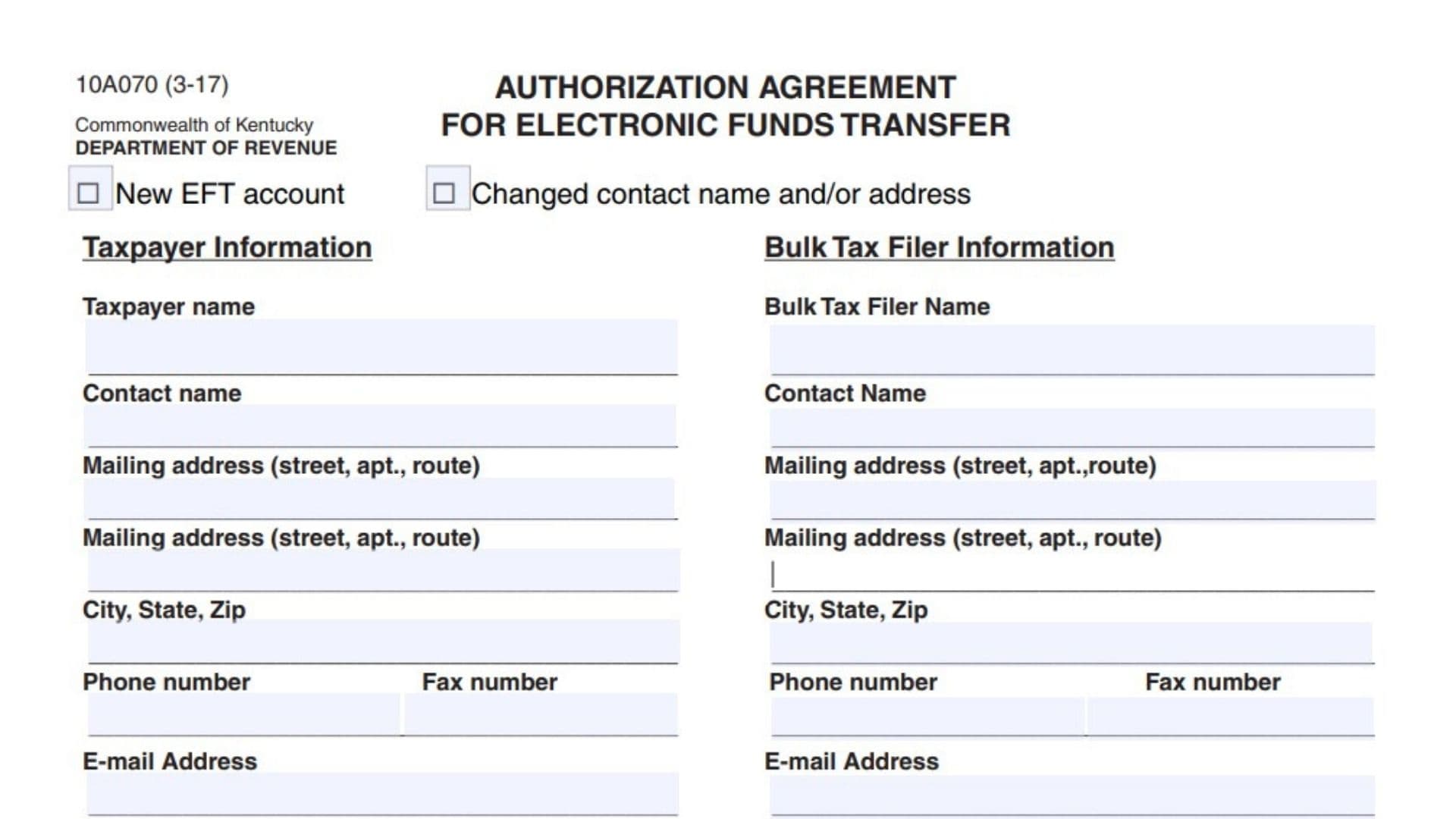
Kentucky Form 10A070, officially titled “Authorization Agreement for Electronic Funds Transfer,” is used to request permission from the Kentucky Department of Revenue to make certain state tax payments electronically through the Automated Clearing House, or ACH, credit method. With an ACH credit payment, the taxpayer initiates the transaction through the taxpayer’s own bank and instructs the bank to transfer the payment to the Department of Revenue’s account. The form may be submitted when establishing a new electronic funds transfer account or when updating the contact name or address connected with an existing account. It collects identifying and contact information for the taxpayer and, when applicable, the bulk tax filer responsible for transmitting payments. It also requires the taxpayer to identify each tax account that will be paid electronically by entering the tax type code, Kentucky identification number, business name, and Federal Employer Identification Number. By selecting the ACH credit option and signing the authorization, the taxpayer asks the Department of Revenue to approve ACH credit transactions for the listed tax types. The taxpayer also acknowledges that each payment must follow the NACHA CCD+ format and include the required TXP payment information. Incorrect or incomplete payment data may prevent the Department of Revenue from matching the payment to the proper tax account and can delay the posting of the credit. Form 10A070 authorizes the payment arrangement, but it does not serve as the tax return or the electronic tax payment itself.
Who Should Complete Form 10A070?
Complete Form 10A070 when you need to:
- Establish a new Kentucky electronic funds transfer account using ACH credit.
- Update the contact name or mailing address associated with an existing EFT account.
- Authorize your business to initiate Kentucky tax payments through its own bank.
- Identify the Kentucky tax accounts that will be paid using ACH credit.
- Provide information about a bulk tax filer that will transmit payments for the taxpayer.
This form is specifically connected with the ACH credit method, under which the taxpayer or an authorized bulk filer initiates the payment through its own financial institution.
Information Needed Before You Begin
Gather the following information before completing the form:
- The taxpayer’s legal or registered name.
- The taxpayer’s contact person.
- The taxpayer’s complete mailing address.
- A telephone number, fax number, and email address.
- Bulk tax filer details, when a bulk filer is involved.
- The tax type code for every tax being paid electronically.
- The Kentucky identification number for each tax account.
- The business name associated with each account.
- The business’s Federal Employer Identification Number, or FEIN.
- The name of the person authorized to sign for the taxpayer.
You may enter as many as four tax accounts or tax types in the available rows.

How To Complete Kentucky Form 10A070 Line By Line
Form Identification And Agency Information
Form Number: 10A070
The number 10A070 identifies the specific Kentucky Department of Revenue form being completed. You do not need to enter anything beside this number.
Revision Code: 3-17
The revision code identifies the edition of the form. It is not a filing date, tax period, account number, or payment amount.
Commonwealth Of Kentucky
This line identifies Kentucky as the government jurisdiction that issued the form. No information should be entered here.
Department Of Revenue
This identifies the Kentucky Department of Revenue as the agency receiving and processing the authorization.
Authorization Agreement For Electronic Funds Transfer
This is the official title of the form. It indicates that the document is used to authorize electronic tax payments rather than to calculate or report a tax liability.
Reason For Submitting The Form
Two checkboxes appear near the top of the form. Select the option that accurately describes why you are submitting it.
New EFT Account
Check the “New EFT account” box when the taxpayer is applying to establish an electronic funds transfer arrangement for the first time.
Selecting this box tells the Department of Revenue that it should create or approve a new EFT account connected with the taxpayer information and tax accounts listed on the form.
Changed Contact Name And/Or Address
Check the “Changed contact name and/or address” box when an existing EFT account remains active but its contact person or mailing information needs to be updated.
Use this option when:
- The responsible contact person has changed.
- The business has moved.
- The mailing address has changed.
- Both the contact name and address have changed.
Mark both account-purpose boxes only when both statements accurately apply to the submission.
Taxpayer Information
The left side of the form is reserved for the taxpayer or business whose Kentucky taxes will be paid through electronic funds transfer.
Taxpayer Name
Enter the taxpayer’s complete legal name.
For a business, use the registered business name associated with its Kentucky tax accounts. Avoid using an informal trade name unless that is the name under which the business is registered with the Department of Revenue.
Contact Name
Enter the full name of the person the Department of Revenue may contact regarding the EFT account.
This should be someone who understands the business’s tax payment process and can answer questions about the information entered on the form.
Mailing Address: First Line
Enter the taxpayer’s primary mailing address.
Include the street number and street name. You may also include an apartment, suite, unit, route, or similar delivery information when applicable.
Mailing Address: Second Line
Use the second mailing-address line for additional address information that does not fit on the first line.
Examples may include:
- Suite or unit number.
- Building name.
- Department name.
- Route information.
- Post office box details.
- Attention line.
When the complete address fits on the first line, the second line may be left blank.
City, State, Zip
Enter the city, two-letter state abbreviation, and ZIP code belonging to the taxpayer’s mailing address.
Check the ZIP code carefully because incorrect address information may interfere with correspondence about the EFT account.
Phone Number
Enter a current telephone number for the taxpayer’s contact person.
Include the area code. Use a number where the contact person can be reached during normal business hours.
Fax Number
Enter the taxpayer’s fax number when one is available.
When the taxpayer does not use fax communication, this field may be left blank unless the Department of Revenue has specifically requested it.
E-Mail Address
Enter a current email address that is regularly monitored by the taxpayer or the designated contact person.
Review the spelling before submitting the form. An incorrect email address may prevent the taxpayer from receiving account-related communications.
Bulk Tax Filer Information
The right side of the form is for information about a bulk tax filer. Complete this section when another organization or authorized provider will transmit tax payments for the taxpayer.
When no bulk tax filer is involved, leave this section blank unless instructed otherwise by the Department of Revenue.
Bulk Tax Filer Name
Enter the full legal or registered name of the bulk tax filer responsible for transmitting the electronic payments.
Do not enter the taxpayer’s name again unless the taxpayer is also operating as the bulk filer.
Contact Name
Enter the name of the person at the bulk tax filing organization who is responsible for the taxpayer’s EFT transactions.
The contact should be able to answer questions about payment files, transaction details, and payment transmission.
Mailing Address: First Line
Enter the bulk tax filer’s primary street or mailing address.
Include the street number, street name, apartment, suite, unit, or route information as applicable.
Mailing Address: Second Line
Use the second address line for any remaining portion of the bulk filer’s mailing address.
Leave this line blank when no additional address information is necessary.
City, State, Zip
Enter the bulk tax filer’s city, state abbreviation, and ZIP code.
The address should belong to the organization listed in the “Bulk Tax Filer Name” field.
Phone Number
Enter the business telephone number for the bulk tax filer’s designated contact person.
Include the area code and use a number where questions about transmitted payments can be answered.
Fax Number
Enter the bulk tax filer’s fax number when available.
Do not place a telephone number in this space.
E-Mail Address
Enter the email address of the bulk filer’s designated contact person or electronic payment department.
Use an address that is actively monitored and associated with the organization handling the transactions.
Taxes To Be Paid Using EFT
This section identifies the specific tax accounts for which ACH credit payments will be authorized.
The form provides four rows. Use one row for each separate tax type or tax account.
Tax Type Code
Enter the correct code for the tax being paid electronically.
The tax type code identifies the kind of Kentucky tax connected with the payment. Use the code provided in the taxpayer’s Department of Revenue records or electronic payment instructions.
Do not guess the code. An incorrect tax type code may direct the payment information to the wrong tax category.
KY ID Number
Enter the Kentucky identification number associated with the tax type entered in the same row.
Use the account number assigned by the Kentucky Department of Revenue. Confirm that the number belongs to both the listed business and the listed tax type.
Business Name
Enter the business name associated with the Kentucky identification number in that row.
The name should match the Department of Revenue’s account records. When several tax accounts belong to the same business, repeat the business name on each applicable row.
FEIN
Enter the taxpayer’s Federal Employer Identification Number.
The FEIN is the federal identification number assigned to the business. Confirm that it belongs to the business name and Kentucky account entered in the same row.
First Tax Account Row
Use the first row for the taxpayer’s first tax type.
Enter the tax type code, Kentucky identification number, business name, and FEIN across the same row.
Second Tax Account Row
Use the second row when the taxpayer will make ACH credit payments for another tax type or account.
Do not combine two tax types in one row.
Third Tax Account Row
Use the third row for an additional tax type or account when applicable.
Make sure all four pieces of information relate to the same account.
Fourth Tax Account Row
Use the fourth row for the final available tax type or account.
When the taxpayer has fewer than four applicable tax accounts, leave the unused rows blank.
ACH Credit Selection
ACH Credit—Taxpayer Initiates Through Own Bank
Check this box to confirm that the taxpayer is requesting the ACH credit payment method.
Under this method, the taxpayer gives payment instructions to its own bank. The bank then sends the tax payment and the required identifying information to the Kentucky Department of Revenue’s bank account.
Do not select this option unless the taxpayer intends to initiate payments through its financial institution.
Authorization Agreement
The paragraph below the ACH credit checkbox explains the authority being requested and the taxpayer’s responsibilities.
Request For ACH Credit Authority
By signing the form, the authorized representative asks the Department of Revenue to permit the named taxpayer to initiate ACH credit transactions to the Department’s bank account.
The authorization applies to the taxpayer identified in the taxpayer-information section.
NACHA CCD+ Format Requirement
The taxpayer acknowledges that ACH credit transactions must be transmitted in the NACHA CCD+ format.
The taxpayer should coordinate with its bank or payment provider to ensure that the transaction is created in the required format.
TXP Convention Requirement
The payment must include the appropriate TXP convention information.
TXP information allows the Department of Revenue to identify important payment details, such as the taxpayer, tax account, tax type, and payment period.
Before making a payment, confirm that the bank can transmit the required TXP data with the ACH credit transaction.
Limitation To Listed Tax Types
The authorization applies only to the tax types entered in the “Taxes to be paid using EFT” section.
Do not use the authorization for a tax type that has not been listed and approved. Add each applicable tax type as a separate entry.
Consequences Of Missing Or Incorrect TXP Information
The taxpayer accepts responsibility for including suitable TXP information with every payment.
When the required data is missing, incomplete, or incorrectly formatted, the Department of Revenue may be unable to apply the money promptly to the correct account. This can delay the proper posting of the payment credit.
Signature And Date
Authorized Signature
An individual with authority to act for the taxpayer must sign on the signature line.
The signer should review the entire form before signing. The signature confirms the request for ACH credit authority and the taxpayer’s understanding of the transaction requirements.
An unsigned form may be considered incomplete.
Date
Enter the date on which the authorized representative signs the form.
Use a complete date that clearly shows the month, day, and year. Do not enter a tax period or payment date unless it is also the actual signing date.
How To File Kentucky Form 10A070
Review The Completed Form
Before sending the form, confirm that:
- The correct reason-for-filing box is checked.
- The taxpayer’s legal name is entered.
- The taxpayer contact information is complete.
- Bulk filer information is completed when applicable.
- Every tax type has its own row.
- Each tax type code matches the correct Kentucky identification number.
- The business name and FEIN are accurate.
- The ACH credit box is checked.
- An authorized person has signed and dated the form.
Make a copy of the completed form for the taxpayer’s records.
Return The Completed Copy
Send the completed form to:
Kentucky Department of Revenue
Electronic Commerce
501 High Street, Station 22
Frankfort, KY 40601
Fax Information
The form lists the following fax number:
(502) 564-0230
When filing by fax, retain the transmission confirmation with the taxpayer’s records.
Email Information
The form lists the following email address:
When sending the completed form electronically, use a clear subject line that identifies the taxpayer and indicates that the message concerns an EFT authorization request. Avoid including sensitive information in the email subject line.
Telephone Assistance
For questions about the form or the EFT authorization process, the listed telephone number is:
1-800-839-4137
The telephone number is provided for assistance and is not a substitute for submitting the signed form.
What Happens After Filing?
Form 10A070 does not provide a specific processing time or describe how approval will be confirmed. Contact the Kentucky Department of Revenue using the listed telephone number when you need to verify receipt, request a status update, or confirm that the EFT account is ready for ACH credit payments.
Continue to follow all regular tax filing and payment deadlines while the authorization request is being processed.
Common Form 10A070 Mistakes To Avoid
Selecting The Wrong Submission Reason
Do not check “New EFT account” when you are only updating an existing account’s contact information. Select the option that accurately describes the request.
Leaving The ACH Credit Box Unchecked
The form is specifically requesting ACH credit authority. Failing to select the ACH credit option may leave the taxpayer’s requested payment method unclear.
Entering An Incorrect Tax Type Code
The tax type code determines which tax category is associated with the payment. Confirm the code instead of estimating or using an unrelated account code.
Mixing Account Information Across Rows
Every row must contain information for one tax type or tax account. Do not enter one account’s Kentucky ID number beside another account’s tax type code.
Omitting TXP Payment Information
Authorization alone does not guarantee that future payments will post correctly. Each ACH credit transaction must include properly formatted TXP information.
Using An Unmatched Business Name Or FEIN
The business name, Kentucky identification number, and FEIN should refer to the same taxpayer account.
Completing The Bulk Filer Section Unnecessarily
Complete the bulk tax filer section only when a bulk filer is involved in transmitting payments for the taxpayer.
Forgetting The Signature Or Date
Reviewing or typing information into the form does not replace the authorized signature. Sign and date the form before submission.
Final Filing Checklist
Before filing Kentucky Form 10A070, verify that you have:
- Checked “New EFT account” or “Changed contact name and/or address.”
- Entered the taxpayer’s complete name.
- Provided a responsible contact person.
- Completed both address lines as needed.
- Entered the correct city, state, and ZIP code.
- Provided current telephone, fax, and email information.
- Completed the bulk tax filer section when applicable.
- Listed every tax type that will be paid through EFT.
- Entered the correct Kentucky identification number for each tax type.
- Matched each account with the proper business name and FEIN.
- Checked the ACH credit authorization box.
- Confirmed that the bank can use the NACHA CCD+ format and TXP convention.
- Obtained the signature of an authorized representative.
- Entered the signing date.
- Made a copy for the taxpayer’s records.
- Sent the completed form to the Kentucky Department of Revenue’s Electronic Commerce office.