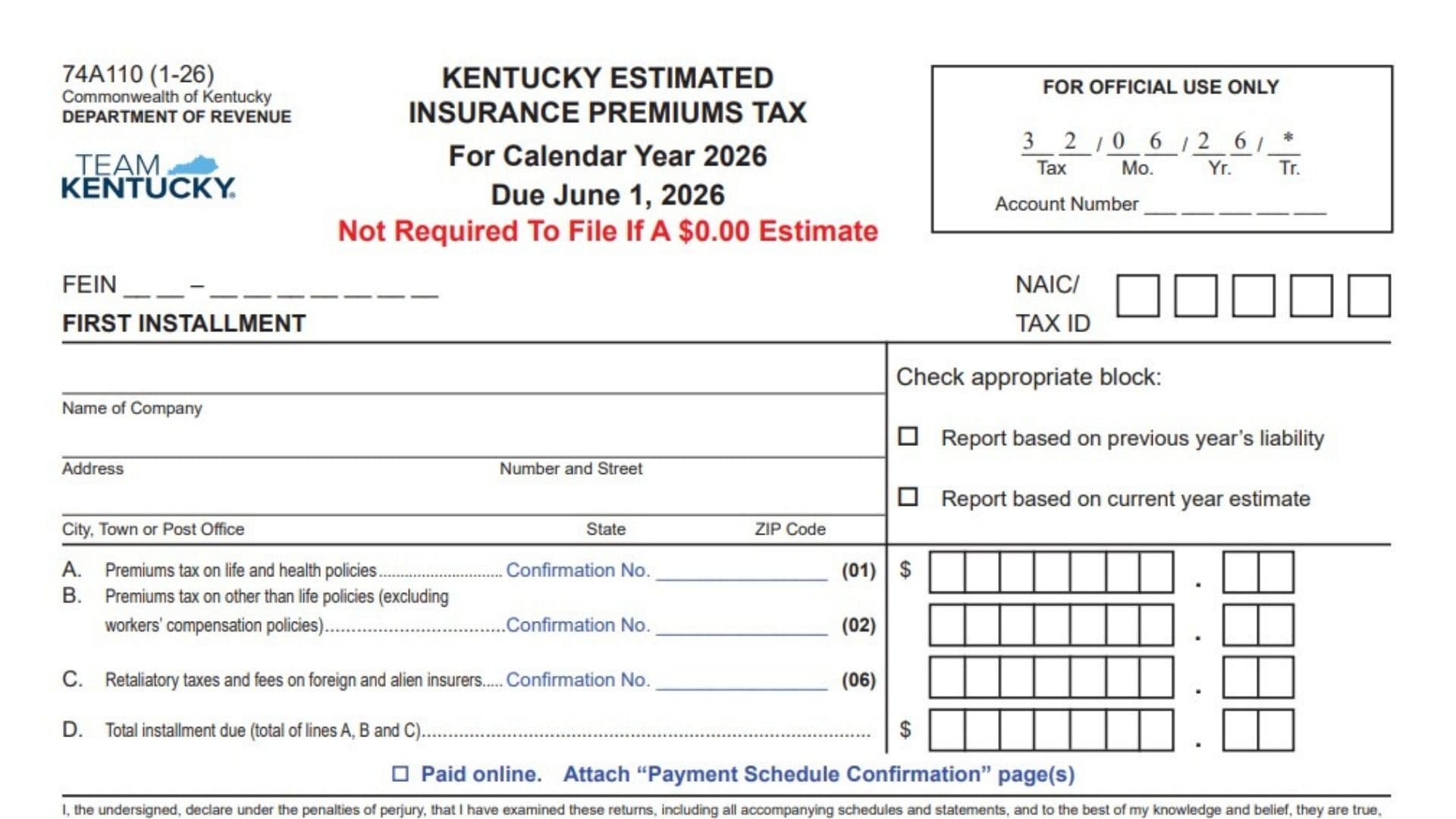
Kentucky Form 74A110 is used by qualifying insurance companies to report and pay estimated Kentucky insurance premiums tax during the calendar year. It covers estimated tax on life and health policies, premiums from policies other than life insurance, and retaliatory taxes and fees that may apply to foreign or alien insurers. The form contains separate vouchers for the first and second installments, a worksheet for calculating the estimated annual liability, and an amended second-installment section for companies that need to revise an earlier estimate. A company generally must file estimated installment reports when its Kentucky insurance premiums tax for the previous calendar year was $5,000 or more. The estimate may be based on the previous year’s reported premiums or the company’s expected taxable premiums for the current year. The annual estimated liability is normally divided into three parts: the first installment, the second installment, and the remaining balance submitted with the annual Insurance Premiums Tax Return. A company with a zero-dollar estimate is not required to file an installment voucher. Because penalties and interest may apply to late or insufficient payments, the company should calculate each tax category carefully, apply all eligible credits, and submit the correct installment by the applicable deadline.
Who Must File Form 74A110?
An insurance company must file estimated Kentucky insurance premiums tax installment reports when its Kentucky insurance premiums tax for the previous calendar year was at least $5,000.
A company does not need to file an installment report when its estimated payment is $0.00.
The filing requirement may include:
- Domestic and foreign life insurance companies
- Companies writing policies other than life insurance
- Foreign and alien insurers subject to retaliatory taxes and fees
Applicable Tax Categories And Statutory Provisions
The tax categories reported on the form are connected to the following Kentucky statutes:
- Domestic and foreign life insurance tax: KRS 136.330
- Other-than-life insurance tax: KRS 136.340, 136.350, 136.370, and 136.390
- Retaliatory taxes and fees on foreign and alien insurers: KRS 304.3-270

How To File Kentucky Form 74A110
Choose The Basis For Your Estimated Report
Each installment must be calculated using one of the following methods:
- The company’s total premiums reported for the previous calendar year
- The company’s estimated total taxable premiums for the current calendar year
Use the same basis consistently when completing the worksheet and installment voucher.
If the current-year estimate is too low, penalties and interest may apply to the underpaid amount.
Calculate Retaliatory Taxes And Fees
If the company’s retaliatory taxes and fees for the previous calendar year were more than $5,000, estimated retaliatory tax payments are required.
Calculate the estimated retaliatory liability using either:
- The previous calendar year’s amount, or
- An estimate for the current calendar year
Divide the resulting amount by three. Enter one-third of the estimated retaliatory taxes and fees on Line C of the applicable installment voucher.
Use The Worksheet Before Completing The Vouchers
The worksheet helps calculate the estimated annual insurance premiums tax and each installment.
Enter taxable premiums, calculate the related tax liability, subtract eligible credits, and divide the remaining estimated liability into three installments.
Prior-year credit information should agree with the credit amounts carried forward from the previous year’s Kentucky Insurance Premiums Tax Return.
First Installment Deadline
The first installment is due on or before June 1, 2026.
Complete the First Installment section, detach it from the remaining form, and submit it with the first estimated payment.
Second Installment Deadline
The second installment is due on or before October 1, 2026.
Complete the Second Installment section, detach it, and submit it with the second estimated payment.
Final Installment Deadline
The final portion of the estimated tax is paid with Kentucky Form 74A100, Insurance Premiums Tax Return.
For the 2026 calendar year, the remaining balance is due on or before March 1, 2027.
Amending The Estimate
An amended estimated tax report may be filed on or before October 1 of the current calendar year.
Use the Amended Second Installment section to revise the estimate and calculate any additional amount due after considering the first installment already paid.
Paying By Check
Make the check payable to:
KENTUCKY STATE TREASURER
Send the completed voucher and payment to the appropriate address.
Regular Mailing Address
Kentucky Department of Revenue
P.O. Box 1303
Frankfort, KY 40602-1303
Overnight Delivery Address
Kentucky Department of Revenue
501 High Street
Frankfort, KY 40601-2103
Paying Online
When the payment is made online:
- Check the “Paid online” box on the applicable voucher.
- Attach the Payment Schedule Confirmation page or pages.
- Send the voucher and confirmation pages to one of the listed addresses.
Enter any payment confirmation numbers in the appropriate tax-category fields when confirmation numbers have been issued.
Penalty And Interest For Underpayment
An underpaid estimated installment may be subject to a penalty of 5% per month.
The total penalty assessed on one report cannot exceed 25% of the underpaid amount.
Interest also applies from the original due date at the Kentucky tax interest rate defined under KRS 131.010(6).
Getting Additional Information
For additional forms or assistance, contact the Kentucky Department of Revenue Financial Tax Section at:
(502) 564-4810
How To Complete The First Installment
The first installment section is used for the payment due June 1, 2026.
For Official Use Only
Do not enter information in the box marked for official use.
The tax period, transaction information, and account number fields in this box are completed by the Kentucky Department of Revenue.
FEIN
Enter the company’s nine-digit Federal Employer Identification Number.
Follow the displayed format, placing the first two digits before the hyphen and the remaining seven digits after it.
First Installment Label
The words “First Installment” identify this voucher as the company’s first estimated payment for the calendar year.
No additional entry is required on this label.
NAIC Or Tax ID
Enter the applicable National Association of Insurance Commissioners identification number or Kentucky tax identification number.
Use all available boxes and enter the number accurately.
Name Of Company
Enter the complete legal name of the insurance company.
Use the same company name shown on the company’s Kentucky tax records.
Address Number And Street
Enter the company’s mailing street address.
Include the street number, street name, suite number, or other necessary delivery details.
City, Town, Or Post Office
Enter the city, town, or post-office location connected to the mailing address.
State
Enter the appropriate two-letter state abbreviation.
ZIP Code
Enter the complete ZIP Code for the company’s mailing address.
Reporting Basis
Check only one of the two available boxes.
Report Based On Previous Year’s Liability
Check this box when the installment is calculated using the company’s liability or reported premiums from the previous calendar year.
Report Based On Current Year Estimate
Check this box when the installment is calculated using the company’s estimated taxable premiums for the current calendar year.
Line A: Premiums Tax On Life And Health Policies
Enter the first-installment amount for tax related to life and health insurance policies.
Enter the payment confirmation number in the confirmation field when one is available.
This tax category uses tax code 01.
Line B: Premiums Tax On Other-Than-Life Policies
Enter the first-installment amount for policies other than life insurance.
Do not include workers’ compensation policies in this amount.
Enter the applicable payment confirmation number when one has been issued.
This tax category uses tax code 02.
Line C: Retaliatory Taxes And Fees
Enter the first-installment amount for retaliatory taxes and fees that apply to foreign or alien insurers.
When estimated retaliatory payments are required, this amount is generally one-third of the estimated annual retaliatory liability.
Enter the related confirmation number when applicable.
This tax category uses tax code 06.
Line D: Total Installment Due
Add the amounts entered on Lines A, B, and C.
Enter the combined total on Line D.
The amount on this line is the total first installment due before considering any separately documented payment arrangement.
Paid Online Checkbox
Check this box when the first installment was paid electronically.
Attach the Payment Schedule Confirmation page or pages to the voucher.
Leave the box unchecked when the payment is being submitted by check.
Declaration
The signer declares, under penalties of perjury, that the return and all attached schedules and statements have been examined.
The signer also confirms that the information is true, correct, and complete to the best of their knowledge and belief.
Review all entries before signing.
Date
Enter the date on which the officer or authorized agent signs the first installment report.
E-Mail Address
Enter a current email address where the company or authorized representative can be contacted.
Signature Of Officer Or Agent
An authorized company officer or agent must sign the report.
The signature confirms responsibility for the information reported.
Print Or Type Name Of Officer Or Agent
Clearly print or type the full name of the person who signed the report.
Title Of Officer
Enter the signer’s official company title, such as president, treasurer, controller, tax officer, or authorized agent.
Telephone Number
Enter a working telephone number for the signer or responsible company representative.
Include the area code.
Detach Before Mailing
Separate the first-installment voucher at the marked line before mailing it.
Do not send the second-installment voucher as part of the first-installment submission unless specifically required for another purpose.
How To Complete The Second Installment
The second installment section is used for the payment due October 1, 2026.
For Official Use Only
Leave the official-use box blank.
Do not enter an account number or alter the printed tax-period and transaction information.
FEIN
Enter the same nine-digit Federal Employer Identification Number used on the company’s first installment and other Kentucky tax filings.
Second Installment Label
The “Second Installment” label identifies the October installment voucher.
No entry is required on this printed label.
NAIC Or Tax ID
Enter the company’s applicable NAIC number or Kentucky tax identification number.
Name Of Company
Enter the company’s complete legal name.
The name should match the first-installment report and Kentucky registration records.
Address Number And Street
Enter the company’s current mailing street address, including any suite or unit number.
City, Town, Or Post Office
Enter the city, town, or postal location.
State
Enter the two-letter state abbreviation.
ZIP Code
Enter the complete postal ZIP Code.
Reporting Basis
Check one reporting method.
Report Based On Previous Year’s Liability
Select this option when the second installment is based on the previous year’s premiums or tax liability.
Report Based On Current Year Estimate
Select this option when the payment is based on the company’s expected taxable premiums for the current year.
Line A: Premiums Tax On Life And Health Policies
Enter the second-installment amount for life and health insurance policies.
Add the related confirmation number when applicable.
Use tax code 01 for this category.
Line B: Premiums Tax On Other-Than-Life Policies
Enter the second-installment tax for policies other than life insurance.
Exclude workers’ compensation policies.
Enter the payment confirmation number when available.
Use tax code 02.
Line C: Retaliatory Taxes And Fees
Enter the second-installment amount of retaliatory taxes and fees for foreign or alien insurers.
Enter the corresponding confirmation number when applicable.
Use tax code 06.
Line D: Total Installment Due
Add Lines A, B, and C.
Enter the total second installment due on Line D.
Paid Online Checkbox
Check the box when the second installment was paid online.
Attach all applicable Payment Schedule Confirmation pages.
Declaration
By signing, the officer or agent confirms that the installment report and its attachments have been reviewed and are true, correct, and complete to the best of the signer’s knowledge.
Date
Enter the signing date.
E-Mail Address
Enter the signer’s or company representative’s email address.
Signature Of Officer Or Agent
The authorized officer or agent must sign the second installment report.
Print Or Type Name Of Officer Or Agent
Enter the full printed or typed name of the signer.
Title Of Officer
Enter the signer’s company title or official capacity.
Telephone Number
Enter a telephone number, including the area code, where the responsible person can be reached.
Detach Before Mailing
Separate the second-installment voucher at the marked line before submitting it.
How To Complete The Estimated Tax Worksheet
The worksheet calculates the company’s estimated annual liability and divides it among the three scheduled payments.
Reporting Method Checkbox
Check one box to show how the worksheet was prepared.
Report Based On Previous Year’s Liability
Choose this box when the calculations use the previous calendar year’s liability.
Report Based On Current Year Estimate
Choose this box when the calculations use estimated taxable premiums for the current calendar year.
Line A: Taxable Premiums On Life And Health Policies
Enter the taxable premiums associated with life and health insurance policies.
Use the amount corresponding to the reporting basis selected above.
Line B: Taxable Premiums On Other-Than-Life Policies
Enter taxable premiums from policies other than life insurance.
Exclude premiums from workers’ compensation policies.
Line C: Total Taxable Premiums
Add the taxable premium amounts entered on Lines A and B.
Enter the combined amount on Line C.
Line D-1: Life Insurance Premiums Tax Liability
Calculate the total premiums tax liability for life insurance by multiplying the applicable worksheet premium amount by 1.5%.
Enter the calculated tax on Line D-1.
Line D-2: Other-Than-Life Premiums Tax Liability
Calculate the total premiums tax liability for insurance other than life insurance by multiplying the applicable worksheet premium amount by 2%.
Enter the calculated amount on Line D-2.
Workers’ compensation policies remain excluded from the other-than-life premium calculation.
Line E-1: Prior-Year Credits
Enter credits carried forward from the previous calendar year.
The amount should agree with the prior-year credit reported on the company’s previous Kentucky Insurance Premiums Tax Return.
Line E-2: Guaranty Fund Assessment Credits
Enter the guaranty fund assessment credits available for the current calendar year.
Apply only credits the company is eligible to use.
Line E-3: New Markets Development Program Tax Credits
Enter any available New Markets Development Program tax credits that may be applied to the estimated insurance premiums tax.
Line F: Total Estimated Tax Liability
Combine the tax liability calculated under Line D.
Combine all eligible credits entered under Line E.
Subtract the Line E credits from the Line D tax liability.
Enter the remaining estimated tax on Line F.
Line G: Installment Due June 1, 2026
Divide Line F by three.
Enter one-third of the total estimated tax liability on Line G.
This is the estimated first installment.
Line H: Installment Due October 1, 2026
Enter one-third of Line F on Line H.
This is the estimated second installment.
Line I: Projected Amount Due March 1, 2027
Enter the final one-third of Line F on Line I.
This amount represents the projected balance payable with the annual Insurance Premiums Tax Return.
How To Complete The Amended Second Installment
Use this section when revising the company’s estimated tax on or before October 1 of the current calendar year.
For Official Use Only
Do not complete the official-use box.
Leave the account number, tax-period, and transaction fields for department processing.
FEIN
Enter the company’s nine-digit Federal Employer Identification Number.
Amended Second Installment Label
This printed label identifies the submission as a revised second-installment report.
No entry is required on the label itself.
NAIC Or Tax ID
Enter the company’s NAIC number or Kentucky tax identification number.
Name Of Company
Enter the company’s full legal name.
Address Number And Street
Enter the complete mailing street address.
City
Enter the company’s mailing city.
State
Enter the two-letter state abbreviation.
ZIP Code
Enter the complete ZIP Code.
Calendar Year
Enter the calendar year covered by the amended estimate.
For the current version, enter 2026.
Amended Installment Calculation Table
The table contains four calculation columns and a tax-code column. Complete each applicable tax category separately.
Column 1: Amended Estimated Tax
Enter the revised estimated annual tax for each applicable category.
This column should reflect the company’s updated estimate rather than the amount reported on the original installment.
Column 2: Two-Thirds Of Estimated Tax
Multiply the amended estimated annual tax in Column 1 by two-thirds.
Enter the result in Column 2.
This represents the portion of the revised annual estimate that should generally have been covered by the first and second installments combined.
Column 3: Tax Paid With First Installment
Enter the amount already paid with the first installment for each tax category.
Do not include amounts that were not actually paid.
Column 4: Amount Of Tax Now Due
Subtract Column 3 from Column 2.
Enter the remaining amount due in Column 4.
When calculating the payment, review each tax category separately before entering the total.
Tax Code
Use the printed tax code associated with each tax category:
- 01 for life and health policy premiums tax
- 02 for other-than-life policy premiums tax
- 06 for retaliatory taxes and fees
Row A: Premiums Tax On Life And Health Policies
Enter the revised life and health policy tax in Column 1.
Calculate two-thirds of that amount in Column 2.
Enter the life and health tax paid with the first installment in Column 3.
Subtract Column 3 from Column 2 and enter the result in Column 4.
Enter the related confirmation number when one has been issued.
Row B: Premiums Tax On Other-Than-Life Policies
Enter the revised estimated tax for policies other than life insurance.
Exclude workers’ compensation policies.
Complete Columns 2, 3, and 4 using the same calculation method.
Enter the applicable payment confirmation number.
Row C: Retaliatory Taxes And Fees
Enter the amended estimated retaliatory taxes and fees.
Calculate two-thirds of the amended amount.
Enter any retaliatory tax paid with the first installment.
Subtract the first-installment payment from the two-thirds amount to determine the current amount due.
Enter the related confirmation number when applicable.
Row D: Total Of Lines A, B, And C
Add the amounts from Rows A, B, and C.
Enter the combined total in the final amount-due field.
This is the total payment submitted with the amended second installment.
Paid Online Checkbox
Check the box if the amended second-installment payment was made online.
Attach the Payment Schedule Confirmation page or pages.
Declaration
The authorized signer must confirm that the amended report, accompanying schedules, and statements have been examined and are true, correct, and complete to the best of their knowledge.
Date
Enter the date the amended report is signed.
E-Mail Address
Enter an active email address for the officer, agent, or company representative.
Signature Of Officer Or Agent
The authorized officer or agent must sign the amended report.
Print Or Type Name Of Officer Or Agent
Clearly enter the signer’s full name.
Title Of Officer
Enter the signer’s official title or authority to sign for the company.
Telephone Number
Enter a current telephone number, including the area code.
Final Review Checklist
Before submitting Kentucky Form 74A110, confirm that:
- The company is required to make estimated payments.
- The correct installment or amended section has been completed.
- The FEIN and NAIC or tax identification number are accurate.
- The company name and mailing address are complete.
- Only one reporting-basis box has been checked.
- Life and health tax is entered under tax code 01.
- Other-than-life tax excludes workers’ compensation policies and uses tax code 02.
- Retaliatory taxes and fees are reported under tax code 06.
- Lines A, B, and C have been added correctly on Line D.
- Eligible credits have been entered accurately on the worksheet.
- Each estimated installment equals one-third of the calculated annual liability when that method applies.
- Online payment confirmation pages are attached when required.
- The report has been dated and signed by an authorized officer or agent.
- The signer’s name, title, email address, and telephone number are complete.
- The correct voucher has been detached before mailing.
- The submission is being sent by the applicable deadline.