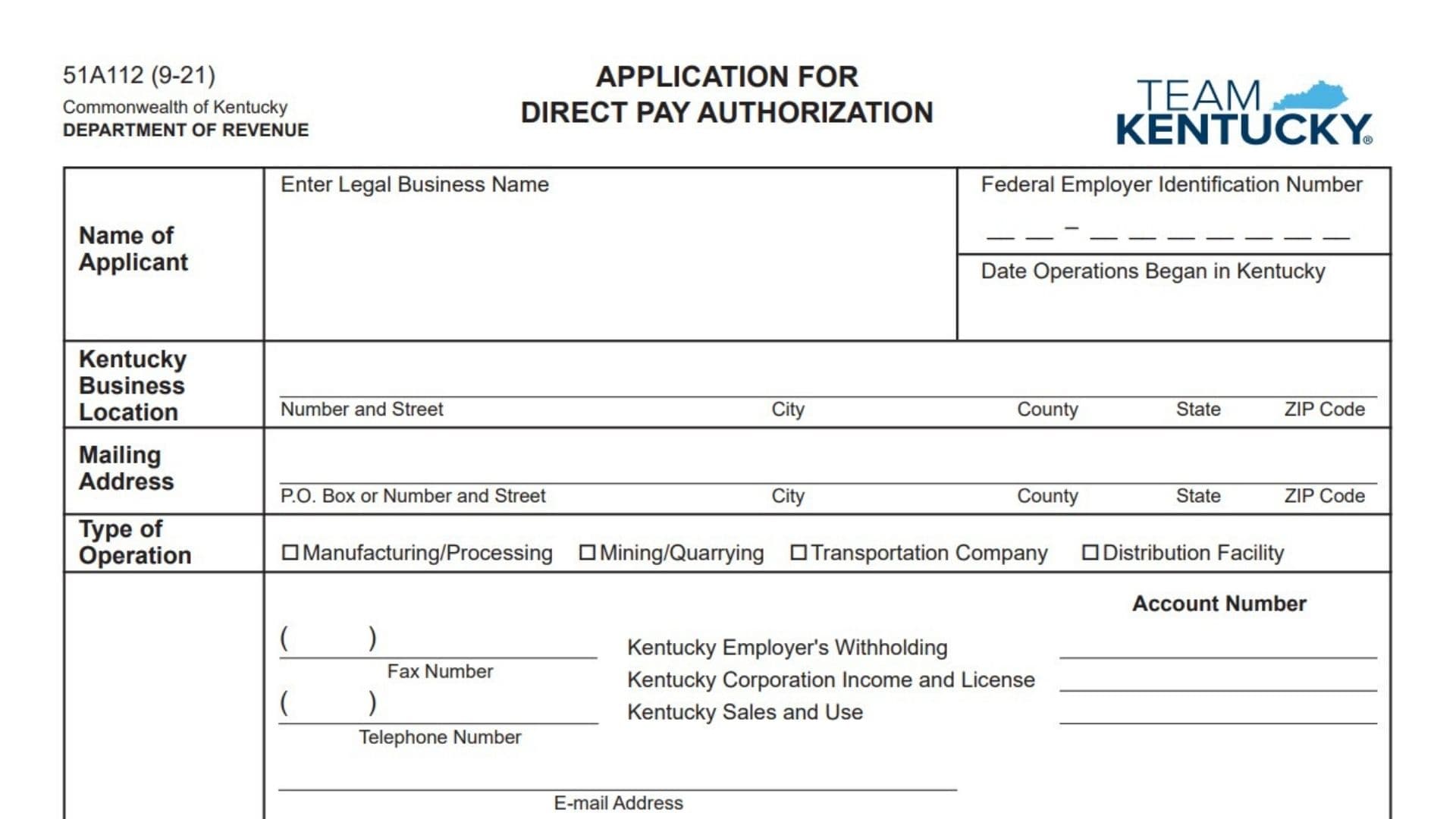
The Kentucky Application for Direct Pay Authorization, Form 51A112, is used by an eligible business to request permission to report and pay Kentucky sales or use tax directly to the Kentucky Department of Revenue instead of having a supplier collect and remit the tax on each applicable purchase. The application asks for the business’s legal name, federal employer identification number, Kentucky operating date, physical location, mailing address, contact details, operation type, and Kentucky tax account numbers. It also asks whether the business operates and owns qualifying property in more than one state, where its home office and other business locations are located, and how much tangible personal property or digital property it purchased for use in Kentucky during its most recent calendar or fiscal year. The applicant must demonstrate that its accounting records can separately identify purchases from Kentucky vendors and out-of-state vendors, including property stored, used, or consumed both inside and outside Kentucky. A detailed explanation of the records and documentation used to calculate taxable purchases must accompany the application. The business must also disclose whether it has paid taxes administered by the Kentucky Department of Revenue on time and whether it has attached its most recent certified financial statement. By signing, an authorized representative confirms that the information is accurate and agrees that, if direct pay authorization is issued, the business will calculate, report, and pay the sales or use tax that otherwise would have been collected or remitted through its suppliers. Submitting the application requests direct pay authorization, but the business should not treat the application itself as proof that authorization has been granted.
Who Should File The Kentucky Direct Pay Authorization Application?
This application is intended for a business seeking authorization to pay Kentucky sales or use tax directly to the Department of Revenue.
The form identifies the following operation types:
- Manufacturing or processing
- Mining or quarrying
- Transportation company
- Distribution facility
The application also requests information about multistate operations, purchasing volume, tax records, financial records, and previous tax compliance. Businesses should review these requirements before applying.
What Does Direct Pay Authorization Do?
If the application is approved, the business assumes responsibility for directly reporting and paying the applicable sales or use tax on qualifying purchases.
Instead of relying entirely on the supplier to determine and collect Kentucky tax, the authorized business evaluates the purchase, determines the taxable amount, and reports the tax directly to the Department of Revenue.
This arrangement requires reliable accounting controls because the business must be able to identify:
- Purchases from Kentucky vendors
- Purchases from out-of-state vendors
- Property used in Kentucky
- Property used in multiple states
- Taxable purchases
- Exempt purchases
- The appropriate amount of Kentucky sales or use tax
How To File The Kentucky Application For Direct Pay Authorization
Complete all applicable sections of the application and answer every Yes or No question.
Before completing the form, gather:
- The business’s complete legal name
- The federal employer identification number
- The date Kentucky operations began
- The physical address of the Kentucky business location
- The business mailing address
- Telephone, fax, and email information
- Kentucky tax account numbers
- The home office address
- The locations of all plants and business facilities
- Purchase totals for the most recent calendar or fiscal year
- A description of the business’s accounting and tax documentation
- The most recent certified financial statement
- Information concerning the business’s Kentucky tax payment history
Attach a separate sheet when the business has more plant or business locations than can fit in the available space.
Also attach a detailed description of the records used to identify and calculate taxable purchases. Include the business’s most recent certified financial statement.
An authorized person must sign and date the application. Mail the completed application and attachments to:
Kentucky Department of Revenue
Division of Sales and Use Tax
P.O. Box 181, Station 66
Frankfort, Kentucky 40602-0181
Keep a complete copy of the signed application and every attachment with the business’s tax records.

How To Complete The Kentucky Application For Direct Pay Authorization
Applicant Information
Line 1: Legal Business Name: Enter the complete legal name of the business applying for direct pay authorization.
Use the name under which the business is registered for federal and Kentucky tax purposes. Do not enter only a trade name or assumed name when the legal entity operates under a different name.
When appropriate, enter both names, such as:
Bluegrass Distribution LLC, doing business as Bluegrass Supply
Line 2: Federal Employer Identification Number: Enter the business’s nine-digit federal employer identification number.
Use the number assigned to the legal entity named on Line 1. Do not enter a Social Security number, Kentucky tax account number, or the identification number of a related company.
Review the number carefully before filing.
Line 3: Date Operations Began In Kentucky: Enter the date on which the business began operating in Kentucky.
Use the date the applicant started conducting the Kentucky business activity covered by the application. Enter the complete month, day, and year.
Do not automatically use the date the company was formed when actual Kentucky operations began on another date.
Kentucky Business Location
Line 4: Number And Street: Enter the physical street address of the applicant’s Kentucky business location.
Do not use only a post office box in this section. Include a building, suite, unit, or facility number when applicable.
Line 5: City: Enter the city where the Kentucky business location is physically situated.
Line 6: County: Enter the Kentucky county in which the business location is situated.
Use the physical location’s county, even when the mailing address is associated with another county.
Line 7: State: Enter Kentucky or the abbreviation KY.
Line 8: ZIP Code: Enter the complete ZIP code for the Kentucky business location.
Use the ZIP+4 code when it is known.
Mailing Address
Line 9: P.O. Box Or Number And Street: Enter the address at which the business receives correspondence.
This may be a post office box or street address. When the mailing address is the same as the physical Kentucky location, repeat the address or enter “Same as above” when accepted.
Line 10: Mailing Address City: Enter the city associated with the mailing address.
Line 11: Mailing Address County: Enter the county associated with the mailing address when applicable.
When the mailing address is a post office box, enter the county connected with the mailing location.
Line 12: Mailing Address State: Enter the state associated with the mailing address.
Line 13: Mailing Address ZIP Code: Enter the complete ZIP code for the mailing address.
Type Of Operation
Select the box that most accurately describes the applicant’s Kentucky operation.
Line 14: Manufacturing Or Processing: Check this box when the business manufactures products or performs production or processing activities.
Examples may include transforming raw materials, fabricating components, assembling products, or processing goods for sale.
Line 15: Mining Or Quarrying: Check this box when the applicant conducts mining, mineral extraction, quarrying, or a related operation.
Line 16: Transportation Company: Check this box when the applicant’s qualifying business activity is transportation.
Line 17: Distribution Facility: Check this box when the Kentucky location operates as a distribution center or facility.
A distribution facility may receive, store, sort, handle, and ship products to customers, stores, or other business locations.
When the business performs more than one listed activity, check each box that accurately applies.
Contact Information
Line 18: Fax Number: Enter the applicant’s fax number, including the area code.
When the business does not have a fax number, enter “None” or “N/A.”
Line 19: Telephone Number: Enter the primary business telephone number, including the area code.
Use a number at which the Department of Revenue can reach someone familiar with the application.
Line 20: Email Address: Enter an active business email address.
Use an address monitored by the applicant’s tax, accounting, finance, or administrative personnel. Review the spelling before filing.
Kentucky Tax Account Numbers
Enter the account numbers registered to the legal business named in the applicant section.
Line 21: Kentucky Employer’s Withholding Account Number: Enter the applicant’s Kentucky employer withholding tax account number.
When the business does not have a Kentucky withholding account, enter “N/A” rather than providing an unrelated number.
Line 22: Kentucky Corporation Income And License Account Number: Enter the applicant’s Kentucky corporation income and license tax account number.
Use the account connected with the entity submitting the application.
If the applicant is not registered for this account type, enter “N/A.”
Line 23: Kentucky Sales And Use Account Number: Enter the applicant’s Kentucky sales and use tax account number.
This should be the account under which the business reports Kentucky sales or use tax. Do not enter a supplier’s account number.
Other Information
Question 1, Multistate Business And Property
Line 24: Business And Property In More Than One State: Indicate whether the applicant is engaged in business and has qualifying property located in more than one state.
Do not count only office furniture and office equipment when answering this question. The question concerns other business property located across state lines.
Select either Yes or No.
Line 25: Yes Checkbox: Check Yes when the business operates and has property, other than office furniture and equipment, in Kentucky and at least one additional state.
When Yes is checked, complete the home office and business-location fields.
Line 26: Location Of Home Office: Enter the complete physical address of the applicant’s principal or home office.
Include:
- Street address
- City
- State
- ZIP code
- Country, when outside the United States
Do not enter only the Kentucky facility address unless it is also the company’s home office.
Line 27: Location Of All Plants Or Places Of Business: List every plant, warehouse, office, distribution facility, production site, or other business location operated by the applicant.
Provide the city and state for each location. Complete addresses are preferable when space permits.
Line 28: Separate Location Sheet: Attach a separate sheet when all locations cannot fit in the space provided.
The attachment should include:
- The applicant’s legal business name
- The federal employer identification number
- A heading identifying it as the continuation of Question 1
- The complete location of every additional plant or place of business
Line 29: No Checkbox: Check No when the applicant does not operate and hold qualifying property in more than one state.
When No is checked, complete the purchase amount and year-ending fields.
Line 30: Kentucky Property Purchase Amount: Enter the total amount of tangible personal property or digital property purchased for use in the applicant’s Kentucky business operations during the most recent calendar or fiscal year.
Include the appropriate total for the reporting period used by the business.
The amount should be supported by accounting records, purchase journals, invoices, general ledger accounts, and other documentation.
Line 31: Year Ending: Enter the ending date of the calendar or fiscal year used for the purchase amount.
For a calendar-year business, this may be December 31 of the applicable year.
For a fiscal-year business, enter the final date of that fiscal reporting period.
Line 32: Amount: Enter the dollar value of the qualifying tangible personal property and digital property purchases for the year entered on Line 31.
Use a consistent calculation method and retain records supporting the total.
Question 2, Recordkeeping
Question 2 contains two separate recordkeeping questions. Answer both.
Purchases From Kentucky Vendors
Line 33: Kentucky Vendor Recordkeeping Question: Indicate whether the applicant’s records can properly identify and report the amount of tangible personal property or digital property purchased from Kentucky vendors.
The accounting system should allow the business to determine which purchases came from Kentucky suppliers and the tax treatment of those purchases.
Line 34: Kentucky Vendor Records, Yes: Check Yes when the business can reliably identify and report those purchases.
Records may include:
- Vendor master records
- Purchase invoices
- Purchase journals
- Accounts payable records
- General ledger accounts
- Tax coding
- Purchase order information
- Sales and use tax reports
Line 35: Kentucky Vendor Records, No: Check No when the business’s records cannot reliably identify the amount purchased from Kentucky vendors.
A No answer may indicate that the business needs stronger recordkeeping procedures before direct pay authorization can be properly administered.
Purchases From Out-Of-State Vendors
Line 36: Out-Of-State Vendor Recordkeeping Question: Indicate whether the applicant can verify the amount of tangible personal property or digital property purchased from out-of-state vendors and then stored, used, or consumed in Kentucky and elsewhere.
The business should be able to determine where the property was delivered and where it was ultimately used.
Line 37: Out-Of-State Records, Yes: Check Yes when the accounting and operational records can verify the proper allocation of purchases used in Kentucky and other locations.
Useful records may include:
- Delivery addresses
- Shipping records
- Receiving reports
- Asset-location records
- Inventory transfer documents
- Usage records
- Cost-center coding
- Plant or facility codes
- Project records
- Purchase invoices
- Fixed-asset ledgers
Line 38: Out-Of-State Records, No: Check No when the business cannot verify how much out-of-state property was stored, used, or consumed in Kentucky compared with other states.
Do not check Yes unless the records can support the allocation during an audit or tax review.
Required Recordkeeping Attachment
Line 39: Detailed Documentation Description: Attach a detailed written description of the records maintained by the applicant.
The description must explain how the business determines the proper amount of taxable purchases.
The attachment should discuss:
- How purchases are entered into the accounting system
- How Kentucky vendors are identified
- How out-of-state vendors are identified
- How taxable and exempt purchases are separated
- How delivery locations are recorded
- How property transferred among states is tracked
- How Kentucky use is identified
- How sales or use tax is calculated
- Who reviews the tax determination
- How corrections are recorded
- How supporting documents are retained
Label the attachment with the legal business name and federal employer identification number.
Question 3, Tax Payment History
Line 40: Timely Payment Of Kentucky Taxes: Indicate whether the applicant has a record of timely payment for all taxes administered by the Kentucky Department of Revenue.
This question applies to all relevant Kentucky tax obligations, not only sales and use tax.
Line 41: Tax Payment History, Yes: Check Yes when the applicant has filed and paid its Kentucky tax obligations on time.
Review the company’s tax accounts before selecting this response.
Line 42: Tax Payment History, No: Check No when the applicant has unpaid taxes, delinquent returns, late payments, or another record that prevents an unqualified Yes response.
The business should not provide an inaccurate answer merely because a late payment was minor or has since been resolved.
Question 4, Certified Financial Statement
Line 43: Most Recent Certified Financial Statement: Indicate whether the applicant has included its most recent certified financial statement with the application.
Line 44: Certified Financial Statement, Yes: Check Yes when the required financial statement is attached.
Confirm that the attachment is the most recent available certified statement and relates to the applicant named on the application.
Line 45: Certified Financial Statement, No: Check No when the financial statement is not attached.
Because the question specifically asks whether the statement has been included, do not check Yes based only on an intention to provide it later.
Certification And Agreement
Line 46: Accuracy Certification: Read the certification statement carefully before signing.
The signer confirms that the information entered in the application is correct to the best of that person’s knowledge and belief.
Review all account numbers, addresses, Yes or No answers, purchase totals, and attachments before signing.
Line 47: Authority To Sign: The signer confirms that they are legally authorized to submit the application for the business.
The signer should be an owner, officer, partner, member, employee, or other representative with sufficient authority to make the certification and accept the direct pay responsibilities.
Line 48: Agreement To Report And Pay Tax Directly: By signing, the applicant agrees that, if direct pay authorization is issued, it will report and pay applicable sales or use tax directly to the Kentucky Department of Revenue.
The business assumes responsibility for tax that otherwise would have been reported or remitted through the supplier and the purchaser.
Line 49: Supplier Tax Responsibility: Understand that direct pay authorization changes how tax is handled for applicable purchases.
The applicant must maintain procedures to ensure that tax is not omitted merely because a supplier did not collect it.
Line 50: Applicant Tax Responsibility: The applicant agrees to calculate and report its own sales or use tax obligations under the authorization.
The business should establish internal controls before using direct pay authority.
Signature Section
Line 51: Signature: An authorized representative must sign the application.
The signature confirms the truth of the application and the applicant’s agreement to accept direct pay responsibilities if authorization is issued.
Do not submit an unsigned application.
Line 52: Title: Enter the signer’s official business title.
Examples include:
- Owner
- President
- Vice president
- Chief financial officer
- Controller
- Tax director
- Tax manager
- Authorized partner
- Authorized member
The title should demonstrate the signer’s authority to act for the applicant.
Line 53: Date: Enter the date the application is signed.
Use the complete month, day, and year. Do not enter a future date.
Line 54: Print Name: Print or type the signer’s full legal name.
The printed name should identify the person whose signature appears above.
Department And Mailing Information
Line 55: Kentucky Department Of Revenue: This identifies the state agency responsible for reviewing the application.
Nothing needs to be entered on this line.
Line 56: Division Of Sales And Use Tax: This identifies the division to which the application should be directed.
Nothing needs to be entered in this area.
Line 57: Mailing Address: Mail the completed application and attachments to:
Kentucky Department of Revenue
Division of Sales and Use Tax
P.O. Box 181, Station 66
Frankfort, Kentucky 40602-0181
Line 58: Form Number And Revision Date: The application is identified as Form 51A112 with a September 2021 revision date.
No entry is required in this area.
Recommended Recordkeeping Procedures
A business applying for direct pay authorization should have written procedures for reviewing purchases and determining sales or use tax.
The procedures should identify:
- Who reviews supplier invoices
- How exempt purchases are classified
- How taxable purchases are identified
- How Kentucky use is determined
- How multistate use is allocated
- How tax rates are applied
- How direct pay tax is reported
- How invoice corrections are handled
- How records are stored
- How tax calculations are reviewed
These procedures should match the documentation description attached to the application.
Final Review Checklist
Before mailing the Kentucky Application for Direct Pay Authorization, confirm that:
- The legal business name is complete.
- The federal employer identification number is correct.
- The date Kentucky operations began is entered.
- The Kentucky physical business address is complete.
- The mailing address is complete.
- The appropriate operation type is selected.
- The fax number is entered or marked not applicable.
- The telephone number is entered.
- The email address is current.
- All applicable Kentucky tax account numbers are entered.
- Question 1 is answered Yes or No.
- The home office and all business locations are listed when Yes is checked.
- A separate location sheet is attached when needed.
- The year-ending date and Kentucky purchase amount are entered when No is checked.
- Both recordkeeping questions in Question 2 are answered.
- The required recordkeeping description is attached.
- Question 3 concerning tax payment history is answered.
- Question 4 concerning the certified financial statement is answered.
- The most recent certified financial statement is attached.
- Every attachment identifies the applicant.
- An authorized person has signed the application.
- The signer’s title, date, and printed name are entered.
- A complete copy is retained with the business’s tax records.