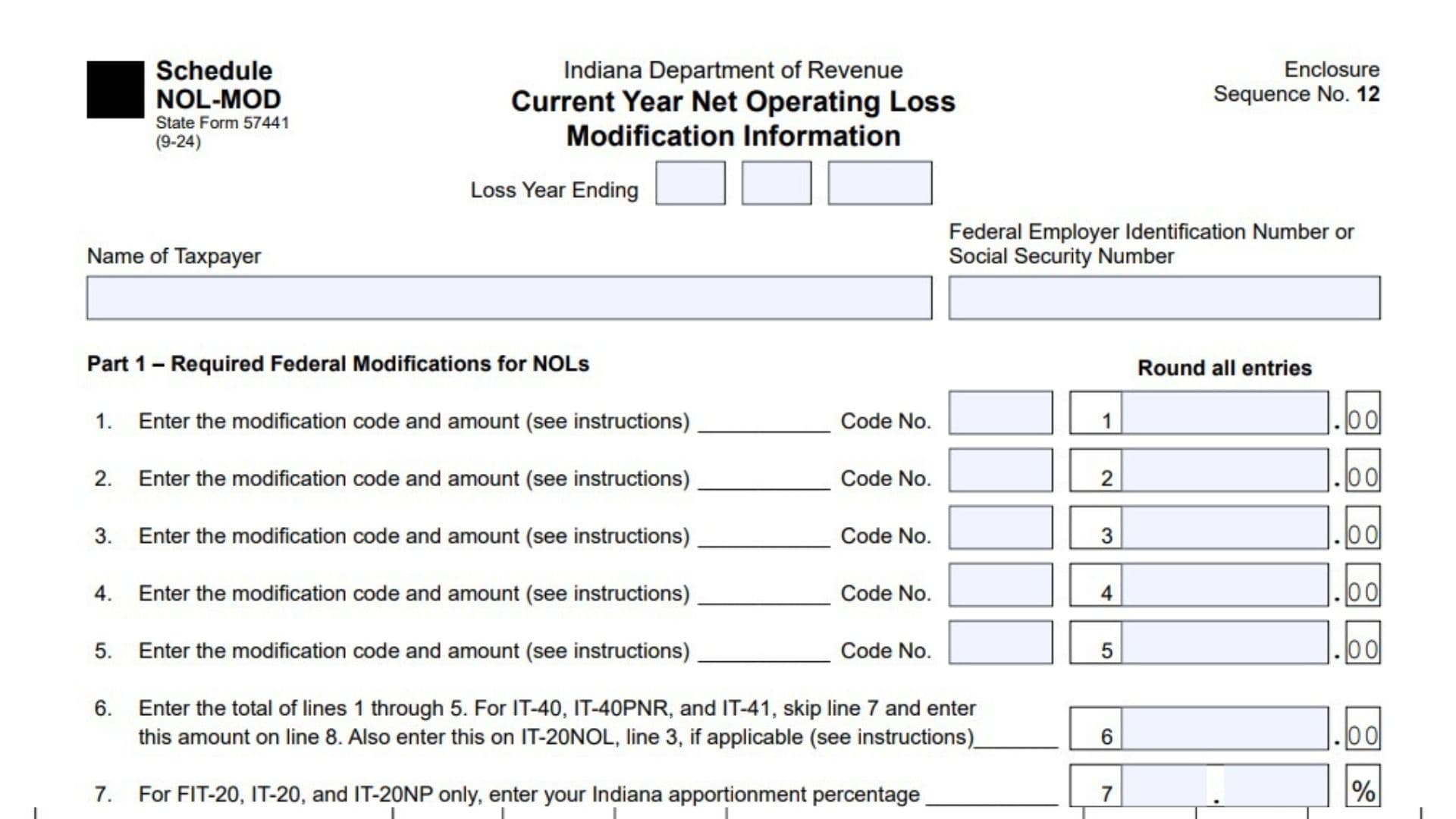
Indiana Schedule NOL-MOD, officially known as the Current Year Net Operating Loss Modification Information schedule, is a tax form issued by the Indiana Department of Revenue. It is used to identify and calculate specific adjustments that affect an Indiana net operating loss (NOL) for the current tax year. The schedule helps taxpayers determine how federal tax modifications, separately stated losses, discharged indebtedness, and other loss-related transactions affect their Indiana income tax calculations.
The form is particularly important for individuals, nonresident individuals, corporations, estates, trusts, and certain financial institutions that have specific net operating loss situations requiring separate reporting. It collects information about federal and Indiana tax adjustments, loss amounts, applicable modification codes, apportionment percentages, and information about entities involved in transferring or terminating net operating losses.
The schedule also addresses situations in which a taxpayer receives an NOL from a terminated estate or trust, a corporation leaves a consolidated or combined group, or a discharged debt affects available NOL deductions. In addition, it provides a way to report losses that are no longer available for future use because of business continuity requirements or expiration.
Completing Schedule NOL-MOD correctly is important because Indiana tax treatment may differ from federal tax treatment. Certain deductions, adjustments, and losses must be modified before determining the amount of Indiana net operating loss available for the current year or future tax years. Incorrect modification codes, missing information, or calculation errors may result in an inaccurate Indiana NOL calculation.
Schedule NOL-MOD is not intended to replace the taxpayer’s primary Indiana income tax return. Instead, it provides supporting information that must be considered alongside the applicable Indiana tax return and related NOL schedules.
How To File Indiana Schedule NOL-MOD
Indiana Schedule NOL-MOD must be completed in conjunction with the applicable Indiana income tax return. The information reported on this schedule may also need to be transferred to one of the following supporting schedules:
- Schedule IT-40NOL.
- Schedule IT-20NOL.
- Schedule FIT-20NOL.
The applicable supporting schedule depends on the taxpayer’s filing status and the type of Indiana tax return being filed.
The form is relevant to taxpayers filing returns such as IT-40, IT-40PNR, IT-41, IT-20, IT-20NP, and FIT-20, depending on the circumstances described in the instructions.
Who Needs To Complete Schedule NOL-MOD?
You may need to complete this schedule if one or more of the following situations apply to you:
- You have negative Indiana adjusted gross income after applying the required Indiana modifications.
- You have an excess business loss, a nonprofit separate business loss, or a net operating loss that is not directly reported on your current-year return.
- You have a corporate dividend deduction limitation that affects the calculation of an Indiana net operating loss.
- You acquired a net operating loss because an estate or trust terminated.
- You excluded discharged indebtedness from federal gross income, and that exclusion affects your Indiana net operating losses.
- Your corporation leaves a consolidated or combined group and has an Indiana net operating loss available.
- Your estate or trust terminates and transfers an Indiana net operating loss to beneficiaries.
- Your corporation is no longer permitted to carry forward an NOL because it does not satisfy the applicable IRC Section 382 continuity-of-business requirements.
- You have an NOL received from an estate or trust that terminates less than 20 years after the loss was incurred (15 years for financial institutions tax purposes).
Information To Prepare Before Completing The Form
Before starting, gather the following information:
- Taxpayer’s legal name.
- Federal Employer Identification Number (FEIN) or Social Security Number (SSN).
- The ending year of the tax year in which the NOL arose.
- Federal income tax return information.
- Indiana income tax return information.
- Applicable three-digit modification codes.
- Current-year NOL calculations.
- Indiana apportionment percentage, if applicable.
- Information about discharged indebtedness.
- Details of NOLs received from terminated estates or trusts.
- Entity identification numbers and relevant loss years.
- Information about NOLs removed from consolidated or combined groups.
- Records of NOLs that are no longer available for carryforward.
Keep the relevant supporting tax schedules and calculations available because several entries on Schedule NOL-MOD must be transferred to other Indiana tax schedules.
How To Complete Indiana Schedule NOL-MOD
Schedule NOL-MOD contains five parts covering federal modifications, separately stated losses, discharged indebtedness, removal of NOLs, and termination of NOLs.
The following instructions explain each section and individual entry.
Taxpayer Information And Identification
The top of the schedule contains several identification fields that must be completed before entering the tax calculations.
Schedule Information
The form identifies itself as Schedule NOL-MOD, State Form 57441. The displayed revision is 9-24, and the schedule is designated as an enclosure to the Indiana Department of Revenue tax return.
Loss Year Ending
Enter the year in which the tax year associated with the net operating loss ends. Use the applicable tax-year ending date or year requested by the form.
Name of Taxpayer
Enter the full legal name of the individual, corporation, estate, or trust associated with the tax filing. The name should correspond with the applicable Indiana income tax return.
Federal Employer Identification Number or Social Security Number
Enter the appropriate federal identification number.
- Individuals generally use their Social Security Number.
- Corporations, estates, and trusts generally use their Federal Employer Identification Number.
Use the identification number associated with the taxpayer whose NOL information is being reported.
Part 1: Required Federal Modifications for NOLs
Part 1 is used to report specific deductions and other tax attributes that must be considered when calculating an Indiana net operating loss.
Complete this section if you have negative Indiana adjusted gross income or if you are a C corporation subject to Indiana adjusted gross income tax that has positive federal taxable income but would have an NOL without the federal limitation on the dividends received deduction under IRC Section 246(b).
This section also applies when certain deductions or tax attributes are not included in federal adjusted gross income for individuals or federal taxable income for other entities.
Enter the applicable three-digit modification code and the corresponding dollar amount. Unless a particular instruction says otherwise, enter the adjustment as a positive number.
For corporations, enter the applicable amounts before apportionment.
If you have more than five adjustments when filing on paper, list the additional adjustments on a separate sheet and include their combined amount in Line 6.
Understanding The Modification Codes For Part 1
Use the following codes when the corresponding adjustment applies.
Code 410: Estate and Trust Exemptions
Estates and trusts should enter the exemption amount used for federal income tax purposes:
- Complex trust: $100.
- Simple trust: $300.
- Estate: $600.
Code 411: Excess Federal Capital Loss Deduction
Individuals, estates, and trusts should use this code when their federal capital losses exceed federal capital gains and some or all of the excess loss is deducted against ordinary adjusted gross income.
Enter the amount of the excess capital loss deducted against ordinary adjusted gross income.
Nonresident individuals should report only the portion deducted against Indiana adjusted gross income.
Code 412: Excluded Capital Gains Under IRC Section 1202
Resident individuals, estates, and trusts should enter the amount of capital gains excluded under IRC Section 1202.
For part-year residents, determine residency based on the taxpayer’s status when the otherwise taxable transaction occurred.
Code 413: Excess Nonbusiness Deductions
Individuals, estates, and trusts should enter nonbusiness deductions that exceed nonbusiness income and are allowable against Indiana adjusted gross income.
Use IRS Publication 536, Worksheet 1, Line 6, or IRS Form 172, Line 6, to calculate the applicable amount.
If the nonbusiness deductions include the federal standard deduction or nonbusiness itemized deductions, reduce the excess nonbusiness deduction amount by those deductions. The resulting amount cannot be less than zero.
Code 414: Dividends Paid Deduction For REITs
Real estate investment trusts filing an Indiana adjusted gross income tax return or financial institutions tax return should report their dividends paid deduction as a positive amount.
This code may also include other modifications needed to determine the federal NOL:
- Enter positive amounts for adjustments that reduce the NOL.
- Enter negative amounts for adjustments that increase the NOL.
A captive REIT that has already added back its dividends paid deduction when determining adjusted gross income should not use this code.
Code 415: Qualified Business Income Deduction For Certain Cooperatives
Specified agricultural or horticultural cooperatives filing an adjusted gross income tax return as a corporation or financial institution should enter the qualified business income deduction under IRC Section 199A.
Estates and trusts are not required to use this code if they have already reported the qualified business income deduction add-back on Form IT-41.
Code 416: Foreign-Derived Intangible Income Deduction
Corporations claiming a federal deduction under IRC Section 250 for foreign-derived intangible income (FDII) should enter the amount of the deduction.
Do not include amounts claimed as a deduction under Section 250 for global intangible low-taxed income (GILTI).
Code 417: Global Intangible Low-Taxed Income Deduction
Corporations filing Form IT-20 or IT-20NP should enter the deduction claimed for global intangible low-taxed income.
Use this code only when the corporation has not already entered a positive GILTI deduction under Code 143 or Code 146.
Code 418: Specific Exemption For IT-20NP Filers
Corporations filing Form IT-20NP should enter the applicable specific exemption amount, which is generally $1,000.
Code 419: Additional Dividends Received Deduction
Corporations filing Form IT-20 should use this code if all the following conditions apply:
- The dividends received deduction was reported on Form IT-20, Line 2, using the federal limitation under IRC Section 246(b).
- The corporation would have qualified for a larger dividends received deduction without that limitation.
- The corporation would have generated an Indiana NOL if the Section 246(b) limitation had not applied.
Enter the additional dividends received deduction as a negative amount.
Report only the difference between the deduction that would have been allowed for federal NOL purposes and the actual deduction reported.
Code 420: Charitable Contribution Deduction For Estates And Trusts
Estates and trusts should enter the amount of their federal charitable contribution deduction.
Code 421: Distribution Deduction For Estates And Trusts
Estates and trusts should enter the distribution deduction claimed for federal income tax purposes.
Nonresident estates and trusts should include only the portion attributable to Indiana.
Code 422: Financial Institutions Tax Adjustment
A corporation filing a financial institutions tax return should use this code when:
- It has negative Indiana adjusted gross income.
- It does not have a federal net operating loss.
Enter the amount necessary to reduce the current-year NOL to zero.
Code 423: Regulated Investment Company Adjustment
Regulated investment companies with negative Indiana adjusted gross income should enter the amount needed to reduce the current-year net operating loss to zero.
Part 1 Line-by-Line Instructions
Line 1: First Federal Modification
Enter the applicable three-digit modification code in the Code No. field and the corresponding adjustment amount in Line 1.
Use the appropriate code from 410 through 423, depending on the nature of the adjustment.
Line 2: Second Federal Modification
Enter the next applicable three-digit modification code and its associated dollar amount.
If you have no second adjustment, leave this line blank.
Line 3: Third Federal Modification
Report the third applicable modification code and the corresponding adjustment amount.
Make sure the code accurately describes the type of federal modification being reported.
Line 4: Fourth Federal Modification
Enter another applicable modification code and its corresponding dollar amount.
If the taxpayer has fewer than four adjustments, leave this line blank when it does not apply.
Line 5: Fifth Federal Modification
Enter the fifth applicable modification code and its corresponding amount.
If additional adjustments exist beyond the five available entries, use a separate sheet and include the total of all adjustments in Line 6.
Line 6: Total Federal Modifications
Add the amounts reported on Lines 1 through 5.
\[ \text{Line 6}=\text{Line 1}+\text{Line 2}+\text{Line 3}+\text{Line 4}+\text{Line 5} \]
If you are filing Form IT-40, IT-40PNR, or IT-41, skip Line 7 and enter the amount from Line 6 directly on Line 8.
If you are completing Schedule IT-40NOL, also report this amount on Line 3.
If you are completing Schedule IT-20NOL, report it on Line 3.
For Schedule FIT-20NOL, use this adjustment to increase current-year adjusted gross income or the loss when the reported amount is negative, subject to the limitation described in the instructions.
Line 7: Indiana Apportionment Percentage
This line applies only to taxpayers filing Form FIT-20, IT-20, or IT-20NP.
Enter the Indiana apportionment percentage reported on the applicable tax return. Express the percentage as a number rounded to two decimal places.
For example, enter 98.76% as 98.76.
If no apportionment percentage is entered on the applicable return, the percentage is treated as 100%.
Taxpayers filing IT-40, IT-40PNR, or IT-41 should skip this line.
Line 8: Apportioned Federal Modifications
Multiply the amount on Line 6 by the percentage on Line 7.
\[ \text{Line 8}=\text{Line 6}\times\text{Line 7 percentage} \]
For IT-40, IT-40PNR, and IT-41 filers, enter the amount from Line 6 directly without completing Line 7.
This amount represents the adjustment to the current-year Indiana NOL. A positive amount reduces the NOL, while a negative amount increases it. However, the NOL cannot be reduced below zero through this adjustment.
If applicable, also report this amount on Schedule IT-40NOL, Line 3.
Part 2: Separately Stated Net Operating Losses
Part 2 is used to report certain losses that are not directly included in the current-year Indiana tax return.
Complete this section if one or more of the following circumstances apply:
- An individual, estate, or trust has an excess business loss reported on IRS Form 461.
- A nonprofit corporation or trust has a business loss that is not directly reported on the current-year IT-20NP or IT-41.
- A taxpayer has an NOL that is not directly reflected on the current-year return because of excess inclusion income under IRC Section 860E.
- A taxpayer becomes entitled to claim an NOL for the first time because an estate or trust has terminated.
If you have multiple types of NOLs, prepare a separate calculation for each type.
Understanding The Modification Codes For Part 2
Code 401: Federal Excess Business Loss
Enter the current-year federal excess business loss reported on IRS Form 461 as a negative amount.
Nonresident taxpayers should report only the portion of the excess business loss attributable to the relevant Indiana calculation.
Code 402: Separate Business Loss Limitation
Enter any federal business loss that cannot be deducted in the current year because of separate business loss limitations.
Report the amount as a negative number.
If there are losses from multiple businesses, combine the applicable amounts before entering them.
Code 403: Net Operating Loss Related To Excess Inclusion Income
Enter any federal NOL that is not reflected on the tax return because federal taxable income cannot be reduced below excess inclusion income under IRC Section 860E.
For individuals, do not include the portion of the federal NOL resulting from the standard deduction or itemized deductions.
Part 2 Line-by-Line Instructions
Line 9: Separately Stated Net Operating Loss
Enter the applicable three-digit loss code and the associated loss amount.
Use the following codes:
- Code 401 for excess business losses.
- Code 402 for losses restricted by separate business loss limitations.
- Code 403 for NOLs affected by excess inclusion income.
Enter the loss as a negative number.
If multiple types of NOLs apply, complete separate calculations for each type. For losses received because an estate or trust terminated, use Line 14 instead.
If you are completing Schedule IT-40NOL, also report the amount from this line on Line 5.
Line 10: Indiana Modification For Separately Stated Loss
Enter the applicable three-digit Indiana modification code and the corresponding adjustment amount for the loss reported on Line 9.
The modification code must correspond to the type of loss entered on Line 9:
- Code 151 applies when Line 9 uses Code 401.
- Code 152 applies when Line 9 uses Code 402.
- Code 153 applies when Line 9 uses Code 403.
If the relevant amount is reported as a negative number on your tax return, enter it as a positive amount on Line 10.
The amount entered on Line 10, when combined with the negative amount on Line 9, must equal zero or a negative amount.
If you have multiple types of losses, prepare a separate calculation for each type.
If you are filing Schedule IT-40NOL, also report the amount from Line 10 on Line 6.
Line 11: Combined Separately Stated Loss
Add Line 9 and Line 10.
\[ \text{Line 11}=\text{Line 9}+\text{Line 10} \]
For IT-40, IT-40PNR, and IT-41 filers, skip Line 12 and transfer the amount directly to Line 13.
If you are filing Form FIT-20, enter this amount on Line 1 of Schedule FIT-20NOL as a current-year loss.
However, if Line 1 of Schedule FIT-20NOL is positive before this adjustment, enter only the amount from Line 11 on that schedule.
Line 12: Indiana Apportionment Percentage
This line applies only to taxpayers filing Form IT-20, IT-20NP, or FIT-20.
Enter the Indiana apportionment percentage shown on the applicable tax return.
Round the percentage to two decimal places.
For example, enter 98.76% as 98.76.
If no apportionment percentage is entered on the return, use 100%.
IT-40, IT-40PNR, and IT-41 filers should skip this line.
Line 13: Current-Year Separately Stated NOL
Multiply Line 11 by Line 12, if applicable.
\[ \text{Line 13}=\text{Line 11}\times\text{Line 12 percentage} \]
For IT-40, IT-40PNR, and IT-41 filers, transfer the amount from Line 11 directly to Line 13 without completing Line 12.
The resulting amount represents the current-year NOL from the separately stated loss.
If you are filing Schedule IT-20NOL, also report this amount on Line 10.
Line 14: Net Operating Loss From Estate Or Trust Termination
Use this line when you first become entitled to claim an NOL because an estate or trust has terminated.
Enter the NOL as a negative number.
The form also requires two pieces of identifying information for each applicable loss:
- Year: Enter the year in which the estate or trust originally incurred the NOL.
- Federal Employer Identification Number: Enter the FEIN of the estate or trust that generated the loss.
If the estate or trust has losses from multiple years, list each loss year separately.
Do not include losses that are no longer available for carryforward to the beneficiary.
Use additional sheets if you need more space.
Line 15: Previously Deducted Estate Or Trust NOL
Enter the portion of the amount reported on Line 14 that has already been deducted during the current tax year.
Enter this amount as a negative number.
This entry ensures that an NOL already claimed is not treated as an additional available loss.
Line 16: Remaining NOL From Estate Or Trust Termination
Subtract Line 15 from Line 14.
\[ \text{Line 16}=\text{Line 14}-\text{Line 15} \]
Enter the resulting amount on the applicable supporting schedule:
- Schedule IT-40NOL, Line 5.
- Schedule IT-20NOL, Line 10.
- Schedule FIT-20NOL, Line 3.
This amount represents the NOL associated with the termination year that remains after accounting for the current-year deduction.
The period during which the beneficiary may carry forward the loss is determined by the year in which the estate or trust originally incurred it.
Part 3: Discharged Indebtedness Excluded From Federal Gross Income
Part 3 addresses certain types of discharged debt that are excluded from federal gross income but may affect the taxpayer’s Indiana net operating losses.
A debt discharge generally occurs when a lender or creditor cancels an amount that the taxpayer owes.
Complete this part when all the following conditions apply:
- You have discharged indebtedness that is excluded from gross income.
- You have a current-year NOL or an NOL carryforward.
- The debt discharge occurred in a Title 11 bankruptcy, while the taxpayer was insolvent, or involved qualified farm indebtedness.
If a discharged debt falls into more than one category under IRC Section 108, apply the applicable order of precedence under that section.
The instructions also identify categories that should not be included in this part when the specified exclusions apply, including certain qualified real property indebtedness, qualified principal residence indebtedness, and discharged student loans.
Understanding The Discharged Indebtedness Codes
Code 430: Bankruptcy Discharge
Use this code for indebtedness discharged through a Title 11 bankruptcy proceeding and excluded from federal gross income.
Code 431: Insolvency Discharge
Use this code for indebtedness discharged while the taxpayer was insolvent and excluded from federal gross income.
Code 432: Qualified Farm Indebtedness
Use this code for discharged indebtedness that qualifies as farm indebtedness under the applicable federal tax rules.
Understanding The Federal Tax Attribute Reduction Codes
Lines 18 and 19 require additional codes when discharged indebtedness is used to reduce certain federal tax attributes.
Code 433: Basis Reduction Through Election
Use this code for amounts applied to reduce basis under an election made under IRC Section 108(b)(5).
Code 434: Federal Capital Loss Reduction
Use this code for amounts applied to reduce federal capital losses in the year the debt was discharged and federal capital loss carryovers to that year.
Code 435: Property Basis Reduction
Use this code for amounts applied to reduce the basis of property under IRC Section 108(b)(2)(E).
Do not include amounts applied to property basis under IRC Section 108(b)(5) or Section 108(c)(1).
Code 436: Passive Loss And Credit Carryover Reduction
Use this code for amounts applied to reduce passive activity loss carryovers and passive credit carryovers from the year of discharge.
When calculating the amount applied to passive credit carryovers, multiply the federal credit reduction by three.
Part 3 Line-by-Line Instructions
Line 17: Discharged Indebtedness Excluded From Gross Income
Enter the three-digit code that identifies the category of discharged indebtedness and the corresponding amount excluded from federal gross income.
Use one of the following codes:
- 430 for bankruptcy-related debt discharge.
- 431 for debt discharge while insolvent.
- 432 for qualified farm indebtedness.
If multiple debt discharges fall within the same category, combine the applicable amounts and report the total under the relevant code.
If multiple categories apply, provide the necessary information for each category. Use an additional sheet when more entries are required.
Line 18: First Federal Tax Attribute Reduction
Enter the applicable three-digit code and the amount of discharged indebtedness applied to reduce another federal tax attribute.
The amount must be entered as a negative number.
Applicable codes include:
- 433 for basis reduction under an election pursuant to IRC Section 108(b)(5).
- 434 for reduction of federal capital losses and related carryovers.
- 435 for reduction of property basis under IRC Section 108(b)(2)(E).
- 436 for reduction of passive loss and passive credit carryovers.
The code should identify the type of federal tax attribute that was reduced.
Line 19: Second Federal Tax Attribute Reduction
Enter another applicable tax attribute reduction code and its corresponding amount.
Like Line 18, the amount must be entered as a negative number.
If the discharged indebtedness was applied to multiple categories, report each applicable category separately.
When more than two categories are involved, provide the additional information on a separate sheet.
Line 20: Total Discharged Indebtedness Adjustment
Add the amounts reported on Lines 17, 18, and 19.
\[ \text{Line 20}=\text{Line 17}+\text{Line 18}+\text{Line 19} \]
For IT-40, IT-40PNR, and IT-41 filers, skip Line 21 and enter the amount from Line 20 directly on Line 22.
Line 21: Indiana Apportionment Percentage
This line applies to taxpayers filing Form IT-20, IT-20NP, or FIT-20.
Enter the Indiana apportionment percentage reported on the applicable return.
Round the percentage to two decimal places.
For example, enter 98.76% as 98.76.
If the tax return does not report an apportionment percentage, use 100%.
IT-40, IT-40PNR, and IT-41 filers should skip this line.
Line 22: Apportioned Discharged Indebtedness Adjustment
Multiply the amount on Line 20 by the percentage on Line 21, when applicable.
\[ \text{Line 22}=\text{Line 20}\times\text{Line 21 percentage} \]
For IT-40, IT-40PNR, and IT-41 filers, transfer the amount from Line 20 directly to Line 22.
The resulting amount is applied against Indiana net operating losses according to the applicable filing rules.
For taxpayers filing Forms IT-40, IT-40PNR, IT-41, and IT-20, the amount is generally applied in the following order:
- First, reduce the current-year Indiana NOL, including applicable losses reported in Part 2.
- If the current-year NOL reaches zero, apply any remaining amount against Indiana NOL carryforwards, starting with the oldest loss year and moving toward the newest.
This carryforward reduction occurs after any otherwise permitted Indiana NOL deduction has been deducted from Indiana adjusted gross income.
FIT-20 filers follow a specific application procedure. The amount on Line 22 is first treated as current-year Indiana income up to the amount of current-year Indiana NOLs. Any remaining amount is then considered for NOL carryforward application.
Line 23: Discharged Indebtedness Not Used To Reduce NOLs
This line applies only to FIT-20 and IT-20NP filers in the circumstances described in the instructions.
For FIT-20 combined-basis filers, enter the amount from Line 22 that was not applied to reduce available NOLs.
This may apply when discharged indebtedness attributed to one corporation completely uses up that corporation’s available NOLs while other corporations in the combined group still have remaining NOLs.
For IT-20NP filers, report the amount of discharged indebtedness that was not applied to reduce net operating losses.
Part 4: Removal Of Net Operating Losses From A Consolidated Or Combined Group, Or Upon Estate Or Trust Termination
Part 4 is used to report NOLs that are transferred or removed because of a change in the taxpayer’s business or legal structure.
This section generally applies in two situations:
- A corporation that was part of a consolidated or combined Form IT-20 group has NOLs that are no longer available to that group.
- An estate or trust terminates and transfers an NOL to a beneficiary or another eligible recipient.
The purpose of this section is to identify the loss, the entity associated with it, and the amount transferred or removed.
Part 4 Table Fields
The table provides three columns for reporting each affected NOL.
Federal TIN Of Entity
Enter the federal taxpayer identification number of the entity associated with the NOL.
Depending on the situation, the identifying information may be a Federal Employer Identification Number, Social Security Number, or Individual Taxpayer Identification Number of the recipient of the NOL.
Use the identification information applicable to the transfer being reported.
Year Of NOL
Enter the year in which the net operating loss originally occurred.
Use the actual loss year rather than the year in which the loss is transferred.
Amount Of NOL Removed
Enter the dollar amount of the NOL removed from the consolidated or combined group or transferred because of an estate or trust termination.
Use the amount attributable to the specific loss year and recipient.
How To Complete Part 4
The table provides three available reporting rows.
If more than one recipient or loss year is involved, report each recipient and loss year on a separate line.
Do not combine different recipients or separate loss years into one entry.
If additional space is required, use an additional sheet containing the same identifying information and loss details.
Part 5: Termination Of Net Operating Loss (NOL)
Part 5 is used to report net operating losses that are no longer available to the taxpayer for future deductions.
This section generally covers two situations:
- An acquired NOL that is no longer available because the corporation associated with the loss no longer meets the applicable IRC Section 382 continuity-of-business requirements.
- An NOL received from an estate or trust that has expired and is no longer available for carryforward.
The purpose of this section is to identify the entity that generated the loss, when the loss occurred, when it first became available to the taxpayer, and the amount that can no longer be used.
Part 5 Table Fields
The table contains four columns that must be completed for each terminated NOL.
Federal TIN Of Entity
Enter the Federal Employer Identification Number of the entity that originally incurred the NOL.
Use the identification number of the entity responsible for generating the loss, not an unrelated business or recipient.
First NOL Year
Enter the tax year in which the net operating loss was originally incurred.
This identifies the year to which the loss belongs.
First Reporting Year
Enter the year in which the NOL first became available to the taxpayer as a deduction.
Include this year even if the taxpayer did not actually deduct the loss during that year.
This distinction is important because the year in which a loss becomes available may differ from the year in which it is ultimately claimed.
Amount Of NOL Terminated
Enter the dollar amount of the NOL that is no longer available for deduction or carryforward.
Include only the amount that has become unavailable under the applicable termination or continuity-of-business rules.
How To Complete Part 5
The table provides three available reporting rows.
Complete a separate row for each applicable NOL.
If multiple losses have become unavailable, report the identifying information and amount for each loss separately.
Make sure the original loss year and first reporting year are not confused. These fields serve different purposes:
- The first NOL year identifies when the loss originated.
- The first reporting year identifies when the taxpayer first became eligible to claim the loss.
If additional entries are required, provide the information on a separate sheet.
Important Filing And Calculation Rules
Before submitting Schedule NOL-MOD, understand the following general requirements.
Entering Negative And Positive Amounts
Different sections require different number formats.
- Part 1 generally uses positive amounts unless a specific code requires a negative adjustment.
- Part 2 requires the loss on Line 9 to be entered as a negative number.
- Part 2, Line 10 generally uses positive amounts when reversing or modifying the negative amount reported on Line 9.
- Part 2, Lines 14 and 15 require negative amounts.
- Part 3, Lines 18 and 19 require negative amounts.
- Part 4 and Part 5 require the applicable NOL amounts to be reported in their respective tables.
Always follow the specific instructions for the applicable line.
Rounding Requirements
The form instructs taxpayers to round all entries.
For apportionment percentages on Lines 7, 12, and 21, use two decimal places.
For example, enter 97.45 rather than a percentage with additional decimal places.
Using Additional Sheets
Additional sheets may be necessary when:
- You have more than five Part 1 modifications.
- You have multiple estate or trust NOL years to report.
- You have multiple discharged indebtedness categories.
- More than two federal tax attribute reduction categories apply.
- You have additional Part 4 or Part 5 entries.
Make sure additional information clearly identifies the relevant taxpayer, section, line, code, and amount.
Reporting Information On Supporting NOL Schedules
Some amounts from Schedule NOL-MOD must also be reported on other Indiana schedules.
The principal transfers include:
| Schedule NOL-MOD line | Supporting schedule | Corresponding line |
|---|---|---|
| Line 6 | Schedule IT-40NOL | Line 3 |
| Line 6 | Schedule IT-20NOL | Line 3 |
| Line 9 | Schedule IT-40NOL | Line 5 |
| Line 10 | Schedule IT-40NOL | Line 6 |
| Line 13 | Schedule IT-20NOL | Line 10 |
| Line 16 | Schedule IT-40NOL | Line 5 |
| Line 16 | Schedule IT-20NOL | Line 10 |
| Line 16 | Schedule FIT-20NOL | Line 3 |
Use the applicable transfer instructions when completing the supporting NOL schedule.
Final Review Before Filing
Before submitting Indiana Schedule NOL-MOD, review the entire form to ensure that every applicable section has been completed accurately.
Use the following checklist:
- Confirm that the taxpayer’s legal name is correct.
- Verify the Federal Employer Identification Number or Social Security Number.
- Enter the correct loss year ending.
- Determine whether Part 1 applies to the taxpayer.
- Verify that every Part 1 adjustment uses the correct three-digit modification code.
- Check the amounts entered on Lines 1 through 5.
- Confirm that Line 6 correctly totals all applicable modifications.
- Verify the apportionment percentage on Line 7, when required.
- Check the calculation on Line 8.
- Determine whether Part 2 applies.
- Verify that Line 9 uses the appropriate loss code and a negative amount.
- Confirm that Line 10 uses the corresponding modification code.
- Check the calculation on Line 11.
- Verify the apportionment percentage on Line 12, when required.
- Confirm that Line 13 is calculated correctly.
- If an estate or trust termination applies, complete Line 14 with the correct loss year and FEIN.
- Check whether any amount from Line 14 was already deducted during the current year.
- Verify the calculation on Line 16.
- Determine whether Part 3 applies to discharged indebtedness.
- Check the applicable discharged indebtedness code on Line 17.
- Confirm that Lines 18 and 19 contain the correct federal tax attribute reduction codes and negative amounts.
- Verify the total on Line 20.
- Enter the correct apportionment percentage on Line 21, when applicable.
- Confirm the calculation on Line 22.
- Complete Line 23 if the applicable FIT-20 or IT-20NP reporting conditions are met.
- Determine whether any NOLs must be reported in Part 4.
- Verify the entity identification number, original loss year, and amount removed in Part 4.
- Determine whether any expired or unavailable NOLs must be reported in Part 5.
- Verify the original NOL year and first reporting year in Part 5.
- Confirm that all applicable calculations have been rounded correctly.
- Attach additional supporting information when required.
- Transfer the applicable amounts to Schedule IT-40NOL, IT-20NOL, or FIT-20NOL.
- Review Schedule NOL-MOD together with the applicable Indiana income tax return before filing.
Final Note: Indiana Schedule NOL-MOD is an important supporting schedule for calculating and reporting current-year Indiana net operating loss modifications. Each part addresses a different tax situation, so taxpayers should complete only the sections that apply to their circumstances while ensuring that all required calculations, identification details, and supporting schedule transfers are accurate.