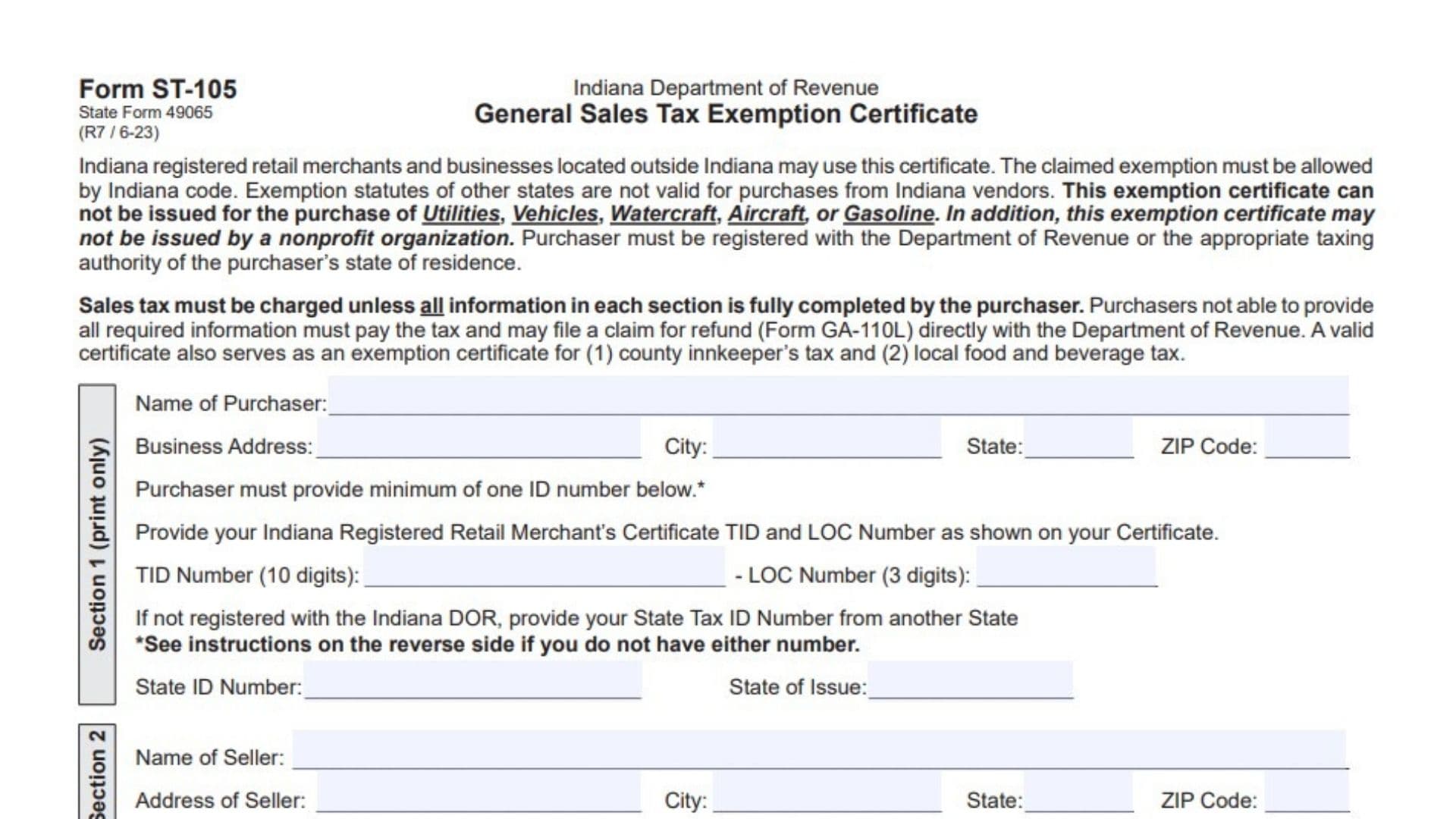
Indiana Form ST-105, also known as the General Sales Tax Exemption Certificate, is a document used by eligible purchasers to buy qualifying goods without paying Indiana sales tax at the time of purchase. It is issued by the Indiana Department of Revenue and is intended for Indiana-registered retail merchants and qualifying businesses located outside Indiana. The certificate allows a purchaser to identify the legal reason for claiming a sales tax exemption and provide the identification information needed to support that claim. It collects the purchaser’s business name, address, tax identification number, seller information, description of the items being purchased, exemption category, and authorized purchaser’s signature. The form also allows the purchaser to request either a blanket exemption for qualifying purchases or an exemption for a single purchase. Common exemption categories include purchases for resale, qualifying manufacturing machinery and equipment, public transportation, agricultural production, exempt construction projects, and purchases by qualifying government entities. The exemption must be permitted under Indiana law. A tax exemption granted by another state does not automatically apply to purchases made from Indiana sellers. There are also restrictions on using this certificate: it cannot be issued for utilities, vehicles, watercraft, aircraft, or gasoline, and nonprofit organizations cannot issue this certificate. All five sections must be completed for the certificate to be valid. If the purchaser cannot provide the required information, the seller must generally collect sales tax. The purchaser may then file a refund claim directly with the Indiana Department of Revenue using Form GA-110L. A properly completed certificate also serves as an exemption certificate for county innkeeper’s tax and local food and beverage tax. Completing Form ST-105 correctly helps the purchaser document the claimed exemption and gives the seller the required support for treating the transaction as tax-exempt.
How To File Indiana Form ST-105
Form ST-105 is completed by the purchaser and provided to the seller when requesting an eligible sales tax exemption. It is not a regular income tax return or a document that must routinely be mailed to the Indiana Department of Revenue.
The purchaser must complete all five sections and provide the required identification information. The seller keeps the completed certificate on file as evidence supporting the exempt sale.
Indiana registered retail merchants and qualifying businesses located outside Indiana may use the certificate. An out-of-state purchaser must be registered with the appropriate taxing authority in their state of residence.
Information To Prepare Before Completing The Form
Gather the following information before filling out Form ST-105:
- Purchaser information: Legal business or purchaser name and complete business address.
- Tax identification: Indiana Taxpayer Identification Number (TID) and Location (LOC) number, or an applicable state tax identification number.
- State registration information: The state that issued the purchaser’s tax identification number.
- Seller information: Seller’s legal name and complete business address.
- Purchase details: A clear description of the products or goods being purchased.
- Exemption category: The applicable reason for claiming the sales tax exemption.
- Transportation information: USDOT number when claiming the public transportation exemption.
- Federal agency information: Agency name and Federal Identification Number when claiming the federal government exemption.
- Agricultural identification: Applicable farmer identification information, such as a Social Security number or Federal Identification Number, when permitted.
- Authorized purchaser information: Signature, date, printed name, and title of the person completing the certificate.
If you do not have an Indiana TID or another state’s business identification number, review the identification exceptions in Section 1 before completing the form.

How To Complete Form ST-105
Indiana Form ST-105 contains five sections. Each section collects information necessary to establish the purchaser’s identity, identify the seller, describe the transaction, explain the exemption being claimed, and certify that the purchase qualifies.
All five sections must be completed. An incomplete certificate is not valid, and the seller remains responsible for collecting Indiana sales tax.
Section 1: Purchaser Information And Identification
Section 1 identifies the purchaser claiming the exemption. Complete this section using printed writing rather than a signature-style entry.
Name Of Purchaser
Enter the complete legal name of the individual or business purchasing the items.
Use the business name associated with the tax registration or other identification information provided on the certificate.
Business Address
Enter the purchaser’s complete business address, including the street number and street name.
Use the address associated with the business or purchaser claiming the exemption.
City
Enter the city where the purchaser’s business is located.
State
Enter the two-letter abbreviation for the state associated with the business address.
ZIP Code
Enter the ZIP code for the purchaser’s business address.
Purchaser Identification Numbers
The purchaser must provide at least one identification number in this section.
The form provides two main identification options.
TID Number (10 Digits)
If the purchaser is registered with the Indiana Department of Revenue, enter the 10-digit Taxpayer Identification Number shown on the Indiana Registered Retail Merchant’s Certificate.
Check the number against the registration certificate to avoid errors.
LOC Number (3 Digits)
Enter the three-digit Location Number associated with the Indiana TID.
The LOC number appears on the Indiana Registered Retail Merchant’s Certificate alongside the TID number.
Both numbers should be entered in their designated fields.
State ID Number
If the purchaser is not registered with the Indiana Department of Revenue, enter the applicable State Tax ID Number issued by another state.
This number must be associated with the purchaser’s registration with the appropriate taxing authority.
State Of Issue
Enter the name or abbreviation of the state that issued the State Tax ID Number.
For example, if the identification number was issued by Ohio, enter Ohio.
Exceptions To The Identification Number Requirement
The form provides special identification alternatives for certain purchasers who do not have an Indiana TID or another state’s State ID Number.
Federal Government Purchasers
A federal government agency that does not have an applicable State ID Number may enter its Federal Identification Number (FID) in the State ID Number field.
Farmers
A farmer who does not have a State Business License Number may enter a Social Security Number (SSN) or Federal Identification Number (FID) in the State ID Number field.
Farmers must also complete the Agricultural Equipment Exemption Usage Questionnaire, Form AGQ-100, to determine the amount of exemption they can claim.
If the purchase does not qualify for a 100% or predominant exemption, the farmer should not issue Form ST-105 to the seller. Instead, the farmer must pay the sales tax and may file a refund claim using Form GA-110L with Form AGQ-100 included.
Public Transportation Haulers
A person or corporation hauling under another motor carrier’s authority or operating under a school bus contract must enter their SSN or FID in the State ID Number field instead of a State ID Number.
These identification exceptions should only be used by the purchaser categories described in the form instructions.
Section 2: Seller Information
Section 2 identifies the seller providing the goods or products for which the purchaser is requesting an exemption.
Enter the seller’s information accurately so the certificate can be associated with the correct transaction.
Name Of Seller
Enter the complete legal name of the seller or business from which you are purchasing the items.
Address Of Seller
Enter the seller’s complete business address, including the street number and street name.
City
Enter the city where the seller is located.
State
Enter the two-letter abbreviation for the seller’s state.
ZIP Code
Enter the ZIP code associated with the seller’s business address.
Make sure the seller information is complete before moving to Section 3.
Section 3: Purchase Information
Section 3 identifies whether the exemption applies to one purchase or multiple qualifying purchases and requires a description of the items being purchased.
Purchase Exemption Type
Blanket Purchase Exemption Request
Mark this checkbox if you are requesting a blanket purchase exemption.
A blanket request identifies an exemption intended to apply to qualifying purchases rather than only one specific purchase.
Single Purchase Exemption Request
Mark this checkbox if the exemption applies to one specific purchase.
Select only one of the two options.
Description Of Items To Be Purchased
Description Of Items To Be Purchased
Describe the goods or products you intend to purchase from the seller.
Be specific enough to identify the items covered by the exemption.
For example, if you are purchasing qualifying manufacturing machinery, describe the machinery or equipment being purchased rather than entering only a general description such as business supplies.
The description should match the actual items involved in the transaction.
Section 4: Type Of Exemption Being Claimed
Section 4 is one of the most important parts of Form ST-105.
The purchaser must identify the legal reason for claiming the exemption by checking the appropriate box or providing an explanation where required.
Select the exemption category that accurately describes the intended use or nature of the purchase.
Sales To A Retailer, Wholesaler, Or Manufacturer For Resale
Sales To A Retailer, Wholesaler, Or Manufacturer For Resale Only
Select this checkbox if the goods are being purchased for resale by a retailer, wholesaler, or manufacturer.
The exemption applies to qualifying purchases made for resale rather than for the purchaser’s own use.
The goods must be intended for resale in accordance with the applicable exemption requirements.
Manufacturing Machinery, Tools, And Equipment
Sale Of Manufacturing Machinery, Tools, And Equipment To Be Used Directly In Direct Production
Select this checkbox when purchasing qualifying machinery, tools, or equipment that will be used directly in direct production.
The equipment must meet the applicable production-use requirements.
Do not select this category for ordinary business equipment that does not qualify for the stated manufacturing exemption.
Public Transportation
Sales Of Tangible Personal Property Predominately Used In Providing Public Transportation
Select this checkbox if the tangible personal property being purchased will be used predominantly in providing public transportation.
Predominantly means that more than 50% of the property’s use must be for the qualifying public transportation activity.
USDOT Number
Enter the applicable United States Department of Transportation (USDOT) number in the designated field.
This number is required for the public transportation exemption category.
If the purchaser is hauling under another motor carrier’s authority or has a contract as a school bus operator, the purchaser must provide an SSN or FID in the State ID Number field in Section 1 instead of a State ID Number.
Agricultural Production
Sales To Persons Occupationally Engaged As Farmers, To Be Used Directly In Production Of Agricultural Products For Sale
Select this checkbox if you are occupationally engaged as a farmer and are purchasing qualifying items for direct use in producing agricultural products for sale.
The property must be used directly in agricultural production.
Additional Farmer Identification Requirements
A farmer who does not possess a State Business License Number may enter an SSN or FID in the State ID Number field in Section 1.
The farmer must also complete Form AGQ-100 to determine the amount of the exemption available.
If the purchase does not qualify for a 100% or predominant exemption, do not issue Form ST-105 to the seller. Pay the applicable sales tax and file a refund claim using Form GA-110L with the completed AGQ-100, if eligible.
Contractor Purchases For Exempt Projects
Sales To A Contractor For Exempt Projects
Select this checkbox if the contractor is purchasing qualifying items for an exempt construction project.
The form provides examples of exempt projects, including:
- Public schools.
- Government projects.
- Nonprofit projects.
The exemption must apply to the particular project under Indiana law.
Sales To Indiana Governmental Units
Sales To Indiana Governmental Units
Select this checkbox if the purchaser is an eligible Indiana governmental unit.
The form identifies the following examples:
- Government agencies.
- Cities.
- Towns.
- Municipalities.
- Public schools.
- State universities.
Select this option when the purchaser is an eligible governmental entity making a qualifying purchase.
Sales To The United States Federal Government
Sales To The United States Federal Government
Select this checkbox if the purchase is being made by the United States federal government.
Agency Name
Enter the name of the federal government agency making the purchase in the designated space.
Federal Identification Number
A U.S. government agency must enter its Federal Identification Number (FID) in the State ID Number field in Section 1 instead of a State ID Number.
Make sure the agency name and identification information are provided correctly.
Other Exemption
Other – Explain
Select this checkbox if the purchase qualifies for an Indiana sales tax exemption that is not covered by the other listed categories.
Provide a clear explanation in the space provided.
Describe the reason for the exemption and identify the applicable use or purpose of the purchase.
The exemption must still be permitted under Indiana law.
Additional Information Requirement
The purchaser must be able to provide additional information supporting the exemption if requested.
Keep relevant business, purchase, and identification records available to support the reason selected in Section 4.
Section 5: Purchaser Certification And Signature
Section 5 contains the purchaser’s legal certification and signature information.
By signing this section, the purchaser confirms that the property being purchased through the certificate will be used for an exempt purpose under Indiana’s Gross Retail Sales Tax Act, Indiana Code 6-2.5.
The purchaser also confirms that the items are not utilities, vehicles, watercraft, aircraft, or gasoline and that the property is not being purchased by a nonprofit organization.
Certification And Legal Responsibility
Purchaser Certification
Read the certification statement carefully before signing.
The purchaser certifies that the property will be used for a qualifying exempt purpose under Indiana law.
The certification also confirms that the purchase does not involve the prohibited categories identified on the form.
Misuse Of Exemption Certificate
The form warns that negligent, intentional, or fraudulent misuse of the certificate may result in tax, interest, and civil or criminal penalties.
These penalties may apply personally to the signer, to the business entity represented, or to both.
Make sure the selected exemption category accurately reflects the intended use of the purchased property.
Purchaser Signature Information
Signature Of Purchaser
The individual authorized to sign for the purchaser must sign in this field.
The signature confirms that the information provided is accurate and that the purchaser is claiming the exemption for a qualifying purpose.
Date
Enter the date the purchaser signs the certificate.
Use the actual signing date.
Printed Name
Enter the full printed name of the individual signing the certificate.
The printed name must identify the person whose signature appears above.
Title
Enter the signer’s official position or title within the business or organization.
For example, enter Owner, President, Manager, or another appropriate business title.
Additional Information For Out-Of-State Purchasers
The form states that the Indiana Department of Revenue may request verification of registration in another state when the purchaser is located outside Indiana.
Out-of-state purchasers should therefore retain their applicable state registration information and be prepared to provide verification if requested.
Important Rules And Restrictions For Form ST-105
Before issuing the certificate, purchasers should understand the restrictions that apply to its use.
Purchases That Cannot Be Covered By This Certificate
Form ST-105 cannot be issued for purchases of:
- Utilities.
- Vehicles.
- Watercraft.
- Aircraft.
- Gasoline.
A nonprofit organization also cannot issue this certificate.
Indiana Law Determines Eligibility
An exemption claimed on Form ST-105 must be allowed under Indiana law.
An exemption available under another state’s tax laws does not automatically qualify a purchase made from an Indiana seller.
All Five Sections Must Be Completed
Every section of the certificate must be fully completed.
If required information is missing, the certificate is not valid, and the seller remains responsible for collecting Indiana sales tax.
If a purchaser cannot provide all required information, the purchaser must pay the applicable sales tax.
The purchaser may then file a refund claim directly with the Indiana Department of Revenue using Form GA-110L.
Seller’s Recordkeeping Responsibility
The seller must keep the completed Form ST-105 on file to support the exempt sale.
The purchaser should also retain a copy of the completed certificate and relevant purchase records.
Final Review Before Filing
Before giving Form ST-105 to the seller, review every section to ensure the information is complete and the exemption category is correct.
Use the following checklist to avoid common mistakes.
Section 1: Purchaser Information
- Enter the purchaser’s complete legal name.
- Provide the full business address.
- Enter the correct city, state, and ZIP code.
- Provide at least one acceptable identification number.
- Enter the 10-digit Indiana TID and three-digit LOC number if registered with Indiana DOR.
- If not registered in Indiana, provide the applicable State Tax ID Number from another state.
- Enter the correct state of issue.
- Use the permitted FID or SSN identification alternative if an applicable exception applies.
- Verify that all identification numbers are accurate.
Section 2: Seller Information
- Enter the seller’s complete legal business name.
- Provide the seller’s full business address.
- Enter the correct city, state, and ZIP code.
Section 3: Purchase Information
- Select either blanket purchase exemption or single purchase exemption.
- Do not select both options.
- Describe the goods or products being purchased.
- Make sure the description matches the actual purchase.
Section 4: Exemption Category
- Select the correct exemption category.
- Verify that purchases for resale are genuinely intended for resale.
- Confirm that manufacturing equipment qualifies for direct production use.
- Verify that public transportation property is used more than 50% for the qualifying activity.
- Enter the USDOT number when claiming the public transportation exemption.
- Provide the required SSN or FID for applicable transportation operators.
- Confirm that agricultural purchases qualify for the stated production exemption.
- Complete Form AGQ-100 when required for agricultural purchases.
- Identify the exempt project when claiming a contractor exemption.
- Verify eligibility when purchasing as an Indiana governmental unit.
- Enter the federal agency name when claiming a federal government exemption.
- Provide the federal agency’s FID in Section 1 when required.
- Explain the reason clearly when selecting Other.
- Make sure the claimed exemption is permitted under Indiana law.
Section 5: Certification And Signature
- Read the purchaser certification carefully.
- Confirm that the purchased property will be used for an exempt purpose.
- Verify that the purchase does not involve prohibited items.
- Make sure the certificate is not being issued by a nonprofit organization.
- Obtain the purchaser’s authorized signature.
- Enter the correct signing date.
- Print the signer’s full name.
- Enter the signer’s business title.
Final Submission
- Confirm that all five sections are fully completed.
- Review the identification numbers and purchase description.
- Check that the selected exemption matches the actual use of the purchased items.
- Provide the completed certificate to the seller.
- Keep a copy of the completed certificate for your records.
- Make sure the seller retains the certificate on file.
- Keep supporting registration and exemption records available if requested by the Indiana Department of Revenue.
Completing Indiana Form ST-105 correctly helps purchasers document qualifying sales tax exemptions and allows sellers to maintain proper records of exempt transactions. Before signing, verify the purchaser’s identification information, seller details, purchase description, and exemption category. Remember that all five sections must be completed and that the exemption must be supported by Indiana law.