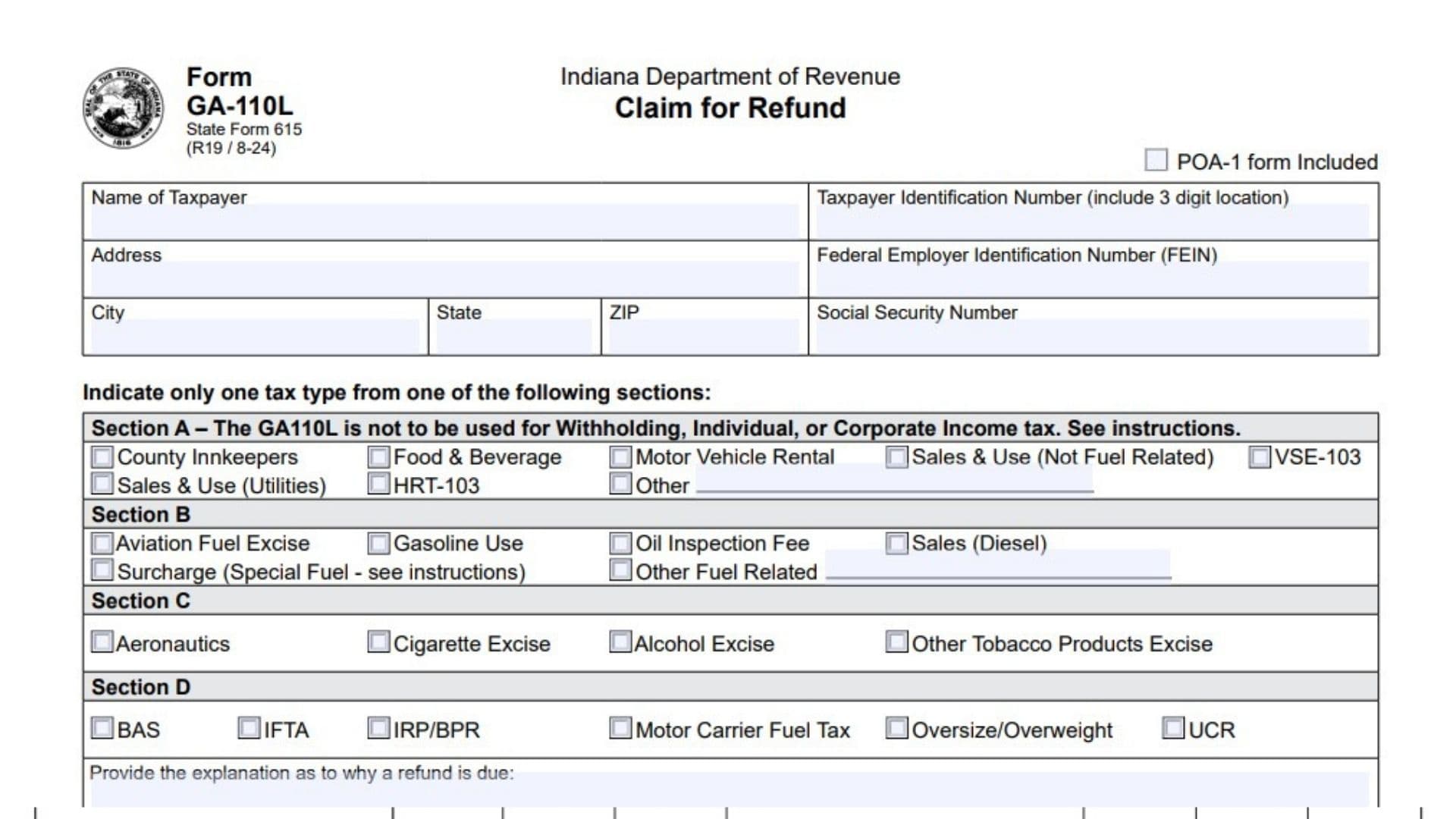
Indiana Form GA-110L, officially called the Claim for Refund, is a tax form issued by the Indiana Department of Revenue (DOR). It allows eligible taxpayers to request a refund of taxes, fees, or other qualifying amounts that they believe they have paid in excess of their legal tax liability. The form collects taxpayer identification details, the type of tax involved, the reason for requesting a refund, the relevant tax periods, payment information, and the amount being claimed.
The form is designed for several Indiana tax categories, including sales and use tax, fuel-related taxes, excise taxes, motor carrier taxes, and certain other business-related taxes. Taxpayers must select the appropriate tax category and provide enough information for the Department of Revenue to review the request. Each claim must identify the specific tax period involved and the amount legally due for that period.
Form GA-110L also requires taxpayers to explain why the refund is owed and provide supporting evidence. Depending on the nature of the claim, this documentation may include invoices showing tax paid, exemption certificates, purchase agreements, contracts, proof of payment, utility bills, or tax journals. Providing complete supporting documentation is essential because incomplete claims may be rejected or denied.
The form must be completed separately for each tax type and location. It is not a general-purpose form for every Indiana income tax refund. Withholding, individual income tax, corporate income tax, Financial Institutions Tax, Composite Tax, and Pass Through Entity Tax refund requests must generally be submitted through the appropriate amended tax return instead.
Completing Form GA-110L accurately is important because the Indiana Department of Revenue uses the information to establish whether a refund is legally due, verify the relevant payments, examine the supporting documents, and determine the amount that should be refunded. Taxpayers must certify that their claim is accurate and that the requested amount has not already been paid.
How To File Indiana Form GA-110L
Indiana Form GA-110L can be completed electronically through the Indiana Department of Revenue’s secure online portal, the Indiana Taxpayer Information Management Engine (INTIME).
Taxpayers can access the portal at intime.dor.in.gov to submit their refund claims and supporting documentation.
The form can also be submitted by mail using the address associated with the selected tax category. Each tax category has a separate mailing address, so selecting the correct section is important.
Who Can File Form GA-110L?
Taxpayers who have a valid refund claim involving an eligible Indiana tax or fee may use Form GA-110L.
The form covers four main categories:
- Section A: Certain general taxes, including county innkeepers, food and beverage, motor vehicle rental, and sales and use taxes.
- Section B: Certain fuel-related taxes, including aviation fuel excise, gasoline use, oil inspection fees, and diesel sales tax.
- Section C: Certain excise taxes, including aeronautics, cigarette excise, alcohol excise, and other tobacco products excise.
- Section D: Certain motor carrier and transportation-related taxes and fees.
A separate form is required for each tax type and location.
Tax Types That Cannot Be Claimed Using Form GA-110L
Form GA-110L must not be used for the following tax categories:
- Withholding Tax.
- Individual Income Tax.
- Corporate Income Tax.
- Financial Institutions Tax.
- Composite Tax.
- Pass Through Entity Tax.
Refunds involving these tax types must be requested using the appropriate amended tax return.
For withholding tax, amended WH-3 returns must also include corrected wage statements.
Information And Documents To Prepare Before Filing
Before completing Form GA-110L, gather the following information:
- Taxpayer’s full legal name.
- Complete mailing address.
- Taxpayer Identification Number (TIN), including the assigned three-digit location number.
- Federal Employer Identification Number (FEIN), when applicable.
- Social Security Number (SSN), when applicable.
- Applicable tax category and tax type.
- Tax year or period for which the refund is requested.
- Amount of refund requested for each period.
- Dates of the relevant tax payments.
- A detailed explanation of why the refund is due.
- Supporting invoices and payment records.
- Applicable exemption certificates.
- Purchase agreements and contracts, when relevant.
- Other documents supporting the refund calculation.
- Power of Attorney Form POA-1, if the taxpayer wants the department to discuss the claim with an authorized representative.
Make sure all applicable tax returns have been filed before submitting the refund claim.
Important Filing Requirements
File A Separate Form For Each Tax Type And Location
Do not combine different tax types or locations on one Form GA-110L. Prepare a separate claim for each applicable tax type and location.
Check Only One Tax Type
Select only one tax type from Sections A, B, C, or D on each form.
Submit All Supporting Documents
All supporting documentation must accompany the refund claim. Missing evidence may cause the claim to be rejected or denied.
Do Not Use Removable Storage Devices
The Indiana Department of Revenue no longer accepts CDs, DVDs, or USB flash drives for submitting supporting documents. This restriction has applied since December 1, 2020. Documents submitted on removable media may be returned or destroyed. Use INTIME to submit electronic records securely.
Do Not Submit Protective Claims At Year-End
The department does not accept protective refund claims submitted at the end of the calendar year. All supporting documentation must be provided with the GA-110L claim.
Allow Processing Time
Allow 60 days for processing before contacting the Indiana Department of Revenue to request a status update.

How To Complete Form GA-110L
Form GA-110L contains taxpayer identification fields, four tax-type sections, a refund explanation area, tax-period and payment tables, a taxpayer certification, and signature fields.
The bottom portion also contains fields reserved exclusively for the Indiana Department of Revenue.
Follow the instructions below to complete each section.
Taxpayer Information And Identification
The top portion of Form GA-110L collects information needed to identify the taxpayer submitting the refund request.
Name Of Taxpayer
Enter the complete legal name of the individual or business requesting the refund.
Use the same taxpayer name associated with the relevant Indiana tax account and tax filings.
Taxpayer Identification Number (Include 3 Digit Location)
Enter the Taxpayer Identification Number assigned by the Indiana Department of Revenue.
Include the three-digit location number assigned by the state for the specific business or tax location involved in the refund claim.
Make sure the identification number and location number are correct because the department uses them to identify the relevant tax account.
POA-1 Form Included
Check this box if you are submitting a Power of Attorney Form POA-1 with the refund claim.
The POA-1 authorizes the Indiana Department of Revenue to discuss the refund claim and the selected tax type with someone other than the taxpayer.
If you are not including a POA-1 form, leave this box unchecked.
An electronic Power of Attorney (ePOA) can also be completed through INTIME.
Address
Enter the taxpayer’s complete mailing address.
Include the street address and any additional address information necessary for correspondence.
Federal Employer Identification Number (FEIN)
Enter the business or entity’s nine-digit Federal Employer Identification Number, when applicable.
Use the FEIN associated with the taxpayer requesting the refund.
City
Enter the city associated with the taxpayer’s mailing address.
State
Enter the state abbreviation for the taxpayer’s mailing address.
ZIP
Enter the ZIP code associated with the mailing address.
Social Security Number (SSN)
Enter the taxpayer’s Social Security Number when applicable.
Use the identification information appropriate to the taxpayer and the account involved in the claim.
Section A: General Tax Refund Categories
Section A is used for certain general Indiana tax categories.
The form specifically states that Section A must not be used for withholding, individual income, or corporate income tax refund claims.
Select only one applicable tax type.
County Innkeepers
Check this option if your refund claim relates to County Innkeepers Tax.
Use this category when the refund concerns an eligible payment or overpayment associated with the applicable county innkeepers tax.
Food & Beverage
Select this option when requesting a refund related to Food and Beverage Tax.
The claim should identify the relevant tax period, payment, and reason the tax should be refunded.
Motor Vehicle Rental
Check this option if the refund relates to Motor Vehicle Rental Tax.
Provide supporting information showing the applicable tax payment and the amount being claimed.
Sales & Use (Not Fuel Related)
Select this option for eligible sales and use tax refund claims that are not related to fuel.
Examples of supporting documentation may include purchase invoices, proof of tax paid, exemption certificates, and purchase agreements.
VSE-103
Select this option when the refund claim relates to the VSE-103 tax category.
Make sure the explanation and supporting documents identify the relevant tax payments and refund amount.
Sales & Use (Utilities)
Check this option when the refund involves sales and use tax associated with utilities.
The claim should include the relevant utility bills and other supporting records.
Utility bills showing the meter number may be useful supporting evidence.
HRT-103
Select this option if the refund request concerns the HRT-103 tax category.
Include the relevant tax-period information, payment details, and evidence supporting the requested refund.
Other
Select Other when the refund request concerns a tax type within Section A that is not separately listed.
Clearly identify the specific tax type in the explanation area so the department can determine what the refund concerns.
Section B: Fuel-Related Tax Refund Categories
Section B is used for eligible fuel-related tax refund claims.
Select only one applicable tax type from the following options.
Aviation Fuel Excise
Check this option if the refund claim relates to Aviation Fuel Excise Tax.
Provide the relevant payment details, tax period, and documentation supporting the refund.
Gasoline Use
Select this option when requesting a refund involving Gasoline Use Tax.
Identify the relevant payment and explain why the amount should be refunded.
Oil Inspection Fee
Check this option if your claim involves an Oil Inspection Fee.
Provide records showing the applicable payment and the amount being requested.
Sales (Diesel)
Select this option for eligible refund claims related to Sales Tax on Diesel.
Attach relevant invoices and proof of payment to establish the tax amount being claimed.
Surcharge (Special Fuel – See Instructions)
Select this option when requesting a refund of the applicable special fuel surcharge.
The form instructions identify a specific historical refund provision for non-motor carriers who purchased special fuel in Indiana between July 1, 2017, and June 30, 2018.
Eligible fuel categories under this provision include:
- Diesel.
- Biodiesel.
- Compressed natural gas.
- Liquefied natural gas.
For these claims, include the vehicle’s make, model, and Vehicle Identification Number (VIN), together with the purchase receipts.
Other Fuel Related
Select this option when the refund relates to another fuel-related tax or fee that is not separately listed in Section B.
Specify the exact tax type in the explanation area and attach supporting records.
Section C: Excise Tax Refund Categories
Section C covers certain Indiana excise tax categories.
Select only one applicable option.
Aeronautics
Check this option if your refund claim concerns Aeronautics Tax.
Provide the relevant tax period, payment information, and supporting documentation.
Cigarette Excise
Select this option when requesting a refund related to Cigarette Excise Tax.
Include the applicable tax records and evidence explaining why the amount is refundable.
Alcohol Excise
Check this option if the claim involves Alcohol Excise Tax.
Provide the relevant payment details and documents supporting the requested refund.
Other Tobacco Products Excise
Select this option when requesting a refund related to Other Tobacco Products Excise Tax.
Include the applicable tax information and supporting evidence.
Section D: Motor Carrier And Transportation-Related Tax Categories
Section D is intended for eligible motor carrier and transportation-related tax and fee refund claims.
Select only one applicable option.
BAS
Check this option if the refund claim concerns the BAS category.
Provide the relevant tax or fee period, payment information, and supporting explanation.
IFTA
Select this option when requesting a refund related to the International Fuel Tax Agreement (IFTA).
Include the applicable reporting period and supporting payment or tax records.
IRP/BPR
Check this option when the refund involves the IRP/BPR category.
Identify the relevant period and provide the documents supporting the requested refund.
Motor Carrier Fuel Tax
Select this option if the refund relates to Motor Carrier Fuel Tax.
Provide the relevant tax-payment details and supporting documentation.
Oversize/Overweight
Check this option when requesting a refund involving Oversize/Overweight fees or taxes.
Identify the relevant payment and explain why the amount should be refunded.
UCR
Select this option when the refund request concerns Unified Carrier Registration (UCR).
Include the applicable payment details and evidence supporting the claim.
Explanation Of The Refund Claim
The next section contains a large space where the taxpayer must explain why the refund is due.
Provide The Explanation As To Why A Refund Is Due
Write a clear and complete explanation of the circumstances that resulted in the refund request.
Identify the tax involved, explain what happened, and describe why the taxpayer believes the amount is legally refundable.
Your explanation should be consistent with the tax period, payment information, and supporting documents attached to the claim.
For example, a taxpayer requesting a sales and use tax refund may explain that tax was paid on a purchase that qualified for an exemption and provide the relevant purchase invoice and exemption certificate.
The explanation should be specific enough for the department to understand the basis of the claim without having to guess.
Attach all evidence supporting the explanation.
Tax Period And Refund Amount Information
The next section contains a table with two sets of three columns. Each set allows the taxpayer to report a separate tax period and its associated refund information.
Refund amounts must be separately identified for each tax year or period.
The form provides space for two entries in each set, allowing multiple tax periods to be reported on the same form when they involve the same tax type and location.
Year Or Period Ending (mm/dd/yyyy)
Enter the ending date of the tax year or tax period for which you are requesting a refund.
Use the required month/day/year format.
For example, if the applicable tax period ends on June 30, 2025, enter 06/30/2025.
Requested Refund Amount
Enter the exact amount of the refund being requested for the corresponding tax period.
The amount must represent the refund legally due for that specific period.
Do not combine amounts from different tax years or periods into one figure.
Date(s) Of Tax Payment(s)
Enter the date or dates on which the relevant tax payments were made.
If multiple payments relate to the same refund period, provide the applicable payment dates.
These dates help the department identify and verify the payments associated with the claim.
Second Year Or Period Ending
Use the second set of columns to enter another tax year or period ending date, when applicable.
The date must correspond to the second refund amount being requested.
Second Requested Refund Amount
Enter the refund amount associated with the second tax period.
Keep this amount separate from the first period’s requested refund.
Second Date(s) Of Tax Payment(s)
Enter the payment date or dates associated with the second tax period.
Ensure that the dates correspond to the correct tax payments and refund amount.
If the refund involves additional tax periods beyond the available spaces, provide the additional period-by-period information on a separate sheet.
Taxpayer Certification And Declaration
Below the tax-period table, Form GA-110L contains a certification statement.
By signing the form, the taxpayer confirms that the account information and refund claim are accurate and that the amount requested is legally due after considering applicable credits.
The taxpayer also confirms that the claimed amount has not already been paid.
The certification further acknowledges that the Indiana Department of Revenue may apply the refund against any outstanding liability the taxpayer currently has.
The taxpayer must also declare, under penalties of perjury, that the form and all accompanying schedules and statements have been examined and are true, correct, and complete to the best of their knowledge and belief.
Review this declaration carefully before signing.
Signature
The taxpayer or an appropriately authorized representative must sign the form.
An unsigned Form GA-110L is not a valid refund claim.
Printed Name
Enter the full printed name of the individual who signed the form.
The printed name should correspond to the signature provided.
Title
Enter the signer’s official title or position when signing on behalf of a business or organization.
For example, this may identify the individual as an owner, officer, or other authorized representative.
Daytime Phone Number
Enter a telephone number where the taxpayer or authorized representative can be reached during normal business hours.
Use a valid number so the department can contact the appropriate person if clarification is needed.
Enter a valid email address for the taxpayer or authorized representative.
Providing a correct email address can help expedite the refund process.
Date
Enter the date on which the form is signed.
Use the actual signing date.
For Department Use Only
The following section is reserved exclusively for the Indiana Department of Revenue.
Taxpayers should leave these fields blank when submitting the original refund claim.
Tax Analyst/Auditor
This field is completed by the department’s assigned tax analyst or auditor.
It identifies the department employee responsible for reviewing the claim.
Date
The department records the applicable date associated with the analyst or auditor’s review.
Supervisor
This field identifies the supervisor responsible for the relevant review or approval process.
Supervisor Date
The department records the date associated with the supervisor’s review.
Claim Number
The Indiana Department of Revenue assigns a claim number to identify and track the refund request.
Do not enter a number unless the department has specifically provided one.
Refund Interest And Final Refund Calculation Table
The bottom portion of the form contains a table used by the Indiana Department of Revenue to record interest calculations and the final refund amount.
This section is for department use only. Taxpayers should leave all its fields blank.
Year
The department enters the applicable year associated with the refund or interest calculation.
Interest Paid From
This field records the starting date or period used for calculating interest.
Interest Paid To
This field records the ending date or period used for calculating interest.
Total Interest Amount
The department enters the total interest amount calculated for the applicable refund.
Total Refund Amount
This field records the final refund amount, including any applicable interest.
DLN
The department enters the Document Locator Number (DLN) used for its internal processing and record identification.
Supporting Documents Required For Form GA-110L
Providing the correct supporting evidence is one of the most important parts of the refund process.
The Indiana Department of Revenue requires taxpayers to attach all documentation supporting their refund claims.
The exact documents depend on the type of tax and the reason for requesting the refund.
Examples include:
Invoices Showing Tax Paid
Provide invoices that demonstrate the amount of tax paid and the transaction associated with the refund request.
Exemption Certificate
If the refund is based on an exempt purchase, attach a copy of the applicable exemption certificate.
Purchase Agreement
Provide the relevant purchase agreement when it helps establish the transaction and the basis of the refund.
Contracts For Software And Warranties
Attach relevant contracts or agreements involving software and warranties when they support the refund claim.
Proof Of Payment
Include evidence showing that the tax or amount being claimed was actually paid.
Examples include credit invoices and canceled checks.
Utility Bills Showing Meter Number
For utility-related refund claims, provide utility bills that identify the relevant meter number.
Use Tax Journal
Include the applicable use tax journal when it supports the refund calculation.
Additional Supporting Documentation
Attach any other records necessary to establish the taxpayer’s entitlement to the refund.
The examples above are not exhaustive. Include all documents relevant to the specific circumstances of the claim.
Where To Mail Form GA-110L
If you are submitting Form GA-110L by mail, use the address corresponding to the tax section selected on the form.
Do not send the claim to an address associated with a different tax category.
Section A: General Tax Refund Claims
Mailing Address:
Indiana Department of Revenue
P.O. Box 935
Indianapolis, IN 46206-0935
Telephone: (317) 232-2240
Section B: Fuel-Related Tax Refund Claims
Mailing Address:
Indiana Department of Revenue
P.O. Box 1971
Indianapolis, IN 46206-1971
Telephone: (317) 615-2630
Email: fetax@dor.in.gov
Section C: Excise Tax Refund Claims
Mailing Address:
Indiana Department of Revenue
P.O. Box 901
Indianapolis, IN 46206-0901
Telephone: (317) 615-2710
Email: excisetax@dor.in.gov
Section D: Motor Carrier And Transportation-Related Refund Claims
Mailing Address:
Indiana Department of Revenue
P.O. Box 6075
Indianapolis, IN 46206-6075
Telephone: (317) 615-7200
Email: IndianaMotorFuel@dor.in.gov
Power Of Attorney Requirements
If you want someone other than the taxpayer to communicate with the Indiana Department of Revenue about the refund claim, complete and attach Form POA-1.
The Power of Attorney authorizes the department to discuss the claim and the specific tax type with the designated representative.
An electronic Power of Attorney (ePOA) can also be completed through the INTIME portal.
If a POA-1 is included with the refund claim, check the corresponding box at the top of Form GA-110L.
How Long Does It Take To Process Form GA-110L?
The Indiana Department of Revenue advises taxpayers to allow 60 days for processing before contacting the department to check the status of their refund claim.
Providing complete taxpayer information, a valid signature, a correct email address, and all supporting documentation can help avoid unnecessary processing delays.
If important information or required documents are missing, the claim may be rejected or denied.
What Makes A Valid Indiana Refund Claim?
For a refund claim submitted using Form GA-110L to be valid, it must contain five essential elements:
- Refund Amount: The exact amount of money being requested.
- Tax Period: The specific tax year or period for which the refund is due.
- Reason For Refund: A clear explanation of why the taxpayer believes the refund is legally owed.
- Taxpayer Signature: The required signature certifying the accuracy and completeness of the claim.
- Supporting Documentation: All records and evidence necessary to establish the refund entitlement.
If any of these required elements are missing, the claim may be rejected or denied.
Final Review Before Filing
Before submitting Indiana Form GA-110L, carefully review every section and confirm that all applicable information is accurate.
Use this checklist to help avoid common filing mistakes.
- Enter the taxpayer’s complete legal name.
- Provide the correct taxpayer mailing address.
- Enter the correct Taxpayer Identification Number.
- Include the three-digit state-assigned location number.
- Enter the applicable FEIN or SSN.
- Check the POA-1 Included box if the form is attached.
- Select only one tax type from Sections A, B, C, or D.
- Confirm that the selected tax type is eligible for Form GA-110L.
- Complete the refund explanation with sufficient detail.
- Identify the correct tax year or period ending date.
- Enter the requested refund amount separately for each tax period.
- Provide the applicable tax payment dates.
- Ensure the refund amount represents the amount legally due.
- Attach invoices and other evidence showing tax paid.
- Include exemption certificates when applicable.
- Attach purchase agreements, contracts, and payment records when relevant.
- Include utility bills showing meter numbers for applicable utility claims.
- Attach the use tax journal and any other relevant records when required.
- Confirm that all applicable tax returns have been filed.
- Complete and attach Form POA-1 if authorizing another person to discuss the claim.
- Review the taxpayer certification carefully.
- Obtain the required taxpayer or authorized representative signature.
- Enter the signer’s printed name and title.
- Provide a valid daytime telephone number.
- Enter a correct email address.
- Enter the actual signing date.
- Leave all department-use-only fields blank.
- Do not include CDs, DVDs, or USB flash drives.
- Use the correct mailing address for the selected tax category if filing by mail.
- Confirm that all required supporting documents are included with the claim.
Final Note: Indiana Form GA-110L is used to request refunds for specific eligible state taxes and fees. A successful claim requires accurate taxpayer identification, the correct tax classification, a clear explanation, period-specific refund calculations, a valid signature, and complete supporting documentation. Review all information carefully before submitting the form through INTIME or mailing it to the appropriate Indiana Department of Revenue address.