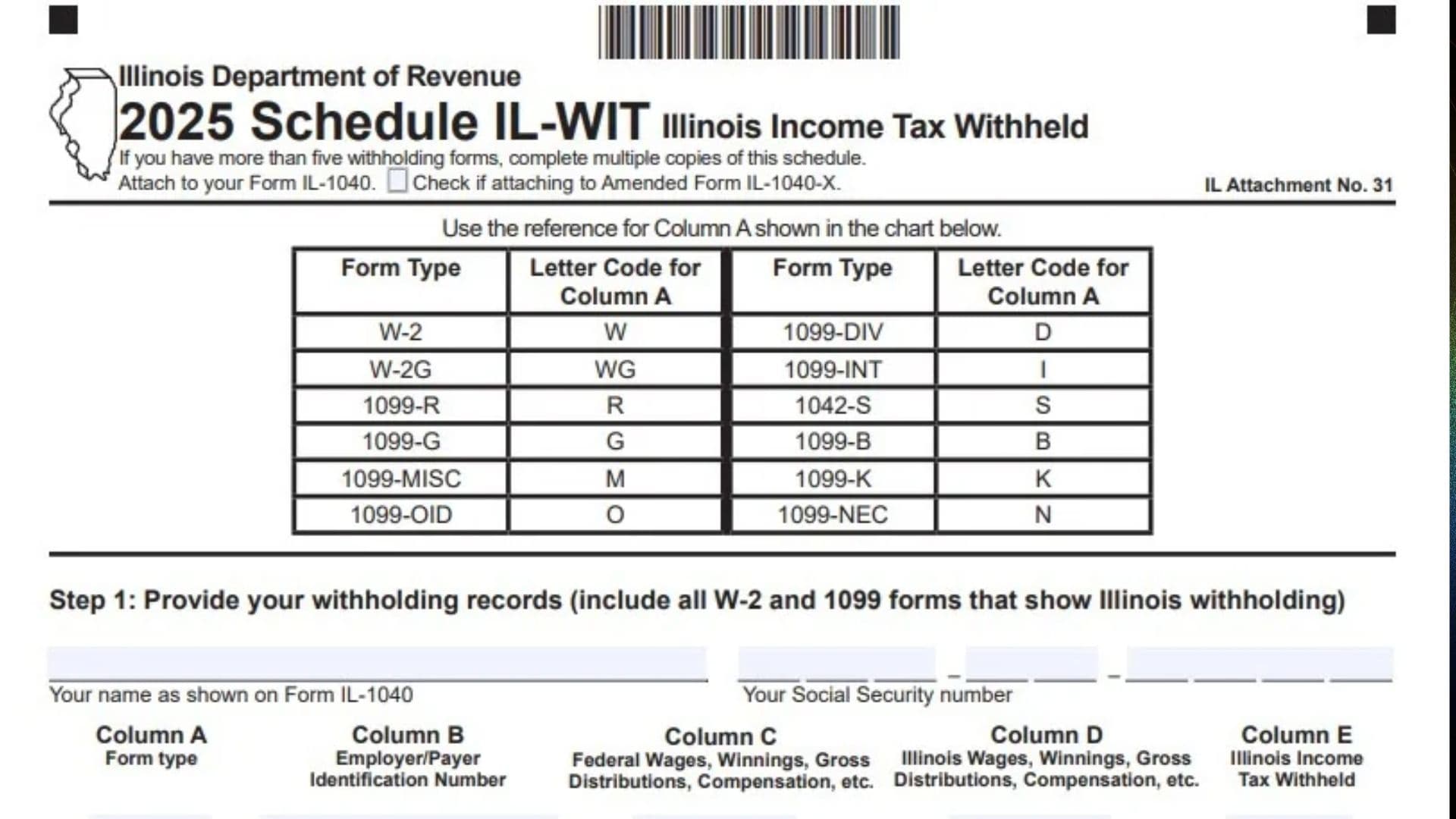
Illinois Schedule IL-WIT, Illinois Income Tax Withheld, is a tax schedule issued by the Illinois Department of Revenue. It is used by individual taxpayers to report the Illinois income tax withheld from their wages, winnings, distributions, compensation, and other qualifying payments during the tax year. The schedule collects withholding information from various tax documents, including Forms W-2 and 1099, so taxpayers can accurately report the total Illinois income tax already withheld from their income.
The purpose of Schedule IL-WIT is to provide a detailed record of Illinois income tax withholding reported by employers, financial institutions, and other payers. It allows taxpayers to identify each employer or payer, provide the associated identification number, report federal and Illinois income amounts, and enter the Illinois income tax withheld. The schedule then combines the reported withholding amounts into one total that is transferred to Form IL-1040, Line 25.
The 2025 Schedule IL-WIT contains three main steps. Step 1 collects the taxpayer’s withholding records, including all applicable W-2 and 1099 forms showing Illinois income tax withholding. Step 2 collects the spouse’s withholding records when applicable. Step 3 calculates the total Illinois income tax withheld by adding the withholding amounts reported in Column E.
The schedule provides space for up to five withholding records for the taxpayer and five additional records for the spouse. If a taxpayer or spouse has more than five withholding forms, additional copies of Schedule IL-WIT must be completed. The form includes a reference chart that assigns a specific letter code to each accepted withholding document type, making it easier to identify the source of each reported amount.
Completing Schedule IL-WIT correctly is important because it establishes the total Illinois income tax withheld during the year. Reporting an incorrect amount could affect the withholding credit claimed on Form IL-1040 and the calculation of the taxpayer’s final Illinois income tax balance or refund. Taxpayers should use their original withholding statements, verify the Illinois withholding amounts, and make sure the total reported on Schedule IL-WIT agrees with the supporting tax documents.
Schedule IL-WIT must be attached to Form IL-1040. If the taxpayer is filing an amended Illinois income tax return using Form IL-1040-X, the amended-return checkbox must be selected. The form is identified as Illinois Attachment No. 31.
Who Must Complete Illinois Schedule IL-WIT?
You must complete Schedule IL-WIT if you have income tax withheld for Illinois that needs to be reported on your Illinois individual income tax return.
The schedule requires taxpayers to include all applicable Forms W-2 and 1099 that show Illinois income tax withholding.
Taxpayers With Employment Income
You may need to complete Schedule IL-WIT if you received wages or other compensation from an employer and Illinois income tax was withheld.
Use your Form W-2 to report the applicable federal wages, Illinois wages, employer identification number, and Illinois income tax withheld.
Taxpayers With Other Income
You may also need this schedule if you received payments reported on qualifying Forms 1099 or other withholding statements showing Illinois income tax withheld.
The form identifies the following document types:
- Form W-2.
- Form W-2G.
- Form 1099-R.
- Form 1099-G.
- Form 1099-MISC.
- Form 1099-OID.
- Form 1099-DIV.
- Form 1099-INT.
- Form 1042-S.
- Form 1099-B.
- Form 1099-K.
- Form 1099-NEC.
Include the applicable forms that report Illinois withholding.
Married Taxpayers With Spouse Withholding Records
Schedule IL-WIT includes a separate section for a spouse’s withholding records.
If you are filing a joint Illinois income tax return and your spouse has withholding forms showing Illinois income tax withheld, report those records in Step 2.
This allows the taxpayer and spouse’s withholding amounts to be included in the combined total.
Taxpayers With More Than Five Withholding Forms
The schedule provides five entry rows for the taxpayer and five for the spouse.
If you have more than five withholding forms, complete multiple copies of Schedule IL-WIT.
Include the withholding information from all applicable forms when calculating the final total.
How To File Illinois Schedule IL-WIT
Schedule IL-WIT must be attached to your Illinois individual income tax return, Form IL-1040. It is not a standalone income tax return.
The taxpayer completes Step 1, enters the spouse’s information in Step 2 when applicable, and calculates the total withholding in Step 3.
If additional copies are necessary, attach all completed Schedule IL-WIT forms to the same Illinois income tax return.
Where To Submit Schedule IL-WIT
Attach the completed Schedule IL-WIT to Form IL-1040.
If you are filing an amended return using Form IL-1040-X, check the amended-return box at the top of the schedule.
The form specifically instructs taxpayers to attach all completed Schedule IL-WIT schedules to Form IL-1040.
Information To Prepare Before Completing Schedule IL-WIT
Gather the following information before starting:
- Your full name as shown on Form IL-1040.
- Your Social Security number.
- Your spouse’s full name, if applicable.
- Your spouse’s Social Security number, if applicable.
- All Forms W-2 showing Illinois income tax withholding.
- All applicable Forms 1099 showing Illinois income tax withholding.
- Other listed withholding statements, if applicable.
- Employer or payer identification numbers.
- Federal wages, winnings, gross distributions, or compensation.
- Illinois wages, winnings, gross distributions, or compensation.
- Illinois income tax withheld.
- Additional copies of Schedule IL-WIT if you have more than five withholding records.
Use the amounts reported on the applicable withholding statements when completing the schedule.

How To Complete Illinois Schedule IL-WIT
The 2025 Schedule IL-WIT contains three steps. Each step collects specific withholding information and contributes to the final Illinois income tax withholding calculation.
Before entering information, review the form-type reference chart to identify the correct letter code for each withholding document.
Form Type Reference Chart
Schedule IL-WIT requires a letter code in Column A to identify the type of withholding document being reported.
Use the following reference chart.
| Withholding document | Column A code |
|---|---|
| Form W-2 | W |
| Form W-2G | WG |
| Form 1099-R | R |
| Form 1099-G | G |
| Form 1099-MISC | M |
| Form 1099-OID | O |
| Form 1099-DIV | D |
| Form 1099-INT | I |
| Form 1042-S | S |
| Form 1099-B | B |
| Form 1099-K | K |
| Form 1099-NEC | N |
Enter the appropriate letter code rather than writing the complete form name in Column A.
For example, if you are reporting Illinois withholding from Form W-2, enter W. If you are reporting withholding from Form 1099-INT, enter I.
Step 1: Provide Your Withholding Records
Step 1 collects the taxpayer’s personal identification information and all applicable withholding records.
Include every W-2 and 1099 form that shows Illinois income tax withholding.
Taxpayer Identification Information
Your Name as Shown on Form IL-1040
Enter your full name exactly as it appears on Form IL-1040.
Make sure the name matches your Illinois individual income tax return.
Your Social Security Number
Enter your Social Security number in the spaces provided.
Verify that the number matches the identification information reported on Form IL-1040.
Withholding Records Table
The taxpayer’s withholding table contains five entry rows, numbered 1 through 5, and five columns.
Each row represents one withholding document.
Complete the columns using the information shown on the applicable W-2 or 1099 statement.
Column A: Form Type
Enter the letter code corresponding to the withholding document being reported.
Use the reference chart at the top of Schedule IL-WIT.
For example:
- W for Form W-2.
- WG for Form W-2G.
- R for Form 1099-R.
- D for Form 1099-DIV.
- I for Form 1099-INT.
- N for Form 1099-NEC.
Select the correct code for each withholding record.
Column B: Employer/Payer Identification Number
Enter the federal identification number of the employer or payer that issued the withholding document.
Use the identification number shown on the applicable W-2 or 1099 form.
For an employer-issued Form W-2, use the employer’s identification number.
For a payer-issued Form 1099, use the payer’s identification number.
Column C: Federal Wages, Winnings, Gross Distributions, Compensation, etc.
Enter the applicable federal income amount reported on the withholding statement.
Depending on the document type, this may represent:
- Federal wages.
- Winnings.
- Gross distributions.
- Compensation.
- Other applicable gross income.
Use the relevant federal amount shown on the original withholding document.
Make sure the amount corresponds to the form type entered in Column A.
Column D: Illinois Wages, Winnings, Gross Distributions, Compensation, etc.
Enter the applicable Illinois income amount reported on the withholding statement.
Depending on the type of document, this may include Illinois wages, winnings, gross distributions, compensation, or other applicable income.
Use the Illinois-specific income amount shown on the withholding statement.
Do not automatically copy the federal amount from Column C because the Illinois amount may be different.
Column E: Illinois Income Tax Withheld
Enter the amount of Illinois income tax withheld by the employer or payer.
Use the Illinois withholding amount shown on the applicable W-2 or 1099 statement.
This column is especially important because the amounts reported here are added together in Step 3 to calculate the total Illinois withholding credit.
Make sure you report the Illinois withholding amount rather than federal income tax withheld or another state’s withholding.
Line 1: First Withholding Record
Enter the information from your first applicable W-2 or 1099 withholding document.
Complete Columns A through E using the information shown on that document.
Line 2: Second Withholding Record
Enter the information from your second applicable withholding document.
Use the appropriate form-type code, employer or payer identification number, federal income amount, Illinois income amount, and Illinois tax withheld.
Line 3: Third Withholding Record
Enter the information from your third applicable withholding document.
Make sure all five columns are completed using the corresponding withholding statement.
Line 4: Fourth Withholding Record
Enter the information from your fourth applicable withholding document.
Verify the Illinois withholding amount against the original tax document.
Line 5: Fifth Withholding Record
Enter the information from your fifth applicable withholding document.
If you have additional withholding forms beyond these five entries, complete another copy of Schedule IL-WIT.
Step 2: Provide Your Spouse’s Withholding Records
Step 2 is used to report your spouse’s Illinois withholding information.
The section includes separate identification fields and five additional entry rows, numbered 6 through 10.
Include all applicable W-2 and 1099 forms showing Illinois income tax withholding for your spouse.
Spouse Identification Information
Your Spouse’s Name as Shown on Form IL-1040
Enter your spouse’s full name exactly as it appears on Form IL-1040.
Use the name shown on the joint Illinois income tax return.
Your Spouse’s Social Security Number
Enter your spouse’s Social Security number in the spaces provided.
Verify that the number matches the identification information reported on Form IL-1040.
Spouse Withholding Records Table
The spouse’s table uses the same five-column structure as Step 1.
Complete each applicable row using your spouse’s original withholding statements.
Column A: Form Type
Enter the letter code identifying your spouse’s withholding document.
Use the same reference chart provided at the top of Schedule IL-WIT.
For example, enter W for Form W-2, R for Form 1099-R, or I for Form 1099-INT.
Column B: Employer/Payer Identification Number
Enter the federal identification number of your spouse’s employer or payer.
Use the identification number shown on the corresponding withholding statement.
Column C: Federal Wages, Winnings, Gross Distributions, Compensation, etc.
Enter the applicable federal income amount shown on your spouse’s withholding document.
Depending on the form type, this may include federal wages, winnings, gross distributions, compensation, or other applicable income.
Column D: Illinois Wages, Winnings, Gross Distributions, Compensation, etc.
Enter the applicable Illinois income amount shown on your spouse’s withholding statement.
Use the Illinois-specific amount rather than automatically copying the federal income figure.
Column E: Illinois Income Tax Withheld
Enter the Illinois income tax withheld from your spouse’s applicable payments.
Use the withholding amount reported on the original W-2 or 1099 statement.
These amounts will be included in the total calculation on Line 11.
Line 6: First Spouse Withholding Record
Enter your spouse’s first applicable withholding record.
Complete Columns A through E using the information shown on the corresponding tax document.
Line 7: Second Spouse Withholding Record
Enter your spouse’s second applicable withholding record.
Provide the correct form-type code, payer identification number, federal income amount, Illinois income amount, and Illinois withholding amount.
Line 8: Third Spouse Withholding Record
Enter your spouse’s third applicable withholding record.
Verify that the information matches the original withholding statement.
Line 9: Fourth Spouse Withholding Record
Enter your spouse’s fourth applicable withholding record.
Complete all applicable columns using the corresponding document.
Line 10: Fifth Spouse Withholding Record
Enter your spouse’s fifth applicable withholding record.
If your spouse has more than five withholding forms showing Illinois income tax withheld, complete additional copies of Schedule IL-WIT.
Step 3: Total Illinois Withholding
Step 3 calculates the combined Illinois income tax withheld from the taxpayer and spouse’s reported withholding documents.
The total includes the Illinois withholding amounts reported in Column E for Lines 1 through 10, along with the applicable amounts from Column E of any additional Schedule IL-WIT copies.
Line 11: Total Illinois Income Tax Withheld
Add all amounts entered in Column E for Lines 1 through 10.
If you completed additional copies of Schedule IL-WIT, also include the Column E amounts reported on those schedules.
Use the following calculation:
Line 1, Column E + Line 2, Column E + Line 3, Column E + Line 4, Column E + Line 5, Column E + Line 6, Column E + Line 7, Column E + Line 8, Column E + Line 9, Column E + Line 10, Column E + Additional Schedule IL-WIT Column E Amounts = Line 11
Enter the combined amount on Line 11.
Transfer this amount to Form IL-1040, Line 25.
This represents the total Illinois income tax withheld from the taxpayer’s and spouse’s reported withholding documents.
Additional Schedule IL-WIT Copies
The form provides space for five withholding records in Step 1 and five withholding records in Step 2.
If you or your spouse have more than five applicable withholding forms, you must complete multiple copies of Schedule IL-WIT.
When using additional copies:
- Enter the applicable taxpayer or spouse withholding records.
- Use the correct form-type codes.
- Complete Columns A through E for each withholding statement.
- Include all Illinois withholding amounts in the final Line 11 calculation.
- Attach every completed Schedule IL-WIT to Form IL-1040.
Do not leave out a withholding statement simply because the original schedule does not provide enough entry rows.
Important Rules and Reporting Considerations for Schedule IL-WIT
Include All Applicable Withholding Forms
Schedule IL-WIT instructs taxpayers to include all W-2 and 1099 forms showing Illinois income tax withholding.
Review all applicable withholding statements before completing the schedule.
Use the Correct Form-Type Codes
Column A requires the letter code corresponding to each withholding document.
Use the reference chart provided on the schedule rather than entering an incorrect or unrelated code.
Report Federal and Illinois Income Separately
Columns C and D collect different income amounts.
Column C reports the applicable federal wages, winnings, gross distributions, or compensation.
Column D reports the corresponding Illinois income amounts.
Use the figures from the appropriate sections of each withholding statement.
Report Only Illinois Income Tax Withheld in Column E
Column E is specifically for Illinois income tax withheld.
Do not enter federal income tax withholding, Social Security tax, Medicare tax, or another state’s income tax withholding in this column.
Include Spouse Withholding Records When Applicable
The form provides a separate section for the spouse’s withholding statements.
Include the applicable spouse information so that the total Illinois withholding calculation accounts for both taxpayers.
Complete Additional Copies When Necessary
If you have more than five withholding forms, complete multiple copies of Schedule IL-WIT.
Include the amounts from every additional schedule when calculating Line 11.
Attach All Schedules to Form IL-1040
The form specifically instructs taxpayers to attach all completed Schedule IL-WIT forms to Form IL-1040.
If filing an amended return, select the amended Form IL-1040-X checkbox.
Required Disclosure
The schedule states that it is authorized under the Illinois Income Tax Act.
Providing the requested information is required. Failure to provide the information could result in a penalty.
Final Review Before Filing
Before submitting the 2025 Illinois Schedule IL-WIT with Form IL-1040, review the following checklist to make sure all withholding records and calculations are accurate.
Taxpayer Information
- Your name matches Form IL-1040.
- Your Social Security number is correct.
- The amended-return checkbox is selected if attaching the schedule to Form IL-1040-X.
Step 1: Taxpayer Withholding Records
- All applicable taxpayer W-2 and 1099 forms showing Illinois withholding are included.
- The correct letter code is entered in Column A.
- Employer or payer identification numbers are correct.
- Federal wages, winnings, gross distributions, or compensation are entered in Column C.
- Illinois wages, winnings, gross distributions, or compensation are entered in Column D.
- Illinois income tax withheld is entered in Column E.
- Each withholding statement is reported on a separate row.
- Additional copies are completed if more than five withholding forms apply.
Step 2: Spouse Withholding Records
- The spouse’s name matches Form IL-1040.
- The spouse’s Social Security number is correct.
- All applicable spouse W-2 and 1099 forms showing Illinois withholding are included.
- The correct form-type codes are entered in Column A.
- Employer or payer identification numbers are accurate.
- Federal income amounts are entered in Column C.
- Illinois income amounts are entered in Column D.
- Illinois income tax withheld is entered in Column E.
- Additional copies are completed if more than five spouse withholding forms apply.
Step 3: Total Illinois Withholding
- Column E amounts from Lines 1 through 10 are added correctly.
- Column E amounts from additional Schedule IL-WIT copies are included.
- Line 11 reflects the complete Illinois withholding total.
- The amount on Line 11 is transferred to Form IL-1040, Line 25.
Final Submission
- All applicable withholding records have been included.
- All required Schedule IL-WIT copies are completed.
- All completed schedules are attached to Form IL-1040.
- The amended-return checkbox is selected when applicable.
- A copy of the completed schedule and supporting withholding statements is retained for your records.
Completing the 2025 Illinois Schedule IL-WIT accurately helps ensure that all Illinois income tax withheld from your income and your spouse’s income is properly reported. Review each withholding statement, verify the amounts entered in Column E, and make sure the final total on Line 11 agrees with the combined withholding records before transferring it to Form IL-1040, Line 25.