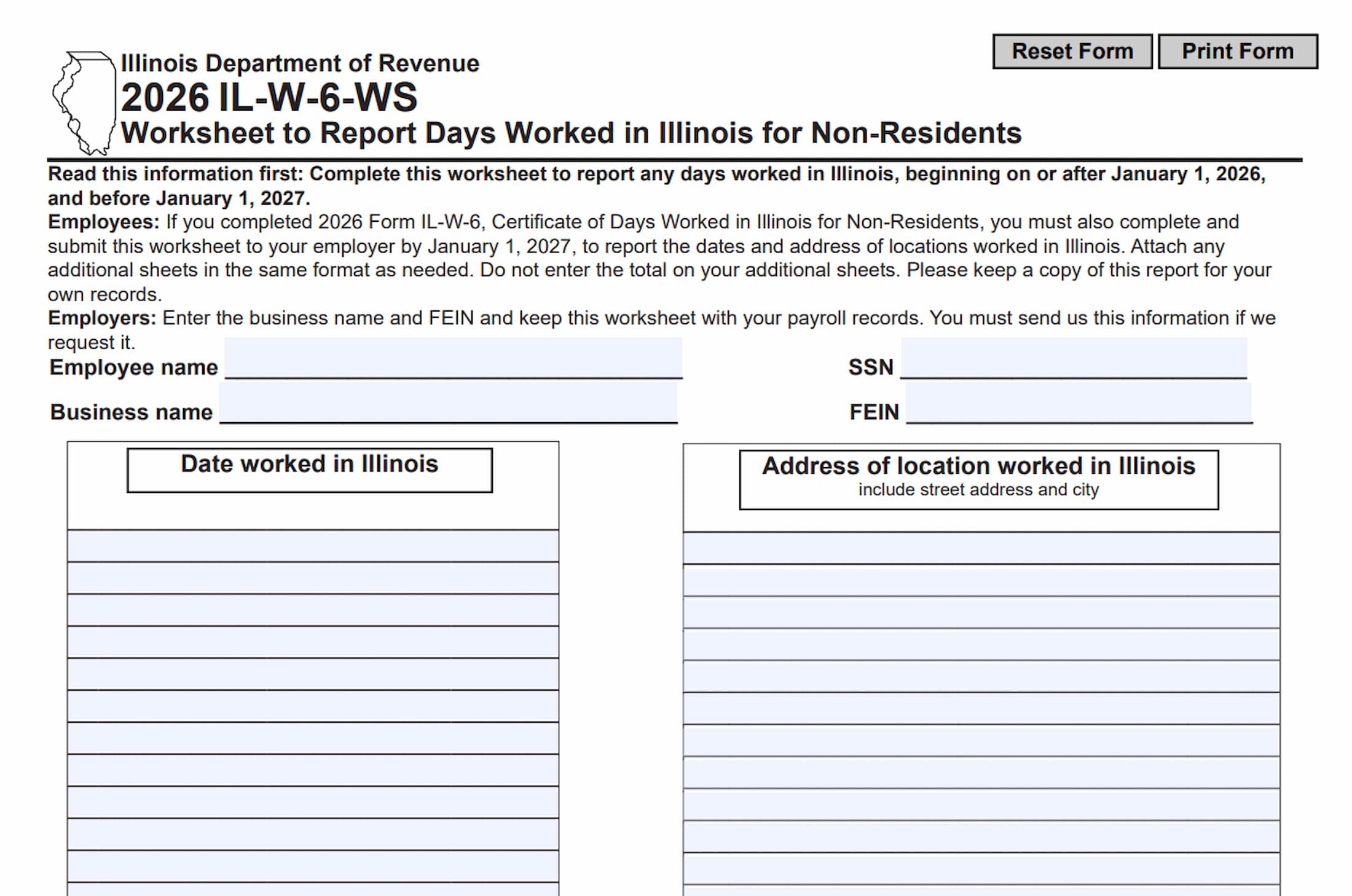
Form IL-W-6-WS, Worksheet to Report Days Worked in Illinois for Non-Residents, is an Illinois Department of Revenue document used by nonresident employees to report the dates they worked in Illinois and the addresses of their Illinois work locations. The worksheet applies to workdays beginning on or after January 1, 2026, and before January 1, 2027. It is associated with Form IL-W-6, Certificate of Days Worked in Illinois for Non-Residents. Employees who completed Form IL-W-6 must also complete and submit Form IL-W-6-WS to their employer.
The worksheet provides a record of the dates employees worked in Illinois and the corresponding street addresses and cities where the work was performed. It also collects identifying information about the employee and employer, including the employee’s Social Security Number (SSN) and the business’s Federal Employer Identification Number (FEIN).
The 2026 Form IL-W-6-WS is a one-page worksheet containing:
- Employee name and Social Security Number.
- Business name and Federal Employer Identification Number.
- A table for recording dates worked in Illinois.
- A corresponding table for reporting the addresses of Illinois work locations.
- A total days worked field.
- Employee certification, signature, and date fields.
Completing Form IL-W-6-WS correctly is important because the Illinois Department of Revenue may request the employer’s records to verify the reported workdays and locations.
Who Must Complete Form IL-W-6-WS?
The worksheet is intended for nonresident employees who completed 2026 Form IL-W-6, Certificate of Days Worked in Illinois for Non-Residents.
These employees must also complete Form IL-W-6-WS to provide the actual dates and locations of their Illinois work.
Employee Responsibilities
Employees must:
- Complete the worksheet with their identifying information.
- Report the dates they worked in Illinois during the applicable period.
- Provide the street address and city of each Illinois work location.
- Calculate or report the total days worked.
- Sign and date the certification.
- Submit the completed worksheet to their employer by January 1, 2027.
- Keep a copy of the completed worksheet for their personal records.
If additional space is needed, employees may attach additional sheets using the same format as the original worksheet.
The instructions specifically state that the total should not be entered on additional sheets.
Employer Responsibilities
Employers have separate recordkeeping responsibilities.
They must:
- Enter the business name.
- Enter the business’s FEIN.
- Keep the completed worksheet with their payroll records.
- Provide the information to the Illinois Department of Revenue if requested.
Employers should retain the worksheet as part of their payroll documentation.
How To File Form IL-W-6-WS
Employees must submit the completed worksheet directly to their employer by January 1, 2027.
The form does not instruct employees to mail the worksheet directly to the Illinois Department of Revenue.
Instead, the employer retains it with payroll records and must provide the information to the department if requested.
Before completing Form IL-W-6-WS, gather the following information:
- Your full name.
- Your Social Security Number (SSN).
- Your employer’s business name.
- Your employer’s Federal Employer Identification Number (FEIN).
- The dates you worked in Illinois during 2026.
- The street addresses of the Illinois work locations.
- The cities where those work locations are located.
- The total number of days worked in Illinois.
Make sure the dates fall within the reporting period beginning January 1, 2026, and ending before January 1, 2027.

How To Complete Form IL-W-6-WS
The 2026 Form IL-W-6-WS is a one-page worksheet divided into three main sections:
- Employee and employer identification information.
- Illinois workday and work-location reporting table.
- Total days worked and employee certification.
Complete the identification fields first, then record each applicable Illinois workday and its corresponding work location.
Employee and Employer Information
At the top of the worksheet, enter the identifying information requested for the employee and employer.
Employee Name
Enter your full name in the designated field.
Use the name associated with your employment and payroll records.
SSN (Social Security Number)
Enter your nine-digit Social Security Number.
Make sure the number is accurate and matches your employment records.
Business Name
Enter the name of the business or employer.
Use the business name associated with the payroll records.
FEIN (Federal Employer Identification Number)
Enter the employer’s nine-digit Federal Employer Identification Number.
Employers are responsible for entering the business name and FEIN on the worksheet.
Verify that the information is accurate before submitting the completed form.
Illinois Workday and Work-Location Reporting Table
The main section of Form IL-W-6-WS contains a two-column table used to report the dates worked in Illinois and the corresponding work locations.
The table provides multiple blank rows for individual workday entries.
The two columns are:
- Date worked in Illinois: The date on which the employee performed work in Illinois.
- Address of location worked in Illinois: The street address and city of the location where the employee worked.
Each entry should correspond to the same workday and work location.
Date Worked in Illinois
Enter the date for each day you worked in Illinois during the applicable reporting period.
The worksheet covers workdays beginning January 1, 2026, and before January 1, 2027.
Use the actual dates on which you performed work in Illinois.
For example, if you worked in Illinois on January 15, February 10, and March 5, enter each date on a separate row.
Continue reporting all applicable Illinois workdays throughout the reporting period.
Use employment schedules, timesheets, calendars, and other work records to verify the dates.
Address of Location Worked in Illinois
For each reported workday, enter the address of the location where you performed work in Illinois.
The form specifically requests:
- Street address.
- City.
Make sure the address corresponds to the workday entered in the first column.
If you worked at different Illinois locations on different dates, report the appropriate address for each date.
The worksheet provides a separate address field for every date entry.
Reporting Multiple Work Locations
Employees who worked at multiple Illinois locations should report the corresponding address for each applicable workday.
For example, if you worked at one location on January 15 and another location on January 16, enter the respective dates and addresses on separate rows.
Do not leave out work locations simply because you worked for the same employer at multiple facilities.
The worksheet is designed to provide a record of both when and where the employee performed work in Illinois.
Additional Sheets
The worksheet provides a limited number of rows for reporting workdays and locations.
If you need more space, attach additional sheets using the same format as the original worksheet.
Each additional sheet should maintain the same two-column structure:
- Date worked in Illinois.
- Address of location worked in Illinois.
The form specifically instructs employees not to enter the total on their additional sheets.
Keep the additional pages together with the original worksheet when submitting the completed report to your employer.
Total Days Worked
At the bottom of the reporting table, the worksheet provides a field labeled Total Days Worked.
Enter the total number of days worked in Illinois during the applicable reporting period.
Use the dates reported in the workday table to determine the total.
Make sure the total accurately reflects the reported Illinois workdays.
If you used additional sheets, include the applicable workdays recorded on those sheets when determining the overall total.
The form does not provide a separate numbered line or a detailed calculation formula for this field.
Employee Certification and Signature
The bottom of Form IL-W-6-WS contains an employee certification statement.
The statement reads:
“By signing below, I certify this record of days worked is accurate and complete.”
Employees must complete the certification section before submitting the worksheet.
Employee’s Signature
Sign the designated signature field to certify that the reported workdays and locations are accurate and complete.
Date
Enter the date you signed the worksheet.
Make sure the certification is completed before submitting the form to your employer.
Additional Form Instructions and Important Requirements
The 2026 Form IL-W-6-WS includes several important reporting, submission, and recordkeeping requirements.
Reporting Period
The worksheet applies to workdays beginning on or after January 1, 2026, and before January 1, 2027.
Do not include workdays outside this reporting period.
Submission Deadline
Employees who completed Form IL-W-6 must also complete Form IL-W-6-WS and submit it to their employer by January 1, 2027.
Make sure the completed worksheet and any additional sheets are submitted by the stated deadline.
Employer Recordkeeping
Employers must retain the completed worksheet with their payroll records.
They must provide the information to the Illinois Department of Revenue if the department requests it.
The worksheet is authorized under the Illinois Income Tax Act.
Additional Documentation
If the available rows are insufficient, attach additional sheets using the same format.
Do not enter the total days worked on the additional sheets.
Keep a copy of the completed report for your own records.
Failure to Provide Information
The form states that disclosure of the requested information is required.
Failure to provide the information may result in the form not being processed and may also result in a penalty.
Make sure all required identification, workday, location, and certification fields are completed.
Final Review Before Submitting Form IL-W-6-WS
Before submitting the worksheet to your employer, review the following checklist to ensure that all required information is complete and accurate.
- Correct tax year: Confirm that you are using the 2026 Form IL-W-6-WS.
- Reporting period: Include only workdays beginning January 1, 2026, and before January 1, 2027.
- Employee name: Enter your full name.
- SSN: Verify your Social Security Number.
- Business name: Confirm the employer’s business name.
- FEIN: Verify the employer’s Federal Employer Identification Number.
- Workday dates: Report every applicable date you worked in Illinois.
- Work locations: Include the street address and city for each reported workday.
- Multiple locations: Make sure the correct address corresponds to each workday.
- Additional sheets: Attach extra pages using the same two-column format if necessary.
- Additional sheet totals: Do not enter the total days worked on additional sheets.
- Total days worked: Enter the overall number of Illinois workdays in the designated field.
- Employee signature: Sign the certification statement.
- Date: Enter the date you signed the worksheet.
- Submission deadline: Submit the completed worksheet and additional sheets to your employer by January 1, 2027.
- Personal records: Keep a copy of the completed report.
- Employer records: Confirm that the employer retains the worksheet with its payroll records.
Review the completed worksheet carefully before submitting it. Make sure every Illinois workday is reported with its corresponding street address and city, the total days worked is accurate, and the certification is signed and dated. Submit the worksheet to your employer by January 1, 2027, and retain a copy for your records.