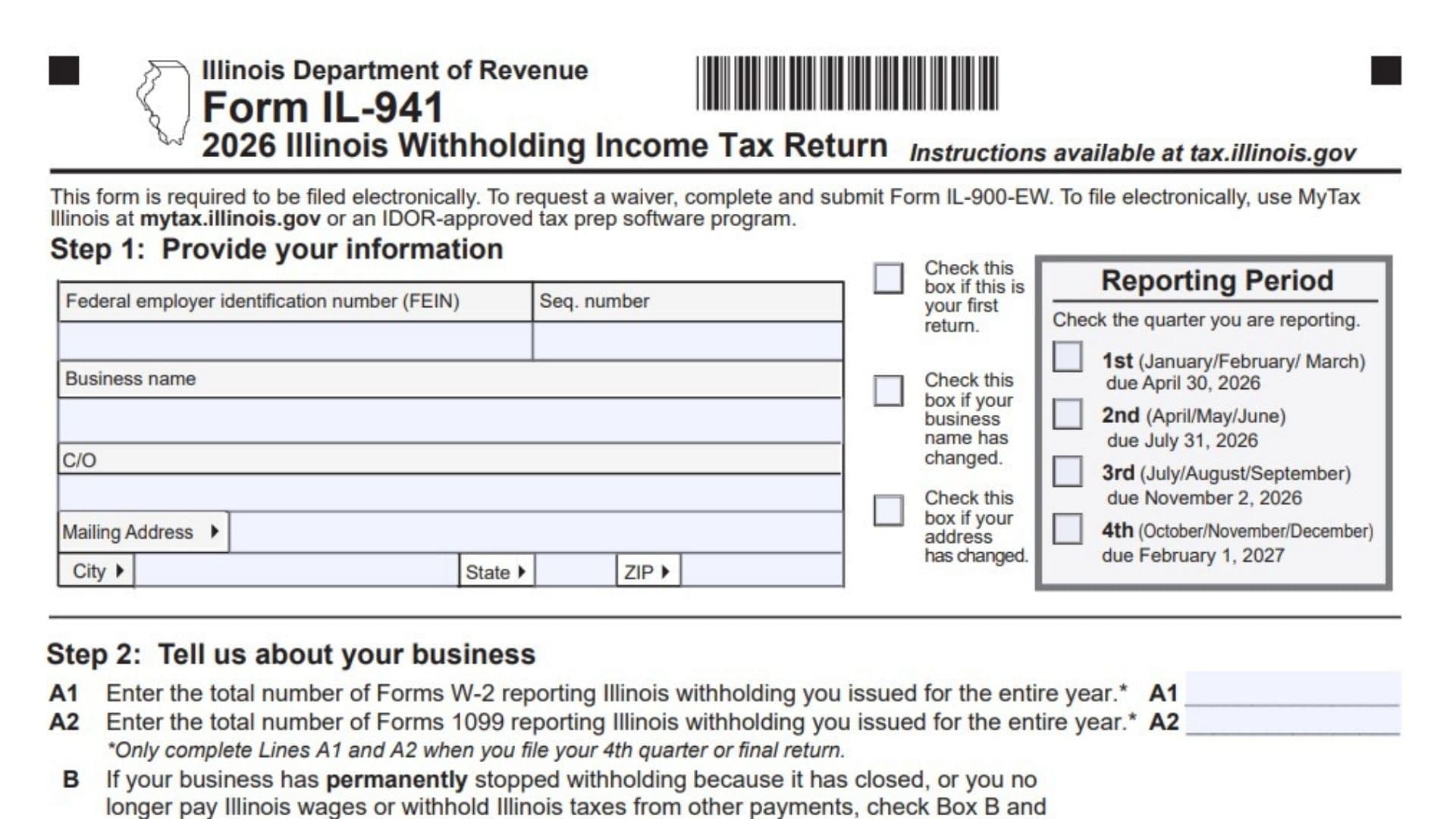
Illinois Form IL-941, titled Illinois Withholding Income Tax Return, is a quarterly tax return used by employers and other businesses to report Illinois income tax withheld from employees and other individuals receiving payments subject to state withholding. The Illinois Department of Revenue uses this return to track the total compensation subject to Illinois withholding, the actual income tax withheld during each month of a quarter, and the payments and credits applied toward the withholding liability. The form helps determine whether the business has paid the correct amount of withholding tax or still owes a balance. It also collects identifying information, reporting-period details, annual information about Forms W-2 and 1099, and business closure information when applicable. An important part of Form IL-941 is its daily withholding breakdown, which requires businesses to record the actual tax withheld on each applicable payment date rather than simply reporting quarterly totals. The 2026 return also includes Schedule P, Illinois Withholding Schedule, which records employee or payee information, income, and withholding amounts for the quarter. Completing Form IL-941 correctly matters because inaccurate withholding figures, missing payment information, or incomplete supporting records can cause discrepancies in the business’s tax account. Businesses must report actual withholding amounts, reconcile their records with payments made to the Illinois Department of Revenue, and submit the return according to the required filing procedures.
Who Needs to File Form IL-941?
Form IL-941 is used by businesses that are required to report Illinois income tax withholding. This generally includes employers that withhold Illinois income tax from employees’ compensation and other payers that withhold Illinois income tax from payments subject to withholding requirements.
The form is organized around quarterly reporting periods. Businesses should determine their filing obligations using their Illinois withholding registration, payment records, and the applicable instructions.
A business that permanently stops withholding Illinois income tax because it closes or no longer makes payments subject to Illinois withholding must report that change in Step 2.
How To File Form IL-941
Form IL-941 must be filed electronically unless the business receives an applicable waiver from the Illinois Department of Revenue.
Businesses can file electronically through MyTax Illinois or use an Illinois Department of Revenue-approved tax preparation software program.
If a business needs an exemption from the electronic filing requirement, it must request a waiver using Form IL-900-EW.
Form IL-941 Filing Deadlines for 2026
The form provides the following quarterly reporting periods and due dates:
| Reporting Quarter | Months Covered | Filing Due Date |
|---|---|---|
| First quarter | January, February, March | April 30, 2026 |
| Second quarter | April, May, June | July 31, 2026 |
| Third quarter | July, August, September | November 2, 2026 |
| Fourth quarter | October, November, December | February 1, 2027 |
Select the quarter that corresponds to the withholding information being reported.
Where to Submit Form IL-941
Businesses are required to file electronically through an approved method unless a waiver applies.
For businesses authorized to submit a paper return, the form provides this mailing address:
Illinois Department of Revenue
PO Box 19052
Springfield, IL 62794-9052
If payment is required, follow the applicable remittance instructions. Semi-weekly payers must make payments electronically.
What to Prepare Before Completing Form IL-941
Gather the following information before starting the return:
- The business’s federal employer identification number (FEIN) and Illinois sequence number, if applicable.
- The legal business name and mailing address.
- The quarter being reported.
- Payroll records showing compensation subject to Illinois withholding.
- Records of income tax actually withheld on each payment date.
- Monthly withholding totals for the reporting quarter.
- Illinois withholding payments made during the quarter, including IL-501 payments.
- Any applicable credit reported through Schedule WC.
- Employee and payee information needed for Schedule P.
- Annual totals of Forms W-2 and Forms 1099 reporting Illinois withholding, if filing the fourth-quarter or final return.
- Business closure information, if withholding has permanently stopped.
- Authorized signer’s information and paid preparer details, if applicable.
Use actual payroll, withholding, and payment records rather than estimates. Several lines require exact withholding amounts.

How To Complete Form IL-941
The 2026 form contains seven main steps and a required supporting schedule.
The first page collects business information, reporting-period details, the amount subject to withholding, and withholding activity for the first month of the quarter.
The second page continues the withholding breakdown, calculates payments and credits, determines any outstanding balance, and includes the signature section.
The third page contains Schedule P, which provides employee or payee income and withholding information.
Step 1: Provide Your Information
This section identifies the business and the quarter covered by the return. Enter the information associated with the Illinois withholding account.
Federal Employer Identification Number (FEIN)
Enter the business’s federal employer identification number. Use the number associated with the withholding account and verify it against the business’s tax records.
Sequence Number
Enter the applicable sequence number assigned to the business’s Illinois withholding account. Use the number associated with the account being reported.
Business Name
Enter the business name associated with the Illinois withholding account. Check the spelling and make sure it agrees with the business’s registration information.
First Return Checkbox
Mark the designated box if this is the business’s first Illinois withholding income tax return.
Do not mark the box simply because this is the first quarter of the calendar year. The question concerns whether this is the business’s first return.
Business Name Change Checkbox
Mark this box if the business name has changed. Enter the appropriate business name in the identification field.
C/O Field
If correspondence should be directed to another person, company, or department, enter the appropriate care-of information.
Mailing Address
Enter the business’s mailing street address or other applicable mailing address.
City
Enter the city associated with the mailing address.
State
Enter the state using the appropriate abbreviation.
ZIP Code
Enter the ZIP code associated with the mailing address.
Address Change Checkbox
Mark this box if the business’s mailing address has changed. Make sure the address entered on the return reflects the current mailing information.
Reporting Period
Select the quarter for which the business is reporting Illinois withholding tax.
First Quarter Checkbox
Mark this box when reporting withholding for January, February, and March 2026.
The filing due date shown on the form is April 30, 2026.
Second Quarter Checkbox
Mark this box when reporting withholding for April, May, and June 2026.
The filing due date shown on the form is July 31, 2026.
Third Quarter Checkbox
Mark this box when reporting withholding for July, August, and September 2026.
The filing due date shown on the form is November 2, 2026.
Fourth Quarter Checkbox
Mark this box when reporting withholding for October, November, and December 2026.
The filing due date shown on the form is February 1, 2027.
Select the appropriate reporting quarter and use the withholding records for those three months.
Step 2: Tell Us About Your Business
Step 2 collects annual information about withholding forms issued by the business and asks whether the business has permanently stopped withholding Illinois income tax.
Annual Forms W-2 and 1099 Information
Line A1: Total Forms W-2 Reporting Illinois Withholding
Enter the total number of Forms W-2 issued for the entire year that report Illinois income tax withholding.
Count the applicable Forms W-2 issued by the business. This field asks for the number of forms, not the total wages or withholding amounts reported on those forms.
Complete line A1 only when filing the fourth-quarter return or a final return.
Line A2: Total Forms 1099 Reporting Illinois Withholding
Enter the total number of Forms 1099 issued for the entire year that report Illinois income tax withholding.
Count the applicable Forms 1099 rather than entering the total payments or withholding reported on them.
Complete line A2 only when filing the fourth-quarter return or a final return.
Final Return Information
Box B: Business Permanently Stopped Withholding Illinois Income Tax
Mark Box B if the business permanently stopped withholding Illinois income tax because it closed or no longer pays Illinois wages or makes other payments from which Illinois tax must be withheld.
Date Withholding Stopped
If Box B applies, enter the date the business permanently stopped withholding. Use the date format provided on the form.
Checking Box B and entering the date identifies the return as a final return.
Once the business has permanently stopped withholding and filed its final return, the form directs it not to submit future returns unless it resumes withholding Illinois income tax.
Do not use Box B for a temporary period without payroll if the business has not permanently stopped its withholding activities.
Step 3: Tell Us About the Amount Subject to Withholding
Step 3 reports the total compensation and other payments subject to Illinois withholding during the reporting quarter.
Line 1: Total Amount Subject to Illinois Withholding
Enter the total dollar amount of payments subject to Illinois income tax withholding during the quarter.
This may include payroll, employee compensation, and other payments subject to Illinois withholding.
Use the business’s payroll and payment records to identify the amounts that belong in this total.
This line reports the amount subject to withholding, not the amount of tax actually withheld.
For example, if a business paid $80,000 in compensation subject to Illinois withholding during the quarter, it would enter $80,000 on line 1.
The Illinois income tax withheld from those payments is reported separately in Step 4.
Step 4: Tell Us About the Amount Withheld
Step 4 requires a daily breakdown of Illinois income tax actually withheld during each month of the quarter.
Unlike line 1, which reports compensation subject to withholding, Step 4 reports the actual Illinois income tax withheld from employees or other payees.
Enter the withholding on the date compensation was paid and tax was withheld.
Do not substitute the date the business deposited the tax with the Illinois Department of Revenue if that differs from the withholding date.
Only complete the daily entries for dates on which Illinois income tax was actually withheld. Leave the remaining daily entries blank.
If no Illinois income tax was withheld during an entire month, enter zero on that month’s total line.
Line 2a: First Month of the Quarter
Use line 2a to report the daily Illinois income tax withheld during the first month of the selected quarter.
The applicable month depends on the reporting period:
| Quarter | Month for Line 2a |
|---|---|
| First quarter | January |
| Second quarter | April |
| Third quarter | July |
| Fourth quarter | October |
Days 1 Through 8: Daily Withholding
For each date from the 1st through the 8th, enter the actual Illinois income tax withheld on that date.
If no Illinois income tax was withheld on a particular date, leave that daily field blank.
Days 9 Through 16: Daily Withholding
Enter the tax actually withheld on each applicable date from the 9th through the 16th.
If several employees or payees received compensation on the same date, report the total Illinois tax withheld on that date.
Days 17 Through 24: Daily Withholding
Enter the actual Illinois income tax withheld on each applicable date from the 17th through the 24th.
Leave dates without withholding activity blank.
Days 25 Through 31: Daily Withholding
Enter the Illinois income tax actually withheld on each applicable date from the 25th through the last day of the month.
If the month has fewer than 31 days, do not enter amounts for dates that do not exist.
Line 2a: Total Illinois Income Tax Withheld During the First Month
Add the daily withholding amounts entered for days 1 through 31, as applicable.
Calculation:
Line 2a = Total of all daily withholding entries for the first month
For example, assume the business withheld:
- $450 on the 5th.
- $625 on the 15th.
- $575 on the 28th.
The first-month total would be:
$450 + $625 + $575 = $1,650
Enter $1,650 on line 2a.
If no Illinois income tax was withheld during the month, enter zero on line 2a.
Line 2b: First-Month Withholding Total Carried Forward
Line 2b: Amount From Line 2a
Enter the same amount reported on line 2a from the first page.
Calculation:
Line 2b = Line 2a
This carries the first-month withholding total into the quarterly calculation on the second page.
Line 2c: Second Month of the Quarter
Use line 2c to report withholding for the second month of the selected quarter.
| Quarter | Month for Line 2c |
|---|---|
| First quarter | February |
| Second quarter | May |
| Third quarter | August |
| Fourth quarter | November |
Days 1 Through 8: Daily Withholding
Enter the actual Illinois income tax withheld on each applicable date from the 1st through the 8th of the second month.
Days 9 Through 16: Daily Withholding
Enter the actual tax withheld on each applicable date from the 9th through the 16th.
Days 17 Through 24: Daily Withholding
Enter the tax withheld on each applicable date from the 17th through the 24th.
Days 25 Through 31: Daily Withholding
Enter the actual tax withheld on each applicable date from the 25th through the end of the month.
Use only valid calendar dates. For example, February 2026 has 28 days, so entries for February 29, 30, and 31 do not apply.
Line 2c: Total Illinois Income Tax Withheld During the Second Month
Add all daily withholding amounts entered in the second-month section.
Calculation:
Line 2c = Total of all applicable daily withholding entries for the second month
Enter the resulting amount on line 2c.
If the business did not withhold any Illinois income tax during the second month, enter zero on line 2c.
Line 2d: Third Month of the Quarter
Use line 2d to report Illinois income tax withheld during the final month of the reporting quarter.
| Quarter | Month for Line 2d |
|---|---|
| First quarter | March |
| Second quarter | June |
| Third quarter | September |
| Fourth quarter | December |
Days 1 Through 8: Daily Withholding
Enter the actual Illinois income tax withheld on each applicable date from the 1st through the 8th.
Days 9 Through 16: Daily Withholding
Enter the actual withholding amounts for applicable dates from the 9th through the 16th.
Days 17 Through 24: Daily Withholding
Enter the actual withholding amounts for applicable dates from the 17th through the 24th.
Days 25 Through 31: Daily Withholding
Enter the actual withholding amounts for applicable dates from the 25th through the end of the month.
Leave dates without withholding activity blank, including dates that do not exist in a particular month.
Line 2d: Total Illinois Income Tax Withheld During the Third Month
Add the daily withholding amounts entered in the third-month section.
Calculation:
Line 2d = Total of all applicable daily withholding entries for the third month
Enter zero if no Illinois income tax was withheld during that month.
Line 2: Total Illinois Income Tax Withheld for the Quarter
Line 2: Quarterly Illinois Income Tax Withheld
Add lines 2b, 2c, and 2d.
Calculation:
Line 2 = Line 2b + Line 2c + Line 2d
This gives the total Illinois income tax actually withheld from employees and other payees during the reporting quarter.
For example:
| Monthly Total | Amount |
|---|---|
| Line 2b: First month | $1,650 |
| Line 2c: Second month | $2,100 |
| Line 2d: Third month | $1,950 |
| Line 2: Quarterly total | $5,700 |
Enter $5,700 on line 2 in this example.
Check that the quarterly total agrees with the business’s payroll withholding records.
Step 5: Tell Us About Your Payments and Credits
Step 5 reports credits and withholding tax payments associated with the quarter.
The amounts in this section are compared with the actual Illinois income tax withheld in Step 4.
Line 3: Schedule WC Credit Applied to This Period
Enter the amount of credit from Schedule WC that the business is using for the reporting period.
Use the applicable credit amount supported by Schedule WC and the relevant instructions.
Do not enter a credit that has not been established or cannot be applied to the period.
Line 4: Total Illinois Withholding Payments Made for the Period
Enter the total dollar amount of withholding payments actually made to the Illinois Department of Revenue for the reporting period.
Include applicable IL-501 payments, whether the business made those payments electronically or using paper payment coupons.
The form specifically instructs businesses not to estimate this amount.
Use payment confirmations, tax account records, and other reliable payment information to identify the correct total.
Line 5: Total Payments and Credits
Add lines 3 and 4.
Calculation:
Line 5 = Line 3 + Line 4
This is the total amount of payments and credits available for the reporting period under the form’s calculation.
For example, if the business has a $300 applicable Schedule WC credit and made $4,900 in withholding payments:
$300 + $4,900 = $5,200
Enter $5,200 on line 5.
Step 6: Figure Your Balance
Step 6 compares the Illinois income tax withheld during the quarter with the payments and credits reported in Step 5.
Line 6: Remaining Balance Due
If line 2 is greater than line 5, subtract line 5 from line 2.
Calculation:
Line 6 = Line 2 − Line 5
For example:
- Line 2: $5,700.
- Line 5: $5,200.
- Remaining balance: $500.
Enter $500 on line 6.
This represents the remaining withholding tax liability for the quarter.
If line 5 is greater than line 2, follow the instructions for handling the excess payments or credits rather than treating the difference as an amount due.
How to Pay the Balance
The form directs businesses to pay electronically or make a remittance payable to the Illinois Department of Revenue.
Semi-weekly payers must make payments electronically.
Follow the applicable payment instructions and ensure that the payment is associated with the correct business account and reporting period.
Step 7: Sign the Return
The signature section confirms that the person signing the return has reviewed the information and believes it to be accurate and complete.
The declaration is made under penalties of perjury.
Signature
The authorized person must sign the return in the designated space.
Date
Enter the date the return is signed in month/day/year format.
Title
Enter the signer’s business title or position.
Daytime Phone Number
Enter a telephone number where the signer can be reached during normal business hours.
Permission to Discuss the Return With the Paid Preparer
Mark the checkbox if the Illinois Department of Revenue may discuss the return with the paid preparer identified in the preparer section.
Do not select this option unless the business intends to allow that discussion.
Paid Preparer Information
Complete this section when a paid tax preparer is involved in preparing the return.
Paid Preparer’s Name
Enter the preparer’s printed or typed name.
Paid Preparer’s Signature
The paid preparer must sign in the designated field when applicable.
Paid Preparer’s Date
Enter the date the preparer signs the return in month/day/year format.
Self-Employed Preparer Checkbox
Mark this box if the preparer is self-employed.
Paid Preparer’s PTIN
Enter the preparer’s Preparer Tax Identification Number (PTIN).
Firm’s Name
Enter the name of the firm responsible for preparing the return, if applicable.
Firm’s FEIN
Enter the preparer firm’s federal employer identification number.
Firm’s Address
Enter the firm’s business address.
Firm’s Phone Number
Enter the firm’s contact telephone number.
Review all preparer information before filing.
Schedule P: Illinois Withholding Schedule
Schedule P is the required supporting schedule included with the 2026 Illinois withholding return.
Its purpose is to verify the income and Illinois withholding reported for employees and other payees during the quarter.
The schedule collects the business’s identification information and a separate record for each employee or payee.
Complete Schedule P and include it with Form IL-941 using the required filing method.
Schedule P: Business and Filing Information
Filing Period
Enter the filing period covered by Schedule P. Make sure it matches the reporting quarter selected on Form IL-941.
Business Name
Enter the business name associated with the withholding account. Use the same business identification information reported on Form IL-941.
Federal Employer Identification Number
Enter the business’s FEIN. Check that it agrees with the number reported on the main return.
Schedule P: Employee and Payee Information
Schedule P provides 34 numbered rows for reporting individual employees or payees.
Each row contains the same identification, income, and withholding fields.
Complete the applicable fields for each employee or payee reported.
Column 1: Row Number
The first column identifies each entry by number.
The schedule provides rows numbered 1 through 34. Use a separate row for each individual employee or payee being reported.
Column 2: Payee’s or Employee’s Name
Enter the name of the employee or payee associated with the withholding information.
Use the name from the applicable payroll or payment records.
Column 3: Social Security Number
Enter the employee’s or payee’s Social Security number.
The form specifically instructs filers to enter the number without dashes.
Check the number carefully against the appropriate records.
Column 4: Income for Quarter
Enter the amount of income associated with the employee or payee for the reporting quarter.
Use the applicable payroll or payment records to determine the income amount.
Column 5: Withholding for Quarter
Enter the Illinois income tax withheld from the employee or payee during the quarter.
Use the actual withholding records to calculate the amount.
How to Complete Rows 1 Through 34
Row 1: First Employee or Payee
Enter the first person’s name, Social Security number without dashes, quarterly income, and quarterly Illinois withholding.
Rows 2 Through 8: Additional Employees or Payees
Use each numbered row for another employee or payee. Complete all applicable columns for every person listed.
Rows 9 Through 16: Additional Employees or Payees
Continue reporting individual employees or payees using the same identification, income, and withholding fields.
Rows 17 Through 24: Additional Employees or Payees
Enter each additional person’s information separately. Verify that the withholding amounts correspond to the correct individuals.
Rows 25 Through 31: Additional Employees or Payees
Continue reporting the required information for each applicable individual.
Rows 32 Through 34: Remaining Employee or Payee Entries
Use the remaining rows for additional individuals when applicable.
If fewer than 34 employees or payees need to be reported, complete only the applicable rows.
If more than 34 individuals need to be reported, follow the applicable electronic filing instructions for submitting the complete withholding information.
Reviewing Schedule P Amounts
After completing the employee and payee entries, compare the withholding information with the business’s payroll and payment records.
The quarterly withholding information on Schedule P should be consistent with the amounts reported on Form IL-941.
For example, if the business reports Illinois withholding for 12 employees, verify that all applicable employees are included and that each person’s quarterly withholding amount agrees with the business’s payroll records.
Check the following information:
- The correct filing period is entered.
- The business name and FEIN match Form IL-941.
- Each applicable employee or payee is included.
- Social Security numbers are entered without dashes.
- Quarterly income amounts are accurate.
- Quarterly Illinois withholding amounts are accurate.
- The withholding information reconciles with the main return and payroll records.
Schedule P is required with Form IL-941. Missing or incomplete information can affect the processing of the return.
How to Calculate Illinois Withholding on Form IL-941
The following example shows how the amounts from Steps 3 through 6 work together.
Assume a business is completing its first-quarter 2026 return with these records:
| Item | Example Amount |
|---|---|
| Total compensation subject to withholding | $120,000.00 |
| January Illinois withholding | $1,800.00 |
| February Illinois withholding | $1,950.00 |
| March Illinois withholding | $2,250.00 |
| Applicable Schedule WC credit | $200.00 |
| Withholding payments made | $5,300.00 |
Step 1: Complete Line 1
Enter the total compensation subject to Illinois withholding.
Line 1 = $120,000.00
Step 2: Complete the Monthly Withholding Totals
After entering the actual withholding amounts by payment date, calculate each monthly total.
- Line 2a = $1,800.00
- Line 2b = $1,800.00
- Line 2c = $1,950.00
- Line 2d = $2,250.00
Step 3: Complete Line 2
Add the three monthly withholding totals.
$1,800 + $1,950 + $2,250 = $6,000
Line 2 = $6,000.00
Step 4: Complete Lines 3 Through 5
Line 3 = $200.00
Line 4 = $5,300.00
Line 5 = $200 + $5,300 = $5,500.00
Step 5: Complete Line 6
Subtract line 5 from line 2 because the total withholding exceeds payments and credits.
$6,000 − $5,500 = $500
Line 6 = $500.00
In this example, the business has a remaining withholding tax balance of $500.
The business must follow the applicable payment instructions to pay this balance.
Common Mistakes to Avoid When Completing Form IL-941
Several reporting mistakes can cause withholding totals and tax payments to disagree.
Reporting Total Wages Instead of Withholding Tax
Line 1 reports the amount subject to withholding. Step 4 reports the actual Illinois income tax withheld. Do not confuse these amounts.
Using Tax Deposit Dates Instead of Withholding Dates
The daily withholding entries in Step 4 are based on the dates compensation was paid and Illinois income tax was withheld. Do not automatically use the dates payments were sent to the Department of Revenue.
Entering Zero for Every Day Without Withholding
Leave daily fields blank when no withholding occurred on those dates. Enter zero on the monthly total line if there was no withholding for the entire month.
Forgetting to Transfer Line 2a to Line 2b
The first-month withholding total must be carried forward to line 2b before calculating the quarterly total.
Using Estimated Tax Payment Amounts
Line 4 requires the actual withholding payments made for the period. Do not estimate the amount.
Completing Lines A1 and A2 in the Wrong Quarter
The annual Forms W-2 and 1099 counts belong on the fourth-quarter or final return, not automatically on every quarterly return.
Failing to Identify a Final Return
If the business permanently stopped withholding, review Box B and enter the date withholding ended.
Leaving Schedule P Incomplete
Schedule P is required. Check that applicable employees or payees and their quarterly income and withholding amounts are correctly reported.
Entering Incorrect Employee Identification Numbers
Social Security numbers on Schedule P must be entered without dashes. Verify the digits carefully.
Omitting the Authorized Signature
Complete the signature section and applicable preparer fields before submission.
Final Review Before Filing
Before submitting Form IL-941, use this checklist to verify the return and its required supporting schedule.
- The correct 2026 reporting quarter has been selected.
- The business’s FEIN and sequence number are accurate.
- The business name and mailing address are correct.
- The first-return, name-change, and address-change checkboxes have been reviewed.
- Lines A1 and A2 have been completed only if filing a fourth-quarter or final return.
- Box B and the date withholding stopped have been completed if this is a final return.
- Line 1 reports the correct amount subject to Illinois withholding.
- Daily withholding entries reflect the actual withholding dates.
- Dates with no withholding activity have been left blank.
- Zero has been entered on any monthly total line when no withholding occurred during that month.
- Line 2a contains the correct first-month withholding total.
- Line 2b agrees with line 2a.
- Line 2c contains the correct second-month withholding total.
- Line 2d contains the correct third-month withholding total.
- Line 2 equals the sum of lines 2b, 2c, and 2d.
- Line 3 includes the correct applicable Schedule WC credit.
- Line 4 reflects the actual withholding payments made for the reporting period.
- Line 5 equals the sum of lines 3 and 4.
- Line 6 correctly reports any remaining withholding tax balance.
- The required payment method has been reviewed.
- The authorized person has signed and dated the return.
- The daytime phone number and signer’s title are complete.
- The paid preparer information is complete when applicable.
- Schedule P includes the correct filing period, business name, and FEIN.
- Schedule P contains the required employee and payee information.
- Employee and payee Social Security numbers are entered without dashes.
- Schedule P quarterly income and withholding amounts agree with the underlying records.
- Form IL-941 and Schedule P are ready for electronic submission, or an applicable electronic filing waiver has been obtained.
- The applicable quarterly filing deadline has been confirmed.
Form IL-941 helps businesses report Illinois withholding tax accurately and reconcile actual withholding with payments and credits. Carefully completing the daily withholding entries, checking the quarterly calculations, and submitting the required Schedule P can help prevent reporting discrepancies and ensure the return contains the information required by the Illinois Department of Revenue.