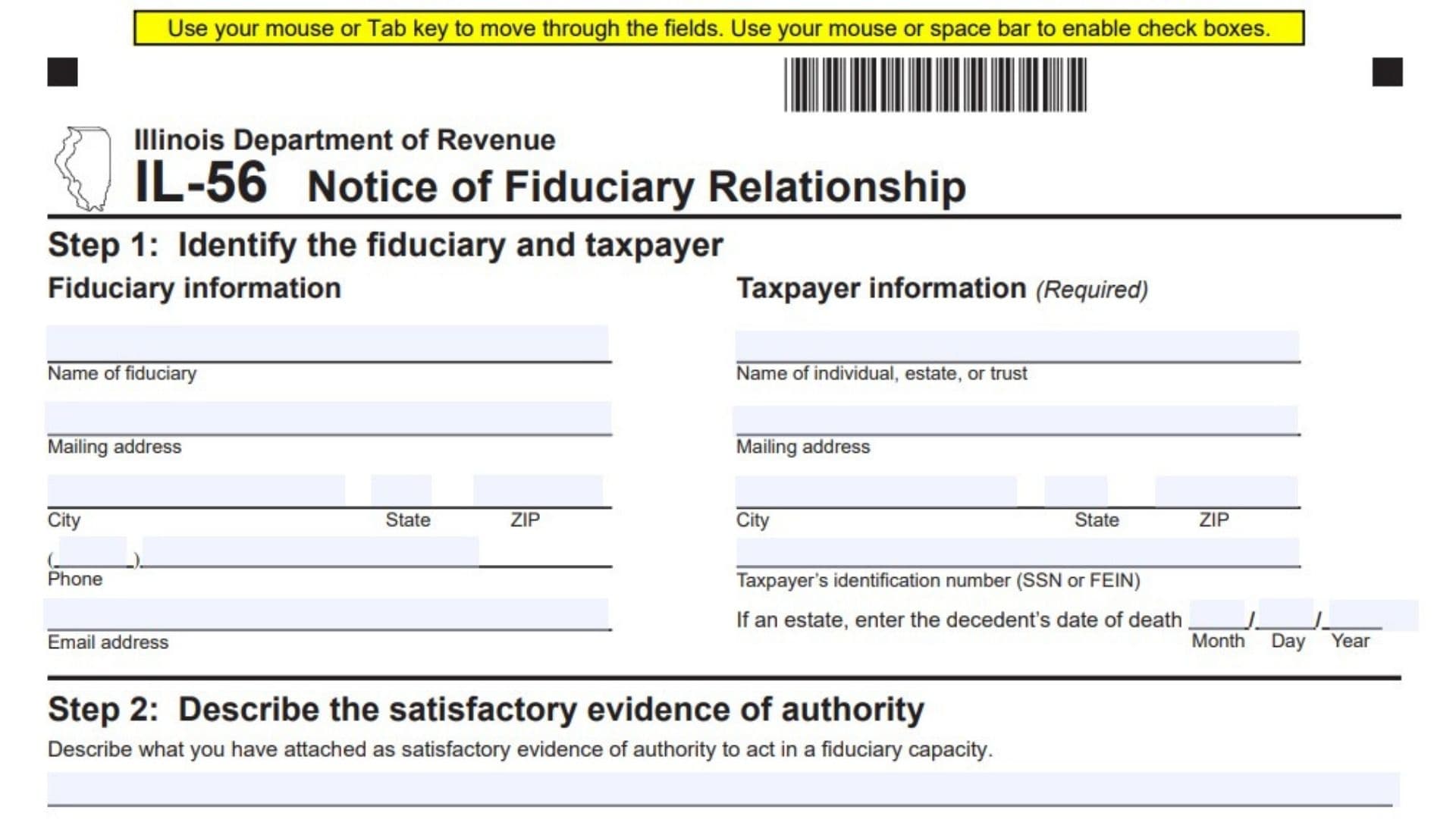
Illinois Form IL-56, officially titled Notice of Fiduciary Relationship, is a form used to notify the Illinois Department of Revenue when an individual or entity acts in a fiduciary capacity on behalf of another taxpayer. A fiduciary is someone who has legal authority to manage, administer, or represent another person’s, estate’s, or trust’s tax-related affairs. The form collects information about both the fiduciary and the taxpayer for whom the fiduciary is acting. It identifies the person or organization accepting fiduciary responsibility, provides contact information for both parties, and records the taxpayer’s identifying information. When the taxpayer is an estate, the form also requests the deceased person’s date of death.
One of the primary purposes of Form IL-56 is to establish the fiduciary’s relationship with the taxpayer and document the authority under which the fiduciary is acting. The form requires the fiduciary to describe and attach satisfactory evidence of authority. This documentation supports the fiduciary’s ability to act on behalf of the individual, estate, or trust in matters involving the Illinois Department of Revenue.
Form IL-56 also records the nature and extent of the taxpayer’s tax liabilities for which the fiduciary is responsible. It requires the fiduciary to identify all applicable tax years, specify the types of taxes involved, and indicate whether additional tax or a refund is due and whether a tax return or payment is required. This information helps the Department understand the scope of the fiduciary relationship and the tax matters being handled.
The form includes a separate section for situations in which a previous fiduciary relationship is being terminated. In these circumstances, the information about the prior fiduciary, including their name, mailing address, telephone number, email address, and termination date, must be provided.
Form IL-56 concludes with a declaration and signature section. The fiduciary must sign the notice, provide their title or capacity, and enter the date. By signing, the fiduciary confirms that the information provided is true, correct, and complete to the best of their knowledge.
Completing Form IL-56 accurately is important because the Illinois Department of Revenue requires the disclosure of this information under the Illinois Income Tax Act. The form expressly states that providing the requested information is mandatory and that failure to provide it could result in a penalty.
How To File Illinois Form IL-56
Illinois Form IL-56 is submitted to the Illinois Department of Revenue to notify the department of a fiduciary relationship involving a taxpayer.
The form is a notification document rather than an individual income tax return. It establishes the fiduciary information, identifies the taxpayer, documents the authority to act, and describes the tax responsibilities associated with the relationship.
Information To Prepare Before Completing Form IL-56
Gather the following information before starting:
- Full legal name of the fiduciary.
- Fiduciary’s complete mailing address.
- Fiduciary’s telephone number.
- Fiduciary’s email address.
- Full name of the individual, estate, or trust represented.
- Taxpayer’s complete mailing address.
- Taxpayer’s Social Security Number (SSN) or Federal Employer Identification Number (FEIN).
- Date of death, if the taxpayer is an estate.
- Supporting documentation establishing the fiduciary’s authority.
- Applicable tax years for which the fiduciary is acting.
- Types of taxes associated with the taxpayer.
- Information about additional taxes due or refunds expected.
- Information about required tax returns and payments.
- Previous fiduciary’s information, if an existing fiduciary relationship is being terminated.
- Date of termination of the previous fiduciary relationship.
- Fiduciary’s official title or capacity.
- Signature and signing date.
Important Filing Considerations
Evidence Of Fiduciary Authority
The form requires satisfactory evidence of authority to act in a fiduciary capacity. The fiduciary must attach supporting documentation and describe the evidence in Step 2.
Taxpayer Identification
The taxpayer’s identification number must be provided. Use the SSN for an individual or the FEIN where applicable.
Estate Information
If the taxpayer is an estate, enter the decedent’s date of death in the designated field.
Tax Liability Information
The fiduciary must identify all applicable tax years and provide information about the types of taxes, additional tax or refunds, and required returns or payments.
Termination Of A Previous Fiduciary Relationship
Step 4 must be completed when terminating a prior fiduciary relationship. It records the previous fiduciary’s details and the effective termination date.
Mandatory Disclosure
The form states that disclosure of the requested information is required under the Illinois Income Tax Act. Failure to provide the information could result in a penalty.
The form does not specify a mailing address or electronic submission destination. Taxpayers should follow the Illinois Department of Revenue’s current submission instructions when sending the completed notice and supporting documentation.

How To Complete Illinois Form IL-56
Form IL-56 contains five steps. Each step addresses a different part of the fiduciary relationship, from identifying the parties to documenting authority, reporting tax liabilities, recording the termination of a previous fiduciary, and signing the notice.
Complete the applicable fields carefully and ensure that the supporting documentation is included.
Step 1: Identify The Fiduciary And Taxpayer
Step 1 collects identifying and contact information for both parties involved in the fiduciary relationship.
The section is divided into two columns:
- Fiduciary Information.
- Taxpayer Information (Required).
Complete both columns using accurate legal names, mailing addresses, and identification details.
Fiduciary Information
Name Of Fiduciary
Enter the full legal name of the person or entity acting as the fiduciary.
The fiduciary is the individual or organization responsible for acting on behalf of the taxpayer.
Use the name associated with the fiduciary’s official records.
Mailing Address
Enter the complete mailing address of the fiduciary.
Include the street number, street name, apartment or suite number, and any other necessary address information.
This address identifies where the fiduciary receives correspondence.
City
Enter the city in which the fiduciary’s mailing address is located.
State
Enter the state abbreviation associated with the fiduciary’s mailing address.
ZIP
Enter the ZIP code corresponding to the fiduciary’s mailing address.
Verify that the city, state, and ZIP code match the address provided.
Phone
Enter the fiduciary’s telephone number, including the appropriate area code.
Provide a number where the fiduciary can be contacted regarding the taxpayer’s affairs.
Email Address
Enter the fiduciary’s email address.
Use an active email address that can be used for relevant correspondence.
Taxpayer Information
Name Of Individual, Estate, Or Trust
Enter the full legal name of the individual, estate, or trust for whom the fiduciary is acting.
Identify the correct taxpayer type and use the name associated with the taxpayer’s official records.
If the fiduciary is acting on behalf of an estate or trust, enter its applicable legal name.
Mailing Address
Enter the complete mailing address of the individual, estate, or trust.
Include the street address and any applicable apartment, suite, or other address details.
City
Enter the city associated with the taxpayer’s mailing address.
State
Enter the state abbreviation corresponding to the taxpayer’s mailing address.
ZIP
Enter the taxpayer’s ZIP code.
Check the complete address to ensure that the information is accurate.
Taxpayer’s Identification Number (SSN Or FEIN)
Enter the taxpayer’s identification number.
The form accepts either:
- Social Security Number (SSN).
- Federal Employer Identification Number (FEIN).
Use the identification number applicable to the individual, estate, or trust represented.
Verify the number carefully before submitting the form.
If An Estate, Enter The Decedent’s Date Of Death
Complete this field only when the taxpayer identified in the form is an estate.
Enter the date of death of the individual whose estate is being administered.
The form provides three separate date fields:
- Month.
- Day.
- Year.
Enter each component in the appropriate space.
For example, if the date of death was March 15, 2025, enter the month as 03, the day as 15, and the year as 2025.
This information identifies the deceased individual associated with the estate.
Step 2: Describe The Satisfactory Evidence Of Authority
Step 2 documents the legal or other satisfactory authority that allows the fiduciary to act on behalf of the taxpayer.
The form requires the fiduciary to attach evidence supporting their authority and provide a written description of the attached documentation.
Describe What You Have Attached As Satisfactory Evidence Of Authority To Act In A Fiduciary Capacity
In the space provided, describe the supporting documentation attached to establish the fiduciary’s authority.
The description should clearly identify the evidence being submitted and explain its relationship to the fiduciary’s authority to act.
Include sufficient information to identify the attached documentation.
The supporting evidence should correspond to the fiduciary capacity under which the individual or entity is acting.
For example, where applicable, identify the nature and title of the authority document and the person or entity to which it relates.
Do not leave the description incomplete when supporting evidence is required.
Supporting Documentation
Attach the documentation that establishes the fiduciary’s authority.
The form requires satisfactory evidence but does not provide an exhaustive list of acceptable documents. Therefore, the fiduciary should verify the appropriate documentation requirements with the Illinois Department of Revenue.
Ensure that the description entered in Step 2 accurately reflects the documents being attached.
Step 3: List The Nature And Extent Of Liabilities
Step 3 identifies the taxpayer’s tax liabilities for which the fiduciary is acting.
This section is important because it establishes the tax years and types of taxes associated with the fiduciary relationship.
The form requires information about every applicable tax year and whether additional tax, a refund, a return, or a payment is involved.
Applicable Tax Years
Enter all tax years for which the fiduciary is acting on behalf of the taxpayer.
Include every relevant year within the scope of the fiduciary relationship.
Do not restrict the information to only the current tax year if the fiduciary’s responsibilities extend to earlier or additional years.
Type Of Tax
Identify the type of tax associated with each applicable tax year.
The form provides income tax and retailers’ occupation tax as examples.
Enter the appropriate tax classification for the liability being reported.
If multiple types of taxes are involved, identify each applicable tax type.
Whether Additional Tax Is Due
Indicate whether additional tax is due for the relevant tax year and tax category.
Provide the applicable information so that the department can understand whether an outstanding tax liability exists.
Whether A Refund Is Due
Indicate whether a refund is due for the relevant tax year and tax category.
Identify applicable refund information where relevant.
This helps distinguish tax years involving outstanding liabilities from those involving potential refunds.
Whether A Return Is Required
Indicate whether a tax return must be filed for the applicable tax year.
Identify the relevant return requirement for each tax category.
Whether A Payment Is Required
Indicate whether a tax payment is required for the applicable year and type of tax.
This information helps establish the payment responsibilities being handled by the fiduciary.
Reporting Multiple Tax Years And Tax Types
If the fiduciary is responsible for tax matters covering multiple years, include all applicable years.
For each year, identify:
- The tax year.
- The type of tax.
- Whether additional tax is due.
- Whether a refund is due.
- Whether a return is required.
- Whether a payment is required.
The description should clearly establish the nature and extent of the fiduciary’s tax responsibilities.
The form provides a dedicated space for this information. If additional details are necessary, use an additional statement to provide a clear explanation.
Step 4: Complete This Step When You Terminate A Prior Fiduciary Relationship
Step 4 applies when a previous fiduciary relationship is being terminated.
It collects information about the prior fiduciary and records the date on which the previous relationship ended.
If no prior fiduciary relationship is being terminated, this section is not applicable.
Previous Fiduciary Information
Date Of Termination
Enter the date on which the prior fiduciary relationship was terminated.
The form provides separate fields for:
- Month.
- Day.
- Year.
Enter the date in the appropriate fields.
For example, if the termination date is October 20, 2025, enter the month as 10, the day as 20, and the year as 2025.
Use the actual termination date supported by the relevant records.
Name Of Prior Fiduciary
Enter the full name of the individual or entity that previously acted as the fiduciary.
Use the name associated with the previous fiduciary relationship.
Mailing Address
Enter the complete mailing address of the prior fiduciary.
Include the street number, street name, apartment or suite number, and other relevant address details.
Phone
Enter the previous fiduciary’s telephone number, including the area code.
Provide the applicable contact number associated with the prior fiduciary.
City
Enter the city associated with the previous fiduciary’s mailing address.
State
Enter the applicable state abbreviation.
ZIP
Enter the ZIP code for the prior fiduciary’s mailing address.
Email Address
Enter the previous fiduciary’s email address.
Use the contact information associated with the individual or entity that previously held fiduciary responsibility.
Important Considerations For Step 4
This section is specifically intended to document the termination of an existing fiduciary relationship.
Ensure that the termination date is accurate and that the previous fiduciary’s identifying and contact information is complete.
Do not confuse the information about the current fiduciary in Step 1 with the information about the previous fiduciary in Step 4.
Step 5: Sign Below
Step 5 contains the fiduciary’s declaration and signature.
The individual acting as the fiduciary must review the completed notice before signing.
The declaration confirms that the fiduciary has examined the notice and believes the information to be true, correct, and complete to the best of their knowledge.
Fiduciary Declaration
Signature Of Fiduciary
The fiduciary must sign the form in the designated signature field.
The signature confirms the fiduciary’s declaration concerning the accuracy and completeness of the information provided.
The person signing should be the individual authorized to act in the fiduciary capacity identified in Step 1.
Title (E.g., Guardian, Trustee, Or Executor)
Enter the official title or capacity under which the individual is acting.
Examples provided by the form include:
- Guardian.
- Trustee.
- Executor.
Enter the title that accurately describes the fiduciary’s role.
The title should be consistent with the authority documentation attached in Step 2.
Date
Enter the date the fiduciary signs the form.
The form provides separate fields for:
- Month.
- Day.
- Year.
Ensure that the date reflects the actual signing date.
The form includes instructions for completing its electronic fields.
Mouse Or Tab Key Navigation
Users can move between fillable fields using a mouse or the Tab key.
This allows the form to be completed electronically without manually selecting every field.
Checkbox Selection
Use the mouse or space bar to enable the checkboxes.
Verify that the appropriate options are selected before printing or submitting the form.
Reset
The form provides a Reset button.
This function is intended to clear the entered information. Review the completed fields before using this option.
Use the Print button to print the completed notice.
Before printing, verify that all information is correctly entered and that the supporting documentation is ready to accompany the form.
Final Review Before Filing
Before submitting Illinois Form IL-56, review all five steps and confirm that the fiduciary information, taxpayer details, supporting authority, tax liabilities, and signature information are complete.
Use the following checklist to conduct a final review.
Step 1: Fiduciary And Taxpayer Identification
- Verify the fiduciary’s full legal name.
- Confirm the fiduciary’s mailing address.
- Check the fiduciary’s city, state, and ZIP code.
- Verify the fiduciary’s telephone number.
- Enter the fiduciary’s email address.
- Confirm the individual, estate, or trust’s legal name.
- Verify the taxpayer’s mailing address.
- Check the taxpayer’s city, state, and ZIP code.
- Enter the correct taxpayer identification number (SSN or FEIN).
- Complete the decedent’s date of death if the taxpayer is an estate.
Step 2: Evidence Of Authority
- Attach satisfactory evidence establishing fiduciary authority.
- Describe the attached evidence clearly.
- Confirm that the supporting documentation relates to the correct taxpayer.
- Ensure that the documentation supports the fiduciary capacity identified in Step 1.
Step 3: Nature And Extent Of Liabilities
- List all applicable tax years.
- Identify every relevant type of tax.
- Indicate whether additional tax is due.
- Identify whether a refund is due.
- Indicate whether a tax return is required.
- Confirm whether a payment is required.
- Include all applicable years and tax categories.
Step 4: Termination Of Prior Fiduciary Relationship
- Complete this section when terminating a prior fiduciary relationship.
- Enter the correct termination date.
- Verify the previous fiduciary’s full name.
- Check the previous fiduciary’s mailing address.
- Confirm the telephone number.
- Verify the city, state, and ZIP code.
- Enter the previous fiduciary’s email address.
Step 5: Signature
- Review the entire notice before signing.
- Obtain the fiduciary’s signature.
- Enter the correct fiduciary title.
- Confirm the signing date.
- Ensure that the person signing is authorized to act in the stated fiduciary capacity.
Final Filing Checks
- Confirm that all applicable fields have been completed.
- Verify that the taxpayer’s identifying information is accurate.
- Ensure that the supporting evidence of authority is attached.
- Check that the tax years and liabilities are clearly described.
- Confirm that Step 4 is completed when applicable.
- Verify that the fiduciary’s signature and title are included.
- Follow the current Illinois Department of Revenue submission instructions.
- Retain a copy of the completed notice and supporting documentation.
Important Filing Reminder
Illinois Form IL-56 is a Notice of Fiduciary Relationship used to inform the Illinois Department of Revenue that an individual or entity is acting in a fiduciary capacity for another taxpayer.
The five steps establish the identity of the parties, document the fiduciary’s authority, identify the tax liabilities involved, record the termination of a previous fiduciary relationship when applicable, and obtain the fiduciary’s declaration and signature.
The form specifically states that disclosure of the requested information is mandatory under the Illinois Income Tax Act and that failure to provide the information could result in a penalty.
Accurate completion of Form IL-56, together with satisfactory evidence of fiduciary authority, is essential for properly notifying the Illinois Department of Revenue about the fiduciary relationship and the tax responsibilities associated with it.