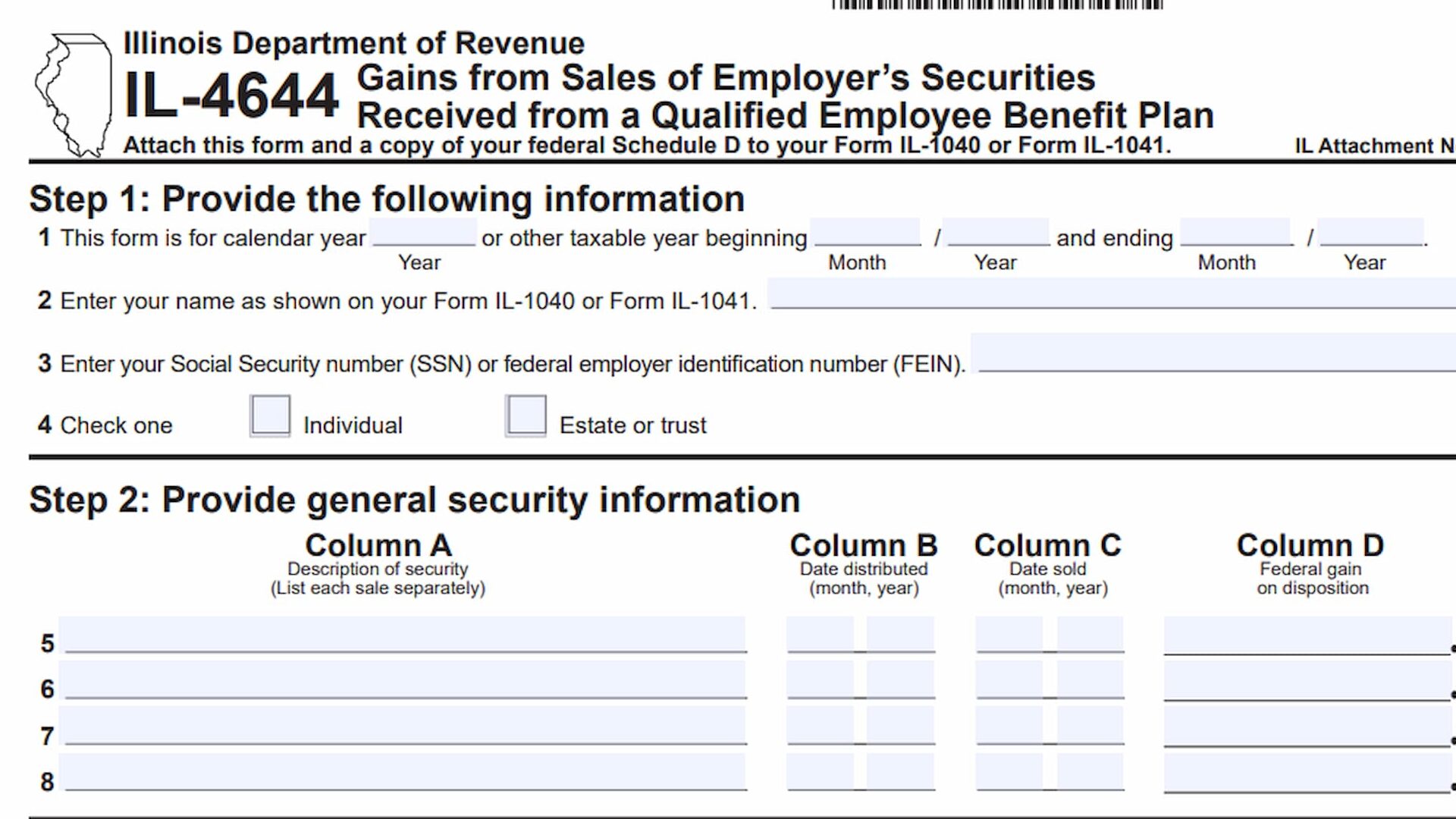
Form IL-4644, Gains from Sales of Employer’s Securities Received from a Qualified Employee Benefit Plan, is an Illinois tax form used to report gains associated with the sale of employer securities distributed through a qualified employee benefit plan. It helps taxpayers calculate the amounts that must be included in their Illinois income tax reporting and determine whether an additional Schedule F filing is required.
The form is intended for individuals, estates, and trusts that received employer securities through a qualified employee benefit plan and subsequently sold those securities. It collects information about the securities, their distribution and sale dates, federal gains on disposition, market values, and federal tax bases. It also includes a separate calculation for securities received in a distribution before August 1, 1969.
Form IL-4644 contains four main steps. Step 1 collects the taxpayer’s identifying information and tax year. Step 2 records general security information, including the description of each security, distribution date, sale date, and federal gain. Step 3 calculates net unrealized appreciation using the market value and federal tax basis of the securities on the distribution date. Step 4 addresses securities received in distributions before August 1, 1969, using additional historical value and tax basis information.
Completing Form IL-4644 accurately is important because the calculated amounts must be transferred to the appropriate lines of the taxpayer’s Illinois income tax return. The form also requires a copy of federal Schedule D to be attached to Form IL-1040 or Form IL-1041.
How To File Form IL-4644
Form IL-4644 must be attached to the applicable Illinois income tax return, together with a copy of federal Schedule D.
The form identifies two possible filing returns:
- Form IL-1040: Individual Illinois Income Tax Return.
- Form IL-1041: Illinois Fiduciary Income and Replacement Tax Return.
The amount calculated on Line 13 must be transferred to Form IL-1040, Line 5, or Form IL-1041, Line 14, as applicable.
If Line 18 results in a gain, taxpayers must also complete Schedule F and report the amount on the appropriate line:
- Form IL-1040, Schedule F, Line 3.
- Form IL-1041, Schedule F, Line 3.
Before completing Form IL-4644, gather the following information:
- Your applicable Form IL-1040 or Form IL-1041.
- Your Social Security Number (SSN) or Federal Employer Identification Number (FEIN).
- The tax year or beginning and ending dates of the applicable tax period.
- Records identifying each employer security received through a qualified employee benefit plan.
- The distribution date for each security.
- The sale date for each security.
- Federal gain information for each sale.
- Market value of the stock on the date of distribution.
- Federal tax basis of the stock on the date of distribution.
- Historical value and federal tax basis information for securities received before August 1, 1969, if applicable.
- A copy of your federal Schedule D.
Make sure the security descriptions and financial amounts correspond to the transactions being reported.
How To Complete Form IL-4644
Form IL-4644 is a one-page form divided into four steps. Each step collects specific information needed to calculate the gains associated with employer securities received through a qualified employee benefit plan.
Complete the applicable fields in order, using your financial records and supporting tax documents.
Step 1: Provide the Following Information
Step 1 identifies the taxpayer, reporting period, and type of filer. Complete all applicable fields using the information associated with your Illinois income tax return.
Line 1: Tax Year
Enter the calendar year covered by Form IL-4644.
If you are filing for a calendar year, enter the applicable year in the designated field.
If you use a different taxable year, enter the beginning and ending dates of your reporting period in the corresponding fields. Use the month and year format indicated on the form.
Line 2: Name as Shown on Your Form IL-1040 or Form IL-1041
Enter the taxpayer’s name exactly as it appears on the applicable Illinois income tax return.
Individuals should use the name shown on Form IL-1040. Estates and trusts should use the applicable name associated with Form IL-1041.
Line 3: Social Security Number (SSN) or Federal Employer Identification Number (FEIN)
Enter the taxpayer’s identifying number.
Individuals generally provide their Social Security Number (SSN), while estates and trusts use their Federal Employer Identification Number (FEIN).
Make sure the number matches the identifying information on the associated Illinois income tax return.
Line 4: Check One
Select the checkbox identifying the type of taxpayer completing the form.
Two options are available:
- Individual: Check this box if the form is being completed by an individual taxpayer.
- Estate or trust: Check this box if the form is being completed for an estate or trust.
Select only the classification that applies.
Step 2: Provide General Security Information
Step 2 collects information about each employer security received through a qualified employee benefit plan and subsequently sold.
The section contains four columns, labeled A through D, and provides four available transaction entries on Lines 5 through 8.
The form instructs taxpayers to list each sale separately. If multiple securities or sales are involved, use a separate row for each applicable transaction.
Column A: Description of Security
Enter a description identifying the employer security sold.
Provide enough information to distinguish each security from the other transactions reported on the form.
The form specifically instructs taxpayers to list each sale separately.
Column B: Date Distributed
Enter the date the security was distributed to you from the qualified employee benefit plan.
Use the month and year format indicated on the form.
Column C: Date Sold
Enter the date the security was sold.
Report the applicable month and year for each transaction.
Make sure the sale date corresponds to the security identified in Column A.
Column D: Federal Gain on Disposition
Enter the federal gain realized on the disposition of the security.
Use the applicable federal gain information from your tax records and supporting calculations.
Report the amount separately for each sale.
Lines 5 Through 8: Individual Security Sales
Use Lines 5, 6, 7, and 8 to report individual security sales.
Each row should contain the corresponding security description, distribution date, sale date, and federal gain.
If you have multiple sales, make sure each transaction is reported separately rather than combining unrelated sales into a single entry.
Step 3: Calculate Net Unrealized Appreciation
Step 3 calculates net unrealized appreciation for the employer securities.
This calculation compares the market value of the stock on the date of distribution with its federal tax basis on that same date. The resulting amount is then compared with the federal gain on disposition to determine the amount reported in Column H.
The section contains four columns, labeled E through H, corresponding to Lines 9 through 12.
Complete a separate calculation for each security sale reported in Step 2.
Column E: Market Value of Stock on Date of Distribution
Enter the market value of the stock on the date it was distributed from the qualified employee benefit plan.
Use the market value applicable to the distribution date for each security.
The form specifically directs taxpayers to consult the accompanying instructions when determining this amount.
Column F: Federal Tax Basis of Stock on Date of Distribution
Enter the federal tax basis of the stock on the date of distribution.
Use the applicable federal tax basis information for each security.
As with Column E, consult the form’s instructions when determining the appropriate amount.
Column G: Column E Minus Column F
Subtract the federal tax basis in Column F from the market value in Column E.
Enter the resulting difference in Column G.
If Column F is greater than Column E, enter zero instead of a negative amount.
This calculation determines the difference between the stock’s market value and its federal tax basis on the distribution date.
Column H: Lesser of Columns G or D
Compare the amounts in Column G and Column D.
Enter whichever amount is smaller.
Column D contains the federal gain on disposition, while Column G represents the difference between the stock’s market value and federal tax basis on the distribution date.
The smaller amount is reported in Column H.
Lines 9 Through 12: Individual Security Calculations
Complete the four available rows using the corresponding security transactions reported in Step 2.
For each row:
- Enter the market value of the stock in Column E.
- Enter the federal tax basis in Column F.
- Subtract Column F from Column E to calculate Column G.
- Enter zero in Column G if Column F exceeds Column E.
- Compare Columns G and D and enter the smaller amount in Column H.
Make sure the information on Lines 9 through 12 corresponds to the securities and sales reported in Step 2.
Line 13: Total
Add the amounts reported in Column H for Lines 9 through 12.
Enter the combined total on Line 13.
This amount must also be reported on the applicable Illinois income tax return:
- Form IL-1040, Line 5.
- Form IL-1041, Line 14.
If Line 18 results in a gain, the amount from Line 13 must also be entered on the appropriate Schedule F, as explained in the form instructions.
Step 4: Identify Securities Received in a Distribution Prior to August 1, 1969
Step 4 addresses employer securities received in a distribution before August 1, 1969.
This section uses historical value and federal tax basis information to calculate the applicable amount associated with those securities.
It contains five columns, labeled I through M, and provides four available transaction entries on Lines 14 through 17.
Complete this section when applicable to the securities being reported.
Column I: August 1, 1969, Value or Applicable Fraction
Enter the August 1, 1969, value of the security or the applicable fraction required for the calculation.
The form specifically instructs taxpayers to consult the accompanying instructions when determining the appropriate value or fraction.
Use the applicable information for each security received in a distribution before August 1, 1969.
Column J: Federal Tax Basis August 1, 1969
Enter the federal tax basis of the security as of August 1, 1969.
Use the historical tax basis information applicable to the security.
Column K: Column I Minus Column J or Fraction in Column I Times Column D
Calculate the amount required for Column K using the applicable method.
The form provides two possible calculations:
- Subtract Column J from Column I.
- Multiply the applicable fraction in Column I by the amount in Column D.
Use the calculation applicable to the security and enter the resulting amount in Column K.
Column L: The Greater of Columns H or K, but Not Greater Than Column D
Compare the amounts in Column H and Column K.
Enter the greater of the two amounts, but the amount reported cannot exceed the federal gain on disposition shown in Column D.
This calculation ensures that the amount entered in Column L does not exceed the applicable federal gain.
Column M: Subtract Column H from Column L
Subtract the amount in Column H from the amount in Column L.
Enter the resulting difference in Column M.
This calculation determines the additional amount resulting from the comparison performed in Column L.
Lines 14 Through 17: Individual Security Calculations
Use the available rows to report securities received in distributions before August 1, 1969.
For each applicable security:
- Enter the historical value or applicable fraction in Column I.
- Enter the federal tax basis as of August 1, 1969, in Column J.
- Calculate the amount required in Column K.
- Compare Columns H and K and enter the applicable amount in Column L.
- Subtract Column H from Column L and enter the result in Column M.
Complete a separate row for each applicable security.
Line 18: Total
Calculate the total amount reported for the Step 4 calculation and enter the result on Line 18.
The form specifically states that if this amount is a gain, you must complete Schedule F.
Report the Line 18 amount on the applicable return:
- Form IL-1040, Schedule F, Line 3.
- Form IL-1041, Schedule F, Line 3.
If Line 18 is a gain, make sure the required Schedule F is completed and the amount is transferred to the correct line.
Additional Form Instructions and Controls
Form IL-4644 includes basic instructions for navigating and completing its electronic fields.
Moving Between Fields
Use your mouse or the Tab key to move from one fillable field to another.
The Tab key allows you to navigate through the available fields without manually selecting each one.
Enabling Checkboxes
Use your mouse or the space bar to select the applicable checkboxes.
This applies to the taxpayer classification options in Step 1.
Reset Button
The electronic version includes a Reset button that allows users to clear the entered information and reset the fillable fields.
Use this option carefully because it may remove information that has already been entered.
Print Button
Use the Print button to print the completed form.
Review all entries before printing to ensure that the taxpayer information, security details, and calculations are accurate.
Final Review Before Filing
Before submitting Form IL-4644 with your Illinois income tax return, review the following checklist to ensure that all required information and calculations are complete.
- Correct tax year: Confirm that the calendar year or other taxable year is entered correctly.
- Taxpayer information: Verify that your name matches Form IL-1040 or Form IL-1041.
- Identifying number: Check that your SSN or FEIN is correct.
- Taxpayer classification: Select the appropriate Individual or Estate or trust checkbox.
- Step 2: Make sure each employer security sale is listed separately.
- Column A: Verify that each security is properly described.
- Column B: Confirm that the distribution dates are entered in the required month and year format.
- Column C: Check that the sale dates are correct.
- Column D: Verify that the federal gain on disposition is reported for each sale.
- Step 3, Column E: Confirm that the market value of each stock is reported as of its distribution date.
- Column F: Verify the federal tax basis of each stock on the distribution date.
- Column G: Check that Column F is subtracted from Column E and that zero is entered when Column F exceeds Column E.
- Column H: Make sure the smaller of Columns G and D is reported.
- Line 13: Confirm that the Column H amounts are added correctly.
- Form IL-1040 or IL-1041: Transfer the Line 13 amount to Form IL-1040, Line 5, or Form IL-1041, Line 14, as applicable.
- Step 4 applicability: Determine whether any securities were received in distributions before August 1, 1969.
- Column I: Verify the applicable August 1, 1969, value or fraction.
- Column J: Check the federal tax basis as of August 1, 1969.
- Column K: Confirm that the applicable historical value or fraction calculation is correct.
- Column L: Verify that the greater of Columns H or K is entered without exceeding Column D.
- Column M: Confirm that Column H is subtracted from Column L.
- Line 18: Check the total amount calculated in Step 4.
- Schedule F: If Line 18 results in a gain, complete the required Schedule F.
- Schedule F transfer: Enter the Line 18 amount on Form IL-1040, Schedule F, Line 3, or Form IL-1041, Schedule F, Line 3, as applicable.
- Federal Schedule D: Attach a copy of your federal Schedule D to Form IL-1040 or Form IL-1041.
- Final review: Check all security descriptions, dates, federal gains, historical values, and calculations before submitting the form.
Review each security transaction and make sure the calculations in Steps 3 and 4 correspond to the correct distribution and sale information. Attach Form IL-4644 and a copy of federal Schedule D to your applicable Illinois income tax return. If Line 18 results in a gain, remember to complete Schedule F and report the amount on the appropriate line.