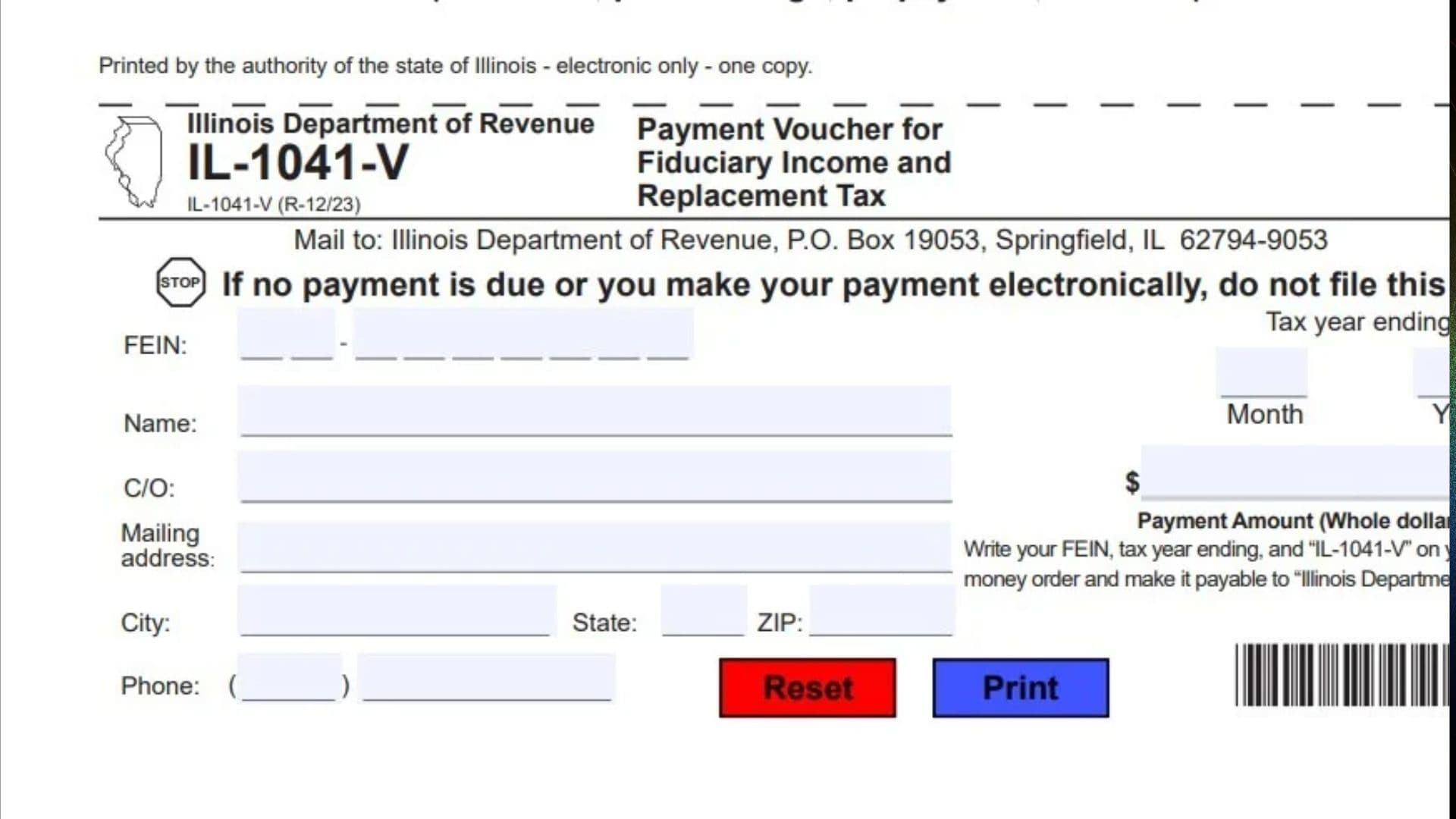
Illinois Form IL-1041-V, officially known as the Payment Voucher for Fiduciary Income and Replacement Tax, is a payment document issued by the Illinois Department of Revenue. It is used by taxpayers making payments associated with their Illinois fiduciary income and replacement tax obligations. The primary purpose of this voucher is to help the department identify and process payments accurately by connecting each payment to the correct taxpayer and tax year. It collects important information, including the federal employer identification number (FEIN), taxpayer or entity name, mailing address, contact telephone number, tax year-ending date, and payment amount. Taxpayers who choose to pay by check or money order can submit this voucher with their payment to ensure that the funds are properly identified. It can be used for different types of IL-1041 payments, including extension payments, pass-through payments, prepayments, and payments made with a tax return. Completing the voucher correctly is important because missing or incorrect information may make it more difficult for the Illinois Department of Revenue to identify and apply the payment to the appropriate account. However, this voucher is not required when no payment is due or when the payment is made electronically.
How To File Form IL-1041-V
Form IL-1041-V is submitted to the Illinois Department of Revenue when a taxpayer chooses to pay an IL-1041 tax obligation by mail rather than electronically.
The completed voucher must be accompanied by a check or money order covering the amount being paid. The payment should be made payable to the Illinois Department of Revenue.
Mailing Address:
Illinois Department of Revenue
P.O. Box 19053
Springfield, IL 62794-9053
Payment Methods
Taxpayers are encouraged to use electronic payment options whenever possible. Electronic payments can help avoid mailing delays, eliminate the need to purchase postage, and provide immediate payment confirmation.
Electronic payments can be made through the Illinois Department of Revenue website at tax.illinois.gov or by scanning the QR code provided on the voucher.
Important: If the Illinois Department of Revenue has notified you that electronic payments are mandatory for your account, you must use one of the department’s approved electronic payment methods. Mailing a check or money order is not an alternative in this situation.
When Should You Use Form IL-1041-V?
If you are not making an electronic payment, this voucher can be used for the following IL-1041 payment types:
- Extension Payment: A payment made in connection with an extension of time to file.
- Pass-Through Payment: A payment associated with a pass-through tax obligation.
- Prepayment: A payment made before completing the tax return.
- Return Payment: A payment submitted with the completed tax return.
You should not submit Form IL-1041-V if you have no payment due or have already made your payment electronically.
Documents And Information To Prepare
Before completing the voucher, gather the following information:
- Your federal employer identification number (FEIN).
- Your legal name or the applicable entity name.
- Your care-of (C/O) information, if applicable.
- Your complete mailing address.
- Your contact telephone number.
- The month and year your tax year ends.
- The exact payment amount in whole dollars.
- A check or money order payable to the Illinois Department of Revenue.
Having these details ready will make the completion process easier and help prevent payment-processing problems.

How To Complete Form IL-1041-V
Form IL-1041-V is a relatively short payment voucher. It contains taxpayer identification fields, mailing information, tax-year details, and a payment amount field.
The following instructions explain each field and provide practical guidance for entering the correct information.
Taxpayer Identification And Contact Information
Federal Employer Identification Number (FEIN)
Enter the federal employer identification number assigned to the taxpayer or entity making the payment. This number is used to identify the account associated with the fiduciary income and replacement tax payment.
Make sure the FEIN is entered correctly. Do not substitute a personal Social Security number for the FEIN requested on the voucher.
Name
Enter the complete legal name of the taxpayer or entity associated with the payment. Use the same name associated with the relevant Illinois tax account and tax return.
Check the spelling carefully to avoid identification problems.
C/O (Care Of)
Complete this field only when correspondence or payment-related communication should be directed through another individual, organization, or responsible recipient.
For example, if a tax professional, representative, or another designated person receives correspondence on behalf of the taxpayer, enter the appropriate care-of information.
If no care-of arrangement applies, leave this field blank.
Mailing Address
Enter the complete mailing address where the taxpayer or designated recipient receives correspondence.
Include the appropriate street number, street name, apartment number, suite number, or other address details when applicable.
Use an address where important tax-related correspondence can be received.
City
Enter the name of the city associated with the mailing address provided above.
Make sure the city information matches the state and ZIP code.
State
Enter the two-letter postal abbreviation for the state associated with the mailing address.
For example, enter IL for Illinois.
ZIP Code (ZIP)
Enter the ZIP code associated with the mailing address.
Check that the ZIP code is accurate and corresponds to the city and state entered on the voucher.
Phone
Provide a telephone number where the taxpayer or responsible representative can be contacted if necessary.
Enter the appropriate area code and telephone number in the spaces provided. Use a reliable contact number that can be used for tax-related communication.
Tax Year Information
Tax Year Ending – Month
Enter the month in which the taxpayer’s tax year ends.
For example, if the tax year ends in December, enter 12 or December in the designated month field, following the form’s field format.
Tax Year Ending – Year
Enter the year in which the tax year ends.
Make sure this information corresponds to the tax period for which the payment is being submitted.
The month and year should identify the correct tax year associated with the payment. Do not enter the current calendar date unless it is also the actual tax year-ending date.
Payment Information
Payment Amount (Whole Dollars Only)
Enter the total amount you are paying with the voucher.
The amount must be entered in whole dollars only. Do not enter cents or decimal amounts in the payment field. The voucher already displays a fixed .00 after the dollar amount.
For example, if the payment amount is $2,500, enter 2500 in the designated dollar field.
Make sure the amount entered on the voucher matches the amount of the accompanying check or money order.
Payment Instructions Printed On The Voucher
FEIN, Tax Year Ending, And IL-1041-V Identification
Write the taxpayer’s FEIN, the tax year-ending information, and the identification IL-1041-V on the check or money order.
These details help the Illinois Department of Revenue identify the payment and associate it with the correct tax account and period.
Payee Information
Make the check or money order payable to:
Illinois Department of Revenue
Verify that the payee name is written correctly before sending the payment.
Official Use Only
Official Use Only
This area is reserved for the Illinois Department of Revenue.
Taxpayers should not enter information in this section or attempt to complete any department-use fields.
Leave this area blank when preparing the voucher.
Barcode And Processing Information
Payment Processing Barcode
The voucher includes a printed barcode near the bottom. This barcode is part of the department’s payment-processing system and helps identify the voucher during processing.
Do not write over, remove, or alter the barcode.
Sequence Number
The voucher also contains a printed sequence number. This is part of the document’s processing information and is not a taxpayer-entry field.
No additional information needs to be entered in this area.
Electronic Form Controls
Reset
The Reset control is provided for clearing information entered into the electronic form. Use it carefully because it may remove information you have already entered.
The Print control allows you to print the completed payment voucher. Review all information before printing the document.
How To Submit Your Payment With Form IL-1041-V
After completing all applicable fields, follow these steps to submit your payment by mail.
Step 1: Review The Completed Voucher
Check the FEIN, taxpayer name, mailing address, telephone number, tax year-ending month and year, and payment amount.
Make sure all applicable fields contain accurate information.
Step 2: Prepare Your Check Or Money Order
Prepare a check or money order for the amount entered on the payment voucher.
Make it payable to the Illinois Department of Revenue.
Step 3: Write The Required Information On Your Payment
Write the following information on the check or money order:
- Your FEIN.
- Your tax year-ending information.
- IL-1041-V.
This information helps the department identify your payment.
Step 4: Detach The Payment Voucher
Detach the payment voucher from the rest of the form as instructed.
Enclose the completed voucher with the check or money order for the amount being paid.
Step 5: Mail The Voucher And Payment
Send the completed voucher and payment to:
Illinois Department of Revenue
P.O. Box 19053
Springfield, IL 62794-9053
Make sure the voucher and payment are properly enclosed before mailing.
Step 6: When Filing The Tax Return By Mail
If you are also submitting your Illinois tax return by mail, you have another option.
You may attach the completed payment voucher and check or money order to the front page of your tax return.
Then mail the tax return, voucher, and payment together to the mailing address provided on the tax return.
Follow the return’s mailing instructions rather than automatically using the separate voucher mailing address.
Common Mistakes To Avoid When Completing Form IL-1041-V
A few simple mistakes can create problems when submitting a tax payment. Review the following points before sending your voucher.
- Entering an incorrect FEIN: Verify that the identification number belongs to the taxpayer or entity associated with the payment.
- Using an incorrect tax year: Make sure the month and year represent the actual ending date of the tax year.
- Entering cents in the payment field: The voucher requires whole-dollar amounts only.
- Using the wrong payee name: Make the check or money order payable to the Illinois Department of Revenue.
- Forgetting payment identification: Write the FEIN, tax year ending, and IL-1041-V on the payment.
- Leaving out the payment voucher: If paying by mail, include the completed voucher with the check or money order.
- Mailing to the wrong address: Use the address printed on the voucher unless you are submitting it together with your tax return.
- Submitting the voucher without a payment: Do not file the voucher when no payment is due.
- Using the paper voucher after electronic payment: Do not submit this voucher when the payment has already been made electronically.
- Ignoring mandatory electronic payment requirements: If the department has notified you that electronic payment is required, use an approved electronic payment method.
Final Review Before Filing
Before mailing Form IL-1041-V, use the following checklist to confirm that everything is complete.
- The correct FEIN has been entered.
- The taxpayer’s legal name is accurate.
- C/O information has been provided when applicable.
- The complete mailing address has been entered.
- The city, state, and ZIP code are correct.
- A valid contact telephone number has been provided.
- The correct tax year-ending month has been entered.
- The correct tax year-ending year has been entered.
- The payment amount is entered in whole dollars only.
- The payment amount matches the check or money order.
- The check or money order is payable to the Illinois Department of Revenue.
- The FEIN, tax year ending, and IL-1041-V have been written on the payment.
- The completed voucher is enclosed with the payment.
- The correct mailing address has been used.
- The official-use-only area and barcode have been left unchanged.
Important Final Reminder: Form IL-1041-V should only be submitted when a payment is being made by mail. If no payment is due or the payment has been made electronically, do not file this voucher. If the Illinois Department of Revenue has specifically required electronic payments, you must follow that requirement.
Completing the voucher carefully, providing accurate taxpayer information, and including the correct payment will help ensure that your Illinois fiduciary income and replacement tax payment can be properly identified and processed.