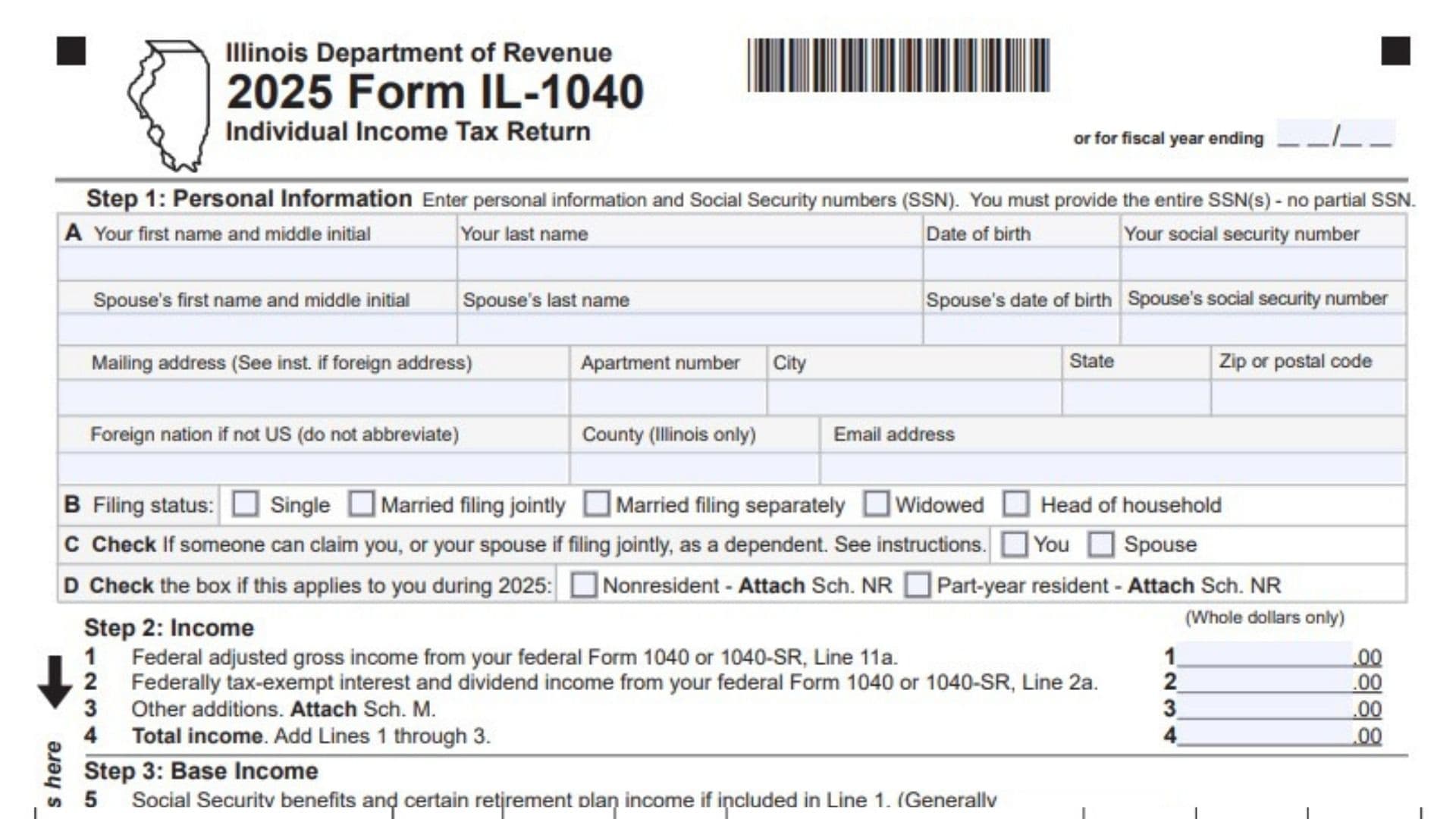
Illinois Form IL-1040 is the state’s individual income tax return used by individuals to report their income, calculate their Illinois income tax liability, claim eligible exemptions and tax credits, report payments, and determine whether they are entitled to a refund or owe additional tax. Issued by the Illinois Department of Revenue (IDOR), the 2025 Form IL-1040 is designed for Illinois residents, nonresidents with Illinois-source income, and individuals who lived in Illinois for only part of the tax year. It collects personal identification details, federal adjusted gross income, tax-exempt interest, income additions and subtractions, exemption allowances, applicable tax credits, other taxes, estimated payments, withholding, and refund or payment information. Taxpayers also use the form to report certain additional tax obligations, voluntary charitable contributions, and information related to household health insurance eligibility. Completing the return correctly is important because errors in income calculations, residency information, exemptions, or payment amounts can lead to incorrect tax assessments, processing delays, or penalties. The form contains 12 steps across two pages, with specific lines directing taxpayers to supporting schedules and federal tax information. Understanding each section before filing can help you report your information accurately and determine your final Illinois tax position.
Who Needs To File Form IL-1040?
Form IL-1040 is intended for individuals who have Illinois individual income tax filing responsibilities.
The form identifies three important taxpayer situations:
- Illinois Residents: Individuals who qualify as Illinois residents generally calculate their Illinois net income using the information reported on the return.
- Nonresidents: Individuals who are not Illinois residents but have income attributable to Illinois may need to file. They generally use Schedule NR to calculate their Illinois-source income and tax.
- Part-Year Residents: Individuals who lived in Illinois for only part of the tax year may need to file and use Schedule NR to determine the income subject to Illinois tax.
Your residency classification determines how certain income and tax amounts are calculated. Nonresidents and part-year residents should pay particular attention to Step 1 and Step 5.
How To File Form IL-1040
Form IL-1040 is submitted to the Illinois Department of Revenue. Follow the filing method and mailing address specified in the official 2025 Illinois Form IL-1040 instructions.
Before completing the return, gather the following information and documents:
- Your federal Form 1040 or Form 1040-SR.
- Social Security numbers and dates of birth for yourself and your spouse, if applicable.
- Mailing address and contact information.
- W-2 forms showing Illinois income tax withholding.
- Relevant 1099 forms.
- Records of federal adjusted gross income.
- Information about federally tax-exempt interest and dividend income.
- Records of income additions and subtractions.
- Applicable exemption and dependent information.
- Supporting schedules, including Schedules M, NR, CR, ICR, 1299-C, and IL-E/EITC, when required.
- Estimated Illinois tax payment records.
- Information about qualifying tax credits and other tax payments.
- Bank account information if requesting a direct deposit refund.
Important Filing Instructions:
- Enter all monetary amounts in whole dollars only.
- Complete the required supporting schedules and attach them where applicable.
- Attach your W-2 and 1099 forms in the designated area on the front page.
- If paying by check, follow the instructions for attaching your payment and Form IL-1040-V.
- Include the required federal return and supporting documentation when instructed.
- Sign and date the return before submission.

How To Complete Form IL-1040
The 2025 Illinois Individual Income Tax Return contains 12 steps. The following instructions explain each section and individual line.
Step 1: Personal Information
The first step identifies the taxpayer, spouse, mailing address, filing status, and Illinois residency classification. Enter accurate information because these details help the Illinois Department of Revenue identify the return and determine the applicable tax treatment.
Tax Year Or Fiscal Year Ending
At the top of the form, the tax year is identified as 2025. If you are filing for a fiscal year, enter the applicable fiscal year-ending date in the designated space.
A: Taxpayer’s First Name And Middle Initial
Enter your legal first name and middle initial as shown on your federal income tax return and identification records.
A: Taxpayer’s Last Name
Enter your complete legal last name.
A: Date Of Birth
Provide your date of birth in the designated field.
A: Social Security Number
Enter your complete Social Security number. The form requires the entire number, not a partial SSN.
Spouse’s First Name And Middle Initial
If you are filing jointly or otherwise providing spouse information, enter your spouse’s first name and middle initial.
Spouse’s Last Name
Enter your spouse’s complete last name.
Spouse’s Date Of Birth
Provide your spouse’s date of birth.
Spouse’s Social Security Number
Enter your spouse’s complete Social Security number. Do not leave out any digits.
Mailing Address
Enter the address where you receive tax correspondence. If you have a foreign address, follow the special instructions referenced by the form.
Apartment Number
If your mailing address includes an apartment or unit number, enter it here.
City
Enter the city associated with your mailing address.
State
Provide the appropriate state abbreviation for your mailing address.
ZIP Or Postal Code
Enter the correct ZIP code or foreign postal code.
Foreign Nation
If your mailing address is outside the United States, enter the full country name. Do not abbreviate the country name.
County
Enter your county only if it is an Illinois county. Follow the form instructions for the applicable county information.
Email Address
Provide your current email address so it can be used for relevant tax-related communication.
B: Filing Status
Select the filing status that applies to your federal and Illinois tax situation. The form provides five options:
- Single
- Married filing jointly
- Married filing separately
- Widowed
- Head of household
Select the appropriate option rather than checking multiple filing statuses.
C: Dependent Status
Check the appropriate box if someone else can claim you as a dependent. If you are filing jointly, also consider whether someone can claim your spouse as a dependent.
The form provides separate checkboxes for:
- You
- Spouse
D: Illinois Residency Status
Indicate whether either of the following situations applied to you during 2025:
- Nonresident: Check this box if you were not an Illinois resident during the tax year but have an applicable Illinois filing obligation. Attach Schedule NR.
- Part-Year Resident: Check this box if you lived in Illinois for only part of 2025. Attach Schedule NR.
Step 2: Income
This section collects your federal adjusted gross income and additional income amounts required for Illinois tax purposes. Enter all amounts in whole dollars.
Line 1: Federal Adjusted Gross Income
Enter the federal adjusted gross income reported on Line 11a of your federal Form 1040 or Form 1040-SR.
Use the amount from your completed federal income tax return. This figure serves as the starting point for calculating Illinois income.
Line 2: Federally Tax-Exempt Interest And Dividend Income
Enter the federally tax-exempt interest and dividend income reported on Line 2a of your federal Form 1040 or Form 1040-SR.
Use the amount from the applicable federal return rather than estimating the figure independently.
Line 3: Other Additions
Enter any additional income amounts required to be added back for Illinois tax purposes.
Use Schedule M to calculate the applicable additions and attach the completed schedule to your return.
Line 4: Total Income
Add Lines 1, 2, and 3.
Calculation:
Line 1 + Line 2 + Line 3 = Line 4
This amount represents your total income for the next stage of the Illinois tax calculation.
W-2 And 1099 Attachment Area
The front page includes a designated space for attaching your W-2 and 1099 forms. Attach the required documents in this area according to the filing instructions.
Step 3: Base Income
Step 3 calculates Illinois base income by subtracting eligible income amounts from total income.
Line 5: Social Security Benefits And Certain Retirement Plan Income
Enter the qualifying Social Security benefits and certain retirement plan income included in Line 1 that can be subtracted for Illinois tax purposes.
The form generally directs taxpayers to the amounts reported on Lines 4b, 5b, and 6b of federal Form 1040 or Form 1040-SR.
Attach your completed federal Form 1040 or Form 1040-SR as instructed.
Line 6: Illinois Income Tax Overpayment
Enter any Illinois income tax overpayment included in your federal income.
The relevant amount is reported on Schedule 1, Line 1, of your federal Form 1040 or Form 1040-SR.
Line 7: Other Subtractions
Enter other amounts that qualify for subtraction from Illinois income.
Calculate the applicable amount using Schedule M and attach the completed schedule to your return.
Line 8: Total Subtractions
Add the amounts entered on Lines 5, 6, and 7.
Calculation:
Line 5 + Line 6 + Line 7 = Line 8
This represents the total subtractions allowed in this section.
Line 9: Illinois Base Income
Subtract Line 8 from Line 4.
Calculation:
Line 4 – Line 8 = Line 9
The result is your Illinois base income before applying the exemption allowance.
Step 4: Exemptions
This step calculates the exemption allowance available to you, your spouse, and eligible dependents.
The form notes that income limitations may apply. Review the applicable instructions before entering exemption amounts.
Line 10a: Personal And Spouse Exemption Amount
Enter the exemption amount allowed for yourself and your spouse, if applicable.
Use the exemption rules and income limitations provided in the 2025 instructions to determine the correct amount.
Line 10b: Additional Exemption For Age 65 Or Older
Check the appropriate box if you or your spouse were 65 or older during the applicable tax year.
The form provides separate checkboxes for:
- You
- Spouse
Count the applicable checked boxes and multiply the total by $1,000.
Calculation:
Number of qualifying checkboxes × $1,000 = Line 10b
Line 10c: Additional Exemption For Legal Blindness
Check the appropriate box if you or your spouse qualify as legally blind under the applicable tax rules.
The form provides separate checkboxes for:
- You
- Spouse
Count the qualifying checkboxes and multiply the total by $1,000.
Calculation:
Number of qualifying checkboxes × $1,000 = Line 10c
Line 10d: Dependent Exemption Amount
If you are claiming dependents, enter the amount from Schedule IL-E/EITC, Step 2, Line 1.
Attach the completed Schedule IL-E/EITC as required.
Line 10: Total Exemption Allowance
Add the amounts entered on Lines 10a, 10b, 10c, and 10d.
Calculation:
Line 10a + Line 10b + Line 10c + Line 10d = Line 10
This is your total exemption allowance for calculating Illinois net income.
Step 5: Net Income And Tax
This section calculates your Illinois net income and the initial income tax amount.
The calculation differs depending on whether you are an Illinois resident, nonresident, or part-year resident.
Line 11: Illinois Net Income
For Illinois residents, subtract Line 10 from Line 9.
Calculation:
Line 9 – Line 10 = Line 11
For nonresidents and part-year residents, enter the Illinois net income calculated on Schedule NR instead.
Attach Schedule NR to your return.
Line 12: Illinois Income Tax
Illinois residents must multiply the amount on Line 11 by 4.95%.
Calculation:
Line 11 × 0.0495 = Line 12
The result cannot be less than zero.
Nonresidents and part-year residents should enter the tax amount calculated on Schedule NR instead of applying the resident calculation independently.
Attach Schedule NR.
Line 13: Recapture Of Investment Tax Credits
Enter any investment tax credit recapture amount required for the tax year.
Calculate the amount using Schedule 4255 and attach the completed schedule.
Line 14: Income Tax
Add the amounts reported on Lines 12 and 13.
Calculation:
Line 12 + Line 13 = Line 14
The result cannot be less than zero.
Step 6: Tax After Nonrefundable Credits
This step calculates the tax remaining after applying eligible nonrefundable credits.
Nonrefundable credits reduce your tax liability but cannot reduce the amount below zero through this section.
Line 15: Income Tax Paid To Another State
Enter qualifying income taxes paid to another state while you were an Illinois resident.
Use Schedule CR to calculate the applicable credit and attach the completed schedule.
Line 16: Property Tax, K-12 Education Expense, And Volunteer Emergency Worker Credits
Enter the applicable credit amount calculated on Schedule ICR.
This line includes eligible credits for:
- Property taxes.
- K-12 education expenses.
- Volunteer emergency workers.
Attach Schedule ICR to support the amount entered.
Line 17: Credit From Schedule 1299-C
Enter the credit amount calculated on Schedule 1299-C.
Complete the applicable schedule and attach it to your return.
Line 18: Total Nonrefundable Credits
Add the amounts reported on Lines 15, 16, and 17.
Calculation:
Line 15 + Line 16 + Line 17 = Line 18
The total credits cannot exceed the income tax amount reported on Line 14.
Line 19: Tax After Nonrefundable Credits
Subtract Line 18 from Line 14.
Calculation:
Line 14 – Line 18 = Line 19
This amount represents your remaining tax after applying the nonrefundable credits.
Step 7: Other Taxes
Step 7 includes additional tax obligations that may apply beyond your regular income tax.
Line 20: Household Employment Tax
Enter any household employment tax required under the applicable Illinois tax rules.
Review the instructions to determine whether this tax applies to your situation.
Line 21: Use Tax On Internet, Mail-Order, Or Other Out-Of-State Purchases
Enter the applicable use tax on qualifying purchases made through the internet, mail order, or other out-of-state transactions.
Calculate the amount using the UT Worksheet or UT Table provided in the instructions.
This line must not be left blank. Enter the calculated amount, including zero when no use tax is due.
Line 22: Additional Program And Gaming Licensee Surcharges
Enter any applicable surcharges associated with the Compassionate Use of Medical Cannabis Program Act or the sale of assets by a gaming licensee.
Only enter amounts that apply to your tax situation.
Line 23: Total Tax
Add the amounts reported on Lines 19, 20, 21, and 22.
Calculation:
Line 19 + Line 20 + Line 21 + Line 22 = Line 23
This is your total Illinois tax before considering payments and refundable credits.
Step 8: Payments And Refundable Credits
This section records Illinois income tax already paid, estimated payments, withholding, and refundable credits.
Line 24: Total Tax From Page 1
Transfer the total tax amount from Page 1, Line 23, to Line 24 on Page 2.
The amount should be identical to the figure reported on Line 23.
Line 25: Illinois Income Tax Withheld
Enter the total Illinois income tax withheld from your wages and other applicable payments.
Use Schedule IL-WIT to support the amount and attach the schedule as required.
Your W-2 and applicable 1099 forms may contain the withholding information needed to complete this line.
Line 26: Estimated Tax Payments
Enter your Illinois estimated income tax payments made using Forms IL-1040-ES and IL-505-I.
Include any overpayment from a previous year’s Illinois return that was applied toward the current tax year.
Add the applicable payments to determine the total amount for this line.
Line 27: Pass-Through Withholding
Enter qualifying Illinois withholding reported through pass-through entities.
Use the information provided on Schedule K-1-P or K-1-T.
Attach the applicable supporting schedule.
Line 28: Pass-Through Entity Tax Credit
Enter the eligible pass-through entity tax credit reported on Schedule K-1-P or K-1-T.
Use the applicable schedule to determine the amount and attach it to your return.
Line 29: Earned Income Tax Credit
Enter the Earned Income Tax Credit amount from Schedule IL-E/EITC, Step 4, Line 9.
Attach Schedule IL-E/EITC.
Line 30: Child Tax Credit
Enter the Child Tax Credit amount from Schedule IL-E/EITC, Step 5, Line 12.
Attach the completed Schedule IL-E/EITC.
Line 31: Total Payments And Refundable Credits
Add all amounts reported on Lines 25 through 30.
Calculation:
Line 25 + Line 26 + Line 27 + Line 28 + Line 29 + Line 30 = Line 31
This represents your total Illinois tax payments and refundable credits.
Step 9: Total
Step 9 compares your total payments and refundable credits with your total tax liability.
The result determines whether you have an overpayment or an unpaid tax balance.
Line 32: Overpayment Before Penalties And Donations
If Line 31 is greater than Line 24, subtract Line 24 from Line 31.
Calculation:
Line 31 – Line 24 = Line 32
Enter the result to determine your overpayment before accounting for penalties and donations.
If Line 31 does not exceed Line 24, this line does not produce an overpayment.
Line 33: Tax Due Before Penalties And Donations
If Line 24 is greater than Line 31, subtract Line 31 from Line 24.
Calculation:
Line 24 – Line 31 = Line 33
The result represents the amount of tax that remains unpaid before adding any applicable penalties or donations.
If Line 24 does not exceed Line 31, this line does not produce an unpaid tax balance.
Step 10: Underpayment Of Estimated Tax Penalty And Donations
This step covers the penalty for underpaying estimated Illinois income tax and any voluntary charitable donations.
Line 34: Late-Payment Penalty For Underpayment Of Estimated Tax
Enter the applicable penalty for underpaying estimated Illinois income tax.
Use the relevant instructions to determine whether a penalty applies and calculate the amount.
The form also provides four conditions that may affect the penalty calculation.
Line 34a: Farming Income Exception
Check this box if at least two-thirds of your federal gross income came from farming.
This information identifies taxpayers who may qualify for special estimated tax penalty treatment.
Line 34b: Age And Nursing Home Exception
Check this box if you or your spouse were 65 or older and permanently living in a nursing home.
Line 34c: Uneven Income And Annualized Income Method
Check this box if your income was not received evenly throughout the year and you annualized your income using Form IL-2210.
Attach Form IL-2210 when this condition applies.
Line 34d: No Previous-Year Illinois Filing Requirement
Check this box if you were not required to file an Illinois Individual Income Tax Return for the previous tax year.
Review the instructions to determine how this condition affects your estimated tax penalty.
Line 35: Voluntary Charitable Donations
Enter the amount you want to contribute toward eligible charitable donations through the Illinois return.
Use Schedule G to identify and calculate the applicable donations.
Attach Schedule G as required.
Line 36: Total Penalty And Donations
Add the amounts entered on Lines 34 and 35.
Calculation:
Line 34 + Line 35 = Line 36
This total is used when calculating your refund or final amount owed.
Step 11: Refund Or Amount You Owe
The eleventh step determines whether you receive a refund, apply an overpayment to a future tax year, or pay additional Illinois income tax.
Line 37: Overpayment After Penalties And Donations
If Line 32 contains an amount and it is greater than Line 36, subtract Line 36 from Line 32.
Calculation:
Line 32 – Line 36 = Line 37
This is your remaining overpayment after accounting for penalties and donations.
If the amount on Line 32 is not greater than Line 36, proceed to Line 41 as directed by the form.
Line 38: Refund Amount Requested
Enter the portion of the overpayment on Line 37 that you want refunded.
The amount requested cannot exceed the available overpayment.
You must also select a refund delivery method on Line 39.
Line 39: Refund Delivery Method
Choose how you want to receive your Illinois tax refund.
The form provides two options.
Line 39a: Direct Deposit
Check this box if you want the refund deposited directly into your bank account.
Complete the following banking details:
- Routing Number: Enter the bank’s routing number used for electronic payments.
- Account Type: Select either Checking or Savings.
- Account Number: Enter the account number associated with the selected account.
Double-check the information before submitting your return to avoid refund processing problems.
Line 39b: Paper Check
Check this box if you prefer to receive your refund by paper check instead of direct deposit.
The form also provides information about contributing to college savings funds. Review the instructions if you want to make such a contribution.
Line 40: Amount To Be Credited Forward
Subtract Line 38 from Line 37.
Calculation:
Line 37 – Line 38 = Line 40
This amount represents the portion of your overpayment that is not being refunded and may be applied toward a future tax year as permitted by the instructions.
Line 41: Amount You Owe
Use this line to determine your final Illinois tax balance.
The calculation depends on whether you have an overpayment or an unpaid tax balance.
- If Line 33 contains an amount, add Line 33 and Line 36.
- If Line 32 contains an amount and it is less than Line 36, subtract Line 32 from Line 36.
- If both Lines 32 and 33 are blank or zero, enter the amount from Line 36.
The resulting amount represents your final balance due.
Review the payment instructions to determine how to submit any amount owed.
Step 12: Health Insurance Checkbox And Signature
The final step collects optional health insurance information-sharing consent, taxpayer signatures, paid preparer information, and third-party designee details.
Line 42: Health Insurance Information-Sharing Consent
Check this box if you authorize the Illinois Department of Revenue to share income and other information from your tax return with the Illinois Department of Insurance.
The information may be used to determine whether members of your household qualify for affordable health insurance coverage through Get Covered Illinois, the state’s Health Insurance Marketplace.
If you select this option, make sure you have provided your email address in Step 1.
The form also asks you to identify which household members need health insurance. Select all applicable options:
- Self
- Spouse
- Dependent(s)
This section concerns information-sharing consent and household insurance needs.
Taxpayer Signature
Sign the return to confirm that you have reviewed the information and believe it is accurate and complete.
Your signature confirms the declaration made under penalties of perjury.
Date
Enter the date you sign the return using the month/day/year format.
Spouse’s Signature
If you are filing a joint return, both you and your spouse must sign the return.
Spouse’s Signature Date
Enter the date your spouse signs the return.
Daytime Phone Number
Provide a telephone number where the Illinois Department of Revenue can contact you if clarification is needed.
Paid Preparer Information
This section is completed when a paid tax preparer prepares the return.
Paid Preparer’s Name
Enter the name of the person who prepared the return.
Paid Preparer’s Signature
The paid preparer must provide their signature in the designated space.
Paid Preparer’s Date
Enter the date the preparer signed the return.
Paid Preparer’s PTIN
Check the applicable box if the paid preparer is self-employed and provide the preparer’s information as required by the form instructions, including the Preparer Tax Identification Number where applicable.
Firm’s Name
Enter the name of the tax preparation firm, if applicable.
Firm’s FEIN
Provide the firm’s Federal Employer Identification Number.
Firm’s Address
Enter the business address of the tax preparation firm.
Firm’s Phone Number
Provide the firm’s contact telephone number.
Third-Party Designee
This section allows you to identify another person who may discuss your Illinois tax return with the Department of Revenue.
Designee’s Name
Enter the full name of the individual you authorize to discuss your return.
Designee’s Phone Number
Provide the designee’s contact telephone number.
Third-Party Discussion Authorization
Check the designated box if you authorize the Illinois Department of Revenue to discuss your tax return with the named third-party designee.
If you do not want another person to discuss your return with the department, leave this authorization unchecked.
Additional Filing And Payment Instructions
The form includes two important attachment and payment reminders on its front page.
W-2 And 1099 Forms
Attach your applicable W-2 and 1099 forms in the designated area on Page 1.
Check And Form IL-1040-V
If you are submitting a check payment, follow the instructions for attaching the check and Form IL-1040-V.
Mailing Address
The mailing address for Form IL-1040 is provided in the official 2025 IL-1040 instructions. Use the address that corresponds to your filing and payment situation rather than assuming that every return uses the same mailing address.
Final Review Before Filing
Before submitting your 2025 Illinois Form IL-1040, review every section to make sure your information is complete and your calculations are accurate.
Use this checklist:
- Confirm that you are completing the correct 2025 Illinois tax return.
- Enter your complete name, date of birth, and Social Security number.
- Verify your spouse’s information if filing jointly.
- Enter your correct mailing address, county, and email address.
- Select the appropriate filing status.
- Complete the dependent and residency questions.
- Attach Schedule NR if you are a nonresident or part-year resident.
- Transfer the correct federal adjusted gross income to Line 1.
- Report federally tax-exempt interest and dividend income on Line 2.
- Complete Schedule M for applicable additions and subtractions.
- Verify your base income calculation on Lines 4 through 9.
- Check your personal, age, blindness, and dependent exemption amounts.
- Verify your Illinois net income and tax calculations.
- Complete all applicable nonrefundable credit schedules.
- Review household employment tax and use tax requirements.
- Include applicable surcharges and calculate total tax.
- Verify Illinois withholding and estimated payments.
- Enter qualifying pass-through credits and refundable credits.
- Compare total payments with total tax.
- Calculate any estimated tax penalty and charitable donations.
- Determine whether you are entitled to a refund or owe additional tax.
- Verify your bank routing and account numbers if requesting direct deposit.
- Review the health insurance information-sharing checkbox.
- Sign and date the return.
- Obtain your spouse’s signature if filing jointly.
- Complete the paid preparer section when applicable.
- Review third-party designee authorization if applicable.
- Attach all required supporting schedules and documents.
- Follow the official mailing and payment instructions.
Completing these checks before filing can help reduce common reporting mistakes and prevent delays in processing your Illinois income tax return.
Important: The correct treatment of exemptions, credits, penalties, and residency-related income depends on the applicable tax rules. Use the official 2025 Illinois Form IL-1040 instructions for calculations and eligibility conditions that require additional guidance.