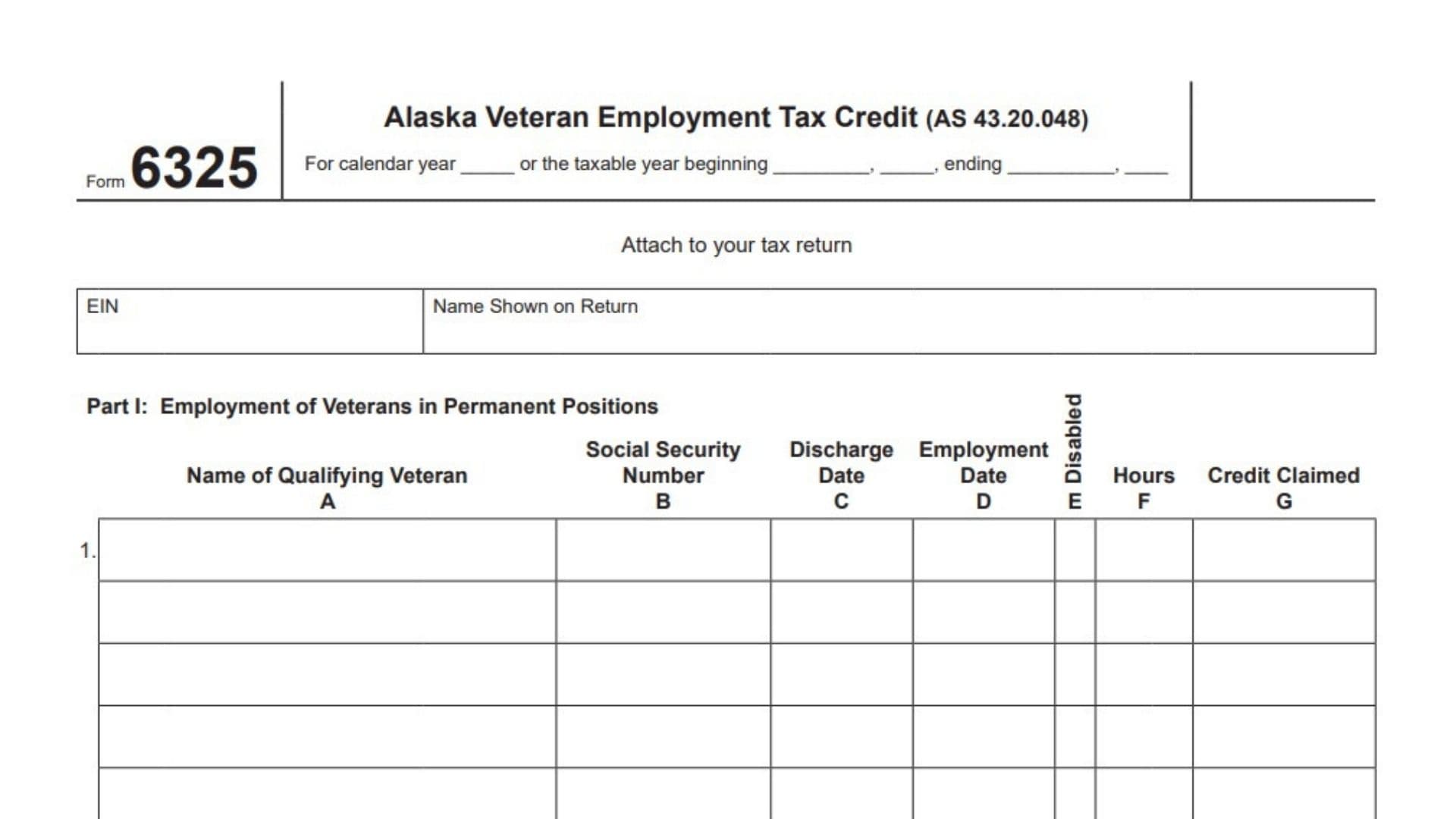
Alaska Form 6325, officially called the Alaska Veteran Employment Tax Credit, is a tax credit form used to report qualifying veteran employment and calculate the credit available to eligible taxpayers under Alaska Statute AS 43.20.048. The form is designed for businesses that employ qualifying veterans in permanent or seasonal positions and need to report the relevant employment information when claiming the applicable Alaska tax credit.
The form collects information about each qualifying veteran employed during the tax year, including the veteran’s name, Social Security Number, military discharge date, employment start date, disability status where requested, hours worked, and the credit claimed. It separates veteran employment into two categories: permanent positions and seasonal positions. This distinction allows the taxpayer to report the employment information separately and calculate the credit associated with each category.
Form 6325 is relevant to corporations and partnerships claiming the veteran employment tax credit through their applicable Alaska tax returns. Corporations use the calculated credit amount when completing Form 6300, while partnerships report the amount through Form 6900, Schedule A. The form must be attached to the applicable tax return.
Completing Form 6325 accurately is important because the credit calculation depends on the employment information reported for each qualifying veteran. Incorrect Social Security Numbers, employment dates, discharge dates, hours, or credit amounts can affect the accuracy of the claim. Taxpayers should maintain appropriate employment and veteran qualification records to support the information reported.
The form covers both calendar-year and fiscal-year taxpayers. It provides separate sections for permanent and seasonal employment, individual veteran information, category-specific credit totals, and the final tentative current-year credit. The final amount is transferred to the appropriate line of the taxpayer’s Alaska tax return.
How To File Form 6325
Alaska Form 6325 is attached to the taxpayer’s applicable Alaska tax return. It is not presented as a standalone tax return.
The filing destination for the calculated credit depends on the taxpayer’s business structure:
- Corporations: Transfer the amount from Form 6325, line 5, to Form 6300, line 13.
- Partnerships: Transfer the amount from Form 6325, line 5, to Form 6900, Schedule A, line 16.
Information To Prepare Before Completing Form 6325
Gather the following information before filling out the form:
- The corporation’s or partnership’s federal Employer Identification Number (EIN).
- The taxpayer’s legal name as shown on the applicable Alaska tax return.
- The applicable calendar or fiscal tax year.
- Names of all qualifying veterans employed during the tax year.
- Social Security Numbers of the qualifying veterans.
- Military discharge dates.
- Employment start dates.
- Disability information for permanent-position entries, where applicable.
- Hours worked by each qualifying veteran.
- Applicable veteran employment credit calculations.
- Supporting employment and veteran eligibility records.
Important Filing Considerations
Form 6325 contains two separate employment categories. Report permanent positions in Part I and seasonal positions in Part II.
Do not combine permanent and seasonal employment information into a single section. Calculate each category separately and transfer the respective totals to the appropriate lines.
The form does not provide the detailed eligibility tests, credit rates, minimum employment periods, or calculation rules for determining the credit per veteran. These requirements should be verified using the applicable Alaska Department of Revenue instructions for the tax year.

How To Complete Alaska Form 6325
Form 6325 consists of two main parts and five numbered lines. The first part reports qualifying veterans employed in permanent positions, while the second part reports qualifying veterans employed in seasonal positions.
Complete the taxpayer identification information first, followed by the veteran employment details and the credit calculations.
Tax Year And Taxpayer Information
Tax Year
Enter the calendar year for which the corporation or partnership is claiming the veteran employment tax credit.
If the taxpayer uses a fiscal year, enter the beginning and ending dates of the applicable tax year in the spaces provided.
EIN
Enter the federal Employer Identification Number of the corporation or partnership claiming the credit.
Use the EIN associated with the taxpayer identified on the applicable Alaska tax return.
Name Shown On Return
Enter the taxpayer’s legal name exactly as it appears on the corresponding Alaska tax return.
The name and EIN should match the information reported on the main return to which Form 6325 is attached.
Part I: Employment Of Veterans In Permanent Positions
Part I is used to report qualifying veterans employed in permanent positions during the applicable tax year.
The section provides a table with seven columns, labeled A through G. Each entry records information about an individual qualifying veteran and the credit claimed for that person’s employment.
Use a separate entry for each qualifying veteran. The table provides multiple spaces for reporting employees.
Understanding The Columns In Part I
Column A: Name Of Qualifying Veteran
Enter the full name of the veteran employed in a qualifying permanent position.
Use the veteran’s identifying name consistently with the supporting employment records.
Column B: Social Security Number
Enter the qualifying veteran’s Social Security Number.
Check the number carefully before submitting the return to avoid identification errors.
Column C: Discharge Date
Enter the date on which the veteran was discharged from military service.
Use the applicable date format consistently with the form’s requirements.
Column D: Employment Date
Enter the date the veteran began working for the corporation or partnership in the qualifying permanent position.
This date should reflect the actual employment start date.
Column E: Disabled
This column identifies whether the qualifying veteran is disabled.
Mark the applicable checkbox when the veteran meets the relevant disability classification requirements.
This column appears in Part I of the form. The seasonal employment table in Part II does not contain a corresponding disability column.
Column F: Hours
Enter the applicable number of hours worked by the qualifying veteran during the relevant reporting period.
Use the actual employment hours supported by the taxpayer’s records.
Column G: Credit Claimed
Enter the veteran employment tax credit amount claimed for that individual.
Calculate the amount using the applicable Alaska credit rules and instructions. The form provides a separate credit field for each qualifying veteran.
Part 1: Individual Permanent Employment Entries
Line 1: Qualifying Veterans In Permanent Positions
Line 1 contains the individual veteran employment entries for permanent positions.
For each qualifying veteran, complete the applicable columns:
- Column A: Veteran’s name.
- Column B: Social Security Number.
- Column C: Military discharge date.
- Column D: Employment date.
- Column E: Disability status.
- Column F: Hours worked.
- Column G: Credit claimed.
Repeat the process for every qualifying veteran employed in a permanent position.
Make sure that the information entered in each row relates to the same individual. Do not combine multiple employees’ information into one entry.
Part 2: Total Permanent Employment Credit
Line 2: Total Credit Claimed For Permanent Positions
Add all individual credit amounts entered in column G of line 1.
Enter the combined amount on line 2.
This figure represents the total veteran employment tax credit claimed for qualifying permanent positions.
Keep the supporting calculations used to determine each individual credit amount.
Part II: Employment Of Veterans In Seasonal Positions
Part II reports qualifying veterans employed in seasonal positions.
The purpose of this section is to calculate the credit associated with seasonal veteran employment separately from the permanent employment credit reported in Part I.
Like Part I, this section contains columns for the veteran’s identity, military discharge information, employment date, hours worked, and credit claimed.
However, the seasonal employment table does not include the Disabled column shown in Part I.
Understanding The Columns In Part II
Column A: Name Of Qualifying Veteran
Enter the full name of the qualifying veteran employed in a seasonal position.
Use a separate entry for each qualifying veteran.
Column B: Social Security Number
Enter the veteran’s Social Security Number.
Verify the number against the taxpayer’s supporting employment records.
Column C: Discharge Date
Enter the veteran’s military discharge date.
Make sure the date corresponds to the correct employee.
Column D: Employment Date
Enter the date the veteran began working in the qualifying seasonal position.
Use the actual employment start date.
Column F: Hours
Enter the applicable number of hours worked by the veteran in the seasonal position.
Use the hours supported by the employer’s employment records.
Column G: Credit Claimed
Enter the veteran employment tax credit amount claimed for the individual’s seasonal employment.
Calculate the amount using the applicable Alaska rules for seasonal veteran employment.
Part 3: Individual Seasonal Employment Entries
Line 3: Qualifying Veterans In Seasonal Positions
Line 3 contains the individual employment entries for qualifying veterans working in seasonal positions.
For every qualifying veteran, complete the applicable columns:
- Column A: Veteran’s name.
- Column B: Social Security Number.
- Column C: Military discharge date.
- Column D: Employment date.
- Column F: Hours worked.
- Column G: Credit claimed.
Enter each veteran separately and ensure that all information is accurate.
If multiple qualifying veterans were employed in seasonal positions, use separate entries for each individual.
The form provides multiple rows for reporting seasonal employees.
Part 4: Total Seasonal Employment Credit
Line 4: Total Credit Claimed For Seasonal Positions
Add all individual credit amounts entered in column G of line 3.
Enter the resulting total on line 4.
This amount represents the combined veteran employment tax credit claimed for qualifying seasonal positions.
Check that the total includes all applicable seasonal employment entries and that no individual credit amount has been counted more than once.
Part 5: Tentative Current-Year Credit Calculation
The final section combines the credit amounts from permanent and seasonal veteran employment.
The resulting figure is the tentative current-year credit that must be transferred to the applicable Alaska tax return.
Line 5: Tentative Current-Year Credit
Add line 2 and line 4.
The calculation is:
\[ \text{Line 5}=\text{Line 2}+\text{Line 4} \]
Where:
- Line 2 represents the total credit for qualifying veterans in permanent positions.
- Line 4 represents the total credit for qualifying veterans in seasonal positions.
Enter the combined amount on line 5.
This is the tentative current-year veteran employment tax credit calculated on Form 6325.
Where To Report The Amount From Line 5
The form provides different reporting destinations depending on the taxpayer’s business structure.
Corporations: Form 6300, Line 13
Corporations must transfer the amount calculated on Form 6325, line 5, to Form 6300, line 13.
Make sure that the amount transferred agrees with the total reported on Form 6325.
Partnerships: Form 6900, Schedule A, Line 16
Partnerships must transfer the amount from Form 6325, line 5, to Form 6900, Schedule A, line 16.
Verify that the amount agrees with the final credit calculation on Form 6325.
Final Review Before Filing
Before attaching Form 6325 to the corporation’s or partnership’s Alaska tax return, review the following checklist to ensure that all required information and calculations have been completed.
Taxpayer Information
- Confirm the correct calendar or fiscal tax year.
- Verify the taxpayer’s EIN.
- Ensure the taxpayer’s name matches the applicable Alaska tax return.
- Confirm that Form 6325 is attached to the correct tax return.
Part I: Permanent Positions
- List every qualifying veteran employed in a permanent position.
- Verify each veteran’s name.
- Check all Social Security Numbers.
- Confirm military discharge dates.
- Verify employment start dates.
- Complete the disability information where applicable.
- Confirm the hours reported for each veteran.
- Verify the individual credit amounts in column G.
- Recalculate the total on line 2.
Part II: Seasonal Positions
- List every qualifying veteran employed in a seasonal position.
- Verify each veteran’s name.
- Check all Social Security Numbers.
- Confirm military discharge dates.
- Verify employment start dates.
- Check the hours reported for each veteran.
- Verify the individual credit amounts in column G.
- Recalculate the total on line 4.
Final Credit Calculation
- Confirm that line 2 reflects the total permanent employment credit.
- Confirm that line 4 reflects the total seasonal employment credit.
- Add lines 2 and 4 correctly.
- Verify the tentative current-year credit on line 5.
- Transfer the amount to the correct destination:
- Corporations: Form 6300, line 13.
- Partnerships: Form 6900, Schedule A, line 16.
- Retain supporting employment and veteran qualification records.
Important Filing Reminder
Alaska Form 6325 is a supporting tax credit form, not a standalone tax return. Its primary purpose is to document qualifying veteran employment and calculate the associated tentative current-year credit.
The form does not provide the complete eligibility criteria or the detailed credit computation rules for permanent and seasonal positions. Taxpayers should consult the applicable Alaska Department of Revenue instructions and AS 43.20.048 before determining which employees qualify and how much credit may be claimed.
Accurate reporting of veteran employment information, individual credit amounts, and the final transfer to Form 6300 or Form 6900 is essential for correctly claiming the Alaska Veteran Employment Tax Credit.