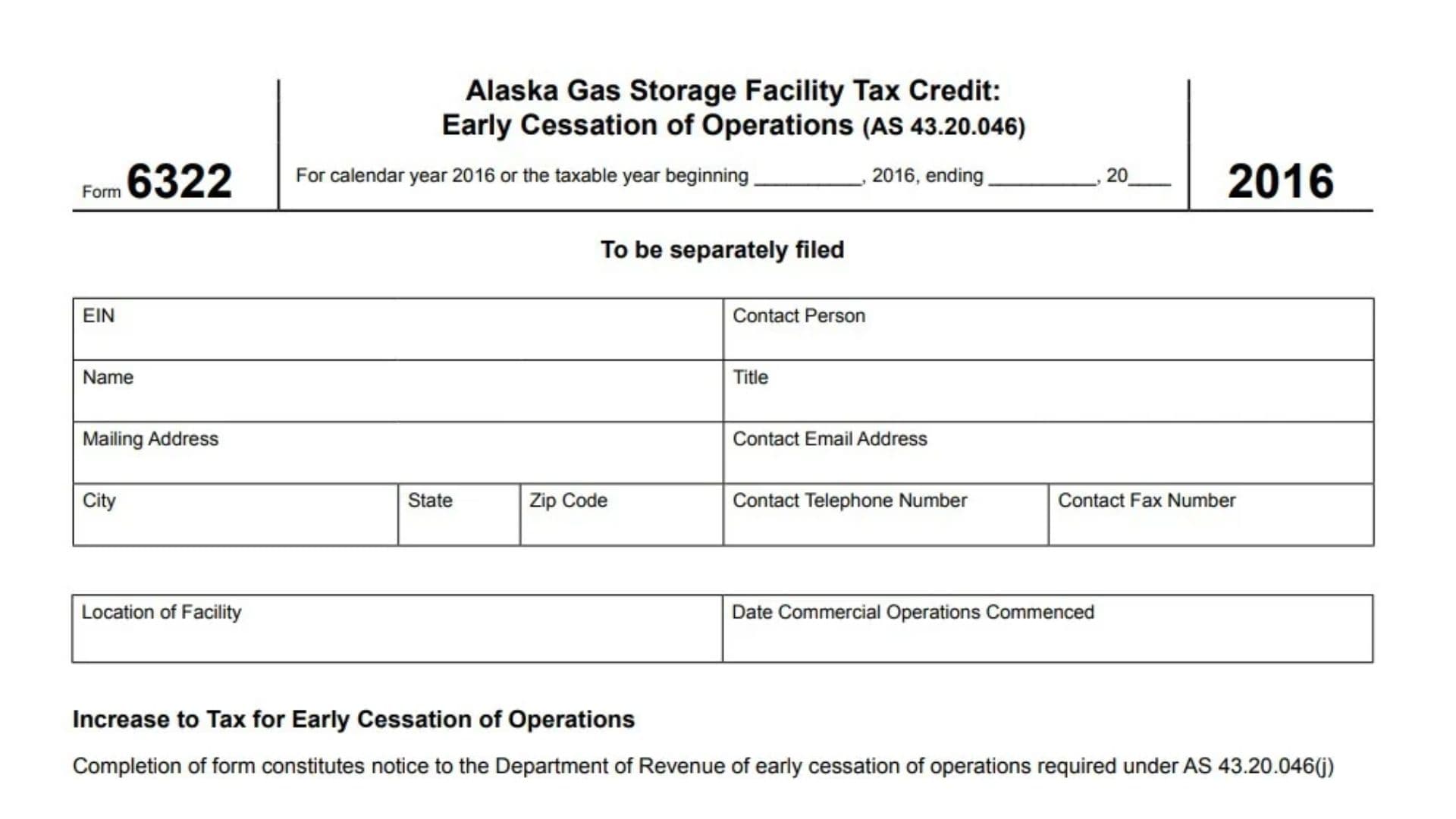
Alaska Form 6322, officially titled Alaska Gas Storage Facility Tax Credit: Early Cessation of Operations, is a tax form associated with Alaska Statute 43.20.046. It is used to calculate the tax increase that may result when a gas storage facility ceases commercial operations before completing the applicable operating period after receiving the Alaska Gas Storage Facility Tax Credit. The form is designed to help the Alaska Department of Revenue identify facilities that have stopped operating early, determine the amount of credit previously claimed, establish how long the facility remained in commercial operation, and calculate the resulting tax due. It also serves as formal notice to the Department of Revenue that commercial operations have ceased, as required under AS 43.20.046(j). The form collects business identification details, contact information, the facility’s location, the date commercial operations began, the date operations ended, and the total tax credit claimed in previous tax years. It then uses the reported operating period and previously claimed credit to calculate the tax adjustment. Form 6322 is intended for taxpayers associated with qualifying Alaska gas storage facilities that have claimed the applicable tax credit and subsequently experienced an early cessation of commercial operations. Completing the form accurately is important because the reported information determines the amount of the credit-related tax increase and provides the Department of Revenue with the required notification. The version discussed in this guide is designated for calendar year 2016 or an applicable fiscal tax year beginning in 2016.
Who Needs to File Form 6322?
Form 6322 is intended for taxpayers who have claimed the Alaska Gas Storage Facility Tax Credit and whose qualifying facility has ceased commercial operations early.
The form is relevant when a facility stops operating and the taxpayer must report the cessation and calculate the resulting increase to tax.
Its completion also fulfills the notification requirement identified under Alaska Statute 43.20.046(j).
The form is marked as separately filed, meaning it should not automatically be treated as an attachment to another tax return.
How To File Form 6322
Form 6322 is submitted separately to the Alaska Department of Revenue. The form explicitly identifies itself as a separately filed document. It does not provide a mailing address, electronic submission procedure, or specific filing destination on its face. Taxpayers should confirm the applicable submission method and destination with the Alaska Department of Revenue before sending it.
Before completing the form, prepare the following information:
- The business’s Employer Identification Number (EIN).
- The legal name and mailing address of the taxpayer or business.
- Contact person and business contact details.
- The physical location of the gas storage facility.
- The date commercial operations originally commenced.
- The date commercial operations ceased.
- Records showing the total Alaska Gas Storage Facility Tax Credit claimed in previous tax years.
- Records establishing the number of years the facility operated commercially.
- Supporting schedules and statements relevant to the reported amounts.
The form includes a declaration under penalty of perjury, so the information should be reviewed carefully before an authorized individual signs it.
Tax Year Information
The 2016 version of Form 6322 covers either the 2016 calendar year or an applicable fiscal tax year beginning in 2016.
If the taxpayer uses a calendar year, identify the calendar-year reporting period. If the taxpayer uses a fiscal year, complete the beginning and ending date fields provided in the tax-period section.
Make sure the reporting period accurately reflects the applicable taxable year.
How To Complete Form 6322
Form 6322 contains a taxpayer identification section, facility information section, early cessation calculation section, and signature and preparer information section.
Complete each section using the taxpayer’s business records and supporting documentation.
Taxpayer And Business Identification Information
EIN: Employer Identification Number
Enter the Employer Identification Number assigned to the business or taxpayer associated with the gas storage facility tax credit. Use the correct EIN associated with the tax credit and reported business information.
Contact Person
Enter the full name of the individual whom the Alaska Department of Revenue can contact regarding the submitted form. This should be someone familiar with the facility’s operations and tax credit information.
Name
Enter the legal name of the taxpayer or business associated with the gas storage facility. Use the name that corresponds to the applicable tax records.
Title
Enter the job title or official position of the contact person identified on the form. Examples may include owner, president, tax manager, or financial officer, depending on the individual’s actual position.
Mailing Address
Provide the complete mailing address where the Department of Revenue can send correspondence regarding the form.
Contact Email Address
Enter a valid email address for the designated contact person or business representative. Verify the address carefully to avoid communication problems.
City
Enter the city associated with the taxpayer’s mailing address.
State
Enter the state abbreviation corresponding to the mailing address.
ZIP Code
Provide the ZIP Code for the mailing address. Make sure it matches the city and state entered in the previous fields.
Contact Telephone Number
Enter the primary telephone number where the Department of Revenue can reach the designated contact person. Include the appropriate area code.
Contact Fax Number
Enter the business or contact person’s fax number, if applicable. This provides an additional communication method for correspondence related to the form.
Gas Storage Facility Information
Location of Facility
Enter the physical location of the gas storage facility associated with the tax credit. Identify the facility clearly so the Department of Revenue can distinguish it from other business properties or facilities.
Date Commercial Operations Commenced
Enter the date the facility originally began commercial operations. Use the actual commencement date supported by the facility’s business and operational records.
This date is important because the form uses the facility’s operating history to calculate the early cessation tax adjustment.
Increase To Tax for Early Cessation of Operations
This section calculates the additional tax resulting from the early cessation of commercial operations.
Completing Form 6322 also provides formal notification to the Alaska Department of Revenue that the facility has ceased operations, as required under AS 43.20.046(j).
Date That Commercial Operations Ceased
Enter the date the gas storage facility stopped conducting commercial operations.
Use the actual cessation date rather than the date the business decided to close or announced its intention to stop operating. The reported date should be supported by the facility’s operational records.
Tax Credit Calculation
Line 1: Total Amount of the Credit Taken in Previous Tax Years
Enter the total amount of Alaska Gas Storage Facility Tax Credit claimed in previous tax years for the facility.
Use the historical tax records to determine the total credit previously taken. Do not enter only the amount claimed in the most recent tax year if credits were claimed over multiple years.
This amount forms the starting point for calculating the tax increase associated with early cessation of operations.
Line 2: Number of Years the Facility Was in Commercial Operation
Enter the total number of years the gas storage facility remained in commercial operation.
Determine the operating period using the facility’s actual commencement and cessation history. The amount should reflect the number of years the facility operated commercially.
Line 3: Remaining Years in the Ten-Year Period
This line calculates the difference between the ten-year period and the number of operating years referenced in the calculation.
The printed form specifically instructs taxpayers to subtract the number of years shown on line 10 from 10 years and enter the difference.
However, the one-page form does not display a line 10. It displays line 2 for the number of years the facility was in commercial operation. Because the printed reference does not match the visible line numbering, taxpayers should confirm the intended reference with the Alaska Department of Revenue before completing this calculation. Do not assume that the reference should automatically be replaced with line 2 without clarification.
Line 4: Remaining Period Percentage
Divide the amount entered on line 3 by 10.
The result represents the remaining portion of the ten-year period expressed as a decimal. Use the calculated amount from line 3 and divide it by 10 to determine the figure for this line.
Line 5: Tax Due
Multiply the amount reported on line 1 by the amount reported on line 4.
The result is the tax due associated with the early cessation calculation.
In other words, this line applies the remaining-period percentage to the total tax credit previously claimed. Check the multiplication carefully before entering the final amount.
Signature And Taxpayer Declaration
The signature section confirms that the information reported on Form 6322 has been reviewed and is accurate to the best of the signer’s knowledge and belief.
Taxpayer Declaration
The declaration confirms that the taxpayer or authorized representative has examined the form, including any accompanying schedules and statements, and considers the information true, correct, and complete.
The declaration is made under penalty of perjury. Therefore, the person signing should review all reported information before completing this section.
Check If the DOR May Discuss This Return With the Preparer
Mark this checkbox if you authorize the Alaska Department of Revenue to discuss the submitted form with the tax preparer.
Selecting this option gives the Department permission to communicate with the preparer regarding the form. Leave the box unmarked if you do not wish to provide this authorization.
Authorized Signature
The taxpayer or an authorized representative must sign this field. The signature confirms that the person has reviewed the information and accepts responsibility for the declaration.
Date
Enter the date the authorized individual signs the form.
Title
Enter the official title or position of the person signing on behalf of the taxpayer or business. This identifies the signer’s authority in relation to the entity.
Paid Preparer Information
If a tax professional or other preparer completes Form 6322 on behalf of the taxpayer, complete the applicable preparer information fields.
Preparer’s Signature
The individual who prepared the form should sign this field to identify themselves as the preparer.
Date
Enter the date the preparer signs the form.
Check If Self-Employed
Mark this checkbox if the tax preparer is self-employed rather than preparing the form as an employee of a tax preparation firm.
Preparer’s SSN or PTIN
Enter the preparer’s Social Security Number (SSN) or Preparer Tax Identification Number (PTIN), as applicable.
Use the correct identification number associated with the individual who prepared the form.
Preparer Firm’s Name (or Yours if Self-Employed) and Address
Enter the name of the tax preparation firm responsible for preparing the form.
If the preparer is self-employed, enter the preparer’s own business name or applicable identifying name and address.
EIN
Enter the Employer Identification Number associated with the tax preparation firm, when applicable.
Phone
Provide the telephone number of the tax preparation firm or self-employed preparer. This allows the Department of Revenue to contact the preparer if necessary.
City
Enter the city associated with the preparer’s business address.
State
Enter the state abbreviation for the preparer’s address.
ZIP Code
Enter the ZIP Code associated with the preparer’s business address.
Important Calculation And Filing Considerations
Understanding the Ten-Year Calculation
The calculation section uses a ten-year period to determine the remaining portion associated with the early cessation adjustment.
The basic calculation shown on the form follows this sequence:
- Determine the total credit previously claimed.
- Establish the number of years the facility operated commercially.
- Determine the remaining years in the ten-year period.
- Divide the remaining years by 10.
- Multiply the resulting percentage by the previously claimed credit.
The form’s reference to line 10 in the line 3 calculation should be clarified with the Department of Revenue because no line 10 appears on the displayed form.
Early Cessation Notification
Completing Form 6322 serves two purposes. It reports the information needed to calculate the tax increase and provides notice to the Department of Revenue that commercial operations have ceased.
The notification requirement is identified under Alaska Statute 43.20.046(j). Therefore, the cessation date and facility information should be reported accurately.
Separate Filing Requirement
The form states that it must be separately filed. Do not assume that including it with another tax return automatically satisfies its submission requirement.
Confirm the appropriate filing procedure and destination with the Alaska Department of Revenue.
Final Review Before Filing
Before submitting Alaska Form 6322, review the following checklist to make sure every applicable section is complete:
- Confirm that you are using the appropriate 2016 Form 6322 for the relevant taxable year.
- Verify the calendar-year or fiscal-year reporting period.
- Enter the correct Employer Identification Number.
- Provide the taxpayer’s legal name and complete mailing address.
- Enter the contact person’s name and title.
- Verify the contact email address, telephone number, and fax number.
- Provide the correct physical location of the gas storage facility.
- Confirm the date commercial operations originally commenced.
- Enter the actual date commercial operations ceased.
- Verify the total amount of the tax credit claimed in previous tax years.
- Confirm the number of years the facility remained in commercial operation.
- Review the line 3 reference to line 10 and obtain clarification before completing the calculation.
- Check the division calculation on line 4.
- Verify the multiplication used to calculate tax due on line 5.
- Review the taxpayer declaration before signing.
- Obtain the authorized representative’s signature, date, and title.
- Decide whether to authorize the Department of Revenue to discuss the form with the preparer.
- Complete the applicable tax preparer information.
- Verify the preparer’s SSN or PTIN and firm identification information.
- Review all supporting schedules and statements, if applicable.
- Confirm the separate filing procedure with the Alaska Department of Revenue.
- Retain a copy of the completed form and supporting tax records for your records.
Accurately completing Alaska Form 6322 helps taxpayers report the early cessation of gas storage facility operations, document previously claimed tax credits, and calculate the associated increase to tax. Carefully verify the facility’s operating dates, historical credit amounts, and all calculation entries before submitting the form to the Alaska Department of Revenue.