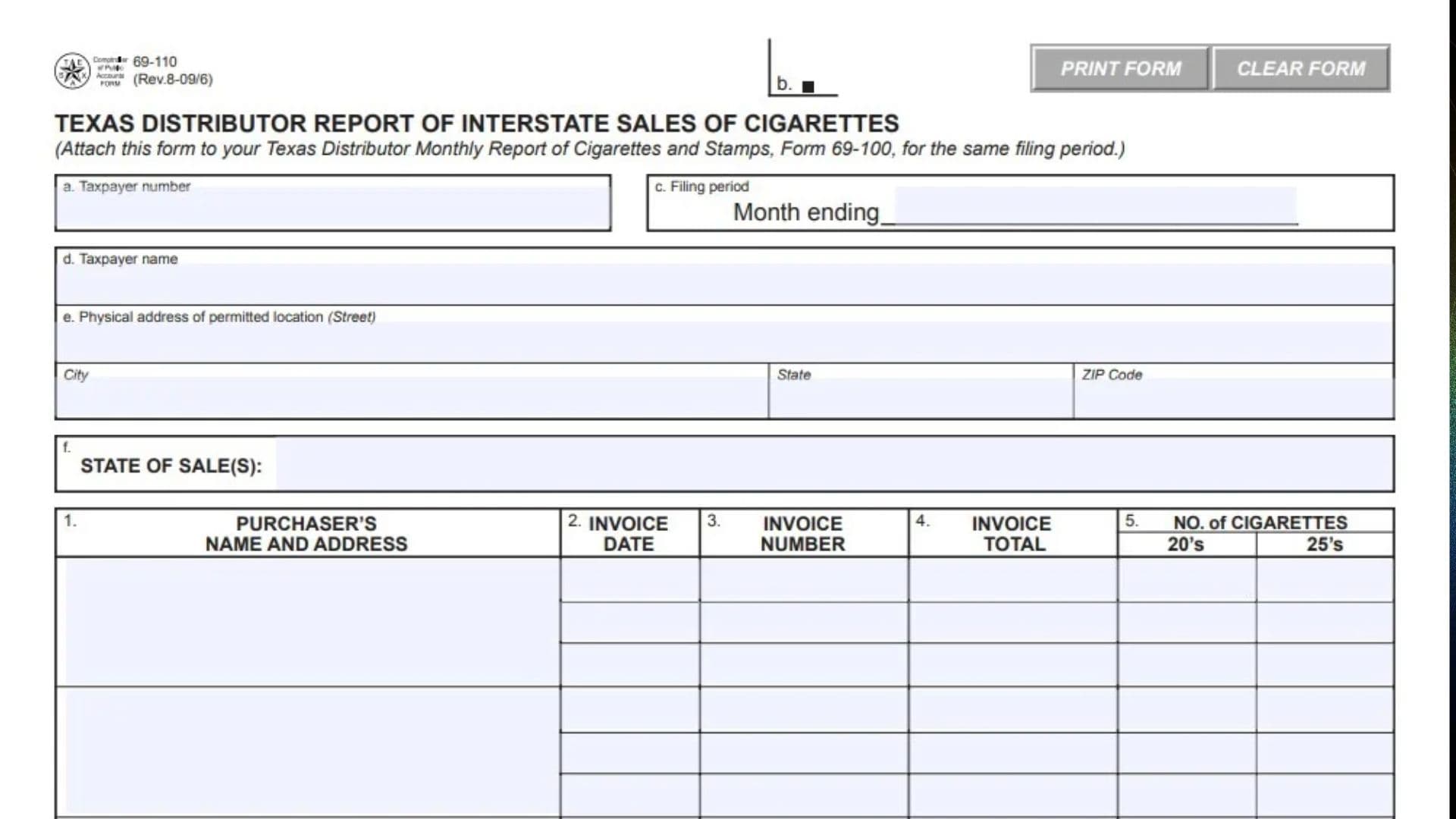
Texas Form 69-110, known as the Distributor Report of Interstate Sales of Cigarettes, is a reporting document used by Texas cigarette distributors to report cigarette sales made to purchasers located in other states. The form is administered by the Texas Comptroller of Public Accounts and helps document cigarette transactions that take place across state lines during a reporting period. Texas cigarette distributors who sell cigarettes to customers outside Texas must complete a separate Form 69-110 for each state in which they made interstate sales. The report collects important transaction details, including the taxpayer’s identification number, business name, permitted location, destination state, purchaser information, invoice dates, invoice numbers, invoice totals, and the number of cigarettes sold. These details help the Comptroller maintain records of interstate cigarette transactions and distinguish sales made to purchasers in different states. Form 69-110 is not filed as a standalone monthly report. Instead, it must be attached to the Texas Distributor Monthly Report of Cigarettes and Stamps, Form 69-100, for the same reporting period. The filing deadline is the same as the due date shown on Form 69-100. Completing the report accurately is important because each interstate sale must be linked to the correct purchaser and invoice. Distributors should verify the purchaser’s address, invoice details, and cigarette quantities before submitting the report. Providing a separate report for each destination state also helps ensure that interstate sales are properly identified and documented.
Who Must File Form 69-110?
Texas cigarette distributors who make interstate sales of cigarettes must complete Form 69-110.
The filing requirement applies when a Texas cigarette distributor sells cigarettes to purchasers located in other states during a reporting period.
A separate report must be completed for each state into which cigarettes were sold.
For example, if a distributor makes sales to purchasers in Oklahoma, Louisiana, and Arkansas during the same reporting period, the distributor must prepare three separate Forms 69-110:
- One report for Oklahoma.
- One report for Louisiana.
- One report for Arkansas.
Each report should include only the sales made to purchasers in the state identified on that particular form.
How To File Form 69-110
Form 69-110 must be attached to the Texas Distributor Monthly Report of Cigarettes and Stamps, Form 69-100, for the same filing period.
It should not be submitted separately from the corresponding monthly distributor report.
Required Form
Form 69-100: Texas Distributor Monthly Report of Cigarettes and Stamps
Complete the applicable Form 69-100 for the reporting period and attach the corresponding interstate sales report or reports.
Make sure the filing period on Form 69-110 matches the reporting period shown on Form 69-100.
Filing Deadline
Mail the interstate sales report along with Form 69-100 on or before the due date listed on Form 69-100.
The same filing deadline applies to both forms.
Information To Prepare Before Completing The Form
Gather the following information:
- 11-digit taxpayer number.
- Taxpayer’s legal or registered business name.
- Physical address of the permitted cigarette business location.
- Reporting month.
- Name of each state where interstate cigarette sales occurred.
- Name and complete address of each out-of-state purchaser.
- Invoice dates.
- Invoice numbers.
- Total amounts of individual invoices.
- Actual number of cigarettes sold in each invoice.
Use the information from the corresponding Form 69-100 and the distributor’s sales and invoice records to complete the report.

How To Complete Form 69-110
Form 69-110 contains taxpayer identification fields, reporting period information, destination state details, and a transaction table for recording interstate cigarette sales.
Complete the following sections carefully.
Taxpayer And Business Information
This section identifies the Texas cigarette distributor responsible for reporting the interstate sales.
Field a: Taxpayer Number
Enter the distributor’s 11-digit taxpayer identification number.
Use the number shown in Item c of the Texas Distributor Monthly Report of Cigarettes and Stamps, Form 69-100.
Make sure the number matches the corresponding monthly report.
Field b: Checkbox
The form displays a small checkbox in the upper-right corner marked with the letter b.
The printed instructions do not explain the purpose of this checkbox. Do not select it based on an assumption. Contact the Texas Comptroller if clarification is needed.
Field c: Filing Period
Enter the reporting period covered by the interstate sales report.
Complete the month-ending information in the space provided.
The filing period must match the period shown in Item d of Form 69-100, to which this report is attached.
Field d: Taxpayer Name
Enter the legal name of the business or taxpayer responsible for reporting the cigarette sales.
Use the same entity or taxpayer name shown in Item g of Form 69-100.
Check the spelling and business name against the monthly distributor report.
Field e: Physical Address Of Permitted Location
Enter the physical address of the Texas location permitted for cigarette sales.
Provide the actual street address of the permitted business location.
Complete the following address fields:
Street
Enter the street number and street name of the permitted location.
Do not use a rural route address or a post office box.
City
Enter the city where the permitted cigarette business is located.
State
Enter the state abbreviation associated with the permitted location.
ZIP Code
Enter the ZIP code of the permitted business location.
Make sure the complete address matches the cigarette permit records.
Field f: State Of Sales
Enter the name of the state into which the cigarettes were sold during the reporting period.
This field identifies the destination state for the interstate sales listed in the transaction table.
Prepare a separate Form 69-110 for every state into which cigarettes were sold.
Do not combine sales from multiple destination states on one report.
Interstate Cigarette Sales Details
The main section of Form 69-110 contains five numbered items. These columns record the purchaser’s details and the invoice information for each interstate cigarette transaction.
Enter the information for every applicable invoice.
Item 1: Purchaser’s Name And Address
Enter the name and complete address of each purchaser located in the destination state identified in Field f.
Provide the following information:
- Purchaser’s name.
- Street address.
- City.
- State.
- ZIP code.
Make sure the purchaser’s address identifies the out-of-state customer who purchased the cigarettes.
List the appropriate purchaser information for the invoices reported in the corresponding rows.
Item 2: Invoice Date
Enter the date of the invoice associated with the cigarette sale to the purchaser listed in Item 1.
Use the actual invoice date shown on the sales document.
Each invoice must have its corresponding date entered in this column.
Item 3: Invoice Number
Enter the invoice number that identifies the cigarette sale made to the purchaser.
Use the number shown on the original sales invoice.
Make sure each invoice number matches the correct purchaser and invoice date.
Item 4: Invoice Total
Enter the total dollar amount of each invoice issued to the out-of-state purchaser.
Report the full invoice amount associated with the cigarette transaction.
Use the sales invoice to verify the amount before entering it.
Item 5: Number Of Cigarettes
Enter the actual number of individual cigarettes, also known as cigarette sticks, sold to the out-of-state purchaser for each invoice listed.
The form divides this item into two separate columns:
20’s
Enter the actual number of cigarettes sold in packages containing 20 cigarettes each.
Report the total number of individual cigarette sticks, not simply the number of packages.
For example, if an invoice includes 100 packs containing 20 cigarettes each, enter 2,000.
25’s
Enter the actual number of cigarettes sold in packages containing 25 cigarettes each.
Report the total number of individual cigarette sticks sold in those packages.
For example, if an invoice includes 40 packs containing 25 cigarettes each, enter 1,000.
Use the appropriate column for each package size and verify the quantities against the sales records.
How To Report Multiple Interstate Cigarette Sales
The transaction table provides multiple rows so distributors can report several invoices for purchasers in the same destination state.
Follow these steps when reporting multiple transactions:
- Identify the destination state in Field f.
- Enter each purchaser’s name and complete address in Item 1.
- Enter the corresponding invoice date in Item 2.
- Record the invoice number in Item 3.
- Enter the invoice total in Item 4.
- Report the actual cigarette quantities in the 20’s and 25’s columns under Item 5.
- Repeat the process for every applicable invoice.
If the distributor sells cigarettes to multiple purchasers in the same state, include each purchaser and the associated invoice information in the report.
If sales are made to purchasers in another state, prepare a separate Form 69-110 for that state.
Relationship Between Form 69-110 And Form 69-100
Form 69-110 is a supporting report for Form 69-100.
The two forms must cover the same reporting period.
Make sure the following information matches:
- Taxpayer number.
- Taxpayer name.
- Filing period.
Form 69-100 serves as the Texas Distributor Monthly Report of Cigarettes and Stamps, while Form 69-110 provides additional details about cigarette sales made to purchasers in other states.
Attach all applicable interstate sales reports to the corresponding Form 69-100 before mailing the monthly filing.
How To Get Help With Form 69-110
If you have questions about Texas cigarette tax reporting or completing Form 69-110, contact the Texas Comptroller of Public Accounts.
Texas Comptroller Assistance
Telephone: (800) 862-2260
Alternative telephone number: (512) 463-3731
The Comptroller’s office can provide assistance with taxpayer identification, interstate cigarette reporting, and related filing questions.
Final Review Before Filing
Before submitting Form 69-110, review the taxpayer information, destination state, purchaser details, and invoice quantities.
Taxpayer Information
- Enter the correct 11-digit taxpayer number.
- Verify the taxpayer name against Item g of Form 69-100.
- Confirm the physical address of the permitted cigarette location.
- Complete the street, city, state, and ZIP code fields.
- Verify the filing period against Item d of Form 69-100.
Interstate Sales Information
- Enter the correct destination state in Field f.
- Prepare a separate report for each state where interstate sales occurred.
- Include the name of every out-of-state purchaser.
- Provide complete purchaser addresses.
- Verify every invoice date.
- Check each invoice number against the sales records.
- Enter the correct invoice total.
- Report the actual number of cigarette sticks sold.
- Separate 20-cigarette package quantities from 25-cigarette package quantities.
- Make sure every reported invoice is associated with the correct purchaser.
Filing Requirements
- Complete all applicable interstate sales reports.
- Make sure each report covers the same period as Form 69-100.
- Attach every completed Form 69-110 to the corresponding Form 69-100.
- Verify the filing deadline listed on Form 69-100.
- Mail the complete monthly filing by the required due date.
Accurate reporting helps Texas cigarette distributors maintain proper records of interstate cigarette transactions. Make sure every destination state has a separate report and that all purchaser, invoice, and cigarette quantity details are correct before submitting Form 69-110 with Form 69-100.